
1. Introduction
Thank you for choosing the WISHBETY Smart AI Recognition Bird Feeder SDC01. This device combines a traditional bird feeder with advanced camera technology, solar power, and artificial intelligence to enhance your bird watching experience. This manual provides essential instructions for setting up, operating, maintaining, and troubleshooting your bird feeder to ensure optimal performance and enjoyment.

Image 1.1: The WISHBETY Smart AI Recognition Bird Feeder SDC01, showcasing its design and integrated camera.
2. Product Overview
The WISHBETY SDC01 is designed to provide a comprehensive bird watching experience. Key features include:
- 4MP HD Camera: Captures clear images and videos of visiting birds.
- Color Night Vision: Allows for bird observation day and night.
- AI Recognition: Identifies over 10,000 bird species (requires cloud service subscription).
- Solar Powered: Integrated solar panel for continuous charging.
- 2.4GHz Wi-Fi Connectivity: For stable connection to your home network.
- 1.5L Seed Capacity: Reduces the frequency of refilling.
- IP65 Weatherproof: Durable design for outdoor use.
- Squirrel Deterrence: AI-powered alarm sounds and ultrasonic waves to deter squirrels.
- Hummingbird Feeding Ports: Six dedicated ports for hummingbirds.

Image 2.1: Overview of key features including 1080P FHD video, AI recognition, app control, built-in mic, 2.4G WiFi, hummingbird feeding, squirrel proofing, and multi-person sharing.
Package Contents:
- WISHBETY Smart AI Recognition Bird Feeder SDC01
- Mounting Bracket and Strap
- USB Charging Cable
- User Manual
- Mounting Screws and Anchors
3. Setup Guide
3.1 Initial Charging
Before first use, fully charge the bird feeder's internal battery using the provided USB cable. Connect the USB cable to the charging port on the device and to a standard USB power adapter (not included). A full charge may take several hours. The solar panel will maintain the charge during daylight hours once installed.
3.2 Mounting the Feeder
The feeder can be mounted using the included bracket and strap or screws.
- Strap Mounting: Secure the mounting bracket to a tree or pole using the adjustable strap. Ensure the feeder is stable and level.
- Screw Mounting: Use the provided screws and anchors to attach the mounting bracket to a wall or sturdy surface.
Position the feeder in an area with good sunlight exposure for the solar panel and clear visibility for the camera. Ensure it is within range of your 2.4GHz Wi-Fi network.

Image 3.1: Details of the feeder's components, including the solar panel for charging and the sturdy mounting stand.
3.3 App Installation and Wi-Fi Connection
Download the companion app from your smartphone's app store (search for 'WISHBETY' or refer to the QR code in the quick start guide). Follow the in-app instructions to connect the feeder to your 2.4GHz Wi-Fi network. Ensure your phone is connected to a 2.4GHz network during the setup process.
3.4 Filling the Feeder
Open the top lid of the feeder and pour bird seed into the main compartment. The feeder has a 1.5-liter capacity. For hummingbird feeding, fill the small red flower-shaped ports with nectar.

Image 3.2: The feeder features six specialized ports for attracting hummingbirds.
4. Operating Instructions
4.1 Live View and Recording
Open the WISHBETY app on your smartphone or tablet. Select your bird feeder from the device list to access the live camera feed. The camera automatically detects bird movement and records short video clips or captures images. You can also manually record or take photos from the live view.

Image 4.1: The app allows multiple users to live stream the bird feeder simultaneously.
4.2 AI Bird Identification
The feeder's AI technology can identify over 10,000 bird species. When a bird is detected, the app will attempt to identify it and provide detailed information. This feature requires a basic cloud service subscription.
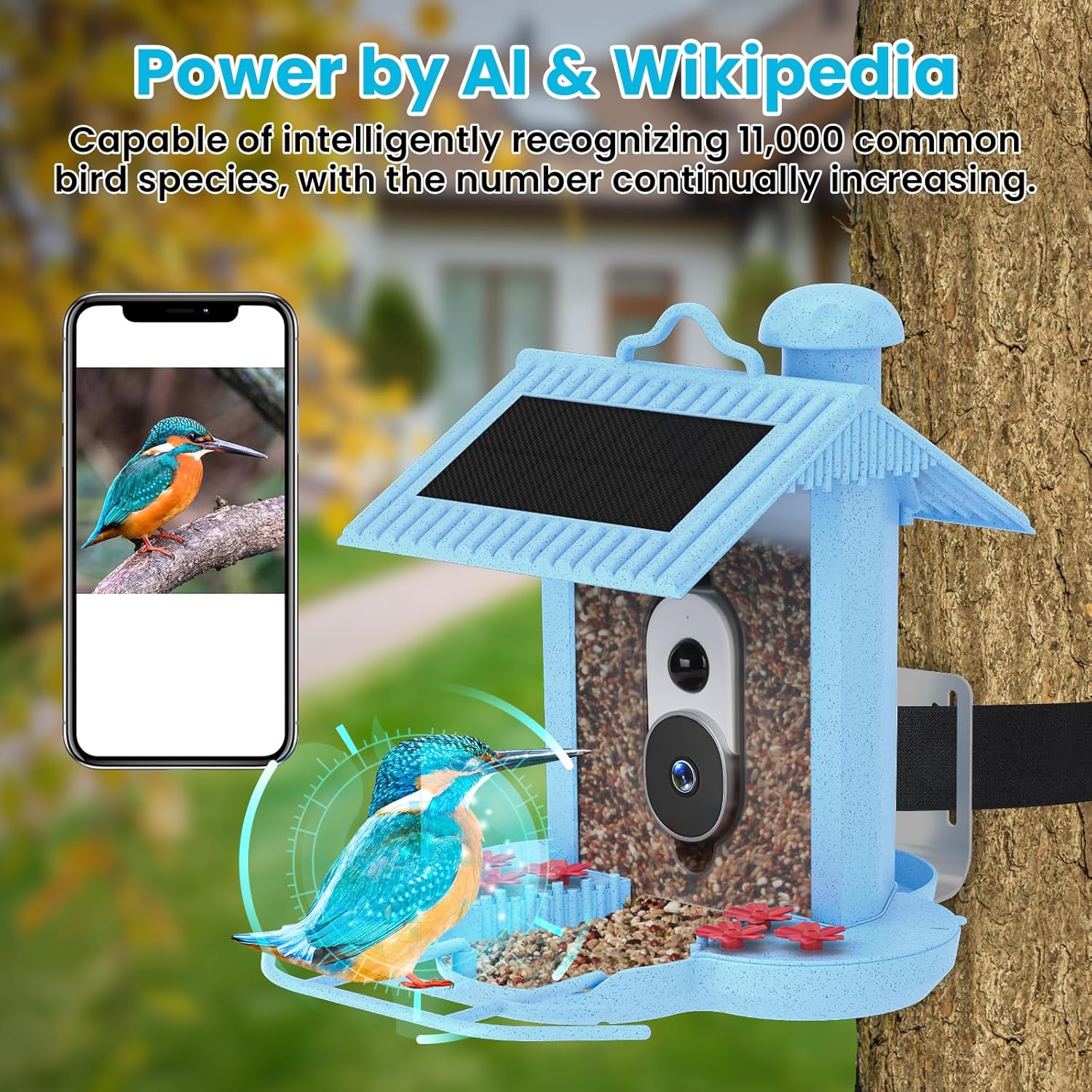
Image 4.2: The AI recognition feature displays identified bird species on your mobile device.

Image 4.3: The self-learning AI accurately identifies bird species and provides continuous updates.
4.3 Night Vision
The camera is equipped with improved night vision sensors, allowing you to observe birds even in low-light conditions or complete darkness. The 4MP HD camera provides clear color night vision.

Image 4.4: The camera captures clear images and videos both during the day and at night.
4.4 Squirrel Deterrence
The AI system can automatically identify squirrels. Upon detection, it can emit alarm sounds and ultrasonic waves to deter them from accessing the bird seed. This feature can be configured within the app.

Image 4.5: The AI system automatically identifies squirrels and uses audible alarms and ultrasonic waves for deterrence.
4.5 Storing and Sharing Content
Captured images and videos are stored in the cloud for up to 30 days for free. You can extend storage via subscription or by inserting an SD card (not included) into the device. The app allows you to easily organize, admire, and share these moments with friends and family.
5. Maintenance
5.1 Cleaning the Feeder
Regular cleaning is essential to prevent the spread of disease among birds and to ensure the feeder functions correctly. Disassemble the feeder components as needed and wash them with warm, soapy water. Rinse thoroughly and allow to dry completely before refilling with seed. The waterproof design helps prevent mold, but regular cleaning is still recommended.
5.2 Cleaning the Solar Panel
Periodically wipe the solar panel with a soft, damp cloth to remove dust, dirt, or debris. A clean solar panel ensures efficient charging of the internal battery.
5.3 Battery Care
While the solar panel provides continuous charging, ensure the feeder receives adequate sunlight. If the feeder is in a shaded area or during prolonged periods of cloudy weather, manual charging via the USB port may be necessary to maintain battery life. Avoid letting the battery fully deplete for extended periods.
6. Troubleshooting
If you encounter issues with your WISHBETY Smart AI Recognition Bird Feeder, refer to the following common problems and solutions:
| Problem | Possible Cause | Solution |
|---|---|---|
| Feeder does not power on. | Low or depleted battery. | Fully charge the device using the USB cable for at least 8-10 hours. Ensure the charging light indicates activity. |
| Feeder does not charge. | Insufficient sunlight for solar panel; faulty USB cable/adapter; internal battery issue. | Ensure the solar panel is clean and receives direct sunlight. Try a different USB cable and power adapter. If the issue persists after manual charging, contact customer support. |
| Cannot connect to Wi-Fi. | Incorrect Wi-Fi password; connecting to 5GHz network; feeder too far from router; network interference. | Ensure you are connecting to a 2.4GHz Wi-Fi network and entering the correct password. Move the feeder closer to your Wi-Fi router. Restart your router and the feeder. |
| Poor camera image/video quality. | Dirty camera lens; low light conditions; network bandwidth issues. | Clean the camera lens with a soft cloth. Ensure adequate lighting for optimal image quality. Check your Wi-Fi signal strength. |
| AI bird identification not working. | No active cloud service subscription; poor image clarity. | Verify your cloud service subscription status. Ensure the camera captures clear images of the birds. |
7. Specifications
| Feature | Detail |
|---|---|
| Model Number | SDC01 |
| Product Dimensions | 12.2 x 10.06 x 10.06 inches |
| Item Weight | 4.33 pounds |
| Brand | WISHBETY |
| Recommended Use | Seed |
| Capacity | 1.5 Liters |
| Theme | Birds, Bird Watching |
8. Warranty and Support
For warranty information, technical support, or any questions not covered in this manual, please refer to the contact information provided with your product packaging or visit the official WISHBETY website. Please have your model number (SDC01) and purchase details ready when contacting support.