
Introduction
Thank you for choosing the Ensenior 22" Low Profile Ceiling Fan with Light and Remote Control. This manual provides important information for the safe installation, operation, and maintenance of your new ceiling fan. Please read it thoroughly before installation and keep it for future reference.
Safety Information
WARNING: To reduce the risk of fire, electric shock, or personal injury, always follow these instructions:
- Ensure the power is turned off at the circuit breaker before installation or servicing.
- All wiring must be in accordance with national and local electrical codes.
- Consult a qualified electrician if you are unsure about wiring.
- Mount the fan directly to a structural ceiling joist or an outlet box marked "Acceptable for Fan Support of 35 lbs (15.9 kg) or less."
- Do not bend the blade holders during installation or cleaning.
- Keep hands, clothing, and other objects away from fan blades when the fan is operating.
- Do not operate the fan with damaged parts.
- This appliance is not intended for use by persons (including children) with reduced physical, sensory or mental capabilities, or lack of experience and knowledge, unless they have been given supervision or instruction concerning use of the appliance by a person responsible for their safety.
Package Contents
Carefully unpack your ceiling fan and inspect the contents. Refer to the list below to ensure all components are present.
- Ceiling Fan Unit
- Remote Control
- Mounting Hardware
- Integrated LED Bulb (Non-removable fixture)
- Instruction Manual

Image: The Ensenior 22-inch Low Profile Ceiling Fan with integrated light and remote control, shown in a modern bedroom setting.
Specifications
| Feature | Detail |
|---|---|
| Brand | Ensenior |
| Model Name | 22" Low Profile Ceiling Fan with Light and Remote Control |
| Color | White |
| Power Source | AC |
| Style | Modern |
| Room Type | Bedroom, Indoor |
| Special Features | 7 CCT (Correlated Color Temperature) options, Nightlight |
| Mounting Type | Flush mount, Downrod Mount |
| Controller Type | Remote Control |
| Number of Speeds | 6 |
| Wattage | 100 watts |
| Voltage | 120 Volts |
| Material | Metal frame, ABS blades |
| Light Color Temperature | 2700K-6000K (Adjustable) |
Installation Guide
This ceiling fan supports both flush mount and downrod mount installations. Ensure you have the necessary tools and follow all safety precautions before beginning.
Pre-Installation Checklist:
- Verify all parts are present (refer to Package Contents).
- Turn off power at the main circuit breaker.
- Ensure the mounting location can support the fan's weight.
Mounting Options:
The fan can be installed as a flush mount (5.9 inches from ceiling) or with a downrod (15.75 inches from ceiling). It also supports sloped ceilings up to 30 degrees.

Image: Diagram illustrating flush mount, downrod mount, and sloped ceiling installation methods for the fan.
Wiring:
Connect the fan's wiring to your household electrical system according to local electrical codes. It is recommended to consult a qualified electrician for proper wiring to prevent electrical hazards. Ensure the ground cable is properly extended and connected if needed, as per safety warnings.
Operating Instructions
Your Ensenior ceiling fan is controlled by the included remote. Ensure batteries are installed correctly in the remote control.
Fan Functions:
- Power On/Off: Press the fan button to turn the fan on or off.
- Speed Control: Use the speed buttons to cycle through 6 fan speeds. Speeds 1-2 are for gentle airflow, 3-4 for moderate, and 5-6 for strong airflow.
- Reversal Design: The fan features a reversible motor for seasonal use. In summer, the fan rotates counter-clockwise to create a cooling downdraft. In winter, it rotates clockwise to circulate warm air. Refer to the remote control for the specific button to change direction.
- Timer: Set the fan to turn off automatically after 1, 2, 4, or 8 hours using the timer function on the remote.
Light Functions:
- Light On/Off: Press the light button to turn the light on or off.
- Color Temperature (CCT) Adjustment: The light offers 7 color temperature options, ranging from 2700K (warm white) to 6000K (cool white).
- Short Press: Adjusts CCT step-by-step.
- Long Press: Provides stepless CCT adjustment.
- Dimming: The light is 8%-100% dimmable.
- Short Press: Adjusts brightness step-by-step.
- Long Press: Provides stepless dimming.
- Night Light: Activate the night light function for a soft, low-brightness light (8% brightness at 2700K).
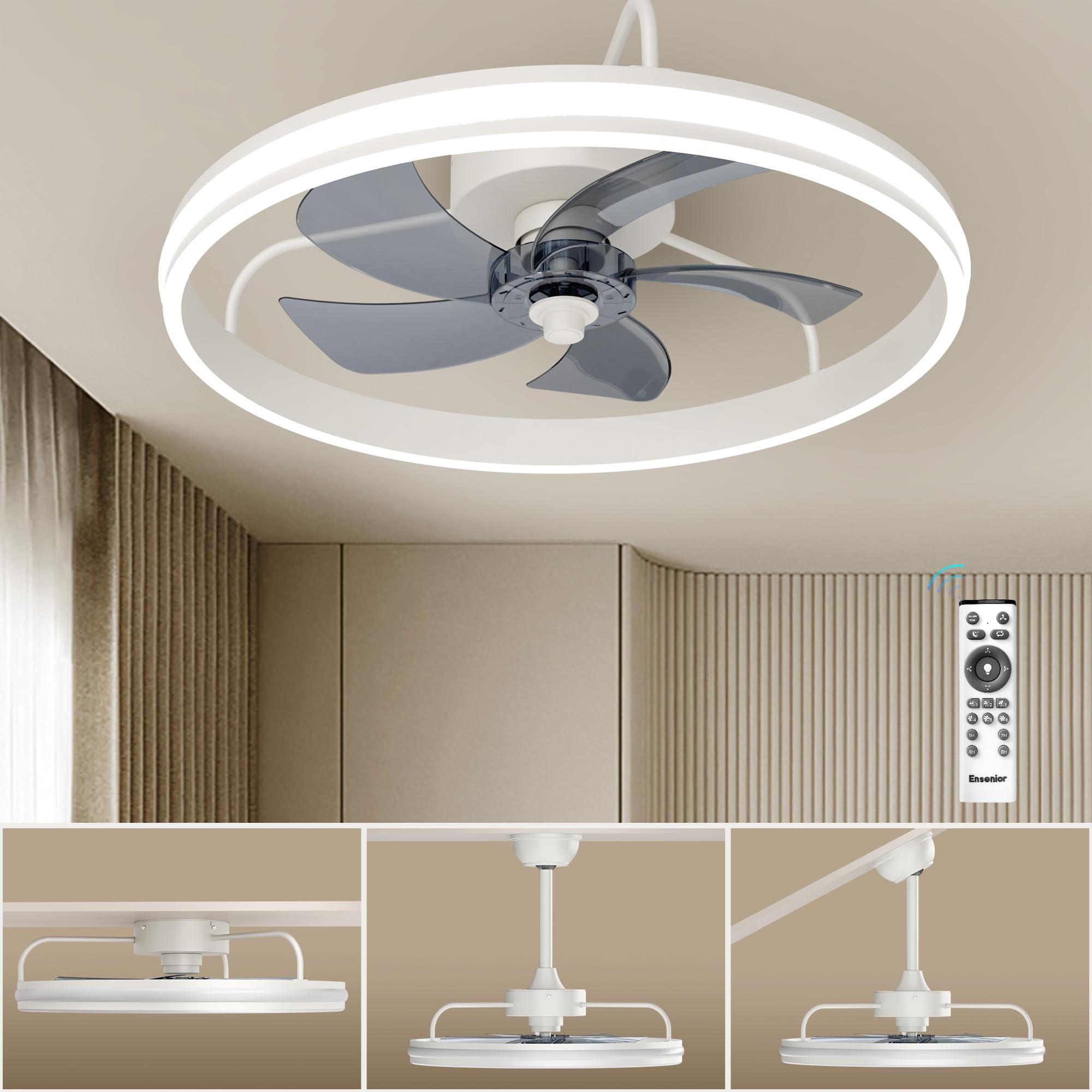
Image: Overview of the fan's features including night light, timer, no flicker, uniform lighting, 7 color temperatures (2700K-6000K), and dimming options.

Image: Illustrates the fan's quiet operation with a premium DC motor, night light feature (8% brightness at 2700K), 6 speeds, reversal design, timer, soft wind, and low noise.

Image: Demonstrates the 8%-100% smooth dimming capability of the fan's light, with options for step-by-step or stepless adjustment.
Maintenance
Regular maintenance helps ensure the longevity and optimal performance of your ceiling fan.
- Cleaning: To clean the fan, wipe with a soft, damp cloth. Do not use abrasive cleaners or solvents. Ensure power is off before cleaning.
- Blade Care: The fan features durable ABS blades. Clean them gently to avoid damage.
- Motor: The premium DC motor is designed for quiet operation and typically requires no lubrication.
- Light Fixture: The integrated LED light is a non-removable fixture. Do not attempt to replace the LED components.

Image: Detailed views highlighting the fan's side and downward lighting, efficient DC motor, ABS blades, and robust metal frame construction.
Troubleshooting
If you experience issues with your ceiling fan, refer to the following common problems and solutions:
| Problem | Possible Cause | Solution |
|---|---|---|
| Fan does not start | No power to the fan; Remote control battery low or incorrectly installed; Incorrect wiring. | Check circuit breaker; Replace remote battery; Verify wiring connections (consult electrician if needed). |
| Light does not work | No power to the light; Remote control battery low; Integrated LED failure. | Check circuit breaker; Replace remote battery; Contact customer support if LED is faulty (non-replaceable). |
| Remote control is unresponsive or intermittent | Low battery; Obstruction between remote and receiver; Remote not paired (if applicable). | Replace remote battery; Ensure clear line of sight; Refer to remote pairing instructions (if provided separately). |
| Fan makes grinding noise | Loose screws; Internal motor issue; Obstruction. | Check and tighten all mounting screws; Ensure no obstructions are near blades; Contact customer support if motor issue persists. |
| Fan wobbles | Loose mounting hardware; Unbalanced blades. | Ensure all mounting hardware is secure; Check for balanced blades (balancing kit may be required, not included). |
Warranty and Support
Ensenior is committed to providing high-quality products. For warranty information or technical assistance, please contact our customer service team.
Our 24/7 Customer Service Team is available to promptly address any inquiries regarding after-sales support and installation.
You can reach us via the contact information provided on our official website or through your purchase platform.

Image: Illustration of the Ensenior 24/7 customer service team ready to assist with product inquiries and support.


