
1. Product Overview
The iDsonix 3 in 1 Mag-Safe Charger Stand is a versatile wireless charging station designed to simultaneously charge your iPhone, Apple Watch, and AirPods. It features advanced magnetic technology for instant and precise alignment, ensuring a fast and stable charging experience while helping to keep your desk tidy.
This charger stand is equipped with an 18W QC 3.0 power adapter for efficient charging and includes built-in intelligent chip-set protections against overcharge, circuit issues, and temperature fluctuations. It also features an adjustable stand for optimal viewing angles and a controllable night light with three brightness levels.
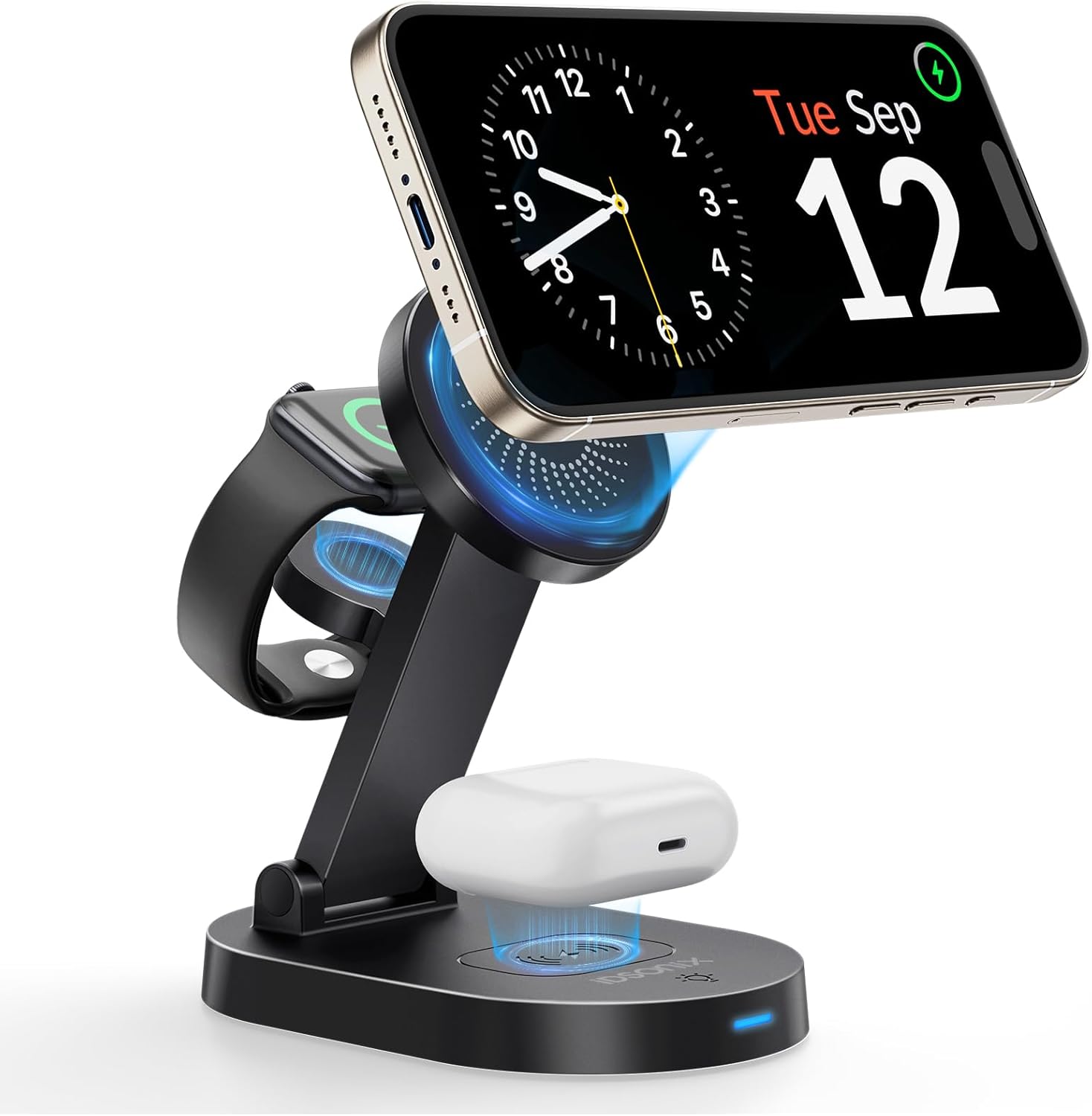
Figure 1: iDsonix 3 in 1 Mag-Safe Charger Stand with devices.
2. Setup Instructions
2.1 Package Contents
Please verify that all items are present in your package:
- 1 x iDsonix 3 in 1 Mag-Safe Charging Stand
- 1 x 18W QC 3.0 Power Adapter
- 1 x USB A to C Cable
- 1 x User Manual (this document)
2.2 Connecting the Power Adapter
To power your iDsonix 3 in 1 Mag-Safe Charger Stand:
- Connect the provided USB A to C cable to the USB-C port located on the back of the charging stand.
- Plug the other end of the USB A to C cable into the 18W QC 3.0 Power Adapter.
- Insert the power adapter into a standard wall outlet.
The charger stand is now ready for use. An LED indicator on the base will illuminate to confirm power connection.
Video 1: Demonstration of connecting the power adapter and initial setup of the iDsonix charger stand.
3. Operating Instructions
3.1 Charging Your Devices
The iDsonix charger stand provides three dedicated charging spots:
- For iPhone: Place your Mag-Safe compatible iPhone (iPhone 12-15 Series) directly onto the magnetic charging pad. For iPhone 8-11 Series, a Mag-Safe compatible case is required. The magnetic connection will ensure proper alignment.
- For Apple Watch: Place your Apple Watch onto the dedicated Apple Watch charging module.
- For AirPods: Place your AirPods (2/3/Pro/Pro2) charging case onto the wireless charging pad located at the base.
Ensure devices are centered on their respective charging areas for optimal charging efficiency. The smart LED indicator will change to blue when a device is actively charging.
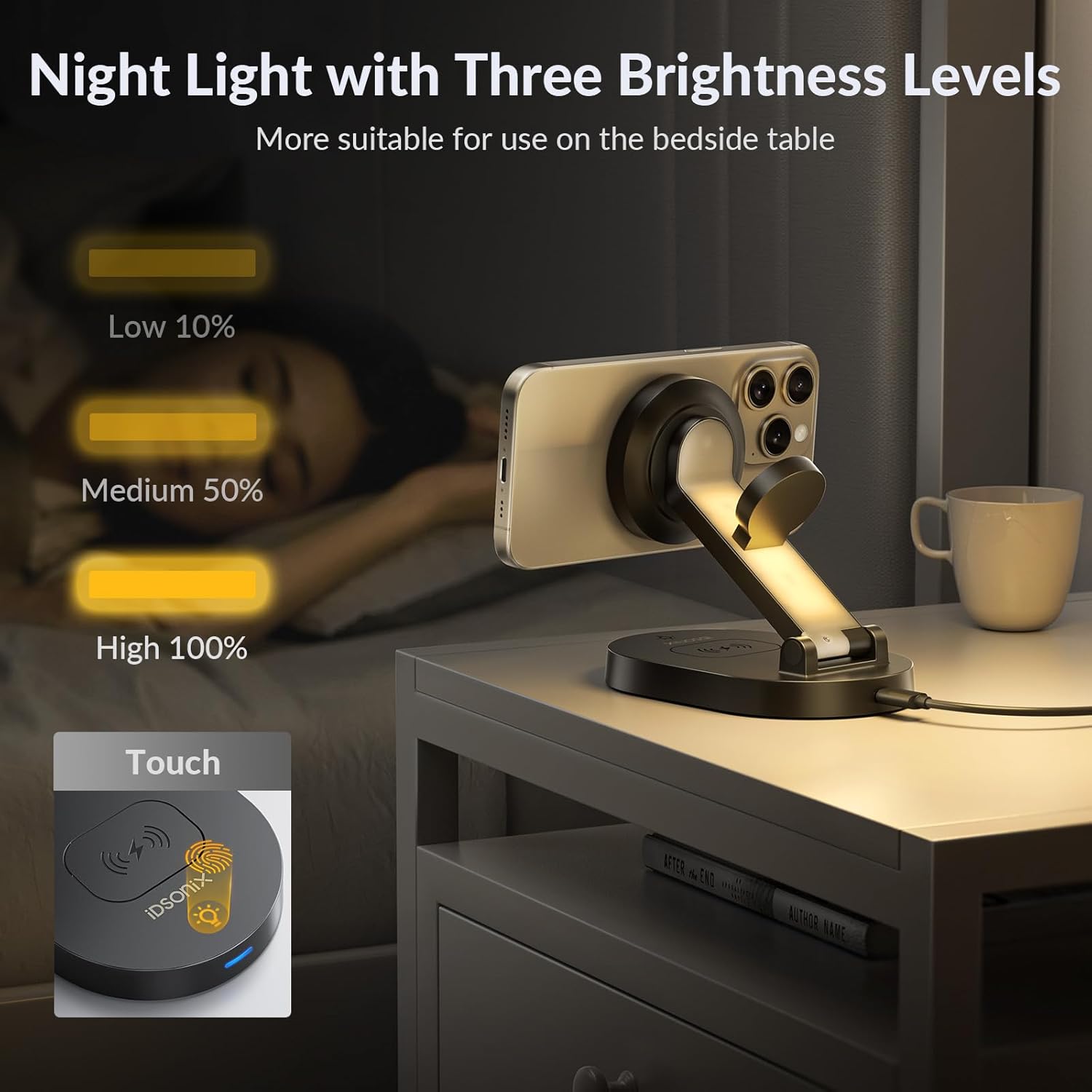
Figure 2: Charging an iPhone, Apple Watch, and AirPods on the stand.
3.2 Adjustable Viewing Angle
The iPhone charging pad offers flexible viewing options:
- Vertical Adjustment: The main arm can be adjusted from 45° to 90° to find your preferred vertical viewing angle.
- 360° Rotation: The magnetic charging pad allows for a full 360° rotation, enabling both portrait and landscape orientations for your iPhone. This is ideal for watching videos, making video calls, or using your phone as a bedside clock.

Figure 3: Adjusting the viewing angle of the iPhone on the charger stand.
3.3 Night Light Function
The base of the charger stand includes a night light with three adjustable brightness levels:
- Activation: Lightly touch the designated touch sensor on the base (indicated by a light bulb icon) to turn the night light on/off and cycle through brightness levels.
- Brightness Levels: Short single touches will adjust the brightness between low (10%), medium (50%), and high (100%).
This feature is designed to create a peaceful and friendly sleeping environment.

Figure 4: Night light with three brightness settings.
3.4 Smart LED Indicator
The LED indicator on the front of the base provides visual feedback on the charging status:
- Red Light: Indicates the charger is in an idle state (no device charging or no device detected).
- Blue Light: Indicates a device is actively charging.
- Flashing Light: Indicates foreign body detection. Remove any objects from the charging surface that are not intended for wireless charging.
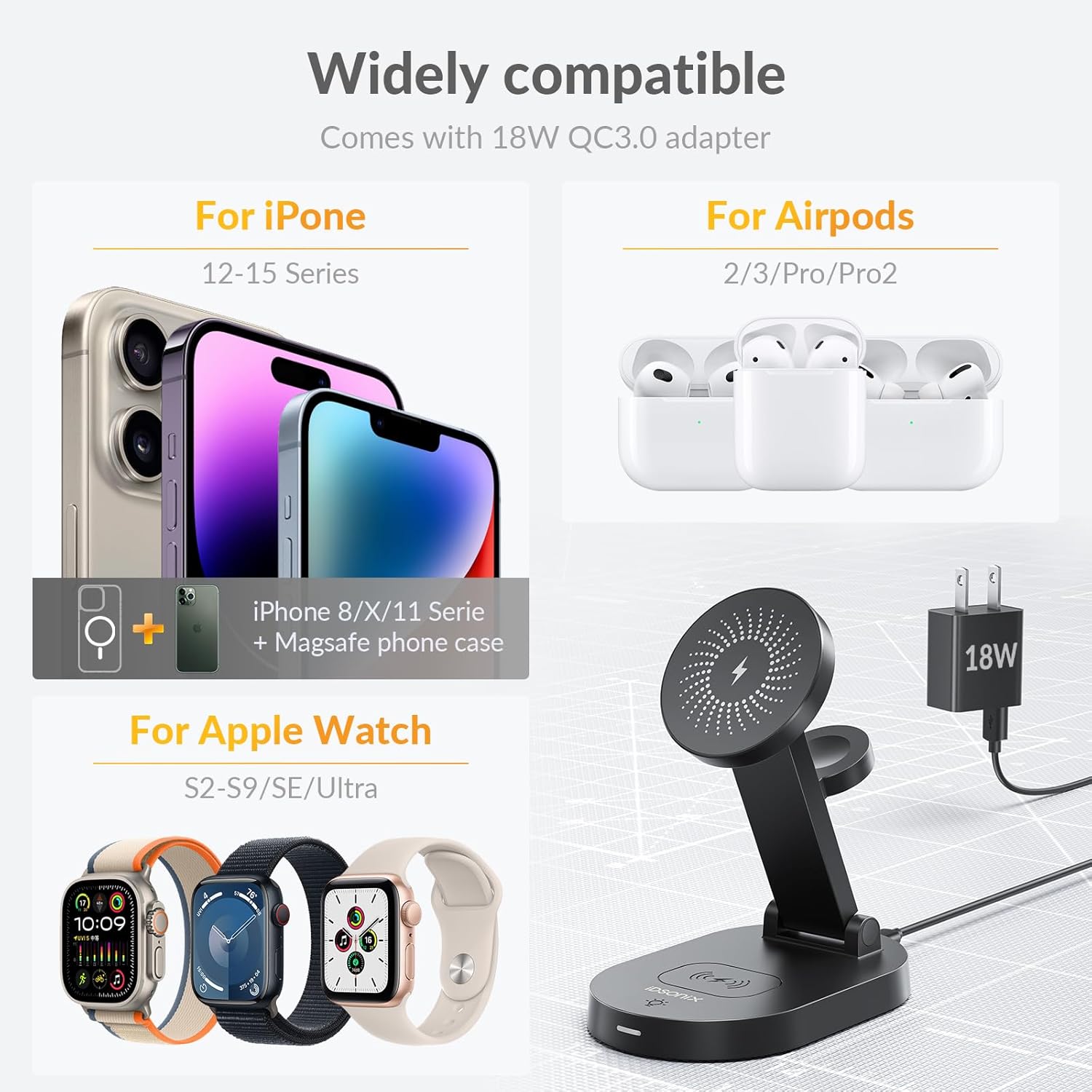
Figure 5: LED indicator states for charging and foreign object detection.
4. Device Compatibility
The iDsonix 3 in 1 Mag-Safe Charger Stand is compatible with the following Apple devices:
- iPhone: iPhone 15 Series, iPhone 14 Series, iPhone 13 Series, iPhone 12 Series. (iPhone 8-11 Series are supported with a Mag-Safe compatible case).
- Apple Watch: iWatch Ultra 1/2, Series 2-9, SE.
- AirPods: AirPods 3, AirPods 2, AirPods Pro, AirPods Pro 2.

Figure 6: Visual guide to device compatibility.
5. Safety Features
Your iDsonix charger stand is designed with multiple safety mechanisms to protect your devices and ensure safe operation:
- Overcharge Protection: Prevents devices from being overcharged, extending battery life.
- Overheating Protection: Monitors and regulates temperature to prevent overheating during charging.
- Circuit Protection: Safeguards against short circuits and power surges.
- Foreign Body Detection (FOD): Automatically detects foreign metal objects on the charging surface and stops charging to prevent damage or overheating.

Figure 7: Icons representing the charger's safety protections.
6. Care and Maintenance
To ensure the longevity and optimal performance of your iDsonix 3 in 1 Mag-Safe Charger Stand, please follow these maintenance guidelines:
- Cleaning: Disconnect the power adapter before cleaning. Use a soft, dry, lint-free cloth to wipe the surface of the charger stand. Avoid using abrasive cleaners, solvents, or chemical sprays.
- Storage: When not in use for extended periods, store the charger stand in a cool, dry place away from direct sunlight and extreme temperatures.
- Handling: Handle the device with care. Avoid dropping or subjecting it to strong impacts, which could damage internal components.
- Environment: Do not expose the charger stand to water, moisture, or high humidity.
7. Troubleshooting Guide
If you encounter any issues with your iDsonix 3 in 1 Mag-Safe Charger Stand, please refer to the following common troubleshooting steps:
- Device Not Charging:
- Ensure the power adapter is securely plugged into both the wall outlet and the charger stand.
- Verify that your device is correctly aligned on the charging pad. For iPhones, ensure it is Mag-Safe compatible or using a Mag-Safe case.
- Check for any foreign objects (e.g., metal, credit cards) between your device and the charging surface. The LED indicator will flash if FOD is detected.
- Remove your phone case if it is thicker than 5mm or contains metal.
- Try restarting your device.
- Night Light Not Working:
- Ensure the charger stand is powered on.
- Lightly touch the night light touch sensor on the base. Multiple touches may be needed to cycle through brightness levels or turn it on.
- Slow Charging:
- Ensure you are using the provided 18W QC 3.0 power adapter and USB A to C cable. Using a lower-power adapter may result in slower charging.
- Check for proper alignment of your device on the charging pad.
- Avoid charging in excessively hot environments, as high temperatures can reduce charging speed.
If these steps do not resolve the issue, please contact customer support for further assistance.
8. Product Specifications
| Feature | Specification |
|---|---|
| Brand | iDsonix |
| Model | B0CLTMGQZG |
| Package Dimensions | 5.35 x 4.57 x 3.23 inches |
| Item Weight | 12 ounces |
| Manufacturer | Dongguan Hao Ren Electronic Technology Co.,Ltd |
| Connector Type | USB |
| Compatible Devices | Headphones, Smartphones, Smartwatches |
| Compatible Phone Models | iPhone 12-15 Series, iPhone 8-11 Series with Mag-Safe case |
| Included Components | 1*3 in 1 Mag-Safe Charging Stand, 1*18W QC 3.0 Power Adapter, 1*USB A to C Cable, 1* User Manual |
| Special Feature | Adjustable charger stand, Fast Charging, LED Night Light, Magnetic, Wireless Charging |
| Color | Black |
| Input Voltage | 12 Volts (DC) |
| Total USB Ports | 1 |
| Wattage | 18 watts |
9. Warranty and Customer Support
iDsonix products are manufactured with high-quality standards. For information regarding warranty coverage, please refer to the warranty card included in your product packaging or visit the official iDsonix website. If you require technical assistance, have questions about product operation, or need to report an issue, please contact iDsonix customer support through the contact information provided on the official website or your purchase platform.