
1. Introduction
This manual provides essential information for the safe and effective use of your ANDELI Welding Helmet with Powered Air Purifying Respirator (PAPR) system. This advanced personal protective equipment is designed to protect users from harmful light, sparks, and airborne particulates encountered during welding operations. Please read this manual thoroughly before initial use and retain it for future reference.
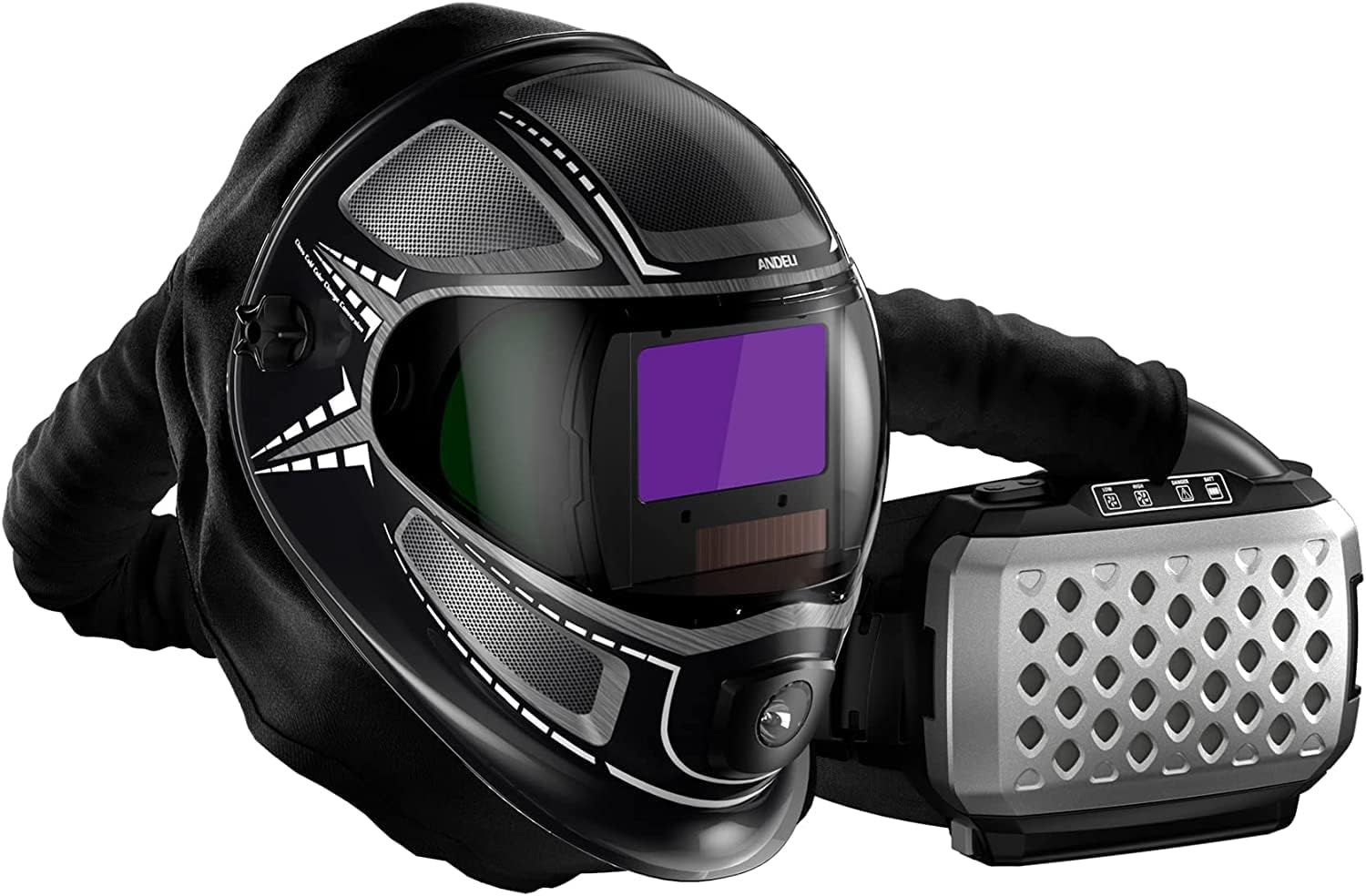
Image 1.1: The ANDELI Welding Helmet with its integrated Powered Air Purifying Respirator (PAPR) unit.
2. Safety Information
Always prioritize safety when operating welding equipment. Failure to follow these safety guidelines may result in serious injury or death.
2.1 General Safety Warnings
- This welding helmet is designed for arc welding processes only. Do not use for laser welding or oxyacetylene welding/cutting.
- Always inspect the helmet and PAPR system for damage before each use. Do not use if any components are cracked, broken, or otherwise compromised.
- Ensure the auto-darkening filter (ADF) is clean and free from scratches. Replace protective lenses as needed.
- The PAPR system provides respiratory protection against particulates. It does not protect against gases or vapors unless specifically equipped with appropriate gas/vapor filters (not included with this model).
- Maintain a clean and well-ventilated workspace.
- Keep children and unauthorized personnel away from the welding area.
2.2 Eye and Face Protection
- The auto-darkening filter protects against harmful UV/IR radiation even in the light state. However, always ensure the filter darkens correctly before beginning welding.
- Never look directly at the welding arc without proper eye protection.
- Use appropriate shade settings for your welding process. Refer to welding standards for recommended shade levels.
2.3 Respiratory Protection
- The PAPR system must be worn correctly with a tight seal around the face to ensure effective protection.
- Regularly check the filter for clogging and replace it according to the maintenance schedule or if airflow is reduced.
- Do not use the PAPR system in oxygen-deficient atmospheres or immediately dangerous to life or health (IDLH) environments.
3. Product Components
Your ANDELI Welding Helmet system includes the following main components:
- Welding Helmet: Features a panoramic 180° viewing area, auto-darkening filter (ADF), and integrated LED light.
- Powered Air Purifying Respirator (PAPR) Unit: A belt-mounted unit containing the fan, motor, battery, and filter housing.
- Air Hose: Connects the PAPR unit to the welding helmet, delivering purified air.
- Particle Filter: High-efficiency filter for removing airborne particulates.
- Rechargeable Battery: Powers the PAPR unit and LED light.
- Battery Charger: For recharging the PAPR battery.
- Headgear: Adjustable internal headgear for a secure and comfortable fit.
- Outer and Inner Protective Lenses: Clear lenses protecting the ADF from scratches and spatter.

Image 3.1: The Powered Air Purifying Respirator (PAPR) unit, which attaches to the user's belt.
4. Setup Instructions
Follow these steps to prepare your welding helmet and PAPR system for first use.
4.1 Charging the Battery
- Connect the battery charger to a suitable power outlet.
- Plug the charger cable into the charging port on the PAPR battery.
- Allow the battery to charge fully before first use. The charging indicator light will change color or turn off when charging is complete.
4.2 Installing the Filter
- Open the filter compartment on the PAPR unit.
- Insert the particle filter, ensuring it is seated correctly and securely.
- Close the filter compartment cover firmly.
4.3 Connecting the Air Hose
- Attach one end of the air hose to the outlet port on the PAPR unit. Twist or push until it clicks securely into place.
- Attach the other end of the air hose to the inlet port on the welding helmet. Ensure a tight connection to prevent air leakage.

Image 4.1: Diagram illustrating the proper connection of the air hose between the PAPR unit and the welding helmet.
4.4 Adjusting the Headgear
- Place the helmet on your head.
- Adjust the top strap and rear headband knob until the helmet fits snugly and comfortably, with the viewing area positioned correctly in front of your eyes.
- Ensure the helmet is balanced and does not put undue pressure on any part of your head.
5. Operating Instructions
Understand how to properly operate your ANDELI welding helmet and PAPR system.
5.1 Powering On/Off the PAPR Unit
- Press and hold the power button on the PAPR unit to turn it on. The fan will start, and indicator lights will illuminate.
- To turn off, press and hold the power button again until the unit powers down.
5.2 Adjusting Airflow
- The PAPR unit typically offers multiple airflow settings (e.g., Low and High).
- Press the airflow adjustment button to cycle through the available settings. Select the setting that provides adequate comfort and protection for your working conditions.

Image 5.1: Detailed view of the PAPR unit's control panel, showing power, battery, and airflow settings.
5.3 Using the Auto-Darkening Filter (ADF)
- The ADF automatically switches from a light state (DIN 4) to a dark state (adjustable shade) within 1/25,000 seconds when an arc is detected.
- Shade Adjustment: Use the external or internal knob to select the appropriate shade level for your welding process.
- Sensitivity Adjustment: Adjust the sensitivity to prevent the filter from darkening due to ambient light or to ensure it darkens reliably in low-light welding conditions.
- Delay Adjustment: Set the delay time for the filter to return to the light state after the arc ceases. This helps protect eyes from afterglow.
5.4 Activating the LED Light
- The helmet features an integrated LED light for improved visibility in dimly lit work areas.
- Locate the LED light switch on the helmet and toggle it to turn the light on or off.

Image 5.2: A welder utilizing the ANDELI helmet with its auto-darkening feature during a welding operation.
6. Maintenance
Regular maintenance ensures the longevity and optimal performance of your ANDELI welding helmet and PAPR system.
6.1 Cleaning the Helmet and Lenses
- Clean the helmet shell with a mild soap and water solution. Avoid harsh solvents.
- Wipe the outer and inner protective lenses with a soft, lint-free cloth. Replace scratched or pitted lenses immediately.
- Gently clean the auto-darkening filter (ADF) with a soft cloth. Do not immerse the ADF in water or cleaning solutions.
Image 6.1: Example of clear protective lenses for the welding helmet.
6.2 Filter Replacement
- The particle filter should be replaced regularly, depending on usage and environmental conditions. A clogged filter will reduce airflow and increase motor strain.
- Replace the filter if you notice a decrease in airflow, an increase in motor noise, or if the filter appears visibly dirty.
- Refer to Section 4.2 for filter installation steps.
Image 6.2: A replacement particle filter for the PAPR unit.
6.3 Battery Care and Storage
- Recharge the battery after each use or when the low battery indicator illuminates.
- Store the battery in a cool, dry place away from direct sunlight and extreme temperatures.
- If storing for extended periods, charge the battery to approximately 50% every 3-6 months to maintain its lifespan.
Image 6.3: The rechargeable battery pack for the PAPR system.
6.4 Inspecting the Air Hose
- Regularly inspect the air hose for kinks, tears, or blockages.
- Ensure connections remain secure. Replace the hose if any damage is found.
7. Troubleshooting
This section addresses common issues you might encounter with your ANDELI welding helmet and PAPR system.
| Problem | Possible Cause | Solution |
|---|---|---|
| PAPR unit does not turn on. | Battery is discharged or not properly installed. | Charge the battery fully. Ensure the battery is correctly inserted into the PAPR unit. |
| Insufficient airflow from PAPR. | Clogged filter, kinked hose, or low battery. | Replace the particle filter. Check the air hose for obstructions or kinks. Recharge the battery. |
| Auto-darkening filter (ADF) does not darken. | Sensors are blocked, low battery in ADF (if applicable), or incorrect sensitivity setting. | Ensure ADF sensors are clean and unobstructed. Check ADF battery (if replaceable). Adjust sensitivity setting. |
| LED light not working. | Low battery or faulty connection. | Recharge the PAPR battery. Check the connection of the LED light to the helmet's power source. |
| Helmet feels uncomfortable or loose. | Headgear not properly adjusted. | Re-adjust the headgear straps and knob for a secure and comfortable fit. |
8. Specifications
Key technical specifications for the ANDELI Welding Helmet with PAPR System:
- Model Number: AKJJOHXJAIR1-1USFBA
- Viewing Area Size: 3.86 × 2.44 inches (Main), 3.72 × 1.76 inches (Side View)
- Auto-Darkening Response Time: 1/25,000 seconds
- Light State: DIN 4
- Respiratory Protection: Powered Air Purifying Respirator (PAPR) with particle filtration (99.95% capture rate)
- Integrated Features: LED Light, Airflow Optimization System
- Package Dimensions: 20.5 x 12.84 x 11.5 inches
- Item Weight: 10.35 Pounds
- Manufacturer: ANDELI
- First Available: October 25, 2023
9. Warranty and Support
ANDELI products are manufactured to high-quality standards. For specific warranty details, including coverage period and terms, please refer to the warranty card included with your product or visit the official ANDELI website. For technical support, replacement parts, or service inquiries, please contact ANDELI customer service through their official channels.
Contact Information: Please refer to the packaging or the official ANDELI website for the most current customer support contact details.
