
1. Introduction and Overview
The Kuulaa Magsafe Battery Pack is a slim and powerful portable charger designed to provide convenient on-the-go power for your compatible devices. With its 5,000 mAh capacity and advanced charging technologies, it ensures your devices stay powered throughout the day.

Figure 1.1: Kuulaa Magsafe Battery Pack (Grey)
This image displays the sleek, grey Kuulaa Magsafe Battery Pack, highlighting its compact design and the 5000 mAh capacity marking.
2. Product Features
- Slim and Powerful: Equipped with an efficient 5000mAh lithium-polymer battery, this power bank is only 0.3-inch thick, making it highly portable.
- Magsafe Wireless Charging: Provides fast 7.5W wireless charging for iPhone 12, 13, 14, 15, and 16 series.
- PD 20W Two-Way USB-C Charging: Supports Power Delivery (PD) 20W for both input and output, allowing for rapid charging of the power bank and connected devices.
- Unshakeable Magnetic Grip: Features powerful magnetic fixation to securely hold the charger to your Magsafe-compatible iPhone.
- Stylish and Aesthetic: Ultra-thin design with a metallic feel, crafted from aluminum alloy and PC for durability and a premium look.
- Superior Safety: Built with MacBook-grade aluminum alloy for rapid heat dissipation and advanced safeguards against overcharging, overheating, and short circuits.

Figure 2.1: Ultra Slim and Portable Design
This image illustrates the ultra-slim profile of the power bank, emphasizing its compact size and lightweight nature, making it easy to carry.
3. Setup
3.1 Initial Charging of the Power Bank
Before first use, fully charge your Kuulaa Magsafe Battery Pack. Connect the included USB-C cable to the power bank's USB-C port and plug the other end into a compatible USB-C power adapter (not included). The LED indicator lights will show the charging progress.
3.2 Attaching for Magsafe Wireless Charging
For Magsafe-compatible iPhones (iPhone 12 series and newer), simply align the power bank with the back of your iPhone. The strong magnets will snap it into place, and wireless charging will begin automatically.
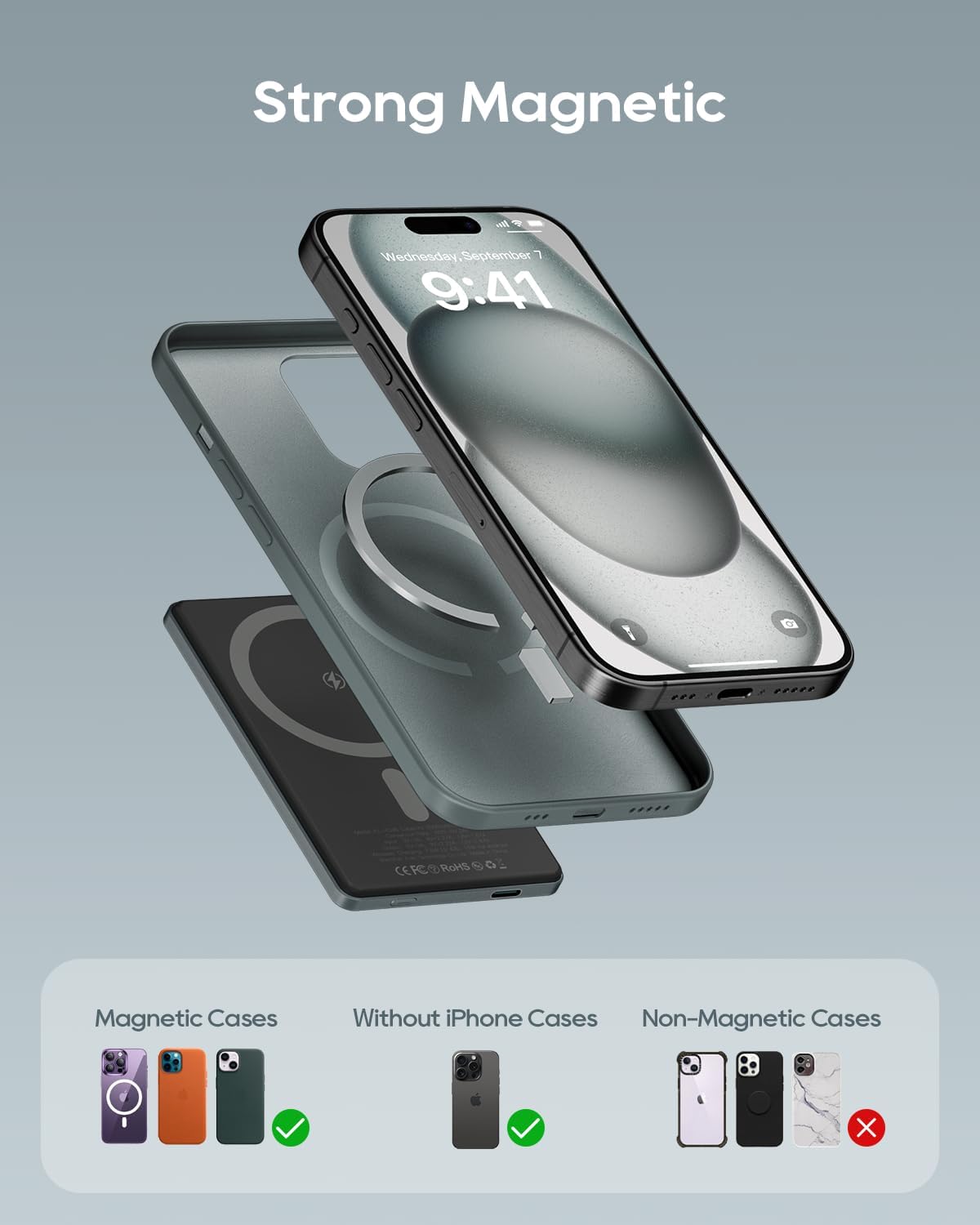
Figure 3.1: Magnetic Attachment for Charging
This image demonstrates the magnetic attachment of the power bank to an iPhone, showing the seamless connection for wireless charging.
3.3 Using Wired Charging (USB-C)
For devices requiring wired charging, connect your device to the power bank's USB-C port using a compatible USB-C to USB-C cable. The power bank will automatically detect the connection and begin charging.
Video 3.1: 0.3 in Slim Magsafe Battery Pack 5,000 mAh
This video showcases the ultra-slim design and magnetic attachment of the 5,000 mAh Magsafe battery pack, demonstrating its ease of use for quick charging.
4. Operating Instructions
4.1 Checking Battery Level
Press the power button once to activate the LED indicator lights, which display the remaining battery capacity of the power bank. Each light typically represents approximately 25% of the charge.
4.2 Charging Your Device
Once magnetically attached or connected via USB-C, your device will begin charging. The power bank features auto-hibernation to conserve power when not in use or when the device is fully charged.

Figure 4.1: Charging iPhone with Kuulaa Power Bank
This image shows an iPhone being charged wirelessly by the Kuulaa Magsafe Battery Pack, illustrating both wireless and wired charging capabilities.
5. Compatibility
- Magsafe Wireless Charging: Fully compatible with iPhone 12, 13, 14, 15, and 16 series for magnetic wireless charging.
- Universal Wireless Charging: Supports 15W wireless charging for other Qi-compatible devices such as Samsung, Huawei, AirPods, and FreeBuds.
- Wired Charging: Compatible with a wide range of devices that support USB-C charging, including smartphones, tablets, and other small electronics.

Figure 5.1: Kuulaa Power Bank Compatibility
This image visually represents the broad compatibility of the power bank, showing various iPhone models for Magsafe, and other devices for wireless and wired USB-C charging.
6. Safety Information
The Kuulaa Magsafe Battery Pack is designed with multiple safety features to protect your devices and ensure safe operation:
- Overcharge Protection: Prevents the battery from being overcharged, extending its lifespan.
- Overheating Protection: Built-in temperature sensors prevent the device from overheating during charging or discharge.
- Short Circuit Protection: Automatically cuts off power in case of a short circuit to prevent damage.
- Foreign Object Detection: For wireless charging, it detects foreign metal objects to prevent overheating and potential hazards.
Important Safety Precautions:
- Do not expose the power bank to extreme temperatures (above 45°C or below 0°C).
- Avoid dropping, disassembling, or attempting to repair the device yourself.
- Keep away from water and high humidity.
- Use only certified charging cables and adapters.

Figure 6.1: Multiple Safety Protection Features
This image highlights the internal components and safety mechanisms of the power bank, including protection against overcharge, strong magnetic hold, short circuit, and general security protection.
7. Maintenance
- Cleaning: Use a soft, dry cloth to clean the surface of the power bank. Do not use liquid cleaners or aerosols.
- Storage: Store the power bank in a cool, dry place away from direct sunlight and extreme temperatures. If storing for extended periods, charge it to about 50% capacity every three months to maintain battery health.
- Handling: Avoid dropping or subjecting the power bank to strong impacts, as this can damage internal components.
8. Troubleshooting
8.1 Power Bank Not Charging
- Ensure the USB-C cable is securely connected to both the power bank and the power adapter.
- Verify that the power adapter is functioning correctly and plugged into a live power outlet.
- Try using a different USB-C cable or power adapter.
8.2 Device Not Charging Wirelessly
- Ensure your device is Magsafe-compatible (iPhone 12 series or newer) or Qi-compatible.
- Check for proper alignment between the power bank and your device. The magnetic connection should be firm.
- Remove any thick cases or metal attachments from your phone that might interfere with wireless charging.
- Ensure the power bank has sufficient charge.
8.3 Device Not Charging via USB-C
- Ensure the USB-C cable is securely connected to both the power bank and your device.
- Try using a different USB-C cable.
- Ensure the power bank has sufficient charge.
8.4 Magnetic Grip is Weak
- Ensure your iPhone is Magsafe-compatible.
- If using a case, ensure it is a Magsafe-compatible case. Non-Magsafe cases may weaken the magnetic connection.
- Clean the surfaces of both the power bank and your iPhone/case to ensure no debris is interfering with the magnetic connection.
9. Specifications
| Feature | Specification |
|---|---|
| Brand | Kuulaa |
| Model Number | KL-YD45 |
| Battery Capacity | 5000 Milliamp Hours (mAh) |
| Battery Type | Lithium Polymer |
| Product Dimensions | 4.1 x 2.6 x 0.3 inches |
| Item Weight | 4.1 ounces |
| Wireless Charging Output | 7.5W (Magsafe for iPhone 12-16 series) |
| Wired Charging Input/Output | PD 20W (USB Type C) |
| Manufacturer | Shenzhen Kula Technology Co.,LTD |
| Country of Origin | China |
| Date First Available | October 25, 2023 |
10. Warranty and Support
For warranty information and customer support, please refer to the product packaging or contact the manufacturer, Shenzhen Kula Technology Co.,LTD, directly. You may also reach out to your point of purchase for assistance.
