
1. Important Safety Information
Please read all instructions carefully before using the ETENTOUS 6-in-1 Bald Head Shaver. Keep this manual for future reference.
- Water Safety: This shaver is IPX7 waterproof and suitable for wet and dry use. However, avoid using it near water when it is not completely turned off.
- Charging: Ensure the shaver is completely dry before connecting it to the charger. Do not charge in wet conditions.
- Cleaning: For cleaning, use water only. Do not use corrosive or abrasive cleaning agents.
- Sensitive Skin: If you have sensitive skin, perform a patch test on a small area before full use to check for any irritation.
- First Use: For optimal results, avoid shaving completely bald before the first use. Allow your hair to grow slightly to help the shaver adapt.
2. Product Overview
The ETENTOUS 6-in-1 Bald Head Shaver is a versatile grooming tool designed for efficient and comfortable shaving of the head and face, along with other grooming needs. It features an 8D floating rotary blade system and comes with multiple attachments.

Image: The ETENTOUS 6-in-1 Bald Head Shaver, showcasing its main unit with eight rotary shaving heads.
Key Features:
- 8D Floating Rotary Blades: Designed to adapt to the contours of your face and head, providing a smooth, precise, and efficient shave. Features self-sharpening blades and a double protection net for skin comfort.
- Wet & Dry Shaving: IPX7 waterproof rating allows for comfortable wet shaving with foam or water, and convenient dry shaving. Can be used in the shower.
- USB Fast Charging & LED Display: Fully charges in approximately 1.5 hours, providing up to 90 minutes of cordless operation. The integrated LED display shows the remaining battery level and operating time.
- 6-in-1 Grooming Kit: Includes the main shaver unit and five interchangeable attachments for comprehensive grooming:
- Ear and Nose Trimmer
- Contour Trimmer
- Body Shaver
- Facial Cleansing Brush
- Facial Massage Brush
- Three guide combs (3mm, 5mm, 7mm) for the contour trimmer.

Image: Detailed view of the upgraded 8D floating head, highlighting self-sharpening blades, 360-degree shaving capability, and the double protection net for a closer, smoother, faster, and more precise cut.
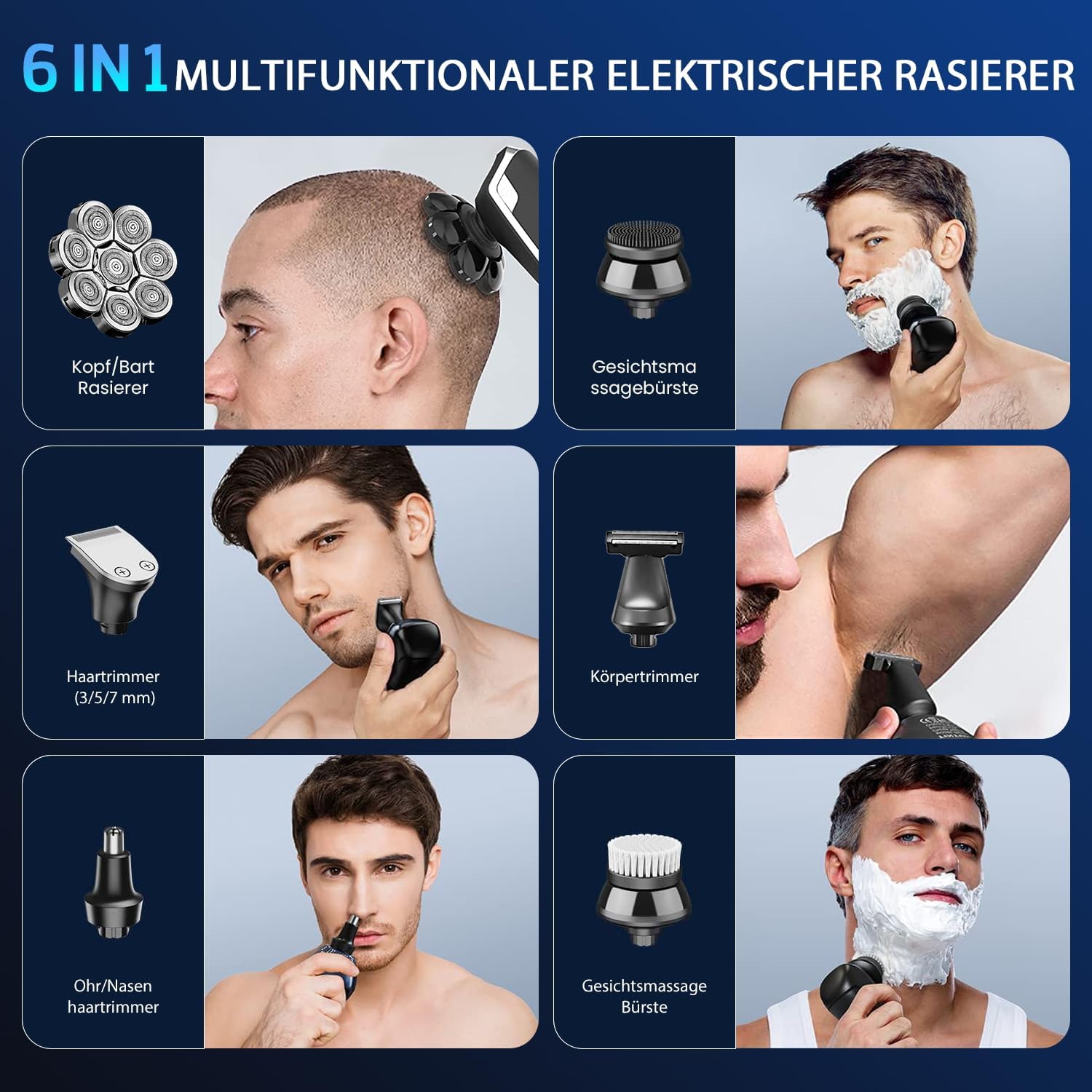
Image: The complete 6-in-1 multifunctional electric shaver kit, showing the main shaver unit and all interchangeable attachments including the head/beard shaver, facial massage brush, hair trimmer with combs, body trimmer, ear/nose trimmer, and facial cleansing brush.
3. Setup
3.1 Initial Charging
- Before first use, ensure the shaver is completely dry.
- Connect the USB charging cable to the shaver's charging port and plug the other end into a compatible USB power source (e.g., computer, car charger, wall adapter).
- The LED display will indicate the charging status. A full charge takes approximately 1.5 hours.
- Once fully charged, disconnect the shaver from the power source.

Image: The shaver connected via USB for charging, with the LED display showing the battery percentage and indicating a 90-minute operating time after a 2-hour charge.
3.2 Attaching/Detaching Heads
- To attach a head, align the desired attachment with the main shaver body and gently push until it clicks into place.
- To detach a head, firmly grasp the attachment and pull it away from the shaver body.
4. Operating Instructions
4.1 Shaving Your Head and Face
- Ensure the 8D rotary shaver head is attached.
- Dry Shaving: For a quick and convenient shave, use the shaver on dry skin.
- Wet Shaving: For a smoother and more comfortable shave, apply shaving foam or gel to your skin before use. The shaver can also be used in the shower.
- Press the power button to turn on the shaver.
- Gently move the shaver in circular motions over the desired area (scalp or face). Do not press too hard to avoid skin irritation.
- After shaving, turn off the shaver and clean it as described in the Maintenance section.

Image: Illustrations of the shaver being used for both wet shaving (with foam in the shower) and dry shaving on the face, demonstrating its versatility.

Image: A man demonstrating the use of the electric 8D rotary shaver for both bald head shaving and facial shaving, highlighting its ability to provide a smooth and efficient shave.
4.2 Using Other Attachments
Interchange the shaver head with the desired attachment for specific grooming tasks:
- Ear and Nose Trimmer: Gently insert the trimmer into your nostril or ear canal to trim unwanted hair. Do not insert too deeply.
- Contour Trimmer: Use for precise trimming of sideburns, beard lines, or other facial hair. Attach a guide comb (3mm, 5mm, or 7mm) for desired hair length.
- Body Shaver: Use for trimming hair on other parts of the body.
- Facial Cleansing Brush: Attach the brush head and use with your preferred facial cleanser to gently exfoliate and clean your skin.
- Facial Massage Brush: Attach the massage brush head and use to gently massage your face, promoting circulation.
5. Maintenance
5.1 Cleaning the Shaver
Regular cleaning ensures optimal performance and hygiene.
- After each use, turn off the shaver.
- Detach the shaving head from the main body.
- Open the rotary blades by twisting the central part of the head (refer to image for visual guide).
- Rinse the shaving head and blades thoroughly under running water to remove hair clippings and debris.
- Use the provided cleaning brush to remove any stubborn hair particles.
- Allow all parts to air dry completely before reassembling or storing.
- For other attachments, rinse them under water and allow them to dry.
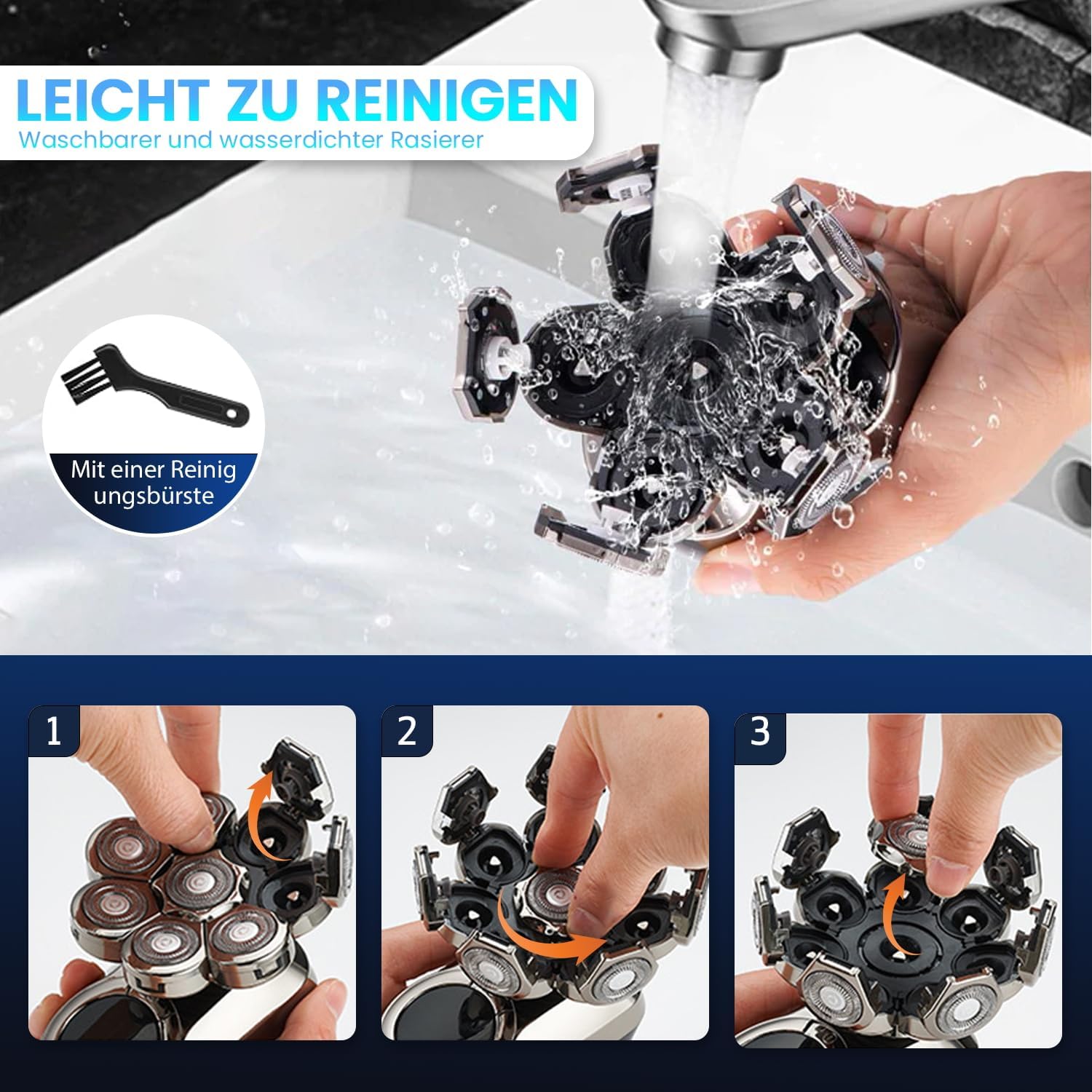
Image: A visual guide demonstrating the three steps to easily clean the shaver head by opening the rotary blades and rinsing them under water, along with the included cleaning brush.
5.2 Storage
Store the shaver and its attachments in a dry, cool place, away from direct sunlight and out of reach of children.
6. Troubleshooting
If you encounter any issues with your shaver, please refer to the following common solutions:
- Shaver Not Turning On: Ensure the shaver is fully charged. If the battery is low, connect it to the charger for 1.5 hours.
- Poor Shaving Performance: Clean the shaving head thoroughly to remove any accumulated hair or debris. If performance does not improve, the blades may need replacement after extended use.
- Skin Irritation: Ensure you are not pressing too hard against your skin. Try wet shaving with foam or gel for increased comfort. If irritation persists, discontinue use.
- Shaver Not Charging: Check the USB cable and power adapter for damage. Ensure the shaver's charging port is dry and free of debris. Try a different USB power source.
If the problem persists after trying these steps, please contact customer support.
7. Specifications
| Feature | Specification |
|---|---|
| Model Name | TXD-8D |
| Brand | ETENTOUS |
| Head Type | 8D Rotary |
| Number of Blades | 8 |
| Blade Material | Stainless Steel |
| Power Source | Rechargeable Battery |
| Battery Life | Up to 90 minutes |
| Charging Time | Approx. 1.5 hours |
| Waterproof Rating | IPX7 |
| Dimensions (L x W x H) | 12 x 8 x 4 cm |
| Weight | 410 grams |
| Color | Champagne Color |
| Recommended Uses | Scalp, Ear, Nose hair, Face |
| Included Components | 1 Bald Shaver, 1 Contour Trimmer, 1 Body Shaver, 1 Ear and Nose Trimmer, 1 Facial Cleansing Brush, 1 Facial Massage Brush, 3 Guide Combs, 1 Cleaning Brush |
| UPC | 734189047944 |
8. Warranty and Support
ETENTOUS offers a one-year warranty for this product, covering manufacturing defects from the date of purchase. Additionally, seven-day technical support is available to assist with any operational questions or issues you may encounter.
For warranty claims or technical assistance, please refer to the contact information provided with your purchase or visit the official ETENTOUS website.