1. Introduction
This manual provides essential information for the safe and efficient operation of your LVYUAN 200W Car Power Inverter. This device converts 12V DC power from your vehicle's cigarette lighter socket into 110V AC power, along with 20W Power Delivery (PD) USB-C and 18W Quick Charge (QC) USB-A outputs, enabling you to power and charge various electronic devices on the go.
2. Safety Instructions
- Water and Damp Conditions: Avoid exposing the inverter to water or damp environments. Internal components may become hazardous if wet.
- Device Wattage Compatibility: Always ensure that the total wattage of your electronic devices does not exceed the inverter's maximum output of 200 watts. Excessive power consumption can cause the internal fuse to blow.
- Vehicle Operation: For optimal performance and to prevent draining your car battery, it is recommended to use the inverter while the vehicle's engine is running.
- Inductive Loads: This inverter is not designed to power inductive electrical appliances such as induction cooktops or microwave ovens.
- Protection Features: The inverter is equipped with smart sensing chips to protect against overheating, undervoltage, overcurrent, overvoltage, overload, and short circuits. If the LED indicator turns red, it signifies a fault condition.
- Cigarette Lighter Socket Limits: Be aware that some vehicle cigarette lighter sockets are designed for lower consumption (e.g., 120W), which may reduce the inverter's effective capacity. Consult your car's manual for specific limits.
3. Product Overview
The LVYUAN 200W Car Power Inverter is a compact and robust device designed for convenience and reliability. It features a full aluminum alloy housing for durability and efficient heat dissipation.
Key Features:
- Power Output: 200 watts continuous power.
- AC Outlets: Two (2) US-standard 110V AC outlets.
- USB Ports: One (1) 20W PD USB-C port and one (1) 18W QC USB-A port for fast charging.
- Cooling System: Built-in smart cooling fan that adjusts operation based on inverter status and temperature.
- Safety Protections: Integrated safeguards against overheating, undervoltage, overcurrent, overvoltage, overload, and short circuits.
- Compact Design: Dimensions of 3.3 x 3.1 x 1.9 inches and a weight of 11.3 ounces for easy portability and storage.
Visual Guide:
Observe the various ports and features of the inverter:

Figure 1: Detailed view of the inverter's ports and features.

Figure 2: Inverter's compact size compared to a smartphone.
Video 1: A closer look at the LVYUAN 200W Car Power Inverter, highlighting its design and port layout.
4. Setup
- Connect to Vehicle: Insert the inverter's cigarette lighter plug firmly into your vehicle's 12V cigarette lighter socket.
- Power On: The inverter will typically power on automatically, indicated by a blue or green LED light. If not, press the power button on the inverter.
- Vehicle Engine: For optimal performance and to prevent battery drain, ensure your vehicle's engine is running before connecting devices.
Video 2: Demonstration of plugging the 200W Car Power Inverter into a vehicle's cigarette lighter socket and observing the power indicator.
5. Operating Instructions
- Connect Devices: Plug your electronic devices into the appropriate ports on the inverter: use the 110V AC outlets for standard plugs, the USB-C port for PD-compatible devices, or the USB-A port for QC-compatible devices.
- Monitor Power: The LED power indicator will show the inverter's status. A green or blue light indicates normal operation. A red light indicates a fault or protection mode.
- Total Wattage: Do not exceed the combined 200-watt output capacity of the inverter. Overloading can trigger safety protections or damage the unit.
6. Usage Scenarios
This versatile power inverter is ideal for various applications, providing convenient power during road trips, travel, business trips, and for charging small electronics.
Compatible Devices (up to 200W total):
- Laptops
- Smartphones
- Tablets (iPads)
- Shavers
- Cameras
- Speakers
- String Lighters
- Drones
- Breast Pumps
- Game Consoles
- Small Fans
- Walkie-Talkies
- Projectors
Incompatible Devices:
- Induction Cooktops
- Microwave Ovens
- Any other inductive electrical appliances.
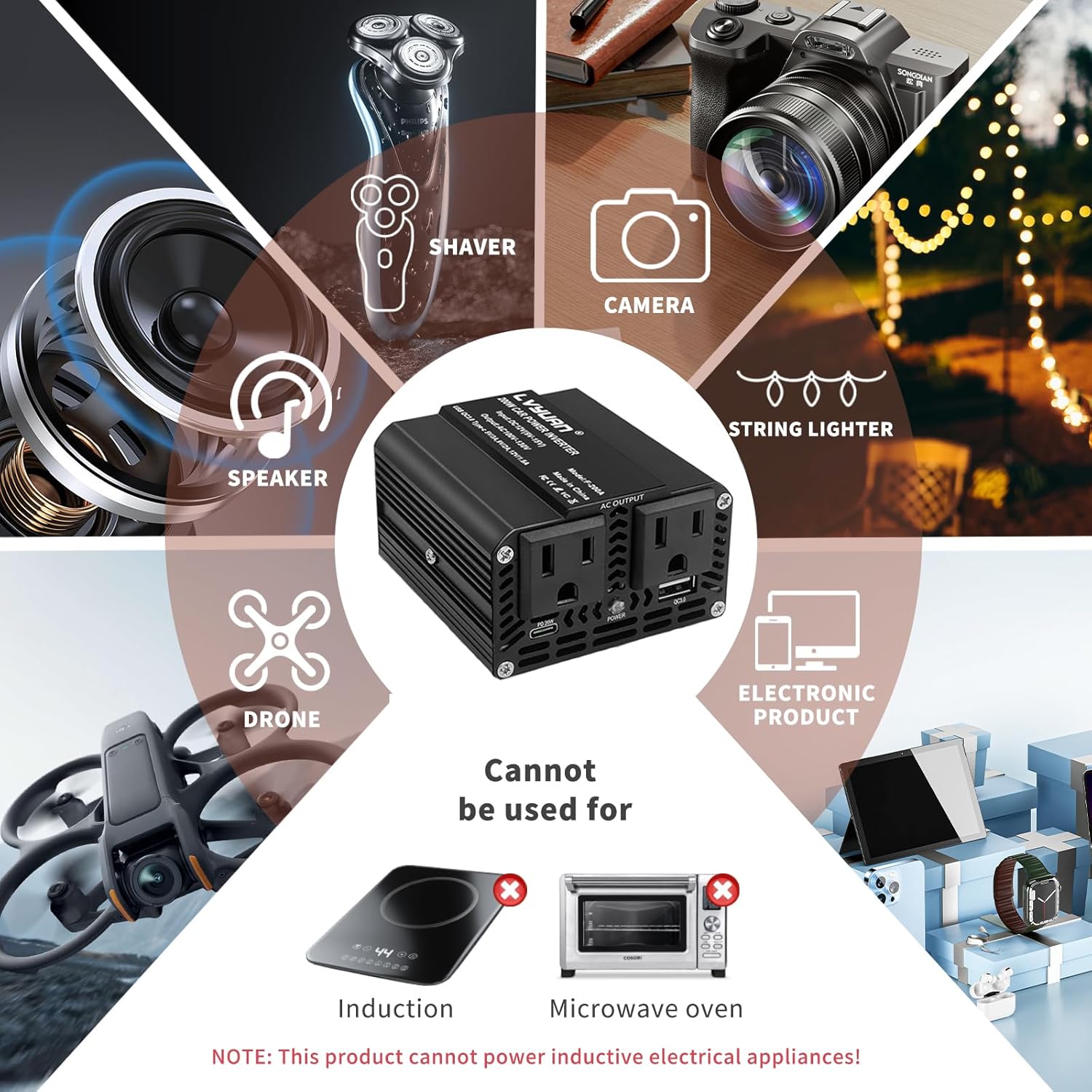
Figure 3: Examples of compatible and incompatible devices.
Video 3: Demonstrates the inverter powering various devices in a vehicle setting.
7. Maintenance
- Keep Dry: Always keep the inverter away from water and damp conditions to prevent damage and ensure safety.
- Starting Vehicle: Disconnect the inverter or ensure it is turned off before starting your car to avoid potential power surges.
- Cleaning: Use a dry, soft cloth to clean the exterior of the inverter. Do not use liquid cleaners.
8. Troubleshooting
- No Power Output:
- Check if the inverter is securely plugged into the cigarette lighter socket.
- Ensure the vehicle's engine is running.
- Verify the LED indicator is blue/green. If red, a protection mode is active.
- Check the wattage of connected devices; they might exceed the 200W limit, causing the internal fuse to blow. Replace the fuse if necessary (refer to a qualified technician).
- Red LED Indicator: A red light indicates that one of the inverter's safety protections has been activated (e.g., overheating, undervoltage, overcurrent, overvoltage, overload, or short circuit). Disconnect all devices, turn off the inverter, and allow it to cool down if overheating is suspected. Reconnect after a few minutes.
- Device Not Charging: Ensure the device is properly connected to the correct port (AC, USB-C, or USB-A) and that the device's charging requirements are compatible with the inverter's output.
9. Specifications
| Product Dimensions | 3.3 x 3.1 x 1.9 inches |
| Item Weight | 11.3 ounces |
| Input Voltage | DC 12V |
| AC Output Voltage | AC 110V |
| Continuous Wattage | 200 watts |
| USB-C Output | 20W PD (Power Delivery) |
| USB-A Output | 18W QC (Quick Charge) |
| AC Outlets | 2 |
| Model Name | BLNC-INVERTER-BLACK |
10. Warranty and Support
Your LVYUAN 200W Car Power Inverter comes with a 24-month warranty. For any product issues, recommendations, or to redeem your warranty, please contact our customer support team. We offer 24H/7D customer support to assist you.
Contact information can typically be found on the product packaging or the official LVYUAN website.


