1. Safety Instructions
Please read all instructions carefully before installation and use. Retain this manual for future reference.
1.1 Electrical Safety
- Always disconnect power at the circuit breaker before installation or servicing.
- Installation must be performed by a qualified electrician or a person with electrical experience.
- Ensure all wiring connections are secure and comply with local and national electrical codes.
- Do not install the fan in a location where blades could strike objects or people.
1.2 General Safety
- Use only Kviflon-approved replacement parts.
- Do not bend the fan blades during installation or cleaning.
- Ensure the mounting structure can support the fan's weight (approximately 9 pounds).
- Keep children away from the fan during operation.
2. Package Contents
Verify all components are present before beginning installation:
- Fan Motor Assembly
- Canopy
- Screw Bag (Mounting Hardware)
- Fan Blades (5 pieces)
- Lampshade
- Receiver
- Remote Control (2 AAA batteries included)
- Installation Instructions (This manual)

3. Specifications
| Feature | Specification |
|---|---|
| Brand | Kviflon |
| Model Name | 8217-RGB |
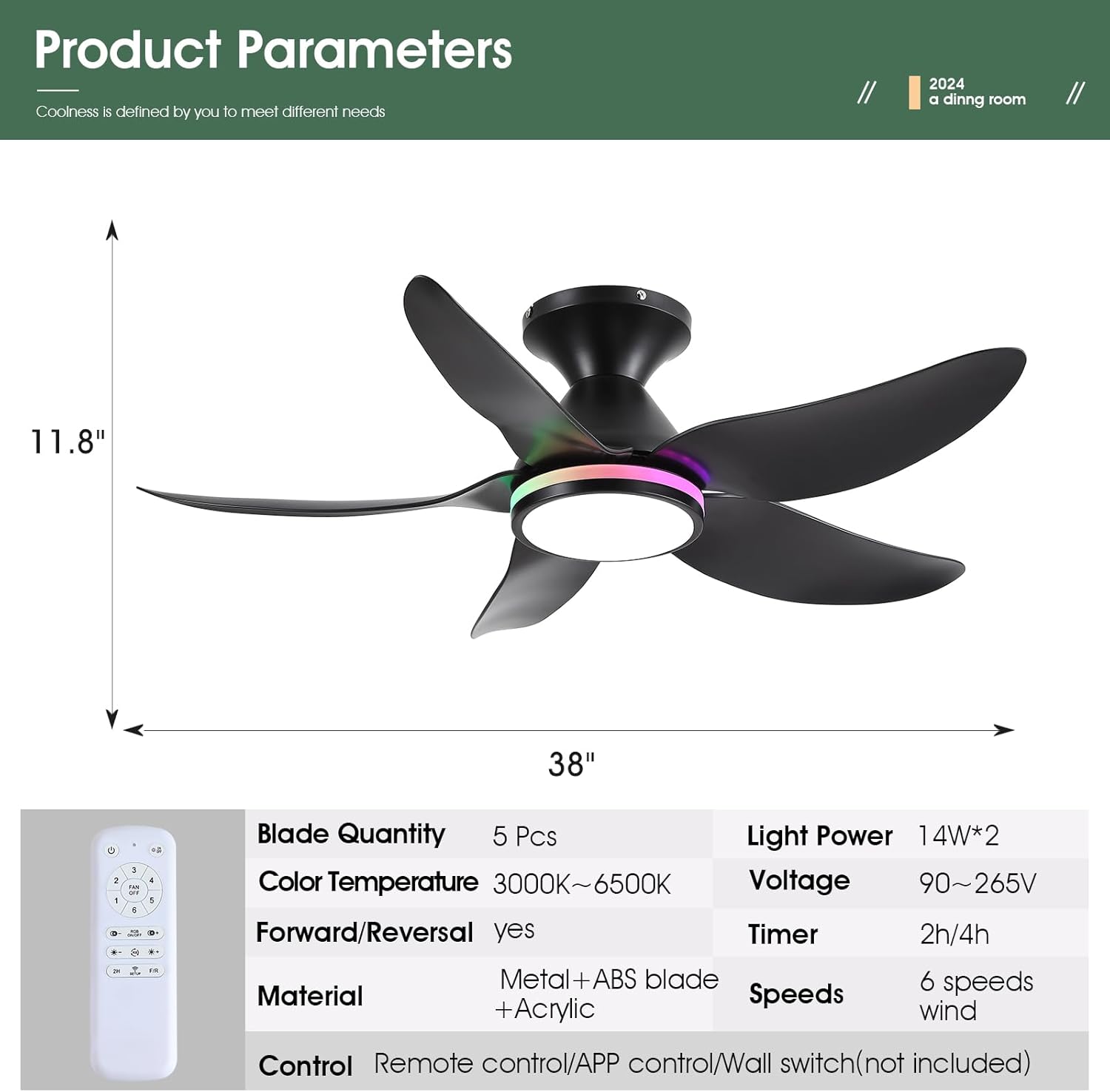
| Product Dimensions | 38"D x 38"W x 11.8"H |
| Number of Blades | 5 |
| Motor Type | DC Motor |
| Fan Speeds | 6 |
| Lighting | Dimmable White (3000K-6500K) + RGB Ring Light |
| Control Method | Remote Control, Mobile APP |
| Special Features | Reversible, Timer (2/4 hours), Night Light Mode |
| Noise Level | Less than 30 dB |
| Item Weight | 9 Pounds |

4. Installation Guide
Follow these steps for a safe and successful installation. A safety hook is included for ease of installation by one person.
4.1 Pre-Installation
- Turn off power at the circuit breaker.
- Ensure the mounting location is structurally sound and can support the fan's weight.
4.2 Mounting Bracket Installation
- Attach the mounting bracket to the ceiling junction box using the provided screws. Ensure it is securely fastened.
4.3 Wiring
- Connect the fan's wiring to the household wiring according to the wiring diagram in the manual. Match neutral (white), live (black), and ground wires.
- Connect the receiver module to the fan and household wiring as instructed.
4.4 Blade and Light Kit Assembly
- Attach the 5 fan blades to the motor assembly using the provided screws. Ensure they are firmly secured.
- Connect the LED light module to the fan's wiring.
- Secure the lampshade to the fan body.
4.5 Final Assembly
- Carefully lift the fan assembly and hang it on the safety hook of the mounting bracket.
- Connect the remaining wires (if any) and tuck them neatly into the junction box.
- Secure the canopy to the mounting bracket with the screws.


5. Operating Instructions
5.1 Remote Control Functions
The included remote control provides full functionality for the fan and lights:
- All Off: Turns off both fan and lights.
- Light On/Off: Toggles the main light.
- Fan Off: Turns off the fan.
- 6 Speed Control: Adjusts fan speed from 1 (low) to 6 (high).
- RGB On/Off: Toggles the RGB ring light.
- Color Temperature +/-: Adjusts white light color temperature (3000K Warm, 4500K Natural, 6500K Cool).
- Brightness +/-: Dims or brightens the main white light.
- RGB Changing: Cycles through RGB colors.
- 2H/4H Timer: Sets the fan to turn off automatically after 2 or 4 hours.
- F/R (Forward/Reverse): Changes fan blade direction for summer (downdraft) or winter (updraft) modes.
- Code Matching (Setup): Used for pairing the remote with the fan.


5.2 App Control Setup
To control the fan via your smartphone, download the companion app:
- Scan the QR code provided in the manual or product images to download the 'FanLamp Pro' app.
- Open the app and follow the on-screen instructions to add a new device.
- Ensure the fan is powered on. Within 5 seconds of powering on, press the pairing button in the app to connect. The fan lights will flash to indicate successful connection.
5.3 Fan Speed and Direction
The fan offers 6 speeds to suit various needs:
- Speeds 1-2: Gentle airflow, suitable for sleeping.
- Speeds 3-4: Natural wind, ideal for general comfort.
- Speeds 5-6: Strong wind, for maximum cooling.
Use the F/R button on the remote or the app to switch between summer (downdraft) and winter (updraft) modes.


5.4 Lighting Modes
The fan features versatile lighting options:
- Dimmable White Lights: Adjust brightness from 0% to 100% and choose between 3 color temperatures (Cool White 6500K, Natural Light 4500K, Warm Light 3000K).
- Independent RGB Ring Lights: The side RGB aperture can be controlled independently, offering various colors and modes.
- Night Light Mode: A dedicated setting for low-level illumination.


6. Maintenance
Regular maintenance ensures optimal performance and longevity of your ceiling fan.
- Cleaning: Use a soft, damp cloth to clean the fan blades and light cover. Do not use abrasive cleaners or solvents.
- Tightening Screws: Periodically check and tighten all screws on the fan blades and mounting hardware to prevent wobbling and noise.
- Dust Removal: Dust the fan motor housing and blades regularly to prevent accumulation, which can affect performance and cause overheating.
7. Troubleshooting
If you encounter issues, refer to the following common problems and solutions:
| Problem | Possible Cause | Solution |
|---|---|---|
| Fan does not start | No power, loose wiring, remote not paired | Check circuit breaker, ensure connections are secure, re-pair remote/app. |
| Lights do not work | Loose wiring, LED module failure | Check light wiring connections, contact support if LED module is faulty. |
| Fan wobbles | Loose blades, uneven installation | Tighten all blade screws, ensure mounting bracket is level and secure. |
| Remote/App not responding | Low batteries, pairing issue, signal interference | Replace remote batteries, re-pair the remote/app, reduce interference sources. |
| Fan makes noise | Loose screws, motor issue | Check and tighten all screws, ensure blades are clean and balanced. |
8. Warranty and Support
Kviflon provides technical support for its products. If you encounter any problems not covered in this manual, please contact Kviflon customer service for assistance. Refer to your purchase documentation for specific warranty details.


