
Poolexa GC01
Contents
Poolexa GC01 LED Color Light Controller User Manual
Model: GC01
Introduction
Thank you for choosing the Poolexa GC01 LED Color Light Controller. This device is designed to provide versatile color control for your LED lights, integrating seamlessly into a standard 2-gang electrical outlet box. It features an integrated 12V transformer, eliminating the need for an external transformer. Please read this manual thoroughly before installation and operation to ensure safe and optimal performance.
Safety Information
WARNING: To avoid electrical shock, ensure power is turned off at the circuit breaker before installation or servicing. All wiring must comply with local electrical codes.
- This controller operates at a safe working voltage of 12 Volts.
- The 12V transformer is integrated within the controller; no additional transformer is required.
- Do not attempt to open or modify the controller.
- Ensure the installation environment is dry and free from excessive moisture unless the product is specifically rated for wet locations.
- Consult a qualified electrician if you are unsure about any part of the installation process.
Product Overview
The Poolexa GC01 controller is a compact unit designed for easy integration into standard electrical boxes. It provides intuitive control over LED light colors and modes.

Figure 1: Poolexa GC01 LED Color Light Controller (Closed View)
This image shows the Poolexa GC01 LED Color Light Controller in its closed state, ready for installation. The Poolexa brand name is visible on the top cover.
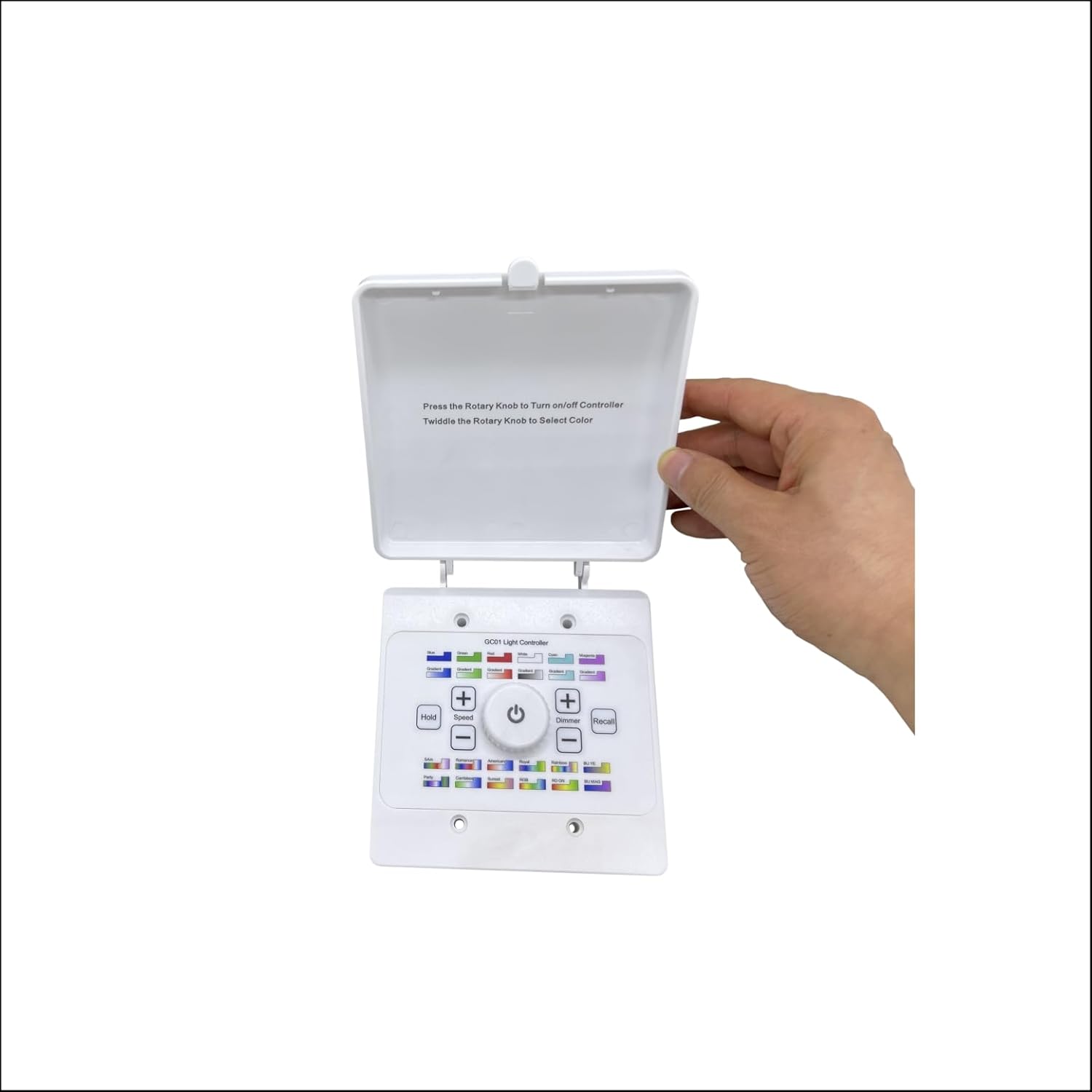
Figure 2: Poolexa GC01 LED Color Light Controller (Open View with Controls)
This image displays the Poolexa GC01 controller with its front cover open, revealing the control panel. The panel includes a rotary knob for power and color selection, along with various buttons for mode and brightness adjustments.

Figure 3: Angled View of Poolexa GC01 LED Color Light Controller (Open)
An angled perspective of the Poolexa GC01 controller with its cover open, highlighting the depth and design of the control interface.

Figure 4: Back View of Poolexa GC01 LED Color Light Controller (Wiring Terminals)
This image shows the rear of the Poolexa GC01 controller, detailing the wiring terminals for input power and output to the LED lights. Clear labels indicate connections for Line, Neutral, Ground, and light outputs.
Setup and Installation
The GC01 controller is designed for installation in a standard 2-gang electrical outlet box.
Installation Requirements:
- Standard 2-gang electrical outlet box.
- Minimum internal depth of 2 inches (5 cm) for the outlet box.
- Appropriate wiring tools (wire strippers, screwdriver).
- Compliance with all local electrical codes.
Installation Steps:
- Turn off Power: Locate the circuit breaker controlling the power to the installation area and turn it OFF. Verify power is off using a voltage tester.
- Prepare Outlet Box: Ensure the 2-gang electrical outlet box is securely mounted and has the required minimum depth.
- Connect Wiring: Refer to the wiring diagram (Figure 6) and the labels on the back of the controller (Figure 4).
- Connect the incoming 120V AC Line (hot) wire to the "Line" terminal.
- Connect the incoming 120V AC Neutral wire to the "Neutral" terminal.
- Connect the incoming Ground wire to the "Ground" terminal.
- Connect the 12V DC output wires from the controller to your LED lights. The controller supports two light outputs. Ensure correct polarity (Black for negative, Blue for positive).
- Mount Controller: Carefully place the controller into the 2-gang electrical outlet box, ensuring all wires are neatly tucked away. Secure the controller using the provided screws.
- Attach Faceplate: Install the decorative faceplate (not included, typically comes with the outlet box) over the controller.
- Restore Power: Turn the power back ON at the circuit breaker.

Figure 6: Wiring Diagram for Multiple Lights with GC01 Controller
This diagram illustrates the wiring connections for the Poolexa GC01 controller when connecting multiple LED lights. It shows the 120V AC input from the GFCI to the controller, and the 12V DC outputs to two separate lights.

Figure 5: GC01 Controller Compatibility
This image demonstrates that the GC01 controller is compatible with both Poolexa Plastic Pool Lights and Stainless Steel Pool Lights, showing examples of each type.
Operating Instructions
The GC01 controller offers simple and intuitive operation for your LED lights.
Basic Operation:
- Power On/Off: Press the central rotary knob to turn the controller and connected lights ON or OFF.
- Select Color: Twiddle (rotate) the rotary knob to cycle through available colors and lighting modes.
- Brightness Adjustment: Use the "+" and "-" buttons to adjust the brightness of the selected color or mode.
- Mode Selection: The control panel features various buttons for specific color presets and dynamic modes. Refer to the labels on the controller for specific functions (e.g., "Hold", "Select", "Recall").
Figure 2: Poolexa GC01 LED Color Light Controller (Open View with Controls)
This image displays the Poolexa GC01 controller with its front cover open, revealing the control panel. The panel includes a rotary knob for power and color selection, along with various buttons for mode and brightness adjustments.
Maintenance
The Poolexa GC01 LED Color Light Controller requires minimal maintenance.
- Cleaning: Wipe the surface of the controller with a soft, dry cloth. Do not use abrasive cleaners or solvents.
- Inspection: Periodically inspect the wiring connections to ensure they are secure and free from corrosion.
- Environmental Conditions: Ensure the controller is not exposed to extreme temperatures or direct water spray unless specifically rated for such conditions.
Troubleshooting
| Problem | Possible Cause | Solution |
|---|---|---|
| Controller does not power on. | No power to the unit; circuit breaker tripped; loose wiring connection. | Check circuit breaker and ensure it is ON. Verify all wiring connections are secure. Test power at the outlet box. |
| Lights do not respond to controller. | Incorrect wiring to lights; faulty light fixture; controller malfunction. | Verify 12V output wiring polarity (Black to negative, Blue to positive). Test lights with a known good 12V source. If issues persist, contact customer support. |
| Colors are incorrect or flickering. | Loose connection; incompatible light fixture; power fluctuation. | Check all wiring connections. Ensure your LED lights are compatible with the GC01 controller. Consult an electrician if power fluctuations are suspected. |
Specifications
- Model: GC01
- Brand: Poolexa
- Dimensions: Width 4.92", Height 5.51", Depth 2.76"
- Housing Material: PC
- Transformer: 100W 12V Transformer Built-in
- Input Voltage: 110V to 240V AC
- Output Voltage: 12V DC
- Maximum Frequency: 60 Hz
- Temperature Rating: -4°F to 122°F (-20°C to 50°C)
- Mounting Type: Wall Mount (Standard 2-Gang Electrical Outlet Box)
- UPC: 717373634120
Warranty and Support
For warranty information and technical support, please refer to the product packaging or visit the official Poolexa website. Keep your purchase receipt for warranty claims.
Documents and downloads
Ask a question about this manual
Ask about setup, troubleshooting, compatibility, parts, safety, or missing instructions. Manuals+ will review the question and use this page’s manual context to help answer it.