
1. Introduction
This manual provides detailed instructions for the safe and effective use of your YIRISO Electric Shaver FK-609. Please read this manual thoroughly before first use and retain it for future reference. The YIRISO FK-609 is a versatile electric foil shaver designed for both dry and wet shaving, featuring a built-in beard trimmer, LED display, and USB-C charging.
2. Safety Information
It is crucial to adhere to the following safety guidelines to prevent injury or damage to the device:
- Always keep the shaver away from water while charging.
- After each use, clean the shaver thoroughly to prevent bacterial growth.
- Exercise caution while shaving to avoid cuts.
- Always unplug the shaver before cleaning or storing.
- Do not disassemble or attempt to repair the shaver yourself. Contact qualified personnel for service.
- Keep out of reach of children.
3. Package Contents
Verify that all items are present in the package:
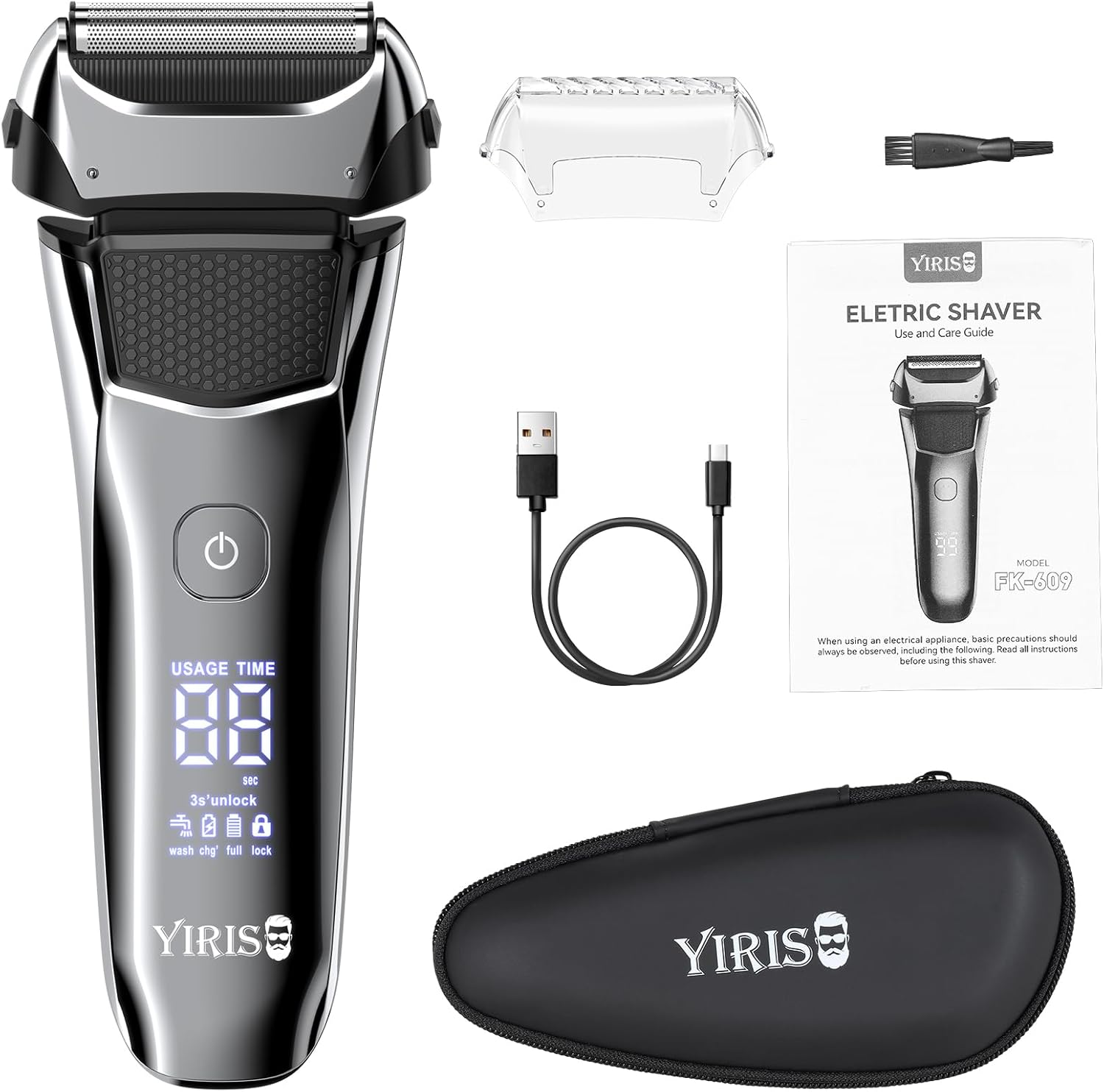
- YIRISO Electric Shaver FK-609
- USB-C Charging Cable
- Cleaning Brush
- Protective Cap
- Travel Case
- User Manual (this document)
4. Product Overview and Features
The YIRISO FK-609 is engineered for an efficient and comfortable shaving experience. Key features include:
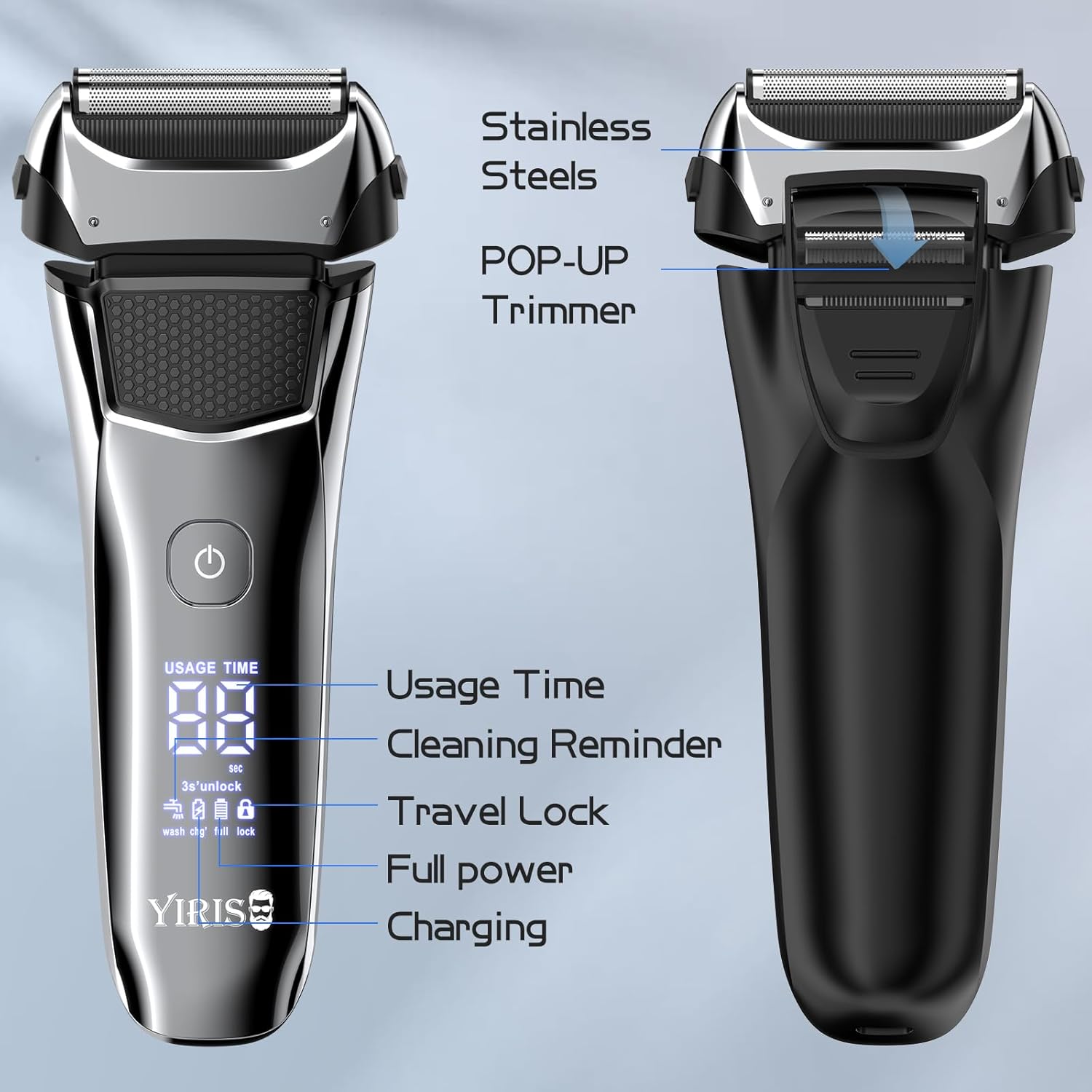
- Stainless Steel Blades: Durable and sharp for a close shave.
- Pop-up Precision Trimmer: For detailing sideburns and facial hair.
- Smart LED Display: Shows usage time, cleaning reminder, travel lock status, and charging status.
- Travel Lock: Prevents accidental activation during travel.
- IPX6 Waterproof: Suitable for wet and dry shaving, and easy to clean under running water.
- 8000 RPM Motor: Provides powerful and efficient shaving.
- USB Type-C Charging: Convenient and widely compatible charging.

5. Setup
5.1 Initial Charging
Before the first use, fully charge the electric shaver. Connect the provided USB-C charging cable to the shaver's charging port and plug the other end into a compatible USB power source (e.g., computer, power bank, car charger, or a wall adapter). The LED display will indicate the charging status. A full charge typically takes approximately 90 minutes and provides up to 100 minutes of working time.


6. Operating Instructions
6.1 Basic Shaving
- Ensure the shaver is charged.
- For dry shaving, ensure your skin is clean and dry. For wet shaving, you may wet the area or apply shaving foam/gel.
- Press the power button to turn on the shaver. The LED display will show the usage time.
- Gently move the shaver over your skin in circular or linear motions, stretching the skin with your free hand for a closer shave.
- After shaving, press the power button again to turn off the shaver.


6.2 Using the Pop-up Precision Trimmer
The integrated pop-up trimmer is ideal for shaping sideburns, mustaches, and other facial hair.
- Locate the trimmer release button on the back of the shaver.
- Slide the button upwards to engage the trimmer.
- Turn on the shaver and carefully trim desired areas.
- After use, push the trimmer back into its closed position.

6.3 Travel Lock Function
To prevent accidental activation during travel, the shaver features a travel lock.
- To activate: With the shaver off, press and hold the power button for 3 seconds. A lock icon will appear on the LED display.
- To deactivate: Press and hold the power button for 3 seconds again. The lock icon will disappear, and the shaver will be ready for use.

7. Maintenance and Cleaning
Regular cleaning ensures optimal performance and hygiene of your shaver.
- Turn off the shaver and unplug it from any charging source.
- Remove the shaving head by gently pressing the release buttons on the sides.
- Rinse the shaving head and the internal cutting blades under running tap water. The shaver is IPX6 waterproof, allowing for easy rinsing.
- Use the provided cleaning brush to remove any stubborn hair particles from the blades and shaver body.
- Allow all parts to air dry completely before reassembling the shaving head onto the shaver body.
- Replace the protective cap over the shaving head when not in use.

8. Troubleshooting
If you encounter issues with your YIRISO Electric Shaver, refer to the following common solutions:
- Shaver not turning on: Ensure the shaver is fully charged. Check if the travel lock is activated (refer to Section 6.3).
- Poor shaving performance: The blades may be dull or clogged with hair. Clean the shaving head thoroughly (refer to Section 7). Ensure the shaver is fully charged for optimal power.
- Shaver stops during use: The battery may be low. Recharge the shaver.
- Irritation after shaving: Ensure your skin is properly prepared (wet or dry). Shave against the grain for a closer shave, but with caution. Clean the shaver head regularly.
If the problem persists, please contact customer support.
9. Specifications
| Feature | Specification |
|---|---|
| Model Name | FK-609 |
| Brand | YIRISO |
| Power Source | Battery Powered |
| Blade Material | Stainless Steel |
| Head Type | Foil |
| Motor Speed | 8000 RPM |
| Charging Time | Approx. 90 minutes |
| Operating Time | Approx. 100 minutes |
| Waterproof Rating | IPX6 |
| Package Dimensions | 7.56 x 3.54 x 2.83 inches |
| Item Weight | 10.55 ounces |
10. Warranty and Support
YIRISO products are manufactured with quality and performance in mind. For warranty information, technical support, or any inquiries regarding your Electric Shaver FK-609, please refer to the contact information provided on the product packaging or visit the official YIRISO website. Please retain your proof of purchase for warranty claims.
Legal Disclaimer: Statements regarding dietary supplements have not been evaluated by the FDA and are not intended to diagnose, treat, cure, or prevent any disease or health condition. This disclaimer is provided as per product information and may not directly apply to this electric shaver but is included for completeness.