
Nettech B0CLNH457T
Nettech Replacement LG Smart TV Remote Control User Manual
Model: B0CLNH457T
1. Introduction
This manual provides detailed instructions for the Nettech Replacement LG Smart TV Remote Control. Designed as a direct replacement for various LG Magic Remotes, this device offers voice control, pointer functionality, and dedicated app buttons to enhance your television viewing experience. Please read this manual carefully to ensure proper setup and operation of your new remote control.

Image: Front view of the Nettech Replacement LG Smart TV Remote Control, showcasing its buttons and ergonomic design.
2. Compatibility
This remote control is broadly compatible with LG Smart TVs released from 2018 to 2024 that support voice control. It serves as an ideal replacement for original LG Magic Remotes, including models such as MR20GA, MR19BA, MR24GN/GA, MR23GN/GA, MR22GA/GN, MR21GA/GC, MR18BA, AKB76039902, AKB75855501, AKB76036204, AKB76045002, AKB76043102, AKB75635305, AKB75455301, and others.
Important Notice: This remote may not pair with TVs that do not support voice control or were released before 2018. It is not compatible with TV boxes or soundbars.

Image: A visual comparison showing the Nettech remote alongside several original LG Magic Remotes (MR650A, MR19BA, MR20GA, MR21GA, MR22GA, MR23GA, MR24GA), illustrating its compatibility as a replacement.

Image: Diagram illustrating compatibility with various LG Smart TV types, including 4K/8K Smart UHD, OLED, QNED Mini-LED, and NanoCell TVs, with examples of specific model series.
3. Key Features
- Voice Control: Easily search for content, launch apps, and control your TV using voice commands.
- Pointer Function: Navigate your TV screen with a responsive on-screen cursor, allowing for intuitive point, click, and scroll actions.
- Dedicated App Buttons: Quick access to popular streaming services for convenient entertainment.
- Enhanced Durability: Built with high-end chips and buttons designed for over 120,000 clicks, ensuring long-lasting performance.
- Safe Materials: Constructed from premium, recyclable ABS materials, making it safe for all age groups, including children and pets.
- Extended Range: Smart Bluetooth technology allows control from up to 40 feet away, from any angle.

Image: A demonstration of the voice command feature, showing speech bubbles with example commands like "Find March MadMadness Highlights!" and "Launch Disney+ and Play Hamilton!"

Image: Illustrates the versatility of voice and pointer functions, showing the remote being used to control a TV from various locations within a home, such as the living room, bedroom, and kitchen.

Image: Highlights key advantages of the Nettech remote, including a 1-year warranty, safety and ease of use for all ages, energy-saving technology, and durable construction with high-end chips.
4. Setup and Pairing Instructions
To unlock the full functionalities of this magic remote, follow these simple steps to pair it with your LG TV via Bluetooth:
- Install two AA batteries into the remote control. Ensure the batteries are inserted with the correct polarity.
- Turn on your LG Smart TV.
- Point the remote control towards the TV.
- Simultaneously press and hold the "Home" button (🏠) and the "Back" button (↩) on the remote for approximately 5 seconds.
- While still aiming the remote at the TV, press the Wheel (OK) button (◎).
- A message will appear on your TV screen confirming that the remote is now paired.
If the pairing process fails, please repeat the steps above. A confirmation message will pop up on your TV screen once pairing is successful.
Note: If your LG TV does not support voice control, the voice function of this magic remote will not be available, even after successful pairing.
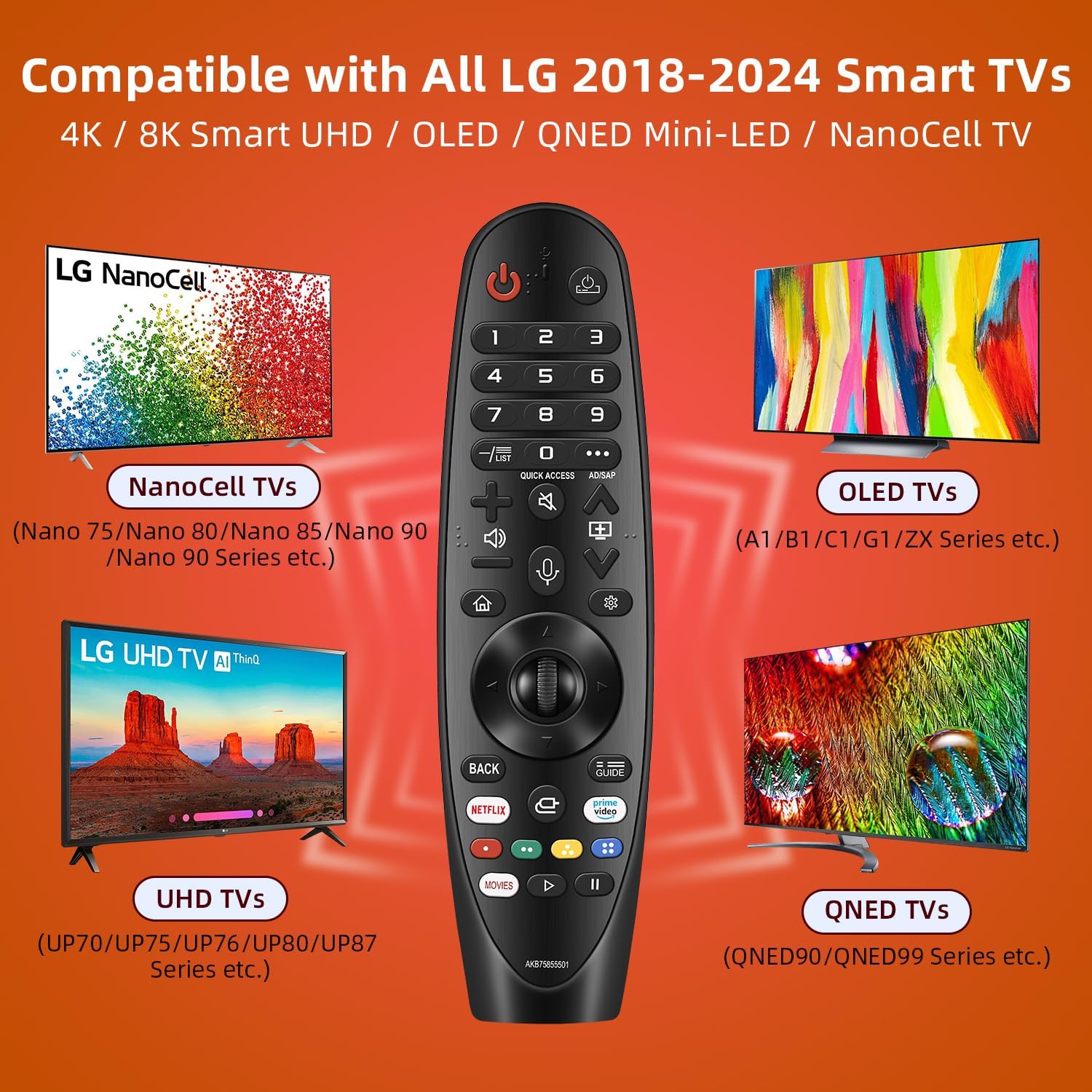
Image: A visual guide detailing the pairing instructions, showing the remote and the specific buttons (Home, Back, Wheel/OK) to press for successful Bluetooth connection with an LG TV.
5. Operating Instructions
Once paired, your Nettech Replacement LG Smart TV Remote Control offers intuitive ways to interact with your television:
- Voice Control: Press the dedicated microphone button and speak clearly into the remote to issue commands. You can search for movies, open applications, change settings, and more.
- Pointer Function: Move the remote in the air to control an on-screen cursor. Click the Wheel (OK) button to select items, or use the directional pad for traditional navigation. The pointer function allows for quick and precise selection of menu items and content.
- Scrolling: Use the scroll wheel to quickly navigate through long lists, web pages, or menus.
- App Buttons: Utilize the pre-programmed app buttons for direct access to popular streaming platforms.
6. Care and Maintenance
To ensure the longevity and optimal performance of your remote control, please follow these care guidelines:
- Cleaning: Wipe the remote with a soft, dry cloth. Do not use liquid cleaners or abrasive materials, as they may damage the surface or internal components.
- Battery Replacement: Replace batteries when the remote's performance diminishes. Always use new AA batteries and dispose of old batteries responsibly.
- Storage: Store the remote in a cool, dry place away from direct sunlight and extreme temperatures.
- Durability: The remote is built with durable materials and buttons designed for extensive use. Avoid dropping the remote or subjecting it to excessive force.
7. Troubleshooting
| Problem | Possible Cause | Solution |
|---|---|---|
| Remote not responding / not pairing. | Low or dead batteries; incorrect pairing procedure; TV not compatible. | Replace batteries. Re-attempt pairing steps (Section 4). Verify TV model supports voice control and is from 2018-2024. |
| Voice control not working. | TV does not support voice control; remote not properly paired for voice. | Ensure your LG TV model supports voice control. Re-pair the remote following Section 4. |
| Pointer function not working. | Remote not properly paired; interference. | Re-pair the remote. Ensure no obstructions between remote and TV. |
| Buttons feel stiff. | New remote; manufacturing variation. | Buttons may soften with use. This is generally not a defect. |
8. Product Specifications
- Product Dimensions: 8 x 2 x 0.68 inches
- Item Weight: 3.84 ounces
- ASIN: B0CLNH457T
- Manufacturer: Nettech
- Country of Origin: China
- Special Feature: Voice Search
- Color: Black
- Max Number of Supported Devices: 5 (for universal control, though primary function is LG TV)
- Compatible Devices: Television (specifically LG Smart TVs 2018-2024 with voice support)
- Power Source: 2 x AA Batteries (not included)
9. Warranty and Support
Nettech offers a 1-year full warranty to ensure your complete satisfaction with your purchase. This warranty covers manufacturing defects and ensures the product performs as advertised under normal use.
For warranty claims, technical support, or any questions regarding your Nettech Replacement LG Smart TV Remote Control, please contact our customer service team through the retailer's platform or visit the official Nettech website for contact information. Please have your purchase details and product ASIN (B0CLNH457T) ready when contacting support.
Ask a question about this manual
Ask about setup, troubleshooting, compatibility, parts, safety, or missing instructions. Manuals+ will review the question and use this page’s manual context to help answer it.