
1. Introduction
This manual provides detailed instructions for the safe and efficient installation, operation, maintenance, and troubleshooting of your High Power 600W 80 Plus Gold Certified ATX Power Supply. Please read this manual thoroughly before using the product and retain it for future reference.
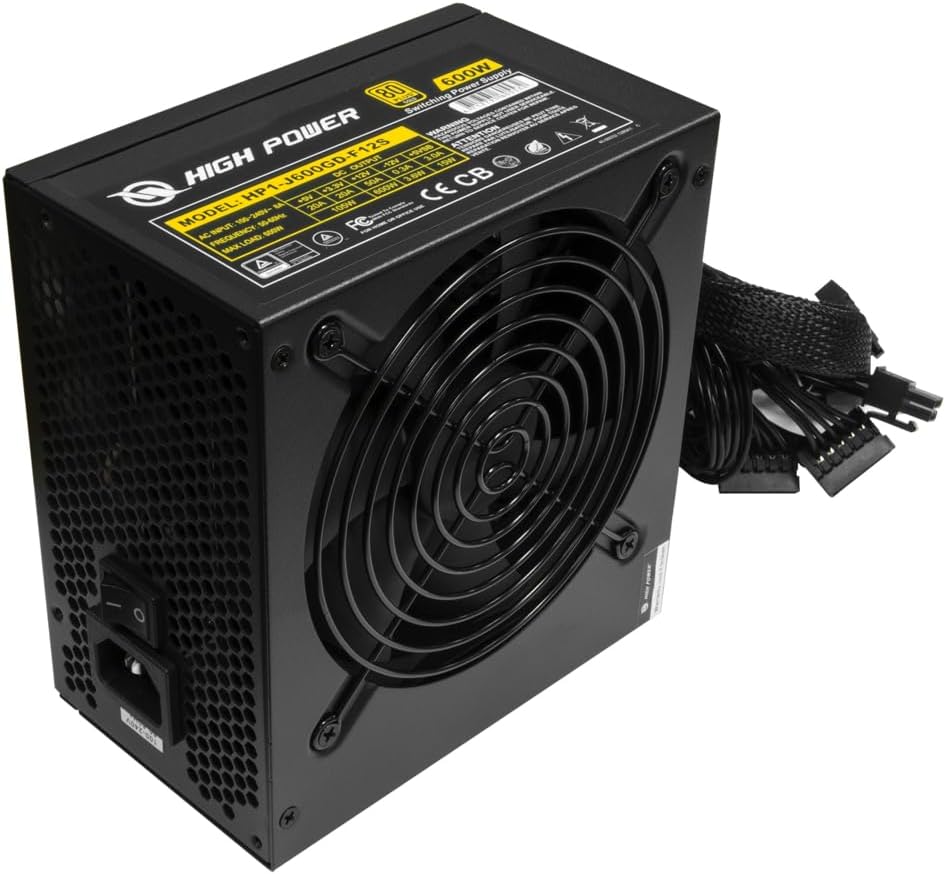
Image 1.1: Overview of the High Power 600W ATX Power Supply.
2. Safety Information
Always observe the following safety precautions to prevent injury or damage to your equipment:
- WARNING: Hazardous voltages are contained within this power supply. This unit is not user-serviceable. Do not open the power supply casing. Refer all servicing to qualified service personnel.
- Ensure the power supply is disconnected from the main power outlet before installation or maintenance.
- Install the power supply in a well-ventilated area to prevent overheating.
- Do not expose the power supply to moisture or extreme temperatures.
- Use only the cables provided with the power supply to ensure compatibility and proper function.
3. Package Contents
Verify that all items are present in the package:
- High Power 600W ATX Power Supply
- AC Power Cord
- Mounting Screws
- User Manual (this document)
4. Key Features
The High Power 600W ATX Power Supply is designed with the following features to provide reliable and efficient power to your system:
- 80 Plus Gold Certified: Ensures up to 90% energy efficiency, reducing heat generation and electricity consumption.
- 600 Watts Continuous Power: Provides stable and ample power for demanding PC components, suitable for gaming and video editing.
- 120mm Whisper Quiet Fan: Equipped with an efficient cooling fan for silent operation and effective heat dissipation.
- Multiple Protection Mechanisms: Includes Over-Voltage Protection (OVP), Over-Current Protection (OCP), and Short-Circuit Protection (SCP) to safeguard your components.
- Wide Compatibility: Designed to be compatible with a broad range of motherboards and PC cases.
- Durable Construction: Built with high-quality components, including Taiwanese branded capacitors, for enhanced system durability and stability.

Image 4.1: The 80 Plus Gold certification and 120mm fan for efficient cooling.

Image 4.2: Illustration of high-quality Taiwanese branded capacitors used in the power supply.
5. Setup and Installation
Follow these steps to install your power supply:
- Preparation: Ensure your computer is completely powered off and unplugged from the wall outlet. Discharge any residual power by holding the power button for a few seconds.
- Remove Old PSU (if applicable): Unscrew and remove your old power supply from the PC case. Disconnect all cables from your components.
- Mounting the New PSU: Place the High Power 600W PSU into the designated power supply bay in your PC case. Ensure the fan faces the correct direction (usually downwards or inwards, depending on your case design for optimal airflow). Secure it with the provided mounting screws.
- Connecting Cables: Connect the necessary cables to your motherboard and other components. Refer to the table below for connector types and quantities.
5.1 Cable Connections
Identify and connect the appropriate cables to your system components:

Image 5.1: Connector types and quantities provided with the power supply.
| Connector Type | Quantity | Purpose |
|---|---|---|
| 24 Pin ATX | 1 | Main motherboard power |
| CPU 4+4 Pin (EPS 12V) | 1 | CPU power |
| PCI-E 6+2 Pin | 2 | Graphics card power |
| 4 Pin HDD (Molex) | 3 | Older hard drives, fans, or accessories |
| SATA | 6 | SATA hard drives, SSDs, optical drives |
| Floppy | 1 | Floppy drives or specific legacy devices |
- Final Check: Double-check all connections to ensure they are secure and correctly seated. Ensure no loose cables are obstructing airflow.
- Power On: Connect the AC power cord to the power supply and then to a wall outlet. Flip the power switch on the PSU to the 'ON' position. You can now power on your computer.
6. Operation
Once installed, the High Power 600W PSU operates automatically with your computer system. The 120mm fan will adjust its speed based on the power supply's temperature to maintain optimal cooling and quiet operation.
- Power On: Press the power button on your computer case.
- Power Off: Shut down your computer through the operating system. For complete power disconnection, turn off the switch on the power supply and unplug the AC cord.
7. Maintenance
Regular maintenance helps ensure the longevity and optimal performance of your power supply:
- Dust Removal: Periodically clean the exterior of the power supply and its fan grille to prevent dust buildup, which can impede airflow and reduce cooling efficiency. Use compressed air for best results, ensuring the system is powered off and unplugged.
- Airflow: Ensure that the PC case has adequate airflow and that the power supply's fan is not obstructed.
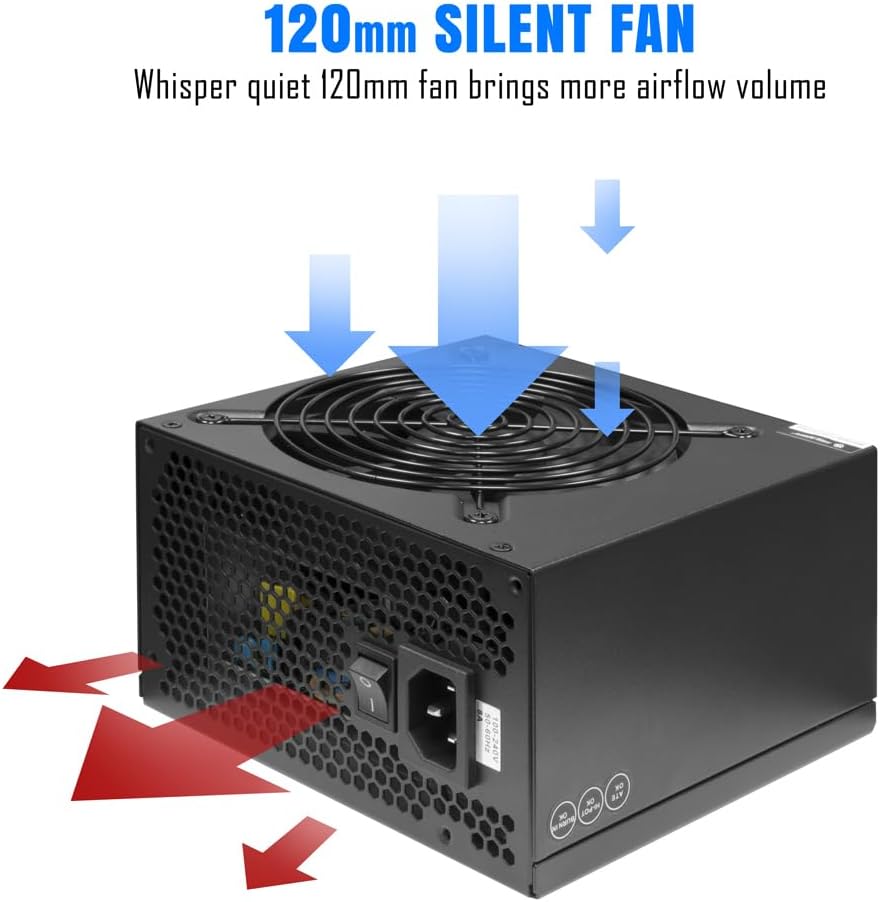
Image 7.1: Illustration of the 120mm silent fan's airflow for effective cooling.
8. Troubleshooting
If you encounter issues with your power supply, refer to the following common problems and solutions:
- No Power:
- Check if the AC power cord is securely connected to both the power supply and the wall outlet.
- Ensure the power switch on the PSU is in the 'ON' position.
- Verify all internal power cables (24-pin ATX, CPU, PCIe) are correctly and firmly connected to the motherboard and components.
- Test the wall outlet with another device to confirm it has power.
- Intermittent Shutdowns/Restarts:
- This could indicate an overloaded power supply or overheating. Ensure your system's power requirements do not exceed 600W.
- Check for proper ventilation within your PC case and ensure the PSU fan is not obstructed by dust or cables.
- Ensure all components are properly seated and connected.
- Loud Fan Noise:
- While designed for quiet operation, excessive noise might indicate dust buildup. Clean the fan grille as described in the Maintenance section.
- Ensure no cables are interfering with the fan blades.
If problems persist after attempting these solutions, contact customer support or a qualified technician.
9. Specifications
Detailed technical specifications for the High Power 600W ATX Power Supply:
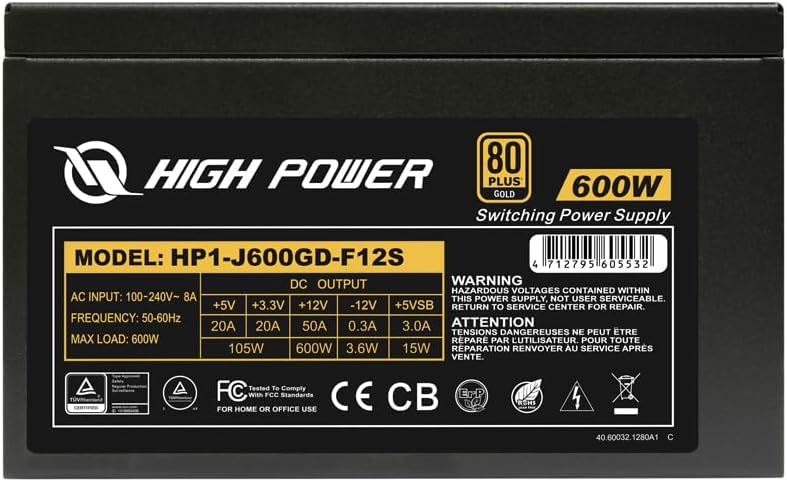
Image 9.1: Product label with electrical ratings and model information. UPC: 4712195605538.
| Feature | Detail |
|---|---|
| Model Number | HP1-J600GD-F12S |
| Output Wattage | 600 Watts |
| Efficiency Certification | 80 Plus Gold (up to 90% efficiency) |
| Form Factor | ATX 12V V2.3 / EPS 12V |
| Cooling Method | Air (120mm Fan) |
| Fan Count | 1 |
| Input Voltage | 100-240V AC |
| Input Frequency | 50-60Hz |
| Dimensions (L x W x H) | 150mm x 140mm x 86mm (approx. 5.9 x 5.5 x 3.4 inches) |
| Item Weight | 1.86 kg (4.09 pounds) |
| Compatible Devices | Personal Computer |
| Protection Mechanisms | OVP, OCP, SCP |

Image 9.2: Physical dimensions of the High Power 600W ATX Power Supply.
10. Warranty Information
High Power products are manufactured to the highest quality standards. This product is covered by a limited warranty against defects in materials and workmanship. Please refer to the warranty card included with your purchase or visit the official High Power website for detailed warranty terms and conditions.
11. Customer Support
If you have any questions, require technical assistance, or need to report an issue with your High Power 600W ATX Power Supply, please contact our customer support team:
- Website: Visit the official High Power website for FAQs, support resources, and contact information.
- Email: Refer to your product packaging or the High Power website for the appropriate support email address.
When contacting support, please have your product model number (HP1-J600GD-F12S) and purchase information readily available.


