
ECONTROLLY RG10L1-C2HS
ECONTROLLY RG10L1-C2HS Remote Control User Manual
Model: RG10L1-C2HS | Brand: ECONTROLLY
1. Introduction
This manual provides comprehensive instructions for the ECONTROLLY RG10L1-C2HS replacement remote control. This remote is specifically designed to be compatible with Midea RG10L(2HS)/BGEFU1 and RG10 series air conditioners. It requires no complex programming and is ready for immediate use upon proper battery installation.

Figure 1: Front view of the ECONTROLLY RG10L1-C2HS remote control, showing the display screen and all control buttons.
2. Package Contents
- 1 x ECONTROLLY RG10L1-C2HS Remote Control
Note: AAA batteries are not included and must be purchased separately.
3. Setup: Battery Installation
Follow these steps to install batteries into your remote control:
- Locate the battery compartment on the back of the remote control.
- Slide the battery cover downwards to open the compartment.
- Insert two (2) AAA batteries into the compartment. Ensure that the positive (+) and negative (-) ends of the batteries align correctly with the markings inside the compartment. Incorrect polarity can prevent the remote from functioning.
- Slide the battery cover back into place until it clicks securely.
For optimal performance, use new alkaline batteries. If the remote control will not be used for an extended period, it is recommended to remove the batteries to prevent potential leakage and damage to the device.

Figure 2: Back view of the remote control with the battery compartment open, illustrating the correct placement for two AAA batteries.
4. Operation
4.1 Basic Usage
The ECONTROLLY RG10L1-C2HS remote control is designed for immediate use after battery installation, requiring no additional programming. Simply point the remote control directly at your Midea air conditioner's receiver and press the desired function button. The soft plastic buttons are designed for comfortable and easy use.
4.2 Button Functions
Below is a general guide to the common functions of the buttons on your remote control. Specific functionality may vary slightly depending on your air conditioner model.
| Button | Description |
|---|---|
| Power () | Turns the air conditioner On or Off. |
| Mode | Cycles through operating modes such as Cool, Heat, Fan, Dry, and Auto. |
| Eye () | Controls display settings or sensor functions. |
| SET / OK / Arrows | Used for navigating menus, adjusting temperature, setting timers, and confirming selections. |
| Fan () | Adjusts the fan speed (e.g., Low, Medium, High, Auto). |
| Swing | Controls the vertical or horizontal swing of the air conditioner's louvers. |
| iEco Gear () | Activates energy-saving or eco-friendly operating modes. |
| Boost | Initiates a rapid cooling or heating function. |
| LED | Turns the air conditioner's display LED On or Off. |
| Humidity | Activates or adjusts the dehumidification function. |
Note: The specific icons and their exact appearance may vary slightly from the general description, but their functions are typically consistent.
5. Specifications
| Feature | Detail |
|---|---|
| Model Number | RG10L1-C2HS |
| Brand | ECONTROLLY |
| Compatible Devices | Midea RG10L(2HS)/BGEFU1, RG10 series Air Conditioners |
| Power Source | 2 x AAA Batteries (not included) |
| Product Dimensions | 7 x 2 x 0.65 inches (approximately 17.8 x 5.1 x 1.65 cm) |
| Item Weight | 2.3 ounces (approximately 65 grams) |
| Color | White |
| Special Feature | No programming required |
| Manufacturer | ECONTROLLY |
| Country of Origin | China |
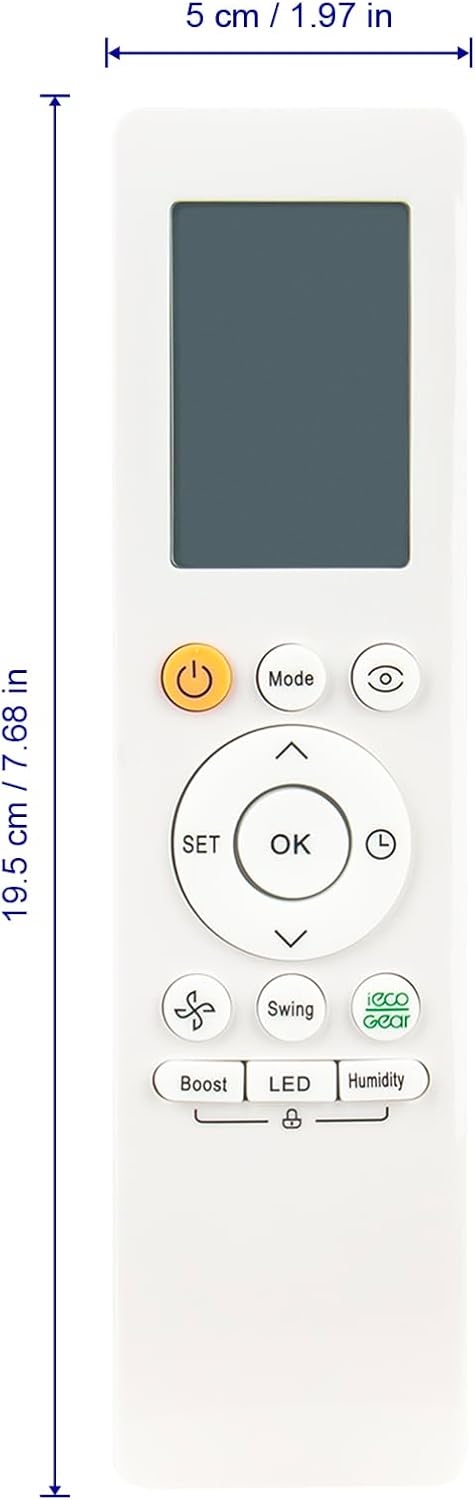
Figure 3: Dimensions of the ECONTROLLY RG10L1-C2HS remote control, showing its length and width.
6. Troubleshooting
If your remote control is not functioning as expected, please try the following troubleshooting steps:
- Check Battery Installation: Ensure that the AAA batteries are inserted correctly, matching the positive (+) and negative (-) terminals with the markings inside the battery compartment.
- Replace Batteries: If the remote is unresponsive or its range is reduced, replace the old batteries with a fresh pair of new alkaline AAA batteries.
- Line of Sight: Make sure there are no obstructions between the remote control and the infrared receiver on your air conditioner unit. The remote requires a clear line of sight to transmit signals.
- Point Directly: Ensure you are pointing the remote control directly at the air conditioner's receiver.
- Air Conditioner Power: Confirm that your air conditioner unit is powered on and functioning correctly.
If issues persist after trying these steps, please refer to the support section.
7. Care and Maintenance
Proper care will extend the life of your remote control:
- Cleaning: Wipe the surface of the remote control with a soft, dry cloth. Do not use liquid cleaners, abrasive materials, or chemical solvents, as these can damage the surface or internal components.
- Avoid Impact: Do not drop the remote control or subject it to strong impacts, which can damage its internal circuitry.
- Environmental Conditions: Avoid exposing the remote control to extreme temperatures, direct sunlight, or high humidity.
- Battery Removal: If the remote control will not be used for an extended period (e.g., several months), remove the batteries to prevent potential battery leakage and corrosion, which can permanently damage the device.
8. Support
For further assistance, technical support, or inquiries regarding your ECONTROLLY RG10L1-C2HS remote control, please refer to the original product documentation that came with your Midea air conditioner or contact the manufacturer of this replacement remote control. Contact information for ECONTROLLY may be available through your point of purchase or on the product packaging.
Ask a question about this manual
Ask about setup, troubleshooting, compatibility, parts, safety, or missing instructions. Manuals+ will review the question and use this page’s manual context to help answer it.