
1. Important Safety Instructions
Always observe basic safety precautions when using electrical tools to reduce the risk of fire, electric shock, and personal injury. Read all instructions carefully before operating this tool.
General Power Tool Safety Warnings
- Work Area Safety: Keep your work area clean and well-lit. Cluttered or dark areas invite accidents. Do not operate power tools in explosive atmospheres, such as in the presence of flammable liquids, gases, or dust.
- Electrical Safety: Avoid body contact with earthed or grounded surfaces such as pipes, radiators, ranges, and refrigerators. There is an increased risk of electric shock if your body is earthed or grounded.
- Personal Safety: Always wear eye protection. Use safety glasses, goggles, or a face shield. Wear hearing protection when operating the tool for extended periods. Dress properly. Do not wear loose clothing or jewelry. Keep your hair, clothing, and gloves away from moving parts.
- Tool Use and Care: Do not force the power tool. Use the correct power tool for your application. Do not use the power tool if the switch does not turn it on and off. Disconnect the plug from the power source and/or the battery pack from the power tool before making any adjustments, changing accessories, or storing power tools.
Angle Grinder Specific Safety Warnings
- This power tool is intended to function as a grinder, sander, wire brush, or cut-off tool. Read all safety warnings, instructions, illustrations, and specifications provided with this power tool.
- Always use a guard that is correctly sized for the wheel being used.
- Ensure the accessory is properly mounted and tightened before use.
- Do not use damaged accessories. Inspect the accessory before each use.
- Maintain a firm grip on the tool and position your body and arm to allow you to resist kickback forces.
- Never place your hand near the rotating accessory.
Battery Pack Safety Warnings
- Do not disassemble, open, or shred battery pack or cells.
- Do not short-circuit a battery pack. Do not store battery packs haphazardly in a box or drawer where they may short-circuit each other or be short-circuited by conductive materials.
- Do not expose battery pack to heat or fire. Avoid storage in direct sunlight.
- Do not subject battery pack to mechanical shock.
- In the event of battery leakage, do not allow the liquid to come into contact with the skin or eyes. If contact has been made, wash the affected area with copious amounts of water and seek medical advice.
2. Package Contents
Upon opening the package, please verify that all items listed below are present and undamaged. If any items are missing or damaged, contact customer support immediately.

Image: The complete Avhrit 21V Cordless Angle Grinder kit, including the grinder unit, two 4.0Ah batteries, a fast charger, various cutting and grinding discs, safety glasses, work gloves, a side handle, a wrench, and a carry bag.
- 1 x Avhrit 21V Cordless Angle Grinder
- 2 x 4.0Ah Lithium-Ion Batteries
- 1 x Fast Charger
- 1 x Grinding Wheel Guard
- 1 x Side Handle
- 1 x Spanner Wrench
- Various Cutting and Grinding Discs (4-1/2'')
- 1 x Pair of Safety Glasses
- 1 x Pair of Work Gloves
- 1 x Carry Bag
3. Product Overview
Familiarize yourself with the components and features of your Avhrit 21V Cordless Angle Grinder before operation.

Image: A detailed view of the angle grinder's function panel, indicating the speed switch button, LED light switch button, display screen (SPD/Auto), and the LED work light.
Key Components:
- Grinder Body: Main housing containing the motor and electronics.
- Spindle Lock Button: Used to lock the spindle for easy accessory changes.
- Guard: Protects the user from sparks and debris.
- Side Handle: Provides additional grip and control.
- Battery Pack: Provides power to the tool.
- Speed Switch Button: Adjusts the rotational speed of the disc.
- LED Light Switch Button: Activates the integrated LED work light.
- Display Screen (SPD/Auto): Shows current speed setting or automatic mode.
- LED Work Light: Illuminates the work area.

Image: An X-ray style view of the angle grinder, emphasizing the powerful brushless motor and its capability to reach up to 9000 RPM, designed for faster work and extended service life.

Image: A close-up of the 4000mAh 21V Lithium-Ion battery, highlighting its long-lasting capacity and compatibility with the fast charger.
4. Setup
Follow these steps to prepare your angle grinder for use.
- Charge the Battery: Insert the 21V Lithium-Ion battery into the fast charger. The charger's indicator light will show the charging status. Ensure the battery is fully charged before first use.
- Attach the Side Handle: Screw the side handle into one of the threaded holes on the grinder head. Choose the position that provides the most comfortable and secure grip for your application.
- Adjust the Guard: The guard protects you from sparks and debris. Loosen the guard's clamping screw, rotate the guard to the desired position to deflect sparks away from you, and then securely tighten the screw.
- Install the Grinding/Cutting Disc:
- Ensure the tool is switched off and the battery is removed.
- Press and hold the spindle lock button.
- Place the inner flange onto the spindle.
- Position the desired 4-1/2'' grinding or cutting disc onto the spindle, ensuring it sits flush against the inner flange.
- Thread the outer flange (nut) onto the spindle and tighten it firmly using the provided spanner wrench. Release the spindle lock button.
- Insert the Battery: Slide the charged battery pack into the battery slot on the grinder until it clicks securely into place.
5. Operating Instructions
This section details how to safely operate your Avhrit Cordless Angle Grinder for various tasks.

Image: A person wearing safety gloves and using the Avhrit cordless angle grinder to cut a metal piece, demonstrating the tool's portability and ease of use without extension cords.
Starting and Stopping the Tool:
- To start the grinder, slide the lock-on switch forward. The tool will begin to operate.
- To stop the grinder, slide the lock-on switch backward to the OFF position.
Adjusting Speed:
- Press the Speed Switch button to cycle through available speed settings. The display screen will show the current RPM or indicate 'Auto' mode.
- The 'Auto' mode automatically adjusts the speed based on the load, optimizing performance and battery life.
Using the LED Work Light:
- Press the LED Light Switch button to turn the integrated work light on or off, providing illumination for your work area.
Application Techniques:

Image: Four distinct scenarios demonstrating the versatility of the Avhrit angle grinder: metal cutting, metal grinding, cutting rebar, and plastic cutting.
- Cutting: For cutting operations, hold the grinder firmly with both hands. Position the cutting disc at a slight angle (15-30 degrees) to the workpiece. Apply steady, even pressure and allow the tool to do the work. Do not force the cut.
- Grinding: For grinding, hold the grinder at a shallow angle (5-15 degrees) to the workpiece. Move the grinder back and forth across the surface to achieve an even finish.
- Material Compatibility: Use appropriate discs for different materials (e.g., metal cutting discs for metal, grinding discs for surface preparation, flap discs for sanding/finishing).
- Workpiece Security: Always secure the workpiece to prevent movement during operation.
6. Maintenance
Regular maintenance ensures the longevity and optimal performance of your angle grinder.
- Cleaning: After each use, clean the tool with a soft, damp cloth. Do not use harsh chemicals or abrasive cleaners. Keep the ventilation openings clear of dust and debris to prevent overheating.
- Disc Replacement: Replace worn or damaged discs immediately. Always ensure the tool is off and the battery is removed before changing discs. Follow the disc installation steps outlined in Section 4.
- Battery Care: Store batteries in a cool, dry place away from direct sunlight and extreme temperatures. Do not store fully discharged batteries for extended periods. Charge them periodically if not in use.
- Brushless Motor: This tool features a brushless motor, which requires less maintenance compared to brushed motors as there are no carbon brushes to replace.
- Heat Dissipation: The tool is designed with heat dissipation features. Ensure air vents are not blocked during operation.

Image: Two detailed views of the angle grinder, showing the middle lock-on switch for convenient operation with both hands, and the heat dissipation design with an adjustable rubber handle to prevent overheating during prolonged use.
7. Troubleshooting
This section addresses common issues you might encounter with your angle grinder.
| Problem | Possible Cause | Solution |
|---|---|---|
| Tool does not start. | Battery not charged or not properly inserted. | Ensure battery is fully charged and securely inserted. |
| Tool stops during operation. | Overload protection activated or battery low. | Reduce pressure on the tool. Check battery charge and recharge if necessary. Allow tool to cool down if overheated. |
| Excessive vibration. | Disc improperly installed or damaged. | Check disc installation. Replace damaged or unbalanced discs. |
| Poor cutting/grinding performance. | Worn or incorrect disc. | Replace with a new, sharp disc appropriate for the material. |
8. Specifications
Technical details for the Avhrit 21V Cordless Angle Grinder.
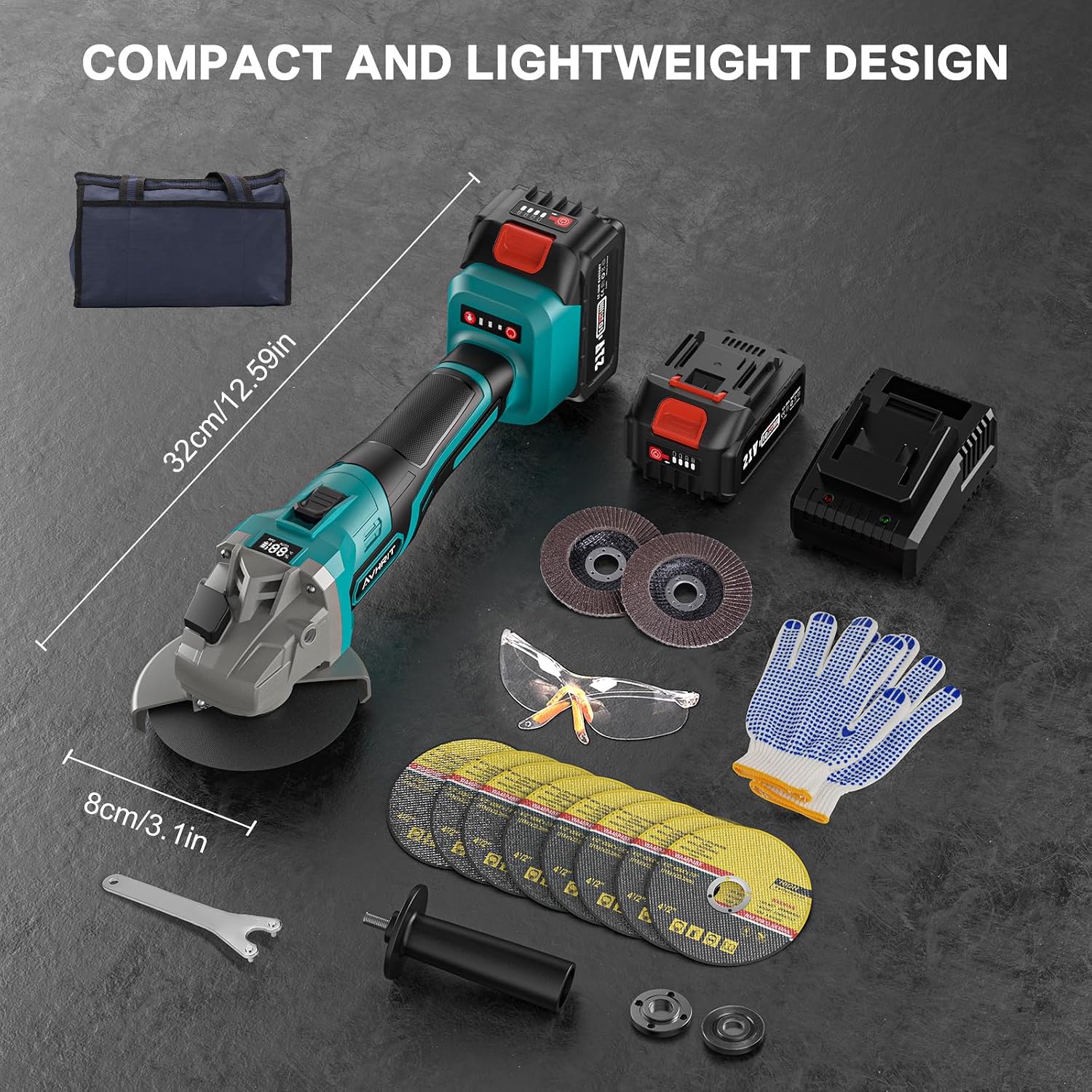
Image: The Avhrit angle grinder displayed with its dimensions (32cm/12.59in length, 8cm/3.1in width) and all included accessories, emphasizing its compact and lightweight design.
| Specification | Value |
|---|---|
| Model Number | AG034-single |
| Voltage | 21 Volts |
| Battery Capacity | 4.0Ah Lithium Polymer |
| Maximum Rotational Speed | 9000 RPM |
| Wheel Diameter | 4.5 Inches |
| Wattage | 84 watts |
| Item Weight | 2.5 Kilograms (approx. 5.5 pounds) |
| Style | Angled |
9. Warranty and Support
Avhrit is committed to providing high-quality products. For warranty information, technical support, or any inquiries regarding your Avhrit 21V Cordless Angle Grinder, please refer to the warranty card included in your package or contact the seller directly through the platform where the purchase was made.
Please retain your proof of purchase for warranty claims.