
Introduction
This manual provides detailed instructions for the assembly, operation, and care of your Aheaplus L Shaped Desk, Model B0CLLGNQ83. This desk is designed to offer a versatile workspace with integrated features for enhanced productivity and organization.
Key Features:
- Ample Storage: Includes two fabric file drawers, two-tier under-storage shelves, a printer cabinet, and a CPU stand.
- Integrated Power Outlet: Features 3 AC outlets and 2 USB charging ports for convenient device power.
- Smart LED Light Strip: Built-in RGB LED strip with app control, over 60,000 colors, multiple modes, and music sync function.
- Reversible Design: Configurable as a left or right-corner desk to suit various space requirements.
- Ergonomic Monitor Stand: Long monitor stand designed to promote correct sitting posture and provide additional storage.
Safety Information
For safe use of this desk, please adhere to the following guidelines:
- Ensure that the total weight on the desktop does not exceed the recommended weight limit of 100 kilograms (220 lbs).
- Securely manage cables and cords to prevent tripping or entanglement hazards.
- Anchor the desk to the wall, especially if it is used by children or in a seismically active area, to prevent tipping.
- Always follow the assembly instructions carefully.
- Consult the manufacturer's website for any updates or additional safety information.
Setup and Assembly
The Aheaplus L Shaped Desk is designed for straightforward assembly. All necessary hardware and tools are included, and parts are clearly labeled. It is recommended to have two people for assembly, though it can be done by one person.
- Unpack Components: Carefully unpack all parts and verify against the included parts list in your instruction booklet.
- Review Instructions: Thoroughly read the entire instruction booklet before beginning assembly. Note that the desk has a reversible design, allowing configuration for either a left or right-corner setup. Ensure you follow the correct directional instructions for your preferred orientation.
- Assemble Frame: Begin by assembling the metal frame components according to the step-by-step diagrams.
- Attach Desktop Panels: Secure the desktop panels to the assembled frame.
- Install Storage Units: Assemble and install the file drawers, under-desk shelves, printer cabinet, and CPU stand as per the instructions.
- Mount Monitor Stand: Attach the long monitor stand to the desktop.
- Connect Power Outlet: Integrate the recessed power strip into its designated slot and connect the power cord.
- Install LED Strip: Adhere the LED light strip to the underside of the monitor stand or desired location.
- Final Check: Ensure all screws are tightened and the desk is stable before placing items on it.

Figure 1: Reversible design options and component dimensions for the Aheaplus L Shaped Desk. The desk can be configured for left or right-hand orientation.

Figure 2: Example of the Aheaplus L Shaped Desk in an office environment, demonstrating its reversible configuration.
Operating Instructions
Power Outlet Usage:
The desk includes a recessed power strip with 3 AC outlets (120V/12A) and 2 USB charging ports (5V/2A).
- Plug the desk's main power cord (6.56 ft) into a standard wall outlet.
- Connect your devices (laptops, phones, gaming consoles, etc.) to the available AC outlets or USB ports.
- Ensure devices do not exceed the total power capacity of the strip.
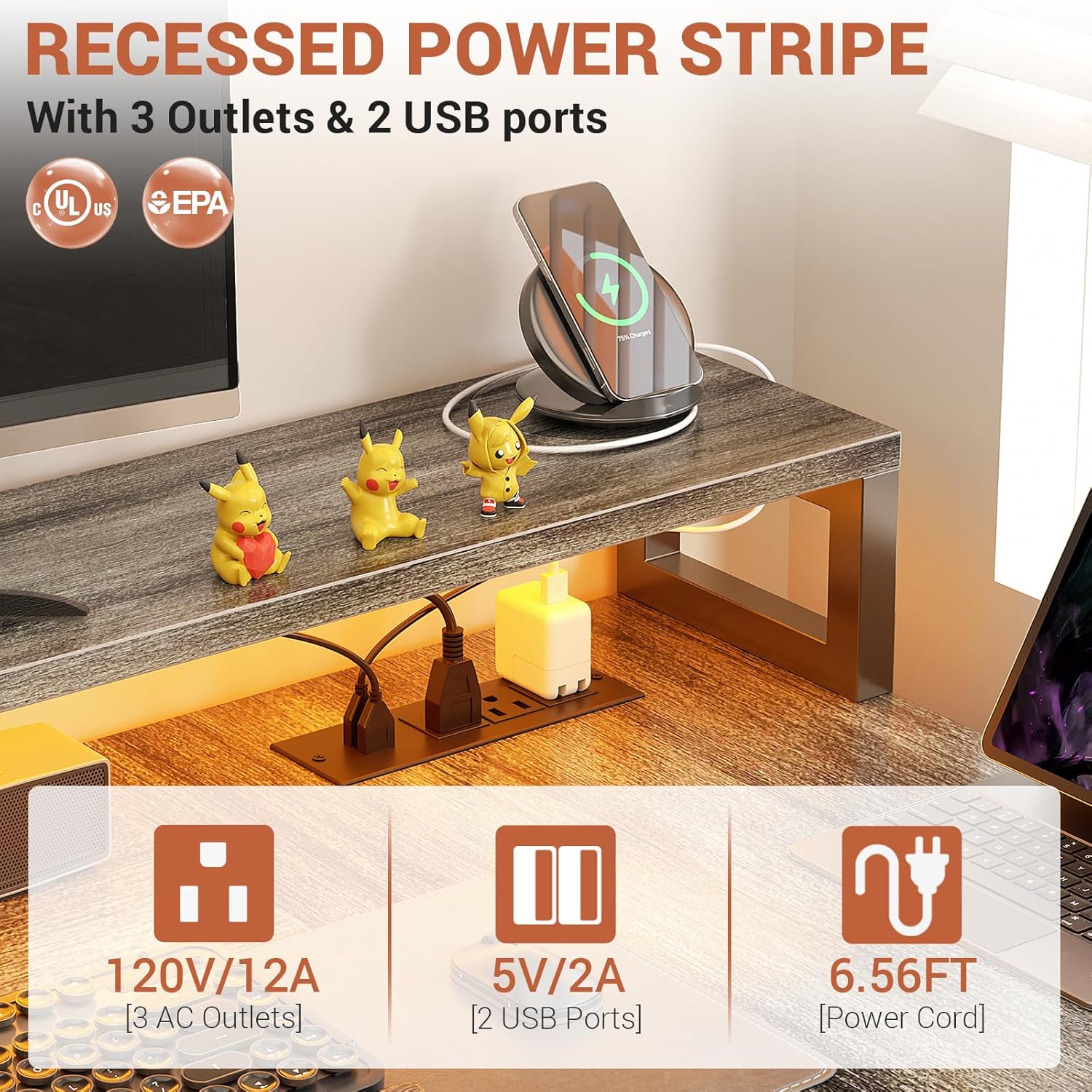
Figure 3: Detail of the recessed power strip with 3 AC outlets and 2 USB charging ports.
LED Light Strip Operation:
The integrated RGB LED light strip can be controlled via a smart application on your mobile device.
- Download the specified smart APP (refer to the LED strip's separate instructions for APP name and QR code).
- Connect the LED strip to your mobile device via Bluetooth or Wi-Fi as instructed by the APP.
- Use the APP to select from over 60,000 colors and various lighting modes.
- Activate the music sync function to change light colors with sound and music rhythm.
- The LED strip also includes a timing function for scheduled operation.

Figure 4: The Aheaplus L Shaped Desk with RGB LED lighting activated, enhancing a gaming or workspace environment.
Storage Features:
Utilize the various storage options to keep your workspace organized.
- Fabric File Drawers: Use for documents and office supplies. The bottom drawer is designed for letter-size files.
- Under-Desk Shelves: Ideal for books, decorative items, or additional equipment.
- Printer Cabinet: Provides a dedicated space for your printer.
- CPU Stand: Keeps your computer tower off the floor, improving airflow and protecting it from dust.
- Monitor Stand: Elevates monitors to an ergonomic height and offers additional space underneath for small items.

Figure 5: Various storage components of the Aheaplus L Shaped Desk, including fabric drawers and a printer shelf.

Figure 6: The two-tier under-desk shelves provide additional storage and display space.

Figure 7: The long monitor stand helps maintain correct sitting posture by elevating your display.
Maintenance
To ensure the longevity and appearance of your Aheaplus L Shaped Desk, follow these maintenance guidelines:
- Cleaning: Wipe surfaces with a soft, damp cloth. Avoid harsh chemicals or abrasive cleaners that may damage the finish.
- Spills: Clean up spills immediately to prevent staining or damage to the wood finish.
- Hardware: Periodically check and tighten all screws and fasteners to maintain stability.
- Weight Distribution: Distribute weight evenly across the desktop and shelves to prevent stress on any single point.
- Heat and Moisture: Avoid placing hot items directly on the desk surface. Use coasters for beverages. Keep the desk away from direct sunlight and excessive moisture.
Troubleshooting
This section addresses common issues you might encounter with your Aheaplus L Shaped Desk.
| Problem | Possible Cause | Solution |
|---|---|---|
| Desk wobbles or is unstable. | Loose fasteners; uneven floor. |
|
| LED lights are not working. | Power connection issue; APP malfunction; damaged strip. |
|
| Power outlets/USB ports not functioning. | Desk's main power cord unplugged; circuit breaker tripped; internal wiring issue. |
|
| Drawers are difficult to open/close. | Overloaded; obstruction; misaligned. |
|
Specifications
| Feature | Detail |
|---|---|
| Brand | Aheaplus |
| Model Number (ASIN) | B0CLLGNQ83 |
| Product Dimensions (D x W x H) | 39.4"D x 73"W x 35"H |
| Color | White Oak |
| Style | Industrial |
| Base Material | Metal |
| Top Material Type | Engineered Wood |
| Special Features | Built-In USB Outlet, LED Lights, Reversible, File Drawer |
| Power Outlet | 3 AC Outlets (120V/12A), 2 USB Ports (5V/2A) |
| Power Cord Length | 6.56 FT |
| Number of Drawers | 2 (Fabric) |
| Number of Shelves | 2 (Under-desk) |
| Number of Cabinets | 1 (Printer Cabinet) |
| Item Weight | 28.44 Kilograms (62.7 lbs) |
| Maximum Weight Recommendation | 100 Kilograms (220 lbs) |
| Assembly Required | Yes (Tools included) |
Warranty and Support
Warranty Information:
The Aheaplus L Shaped Desk comes with a Limited Warranty. For specific details regarding coverage and duration, please refer to the warranty card included with your product or contact Aheaplus customer service. The warranty typically covers manufacturing defects.
Customer Support:
Aheaplus is committed to providing excellent after-sales service. If your item arrives damaged, scratched, or with missing parts, or if you encounter any issues during assembly or operation, please do not hesitate to contact Aheaplus customer support.
You can typically find contact information (email, phone, or support portal) on the Aheaplus official website or within the product packaging. Please have your model number (B0CLLGNQ83) and purchase details ready when contacting support.
