
1. Introduction
This user manual provides comprehensive instructions for the operation and maintenance of your BAOFENG UV-17 series two-way radio. Please read this manual thoroughly before using the device to ensure proper function and safety.
The BAOFENG UV-17 is a versatile tri-band ham radio featuring USB-C charging, 999 channels, FM radio, and NOAA weather alerts. It is designed for reliable long-range communication with an 1800mAh battery and IP54 water resistance.
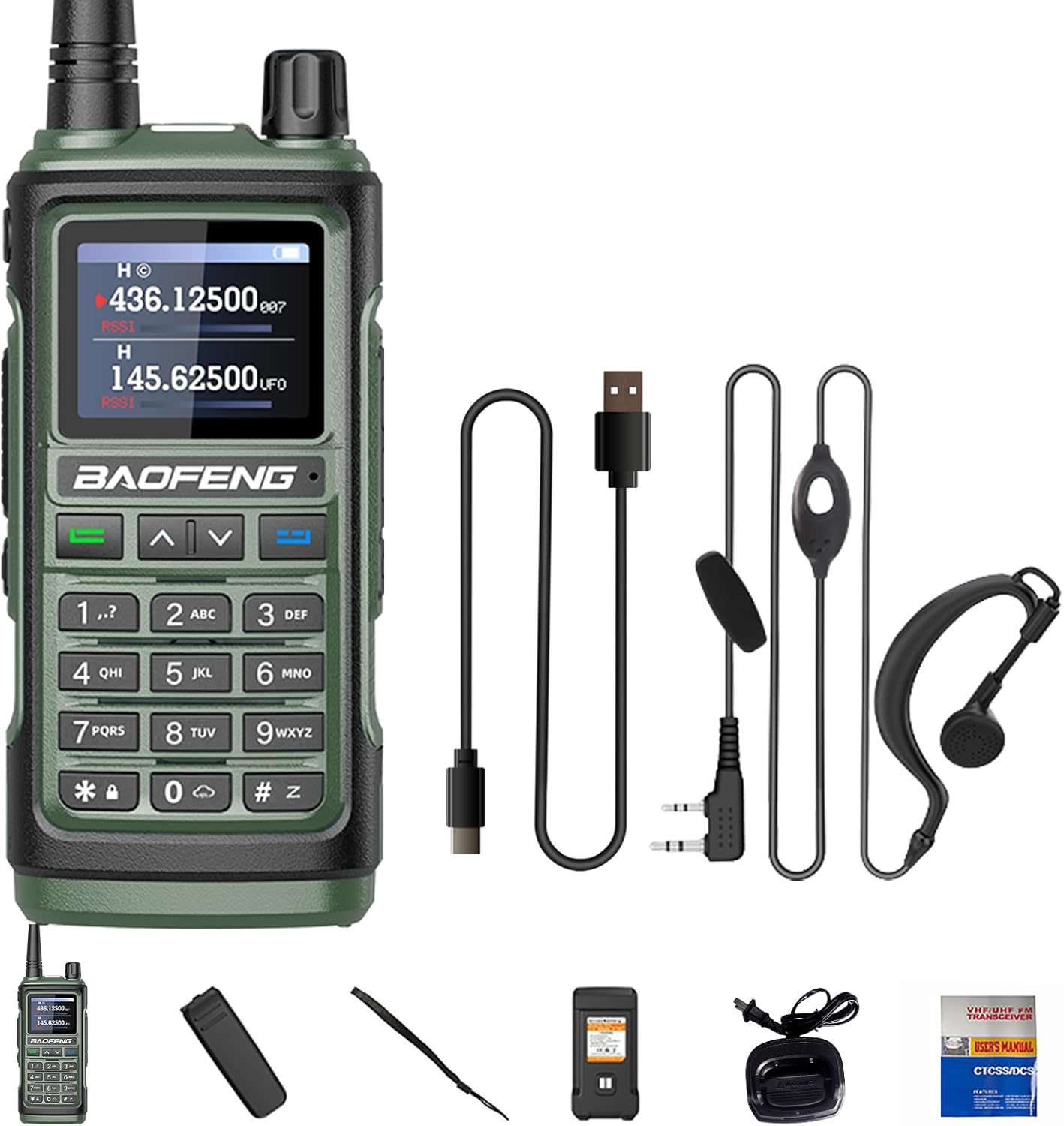
Figure 1: BAOFENG UV-17 Two-Way Radio with included accessories: radio unit, 1800mAh battery, high gain antenna, charger, belt clip, hand strap, Type-C cable, and earpiece.
2. Package Contents
Verify that all items listed below are present in your package:
- Tri-Band Portable Radio Unit
- 1800mAh Rechargeable Battery
- High Gain Antenna
- Charging Base
- Belt Clip
- Hand Strap
- User's Manual (this document)
- USB Type-C Charging Cable
- Earpiece
3. Product Overview
Familiarize yourself with the components and controls of your UV-17 radio.
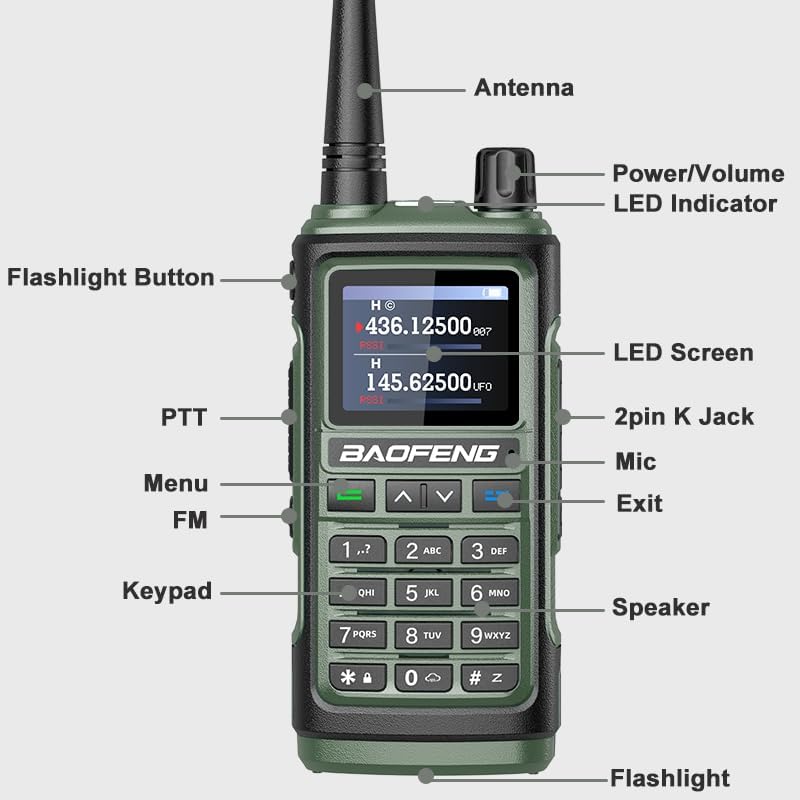
Figure 2: Labeled diagram of the BAOFENG UV-17 radio, indicating the Antenna, Power/Volume knob, LED Indicator, Flashlight Button, PTT (Push-to-Talk) button, Menu button, FM button, Keypad, Speaker, Exit button, Mic, 2pin K Jack, LED Screen, and Flashlight.
- Antenna: For transmitting and receiving signals.
- Power/Volume Knob: Turns the radio on/off and adjusts volume.
- LED Indicator: Shows radio status (e.g., transmitting, receiving, charging).
- Flashlight Button: Activates the built-in flashlight.
- PTT (Push-to-Talk) Button: Press and hold to transmit, release to receive.
- Menu Button: Accesses the radio's menu settings.
- FM Button: Toggles FM radio mode.
- Keypad: For entering frequencies, channel numbers, and menu selections.
- Speaker: Outputs received audio.
- Exit Button: Exits menu or current function.
- Mic: Microphone for voice transmission.
- 2pin K Jack: Port for external earpiece/microphone.
- LED Screen: Displays frequency, channel, and status information.
- Flashlight: Built-in light source.
4. Setup and Initial Use
4.1. Battery Installation and Charging
The UV-17 radio uses an 1800mAh Lithium Ion battery. Ensure the battery is fully charged before first use.
- Install Battery: Align the battery with the compartment on the back of the radio and slide it into place until it clicks securely. Ensure the added fixing screw is tightened for firmness.
- Charging: The radio can be charged using the included USB Type-C cable or the charging base.
- USB-C Charging: Connect the Type-C cable directly to the radio's USB-C port. This allows charging from various sources such as a power bank, PC, car charger, or any USB wall adapter.
- Charging Base: Place the radio in the charging base. Ensure the charging contacts align. The LED indicator on the radio or base will show charging status.
- Attach Antenna: Screw the high gain antenna clockwise onto the antenna connector at the top of the radio until it is finger-tight.
- Attach Belt Clip and Hand Strap: Secure the belt clip to the back of the radio using the provided screws. Attach the hand strap to the designated loop for portability.
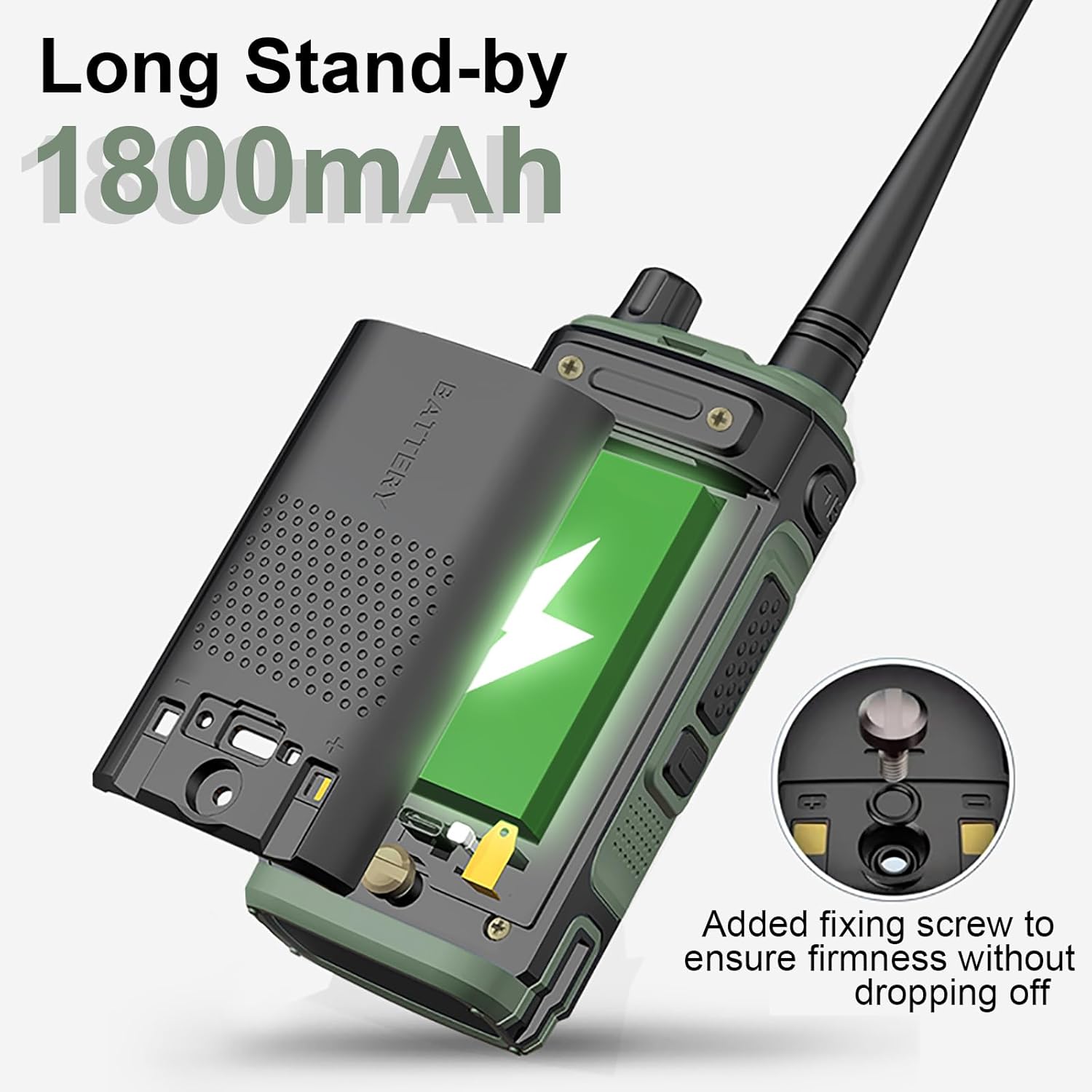
Figure 3: Proper installation of the 1800mAh battery into the BAOFENG UV-17 radio, highlighting the secure fit and optional fixing screw.

Figure 4: The BAOFENG UV-17 radio connected for USB-C charging, compatible with car chargers, PC USB ports, and power banks. Approximate charging time is 3 hours for a full charge.
4.2. Powering On/Off and Volume Adjustment
To power on the radio, rotate the Power/Volume knob clockwise. Continue rotating to increase the volume. Rotate counter-clockwise to decrease volume and turn off the radio.
5. Operating Instructions
5.1. Basic Communication
- Select Frequency/Channel: Use the keypad to directly enter a frequency or navigate through channels. The UV-17 supports 999 channels.
- Transmit: Press and hold the PTT (Push-to-Talk) button on the side of the radio. Speak clearly into the microphone. Release the PTT button to stop transmitting and return to receive mode.
- Receive: When not transmitting, the radio is in receive mode. Audio will be heard through the speaker or connected earpiece.
5.2. Frequency Copy Function
The UV-17 features a wireless frequency copy function, allowing direct programming from one radio to another without a computer or programming cable.

Figure 5: Illustration of the one-key frequency copy function between two BAOFENG UV-17 radios, eliminating the need for a programming cable.
Refer to the radio's on-screen menu for specific steps to initiate and complete the frequency copy process.
5.3. Tri-Band Operation
The UV-17 supports tri-band operation, covering UHF, VHF, and Amateur frequencies. This provides flexibility for various communication needs.

Figure 6: The BAOFENG UV-17 radio emphasizing its Tri-Band capabilities, including anti-interference, noise cancelling, and strong confidentiality. Supported frequency ranges are UHF: 420-450MHz, VHF: 144-148MHz, FM, and Amateur bands.
Frequency Ranges:
- VHF: 144-148MHz
- UHF: 420-450MHz
- Amateur bands
5.4. NOAA Weather Alert
The UV-17 includes a NOAA weather alert function, providing access to 10 U.S.A. NOAA weather forecast channels. This feature is crucial for outdoor activities and emergency preparedness.
To activate or scan NOAA channels, navigate to the NOAA function in the radio's menu.
5.5. Flashlight Function
The radio is equipped with a strong LED flashlight for illumination in low-light conditions.
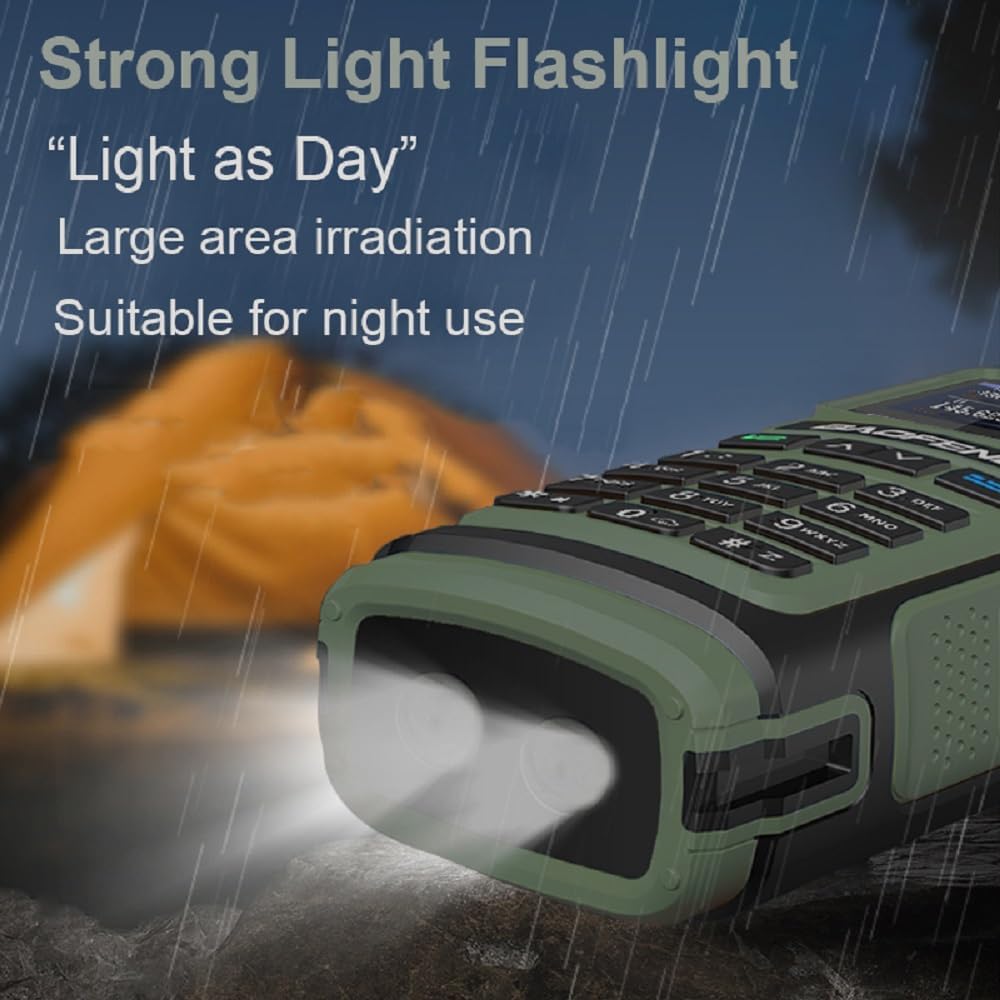
Figure 7: The BAOFENG UV-17 radio's strong LED flashlight providing wide area illumination, suitable for night use.
Press the dedicated Flashlight Button to turn the flashlight on or off.
6. Maintenance
- Cleaning: Wipe the radio with a soft, damp cloth. Do not use harsh chemicals or abrasive cleaners.
- Battery Care: To prolong battery life, avoid overcharging and fully discharging the battery frequently. Store the radio and battery in a cool, dry place when not in use for extended periods.
- Water Resistance: The radio has an IP54 rating, meaning it is protected from dust and splashing water. Do not submerge the radio in water. Ensure all port covers are securely closed to maintain water resistance.
- Antenna Care: Handle the antenna carefully. Bending or forcing the antenna can damage the radio's internal components.
7. Troubleshooting
| Problem | Possible Cause | Solution |
|---|---|---|
| Radio does not power on. | Battery is low or not installed correctly. | Charge the battery. Reinstall the battery securely. |
| Cannot transmit or receive. | Incorrect frequency/channel, antenna not attached, or out of range. | Verify frequency/channel. Ensure antenna is securely attached. Move closer to the other radio. |
| Poor audio quality. | Low battery, weak signal, or incorrect squelch setting. | Charge battery. Adjust squelch level. Ensure clear line of sight. |
| Battery not charging. | Charging cable/base faulty, or poor connection. | Check cable and charger connections. Try a different USB-C port or charging base. |
8. Specifications
| Feature | Detail |
|---|---|
| Brand | BAOFENG |
| Model Number | UV-17 / UV-17R / UV-17 Plus / UV-17 Pro |
| Frequency Range | VHF: 144-148MHz, UHF: 420-450MHz, Amateur bands, FM |
| Number of Channels | 999 |
| Battery Capacity | 1800mAh Lithium Ion |
| Input Voltage | DC 7.4V |
| Max Range | Up to 6.1 miles (line of sight) |
| Operating Temperature | -10°C to 60°C |
| Antenna Impedance | 50 Ω |
| Water Resistance | IP54 |
| Charging | USB-C and Charging Base |
| Special Features | NOAA Weather Alert, FM Radio, VOX mode, CTCSS/DCS, Wireless Frequency Copy |
| Item Weight | Approx. 1.38 pounds (626g) |
9. Warranty and Support
9.1. Warranty Information
A 1-year warranty is provided for the BAOFENG UV-17 series radio. This warranty is exclusively provided through "Shiqun Electronics Co., Ltd." Please retain your proof of purchase for warranty claims.
9.2. Customer Support
For technical assistance, troubleshooting beyond this manual, or warranty inquiries, please contact Shiqun Electronics Co., Ltd. through the vendor contact information provided at the point of purchase or on the official BAOFENG website.