
Introduction
This manual provides comprehensive instructions for the operation, maintenance, and troubleshooting of your BAOFENG UV-17 Tri-Band Ham Radio. Please read this manual thoroughly before using the device to ensure proper functionality and safety.
The BAOFENG UV-17 is a versatile tri-band two-way radio featuring 999 channels, USB-C charging, NOAA weather alerts, and a convenient wireless frequency copy function. It is designed for reliable communication across various frequency bands.
Package Contents
Upon opening the package, verify that all components are present:
- Tri-Band Portable Radio (BAOFENG UV-17)
- 1800mAh Battery
- High Gain Antenna
- Charger Base
- Belt Clip
- Hand Strap
- User's Manual (this document)
- Type-C USB Cable
- Microphone
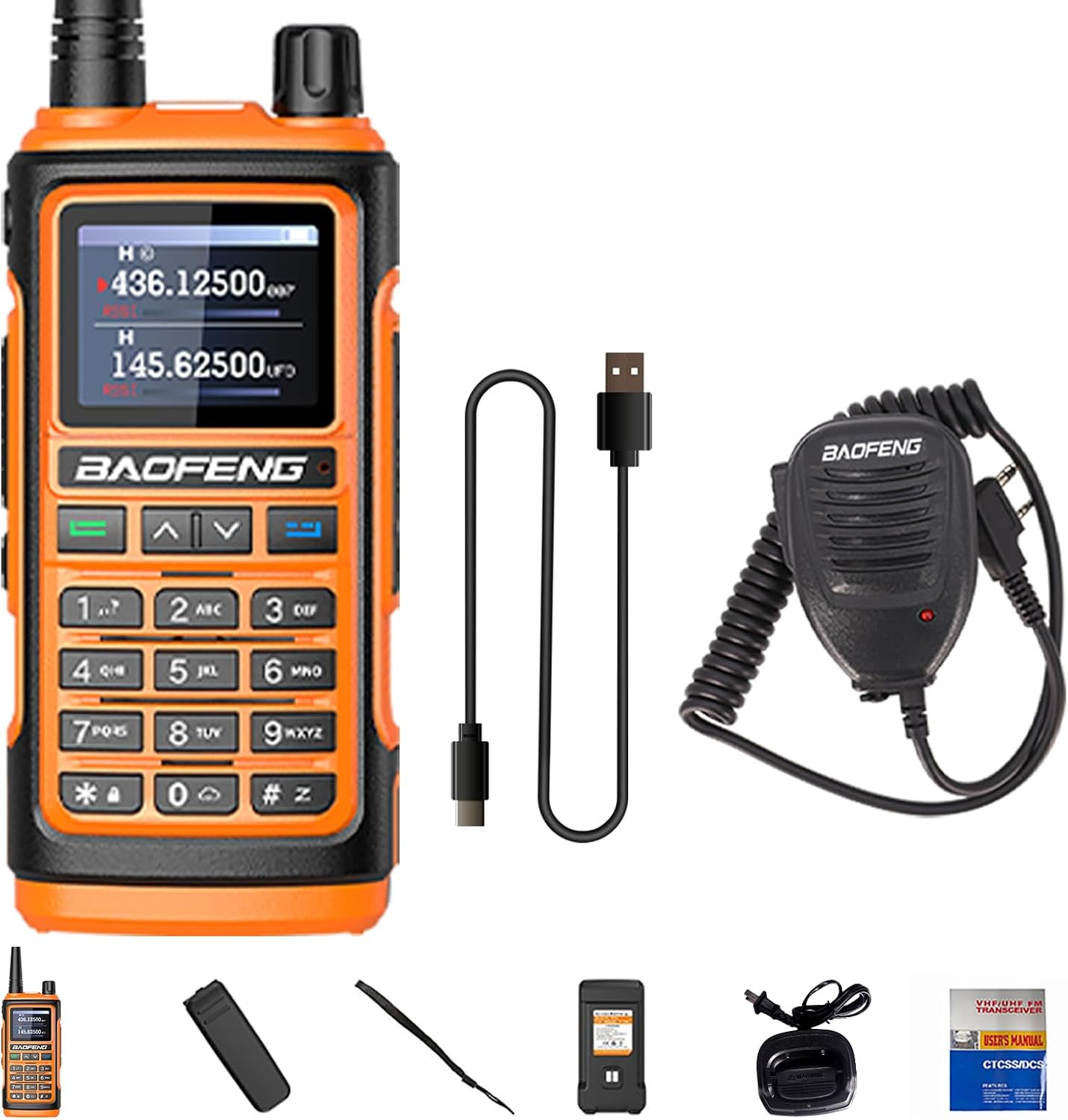
Figure 1: BAOFENG UV-17 and its complete package contents.
Product Overview
Familiarize yourself with the various parts and controls of your BAOFENG UV-17 radio.

Figure 2: Key components and controls of the BAOFENG UV-17 radio.
- Antenna: For transmitting and receiving signals.
- Power/Volume Knob: Turns the radio on/off and adjusts volume.
- LED Indicator: Shows radio status (e.g., transmitting, receiving, charging).
- Flashlight Button: Activates the built-in flashlight.
- PTT (Push-to-Talk) Button: Press and hold to transmit, release to receive.
- Menu Button: Accesses the radio's menu settings.
- FM Button: Toggles FM radio function.
- Keypad: For entering frequencies, channel numbers, and menu selections.
- Speaker: Outputs received audio.
- Flashlight: Integrated light source.
- LED Screen: Displays frequency, channel, battery status, and menu options.
- 2pin K Jack: Port for external audio accessories like headsets or programming cables.
- Mic: Built-in microphone for voice input.
- Exit Button: Exits menu or current function.
Setup
1. Battery Installation and Charging
The BAOFENG UV-17 comes with an 1800mAh rechargeable Lithium-Ion battery. Ensure the battery is fully charged before first use.
- Install Battery: Align the battery with the grooves on the back of the radio and slide it upwards until it clicks into place. Ensure the added fixing screw is tightened to secure the battery firmly.
- Charge Battery:
- Using Charger Base: Place the radio (with battery installed) into the provided charger base. Connect the charger base to a power outlet. The LED indicator on the charger will show charging status.
- Using USB-C Cable: Connect the Type-C USB cable directly to the USB-C port on the side of the radio and to a compatible USB power source (e.g., wall adapter, power bank, PC USB port, car charger).

Figure 4: USB-C charging options for the BAOFENG UV-17.
- Charging Time: A full charge typically takes approximately 3 hours.
- Battery Life: Approximately 5 days of typical use, with a standby time of up to 10 days.
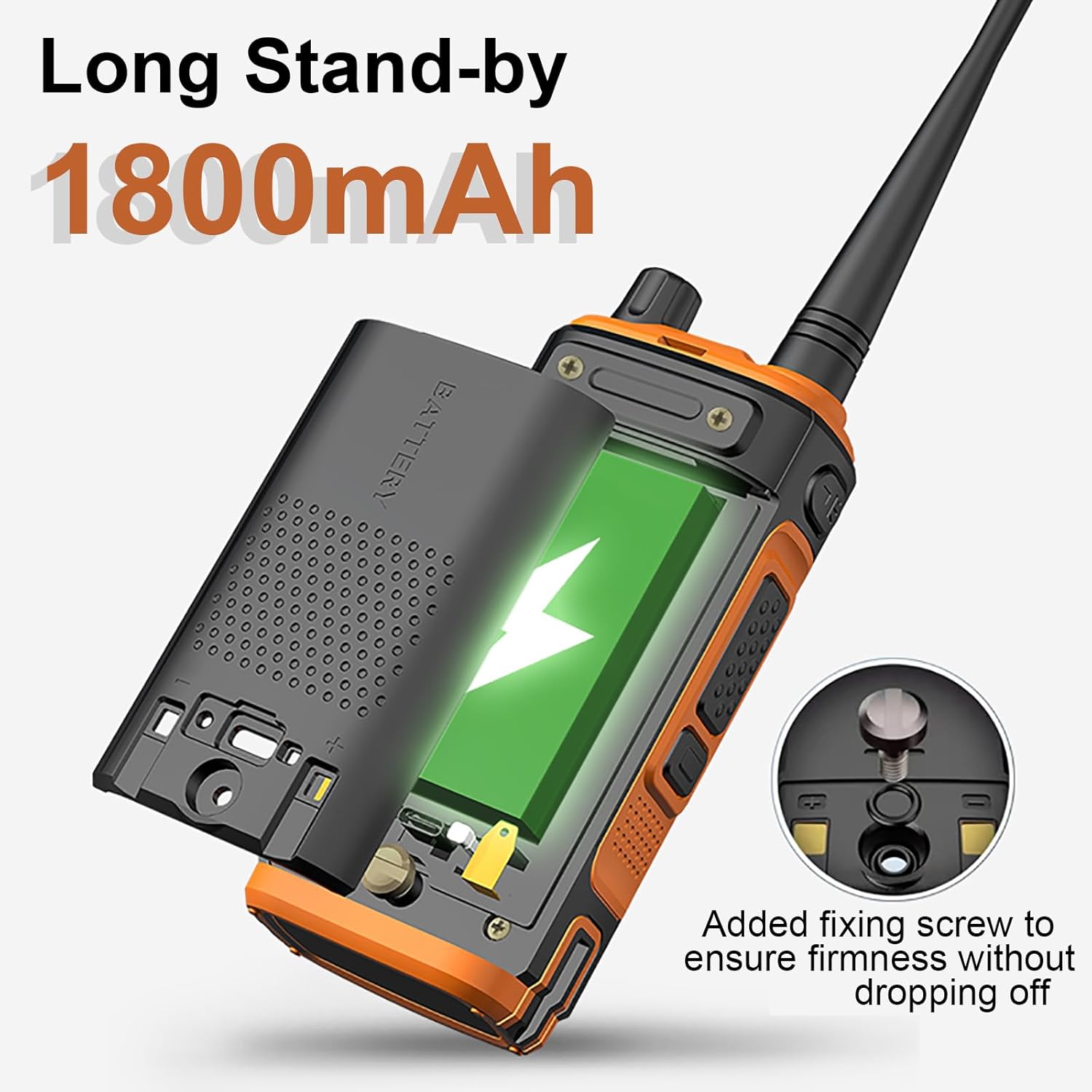
Figure 3: Battery installation and securing screw location.
2. Antenna Attachment
Screw the high-gain antenna clockwise onto the antenna connector at the top of the radio until it is finger-tight. Do not overtighten.
3. Attaching Belt Clip and Hand Strap
Attach the belt clip to the back of the radio using the provided screws. Secure the hand strap to the designated loop on the radio for added security.
Operating Instructions
1. Power On/Off and Volume Adjustment
Rotate the Power/Volume knob clockwise to turn the radio on. Continue rotating clockwise to increase the volume. Rotate counter-clockwise to decrease volume and turn the radio off.
2. Frequency and Channel Selection
The UV-17 supports both VFO (Frequency Mode) and Channel Mode. It operates on Tri-Band frequencies: UHF (420-450MHz), VHF (144-148MHz), and Amateur bands, along with FM radio.
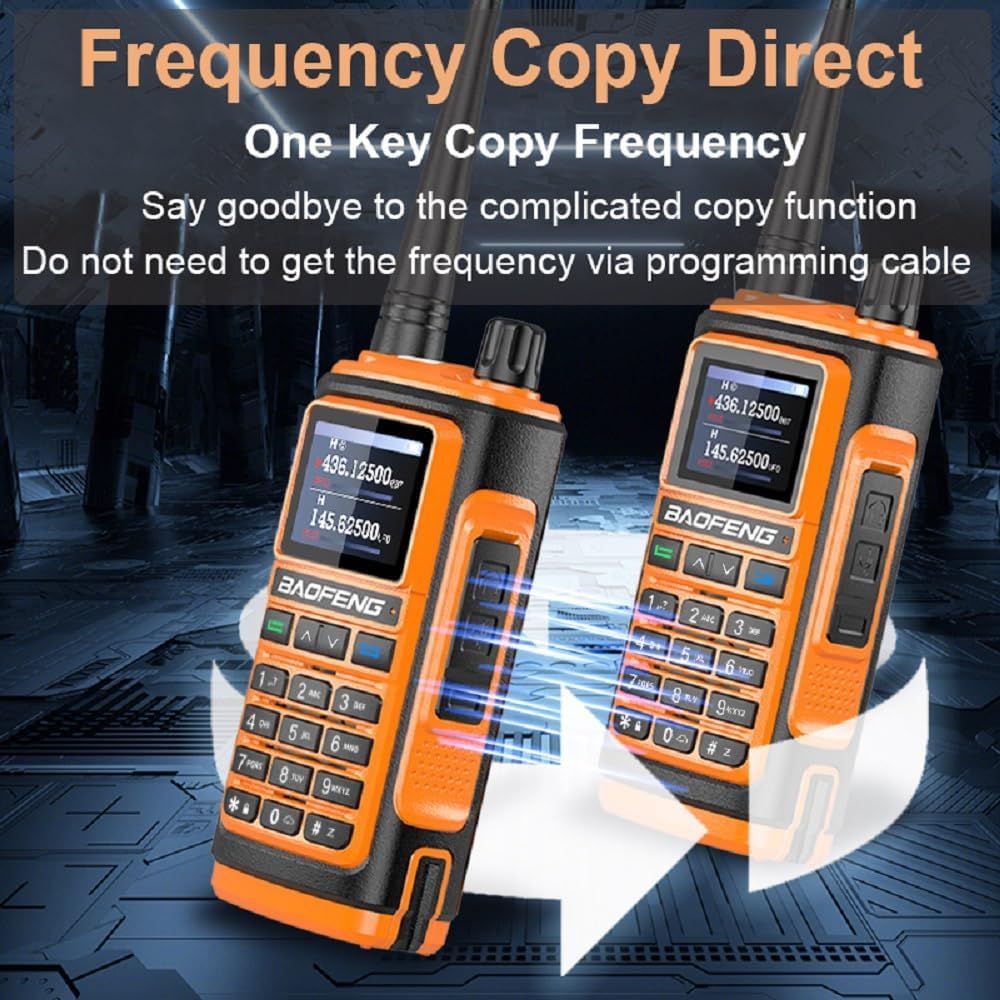
Figure 5: Tri-Band frequency capabilities of the BAOFENG UV-17.
- VFO Mode: Directly enter frequencies using the keypad.
- Channel Mode: Navigate through programmed channels using the Up/Down arrow keys.
- Switching Modes: Refer to the full user manual (included in package) for specific key combinations to switch between VFO and Channel modes.
3. Transmitting and Receiving
- To transmit, press and hold the PTT (Push-to-Talk) button on the side of the radio. Speak clearly into the microphone.
- Release the PTT button to stop transmitting and return to receive mode.
- Ensure you are on an appropriate frequency or channel before transmitting.
4. Wireless Frequency Copy Function
The UV-17 features a wireless frequency copy function, allowing direct programming from one radio to another without a computer or programming cable.

Figure 6: Wireless frequency copy in action between two UV-17 radios.
For detailed steps on how to use this feature, consult the comprehensive user manual provided in the package.
5. NOAA Weather Alert
The UV-17 can receive 10 U.S.A. NOAA weather forecast channels, providing timely weather warnings.
- Activate the NOAA function through the radio's menu.
- The radio will scan and alert you to severe weather broadcasts.
6. Flashlight Function
Press the dedicated Flashlight Button to activate the built-in strong light flashlight. This feature is useful in low-light conditions.
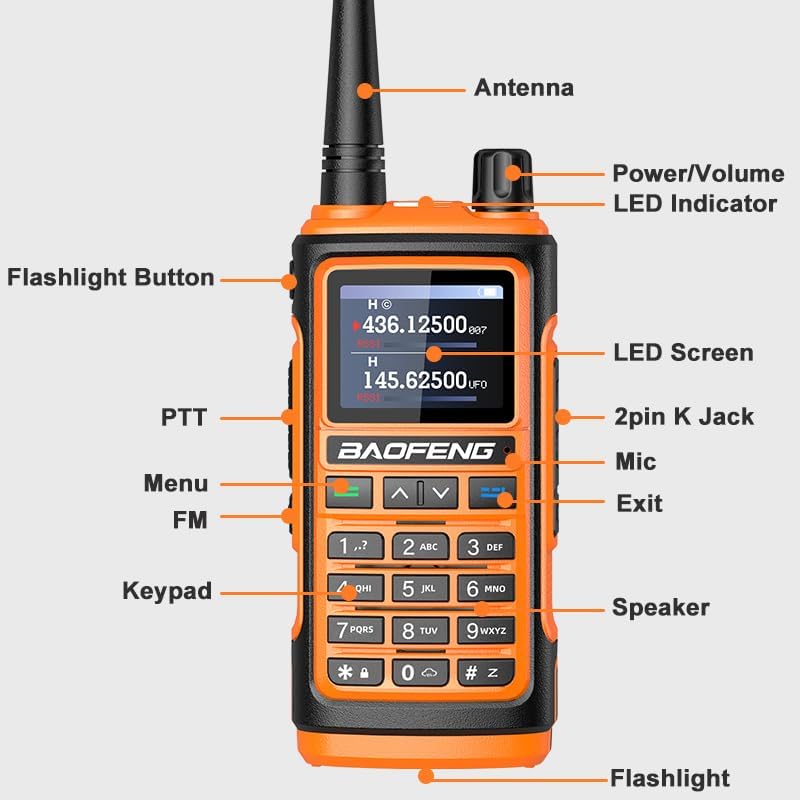
Figure 7: The BAOFENG UV-17's integrated flashlight in use.
Maintenance
- Cleaning: Wipe the radio with a soft, damp cloth. Do not use harsh chemicals or abrasive cleaners.
- Battery Care: To prolong battery life, avoid fully discharging the battery frequently. Store the radio and battery in a cool, dry place when not in use for extended periods.
- Water Resistance: The radio has an IP54 waterproof rating, meaning it is protected from dust and splashing water. Do not submerge the radio in water.
- Antenna: Ensure the antenna is securely attached. Do not bend or force the antenna, as this can damage the connector.
Troubleshooting
| Problem | Possible Cause | Solution |
|---|---|---|
| Radio does not power on. | Battery is low or not installed correctly. | Charge the battery. Reinstall the battery, ensuring it clicks into place and the screw is tightened. |
| Cannot transmit or receive. | Incorrect frequency/channel, antenna loose, or out of range. | Verify frequency/channel settings. Check antenna connection. Move closer to the other radio. |
| Poor audio quality. | Low battery, antenna issue, or interference. | Charge battery. Check antenna. Move away from sources of electrical interference. |
| Wireless frequency copy fails. | Radios too far apart or not in correct mode. | Ensure radios are close to each other. Refer to the full manual for correct copy procedure. |
If the problem persists after attempting these solutions, please contact customer support.
Specifications
| Feature | Detail |
|---|---|
| Model Number | UV-17/UV-17R/UV-17 Plus/UV-17 Pro |
| Frequency Range | 144-148MHz (VHF), 420-450MHz (UHF), Amateur, FM |
| Channels | 999 |
| Battery Capacity | 1800mAh Lithium Ion |
| Input Voltage | DC 7.4V |
| Max Range | 6.1 miles (approximate, varies by terrain) |
| Operating Temperature | -10°C to 60°C |
| Antenna Impedance | 50 Ω |
| Water Resistance | IP54 (Dust and splashing water protected) |
| Display Type | LCD |
| Charging | USB-C and Charger Base |
| Special Features | 999 Channels, FM Radio, NOAA Weather Alert, Tri-Band, USB-C Charging, Wireless Frequency Copy |
Warranty and Support
This product comes with a 1-year warranty provided only through "Shiqun Electronics Co., Ltd". Please retain your proof of purchase for warranty claims.
For technical support or warranty inquiries, please contact the seller or refer to the contact information provided in the full user manual included with your product.
For more information about BAOFENG products, you can visit the official BAOFENG store on Amazon: BAOFENG Store.