
1. Introduction
The K&F Concept 80x100 Monocular-Telescope is a high-performance optical instrument designed for observing distant objects with clarity and precision. Featuring 80x magnification and a 100mm objective lens, it utilizes BAK4 prism and FMC (Fully Multi-Coated) lenses to ensure superior light transmission and sharp, bright images. Its IP68 waterproof rating makes it suitable for various outdoor conditions. This manual provides essential information for the proper setup, operation, and maintenance of your monocular.

Image 1.1: K&F Concept 80x100 Monocular-Telescope with accessories.
2. Package Contents
Please verify that all items listed below are included in your package:
- 1 x K&F Concept 80x100 Monocular-Telescope
- 1 x Adjustable Tripod
- 1 x Smartphone Holder
- 1 x Carrying Pouch
- 1 x Cleaning Cloth
- 1 x User Manual (this document)

Image 2.1: All components included in the K&F Concept 80x100 Monocular-Telescope package.
3. Product Overview
Familiarize yourself with the main parts of your monocular:
- Eyepiece: For viewing. Features an adjustable eyecup.
- Focus Wheel: Adjusts the focus for a clear image.
- Objective Lens: The large front lens that gathers light.
- Tripod Mount Thread: Located on the bottom for attaching to a tripod.
- Lanyard Attachment Point: For securing the monocular with a lanyard.

Image 3.1: Internal structure highlighting the 20mm eyepiece and BAK4 Prism.

Image 3.2: Illustration demonstrating the light-gathering capability of a 50mm objective lens.
4. Setup
4.1 Attaching the Lanyard
To prevent accidental drops, attach the included lanyard to the monocular's attachment point. Thread the thin loop of the lanyard through the small hole on the monocular body and then pass the larger part of the lanyard through the loop to secure it.
4.2 Using the Tripod
For stable viewing, especially at high magnifications, use the adjustable tripod:
- Extend the tripod legs to your desired height.
- Screw the monocular onto the tripod's mounting screw located at the base of the monocular. Ensure it is tightened securely.
- Adjust the tripod head to position the monocular for optimal viewing.
Video 4.1: Official K&F Concept video demonstrating the setup and waterproof features of the 80x100 Monocular-Telescope.
4.3 Attaching the Smartphone Adapter
To capture photos or videos through the monocular using your smartphone:
- Secure your smartphone into the smartphone holder.
- Align your phone's main camera lens with the adapter's eyepiece opening. You may need to test different camera lenses if your phone has multiple.
- Attach the smartphone holder (with phone) to the monocular's eyepiece. Adjust the position until the phone camera captures the full, clear view from the monocular.
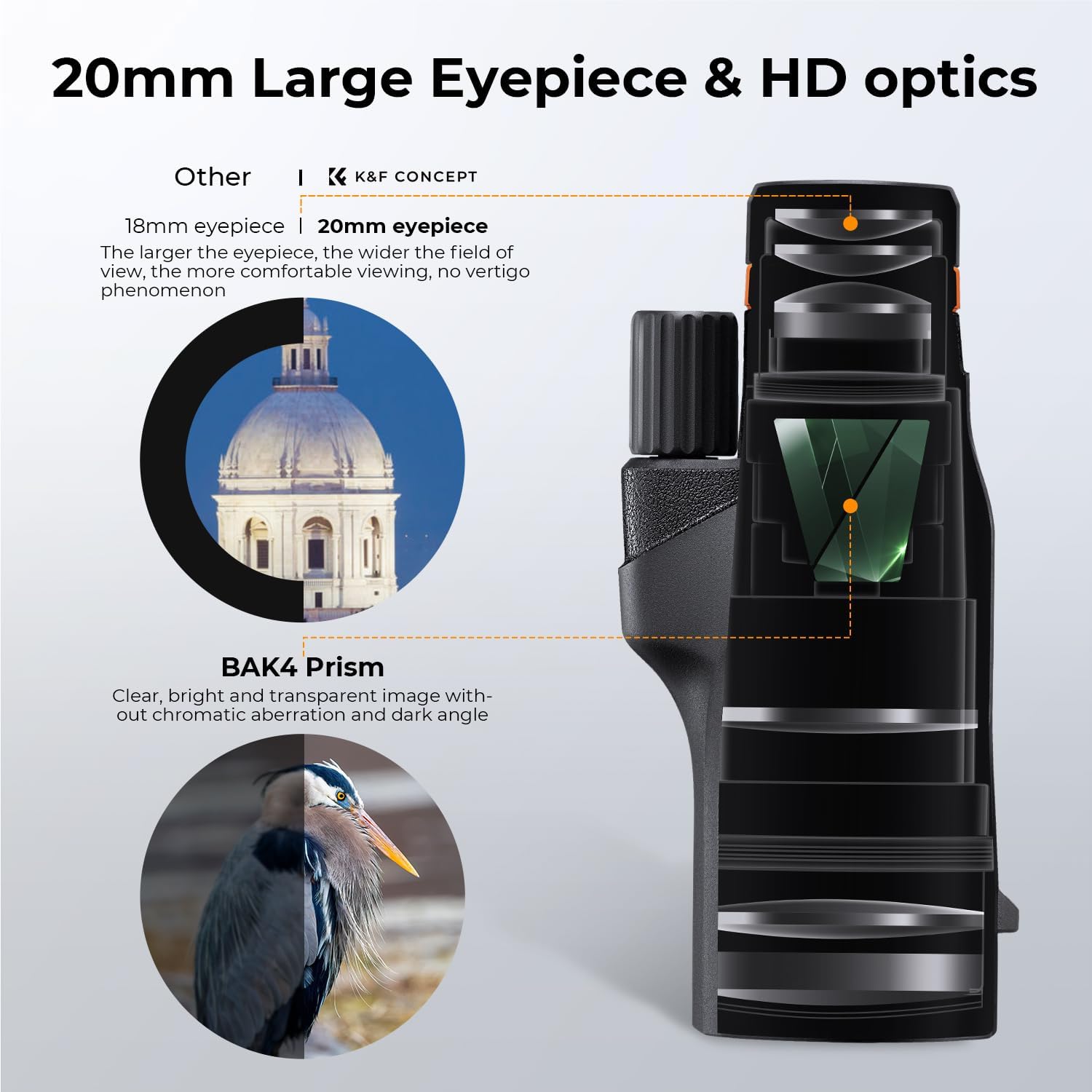
Image 4.1: The monocular mounted on a tripod with a smartphone attached, ready for capturing images.
5. Operation
5.1 Adjusting the Eyecup
The monocular features a rotary eyecup for comfortable viewing, whether you wear glasses or not:
- If you wear glasses, rotate the eyecup down to its lowest position.
- If you do not wear glasses, rotate the eyecup up to its highest position for optimal eye relief.
5.2 Focusing
To achieve a sharp image:
- Point the monocular at your desired object.
- Slowly rotate the focus wheel (located on top of the monocular) until the image appears clear and sharp.
5.3 Using with a Smartphone for Photography/Videography
Once your smartphone is correctly attached to the monocular:
- Open your smartphone's camera application.
- Adjust the monocular's focus wheel until the image on your phone screen is clear.
- Use your phone's zoom function (if available) to further enlarge the image, noting that digital zoom may reduce image quality.
- Capture photos or record videos as desired.

Image 5.1: Example of ultra-long-range visibility through the monocular, demonstrating its magnification capabilities.
6. Maintenance
6.1 Cleaning
- Use the provided cleaning cloth to gently wipe the lenses. Avoid using abrasive materials or harsh chemicals.
- For stubborn dirt, use a lens cleaning solution specifically designed for optical instruments.
- Keep the lens caps on when not in use to protect the lenses from dust and scratches.
6.2 Storage
- Store the monocular in its carrying pouch in a cool, dry place away from direct sunlight and extreme temperatures.
- Avoid storing in areas with high humidity to prevent mold growth.

Image 6.1: The monocular is Nitrogen Waterproof, designed to withstand rain and fog, extending its service life.
7. Troubleshooting
| Problem | Possible Cause | Solution |
|---|---|---|
| Blurred image | Incorrect focus; dirty lenses | Adjust the focus wheel; clean the lenses with the provided cloth. |
| Dark edges in view | Eyecup not adjusted correctly; phone camera misaligned | Adjust the eyecup; realign the smartphone camera with the monocular's eyepiece. |
| Unstable image | Handheld use at high magnification; loose tripod connection | Use the tripod for stability; ensure the monocular is securely screwed onto the tripod. |
8. Specifications
| Feature | Detail |
|---|---|
| Magnification | 80x |
| Objective Lens Diameter | 100 mm |
| Eyepiece Lens Description | Prism (BAK4) |
| Lens Coating Description | Fully Multi-Coated (FMC) |
| Waterproof Rating | IP68 |
| Focus Type | Manual Focus |
| Compatible Devices | Smartphone |
| Product Dimensions | 7.4 x 3.3 x 2.6 inches |
| Item Weight | 1.94 pounds |
9. Warranty and Support
For warranty information and customer support, please refer to the official K&F Concept website or contact their customer service directly. Keep your purchase receipt as proof of purchase for any warranty claims.