
1. Introduction
This user manual provides comprehensive instructions for the operation and maintenance of your BAOFENG GT-18 Walkie Talkies. Please read this manual thoroughly before using the product to ensure proper function and safety. The BAOFENG GT-18 offers seamless communication with 22 channels, long-lasting battery life, and a user-friendly design, making it ideal for various activities.
2. Package Contents
Upon opening the package, please verify that all items listed below are present and in good condition:
- 3 x GT-18 Radio Units
- 3 x USB Charging Cables with Adapters
- 3 x Earpieces with Microphones
- 3 x Lanyards
- 3 x Lithium Ion Batteries (pre-installed or separate)
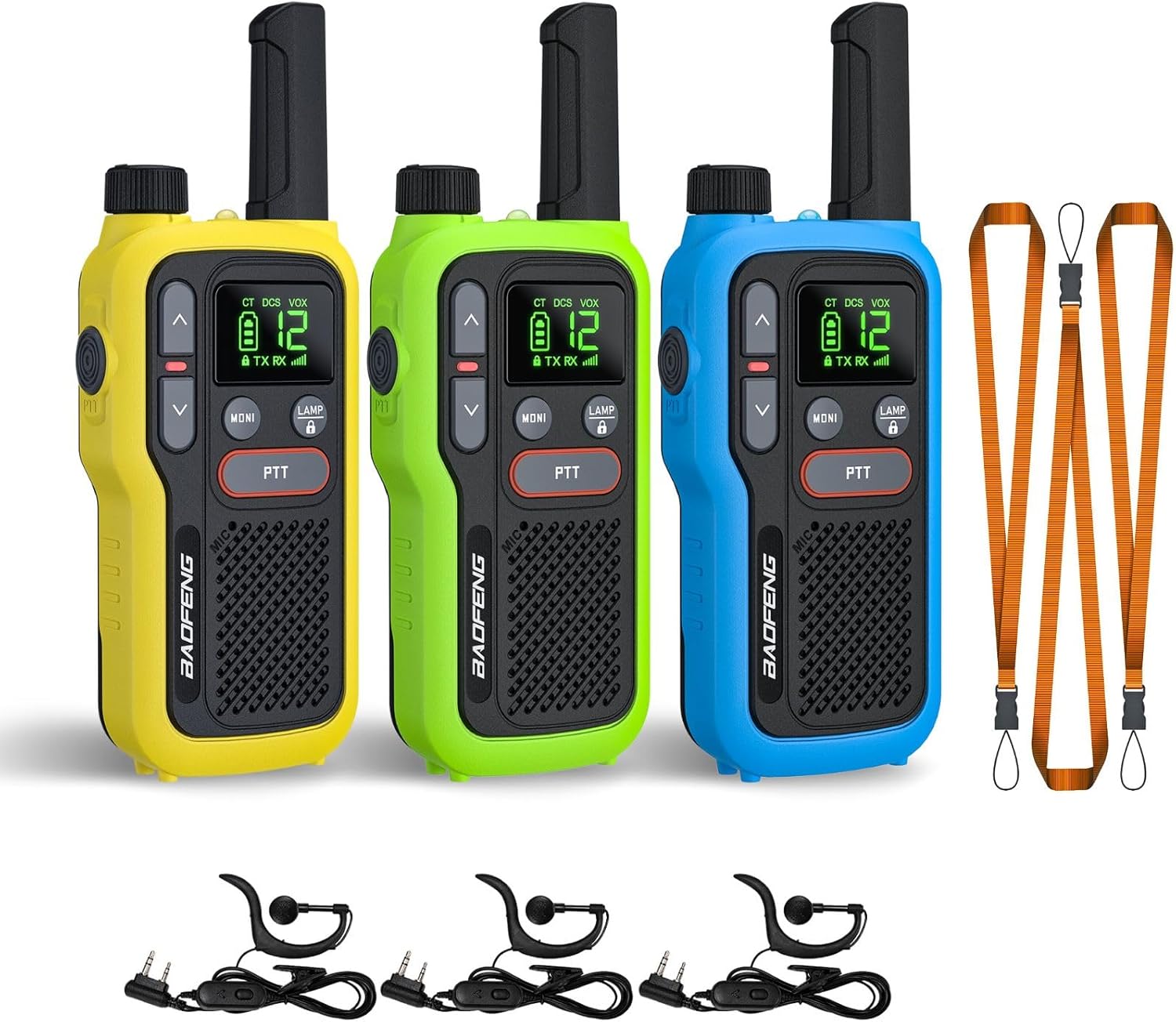
Figure 2.1: Package Contents - Three BAOFENG GT-18 walkie talkies in yellow, green, and blue, along with their accessories including earpieces, charging cables, and lanyards.
3. Product Features
- Seamless Communication and Clear Sound: Wide range of 22 available channels with intuitive key combinations for effortless scanning.
- User-Friendly Design, Perfect to Carry out: Features a clear, backlit LCD screen, easy-to-use button layout with dual PTT buttons, and a flashlight for low-light conditions. Lightweight (33g / 4.7oz) with a belt clip and lanyard for easy portability.
- Long-Lasting Power and Convenient Charging: Equipped with a high-capacity 1500mAh battery, offering up to 3 days of battery life. Convenient USB charging allows for charging anywhere, anytime (computer, car charger, power bank).
- Hands-Free Usage with Wearable Lanyards: Ideal for various activities like biking, scootering, kayaking, and more, clips and wearable lanyards provide a convenient way to keep your hands free.
- NOAA Weather Channels: Stay informed about hazardous weather conditions with 10 NOAA channels.

Figure 3.1: Dual PTT Buttons - The walkie talkies feature two Push-To-Talk buttons for enhanced usability.

Figure 3.2: 10 NOAA Channels - The radios support NOAA channels to provide weather alerts.
4. Setup Guide
4.1 Battery Installation and Charging
- Ensure the walkie talkie is powered off.
- Locate the battery compartment on the back of the unit.
- If the battery is separate, insert the 1500mAh Lithium Ion battery into the compartment, ensuring correct polarity.
- Secure the battery cover.
- Connect the provided USB charging cable to the charging port on the walkie talkie (Micro-USB port, typically at the bottom).
- Connect the other end of the USB cable to a USB power source (e.g., computer, car charger, power bank, or wall adapter).
- The charging indicator will illuminate. A full charge typically takes less than 2 hours.
- Disconnect the cable once charging is complete.

Figure 4.1: USB Charging - The walkie talkies can be conveniently charged via USB from various sources.
4.2 Attaching Belt Clip and Lanyard
- To attach the belt clip, align the clip with the designated slots on the back of the radio and slide it into place until it clicks securely.
- To attach the lanyard, thread the loop of the lanyard through the small hole located on the top or side of the radio, then pass the rest of the lanyard through the loop to secure it.

Figure 4.2: Portability Options - The walkie talkie can be clipped to clothing or worn with a lanyard.
5. Operating Instructions
5.1 Power On/Off
To power on the walkie talkie, rotate the power/volume knob clockwise until you hear a click. To power off, rotate it counter-clockwise until it clicks.
5.2 Adjusting Volume
Rotate the power/volume knob clockwise to increase the volume and counter-clockwise to decrease it.
5.3 Selecting Channels
Use the Up (▲) and Down (▼) arrow buttons on the front of the radio to cycle through the available 22 channels. Ensure all radios you wish to communicate with are set to the same channel.
5.4 Transmitting and Receiving
- To transmit, press and hold the PTT (Push-To-Talk) button located on the side or front of the radio. Speak clearly into the microphone.
- Release the PTT button to stop transmitting and return to receive mode.
- When receiving a transmission, the display may indicate incoming signal, and audio will be heard through the speaker or connected earpiece.
5.5 Scanning Channels
To activate the channel scan feature, press and hold the MONI button (Monitor button) or refer to the specific key combination in the included user manual for detailed scanning instructions. The radio will automatically scan through channels until a signal is detected.

Figure 5.1: Quickly Scan - Press and hold the MONI button to initiate channel scanning.
5.6 Flashlight Function
The BAOFENG GT-18 includes an integrated flashlight. To activate or deactivate the flashlight, press the LAMP button.
5.7 NOAA Weather Scan
The radio supports NOAA weather channels. To access these, you may need to program them using the BAOFENG programming tool and a data cable (not included). Refer to the Troubleshooting section for more details on setting up NOAA channels.
6. Maintenance
- Cleaning: Use a soft, damp cloth to clean the exterior of the walkie talkie. Do not use harsh chemicals or abrasive cleaners.
- Storage: When not in use for extended periods, store the walkie talkie in a cool, dry place away from direct sunlight and extreme temperatures.
- Battery Care: To prolong battery life, avoid fully discharging the battery frequently. Recharge the battery when the low battery indicator appears.
- Water Resistance: The device is water-resistant, but not waterproof. Avoid submerging the unit in water. Ensure the USB port cover is securely closed to prevent water ingress.
7. Troubleshooting
| Problem | Possible Cause | Solution |
|---|---|---|
| No power | Battery is low or not installed correctly. | Charge the battery. Ensure the battery is properly seated in its compartment. |
| Cannot transmit or receive | Different channels, out of range, low battery. | Ensure all radios are on the same channel. Move closer to the other radio. Charge the battery. |
| Poor audio quality / Static | Out of range, interference, low battery. | Move closer to the other radio. Avoid obstacles. Charge the battery. |
| NOAA Weather Radio (NWR) feature does not work | NWR channels are not programmed or are incorrectly configured. | The NOAA feature may require programming. You will need to download BAOFENG's programming tool from their official website and use a data cable (not included). Follow these steps:
|
8. Specifications
| Feature | Detail |
|---|---|
| Model Number | GT-18 |
| Brand | BAOFENG |
| Number of Channels | 22 |
| Battery Capacity | 1500mAh Lithium Ion |
| Battery Life | Up to 3 days |
| Charging Type | USB (Micro-USB) |
| Talking Range (Maximum) | 3 Miles (influenced by terrain and obstructions) |
| Frequency Range | 300 MHz - 3 GHz, 462 MHz - 467 MHz |
| Special Features | Integrated Flashlight, Lightweight, NOAA Scan and Monitor |
| Item Weight | 33g (4.7oz) per unit |
| Dimensions | 147 x 57 x 25.5 mm (5.8 x 2.2 x 1 inches) |
| Water Resistance Level | Water Resistant |

Figure 8.1: Product Dimensions and Weight - The GT-18 is designed to be tiny and light for easy handling.
9. Warranty and Support
Your BAOFENG GT-18 Walkie Talkies come with an 18-month warranty from the date of purchase. This warranty covers manufacturing defects and malfunctions under normal use.
For technical support, warranty claims, or any inquiries regarding your product, please contact BAOFENG customer service through their official website or the retailer where the product was purchased. Please retain your proof of purchase for warranty validation.
For additional resources and product information, visit the official BAOFENG Store: BAOFENG Store on Amazon