1. Introduction
This manual provides comprehensive instructions for the assembly, operation, and maintenance of your Homall Electric Adjustable Height Desk (Model 0496). Designed for ergonomic comfort, this desk allows seamless transitions between sitting and standing positions, promoting a healthier work environment. Please read this manual thoroughly before assembly and use to ensure safe and efficient operation.

Image 1.1: The Homall Electric Adjustable Height Desk in a typical office setup, showcasing its spacious surface and integrated control panel.
2. Safety Information
To prevent injury or damage to the product, observe the following safety precautions:
- Ensure the desk is used in a safe environment, free from obstructions.
- Do not overload the desk. The maximum weight recommendation is 80 kg.
- Keep children and pets away from the desk during operation.
- The desk features a child safety lock function. Activate it to prevent accidental adjustments.
- An anti-collision function is integrated to stop movement if an obstruction is detected.
- The motor includes overheat protection. If the motor overheats, it will temporarily cease operation. Allow it to cool before resuming use.
- Do not attempt to disassemble or repair the motor or control unit yourself. Contact qualified personnel for service.
- Ensure all cables are properly managed to avoid entanglement or damage during height adjustments.
3. Package Contents
Your Homall Electric Adjustable Height Desk package includes all necessary components and tools for assembly. The desk frame parts and the four-part tabletop are typically shipped in two separate packages.
- Electric desk frame (legs, crossbars, motor)
- Four-part tabletop sections
- Control panel with memory function
- Power adapter and cable
- Assembly hardware (screws, bolts, etc.)
- Assembly tools
- Instruction manual
- Convenient hooks for accessories
- Cable management accessories

Image 3.1: Overview of included components and features such as packaging, optional wheels, accessory hooks, and cable management solutions.
4. Setup and Assembly
Assembly of the Homall Electric Adjustable Height Desk is designed to be straightforward. A detailed instruction manual with step-by-step guidance and illustrations is included in your package. Please follow these instructions carefully.
- Unpack all components and verify against the parts list in the included manual.
- Assemble the desk frame according to the provided instructions, ensuring all connections are secure.
- Attach the four-part tabletop sections to the assembled frame. Note that the tabletop consists of multiple parts for easier handling and shipping.
- Install the control panel in the designated location.
- Connect the power adapter and motor cables as instructed.
- Perform initial calibration as described in the detailed manual.
All necessary assembly tools are included in the package.
5. Operating Instructions
The Homall Electric Adjustable Height Desk features an intuitive control panel for easy height adjustments and memory functions.
5.1. Control Panel Overview

Image 5.1: The intelligent control panel, featuring an LED display, up/down controls, three memory presets, a USB-C charging port, and indicators for sit-stand reminders and child lock.
- Up/Down Buttons (▲/▼): Press and hold to adjust the desk height manually.
- LED Display: Shows the current desk height in centimeters.
- Memory Presets (1, 2, 3): Store and recall your preferred sitting and standing heights.
- USB-C Port: Convenient for charging devices.
- Sit-Stand Reminder: (If applicable) A feature to remind you to change positions. Refer to the detailed manual for activation.
- Child Safety Lock: Activates to prevent unintended height adjustments.
5.2. Adjusting Height
Use the Up (▲) and Down (▼) buttons to move the desk to your desired height. The desk can be adjusted smoothly between 72 cm and 116 cm.
5.3. Setting Memory Presets
- Adjust the desk to your desired height (e.g., sitting height).
- Press the "M" or "SET" button (if available, otherwise refer to the detailed manual for specific instructions).
- Press one of the number buttons (1, 2, or 3) within a few seconds to save the current height to that preset.
- Repeat for other desired heights (e.g., standing height).
To recall a saved height, simply press the corresponding number button (1, 2, or 3). The desk will automatically move to the stored position.
5.4. Child Safety Lock
To activate or deactivate the child safety lock, refer to the specific instructions in your detailed manual. This feature prevents accidental operation by children.
5.5. Anti-Collision Function
The desk is equipped with an anti-collision sensor. If the desk encounters an obstruction during height adjustment, it will automatically stop and reverse slightly to prevent damage. Ensure the area around the desk is clear before operation.
5.6. Overheat Protection
The motor has a built-in overheat protection system. If the motor is used continuously for an extended period and reaches a high temperature, it will temporarily shut down. Allow the motor to cool down for approximately 20 minutes before resuming operation.
6. Maintenance
Regular maintenance ensures the longevity and optimal performance of your Homall Electric Adjustable Height Desk.
- Cleaning: Wipe the desk surface and frame with a damp cloth. Avoid abrasive cleaners or harsh chemicals that could damage the finish.
- Cable Management: Periodically check and organize cables to prevent tangling or damage.
- Fasteners: Occasionally check all screws and bolts to ensure they are tight. Retighten if necessary.
- Motor: The motor is maintenance-free. Do not lubricate or attempt to open it.
7. Troubleshooting
If you encounter any issues with your desk, refer to the following common troubleshooting steps:
- Desk not moving:
- Check if the power cable is securely plugged into both the desk and the wall outlet.
- Ensure the child safety lock is not activated.
- If the motor was recently used extensively, it might be in overheat protection mode. Allow it to cool down.
- Uneven movement or strange noises:
- Ensure the desk is not overloaded and weight is evenly distributed.
- Check for any obstructions under or around the desk.
- Verify that all assembly screws are tight.
- Memory presets not working:
- Re-program the memory presets following the instructions in Section 5.3.
For persistent issues not resolved by these steps, please contact Homall customer support.
8. Specifications
| Feature | Detail |
|---|---|
| Brand | Homall |
| Model Number | 0496 |
| Product Dimensions (D x W x H) | 80 cm x 200 cm x 72-116 cm (31.5"D x 78.74"W x 28.35"-45.67"H) |
| Minimum Height | 72 cm |
| Maximum Height | 116 cm |
| Maximum Weight Recommendation | 80 kg |
| Item Weight | 19.3 kg |
| Top Material Type | Wood (Four-part tabletop) |
| Base Material | Metal (Alloy Steel) |
| Lifting Mechanism | Electric |
| Special Features | Adjustable, Electric, Memory Function (3 presets), Child Safety Lock, Anti-collision, Overheat Protection |
| Assembly Required | Yes (All tools included) |
| Product Care Instructions | Wipe with Damp Cloth |

Image 8.1: Detailed dimensions of the Homall Electric Adjustable Height Desk, including the four-part tabletop layout.
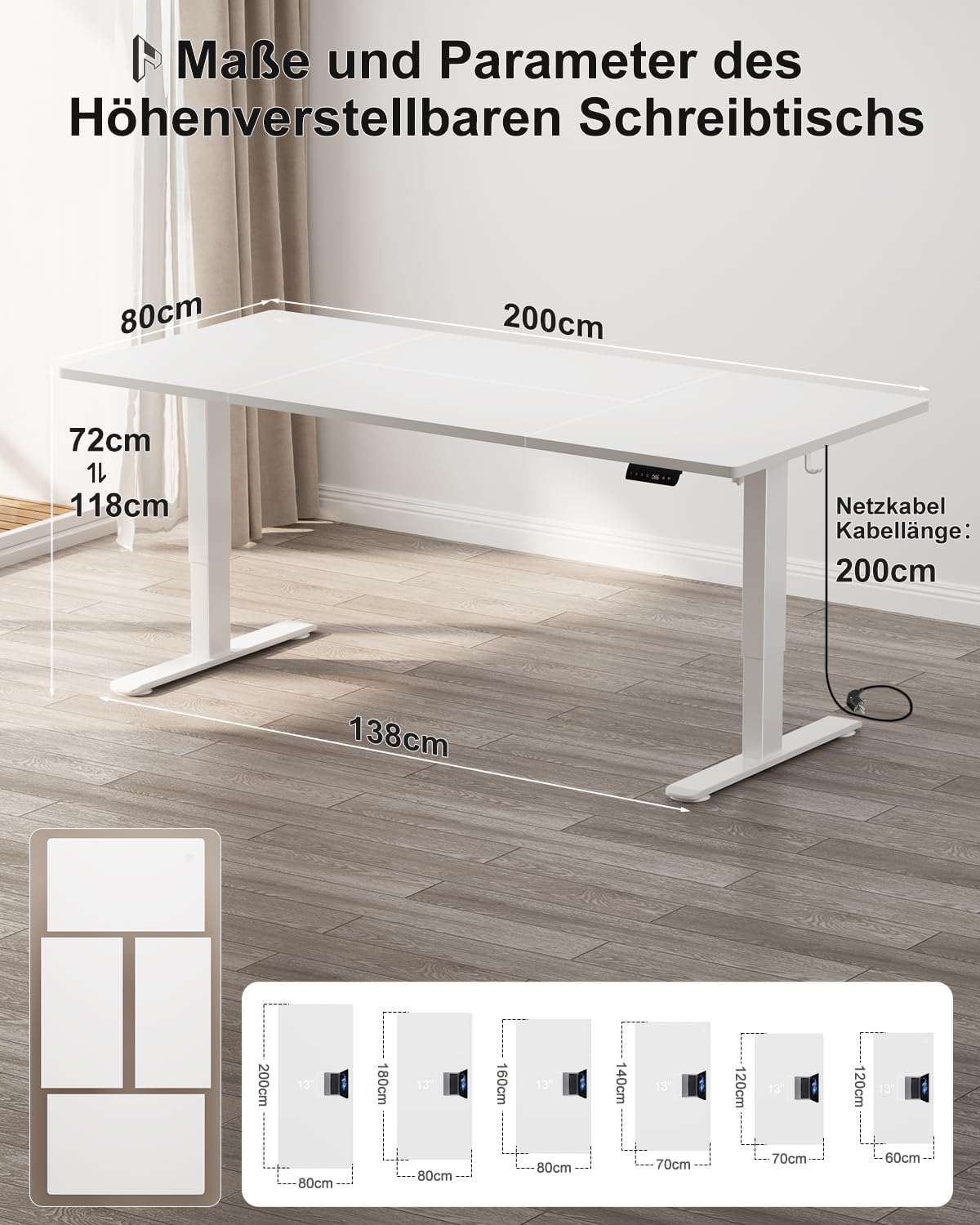
Image 8.2: Illustration of the desk's structural stability, highlighting its 70kg load capacity, robust 80x50mm legs, and high-quality steel frame with non-slip feet.
9. Warranty and Support
Your Homall Electric Adjustable Height Desk comes with a limited warranty. Please refer to the warranty card included in your package for specific terms and conditions.
For technical assistance, missing parts, or any questions not covered in this manual, please contact Homall customer support through the retailer where you purchased the product or visit the official Homall website for contact information.


