
1. Introduction
This manual provides comprehensive instructions for the installation, configuration, and operation of the ALGO 8180G2 PoE IP Paging and SIP Loud Ringer Indoor Audio Alerter. The 8180G2 is a second-generation, SIP-compliant, Power over Ethernet (PoE) wall-mounted loud speaker designed for Voice over IP (VoIP) paging, IP loud ringing, and emergency notification applications. It integrates seamlessly into various environments such as schools, warehouses, and offices.

Figure 1: Front view of the ALGO 8180G2 device, highlighting its 'G2' generation designation.
2. Product Overview
2.1 Key Features
- Multifunctional speaker for voice paging, loud ringing, emergency notification, and bell scheduling.
- New G2 Hardware with enhanced features, including outputs for external speaker, slave amplifier, or strobe/visual alerter.
- Integrated MWI LED (Red / Blue) and I/O Relay.
- Network managed and supervised SIP and multicast endpoint with TLS/SRTP support and 802.1x Security, SIP TCP/UDP.
- SIP compatibility with leading UC vendors such as Avaya, Broadsoft, Cisco, Digium/Asterisk, Metaswitch, NEC, Polycom, and most other SIP IP-PBX and ITSPs.
- PoE (802.3af) for plug-and-play network connectivity, eliminating the need for an additional amplifier.
2.2 Components and Connections
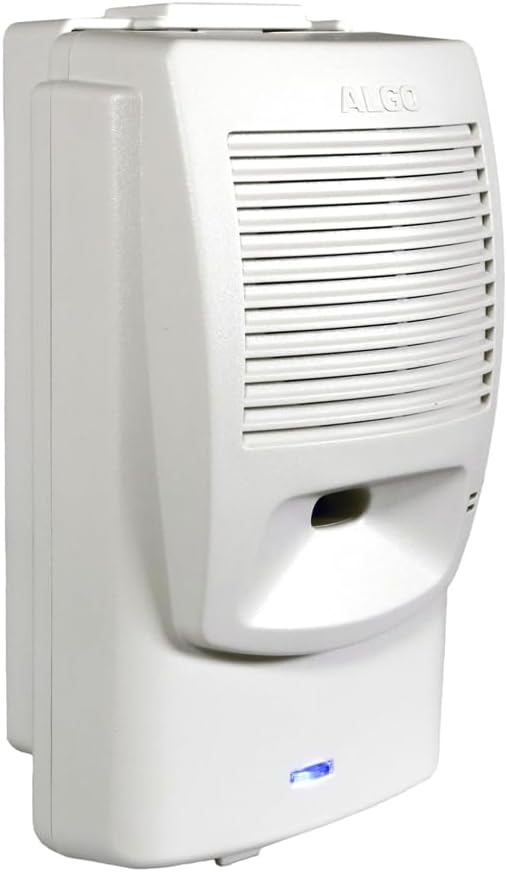
Figure 2: Diagram illustrating the ALGO 8180G2's internal and external components, including the built-in speaker, microphone, LED indicator, RJ45 network port, speaker output, audio output, relay I/O, and manual programming buttons. The surface mount wiring channel is also shown.
The ALGO 8180G2 features:
- Built-in Loud Speaker with Amplifier: Provides clear audio output.
- Microphone: Enables two-way audio for duplex paging.
- Red / Blue LED Indicator: Displays Message Waiting Indicator (MWI), status, and heartbeat (8180G2 only).
- RJ45 Network Port: For Power over Ethernet (PoE) and network connectivity.
- Speaker Output: Allows connection to an external speaker. Note: Connecting an external speaker disables the internal loudspeaker.
- Audio Output: Line-level audio output.
- Relay Input / Output: For integration with external devices (8180G2 only).
- Manual Programming Buttons: For basic configuration or programming via the built-in web interface.
3. Setup
3.1 Physical Installation
The ALGO 8180G2 is designed for wall mounting. Consider the desired coverage area and proximity to network infrastructure when selecting a mounting location.

Figure 3: Front and side dimensions of the ALGO 8180G2, showing a width of 4 inches (10.2 cm), height of 6.3 inches (16 cm), and depth of 2.2 inches (5.5 cm) without the wall bracket.
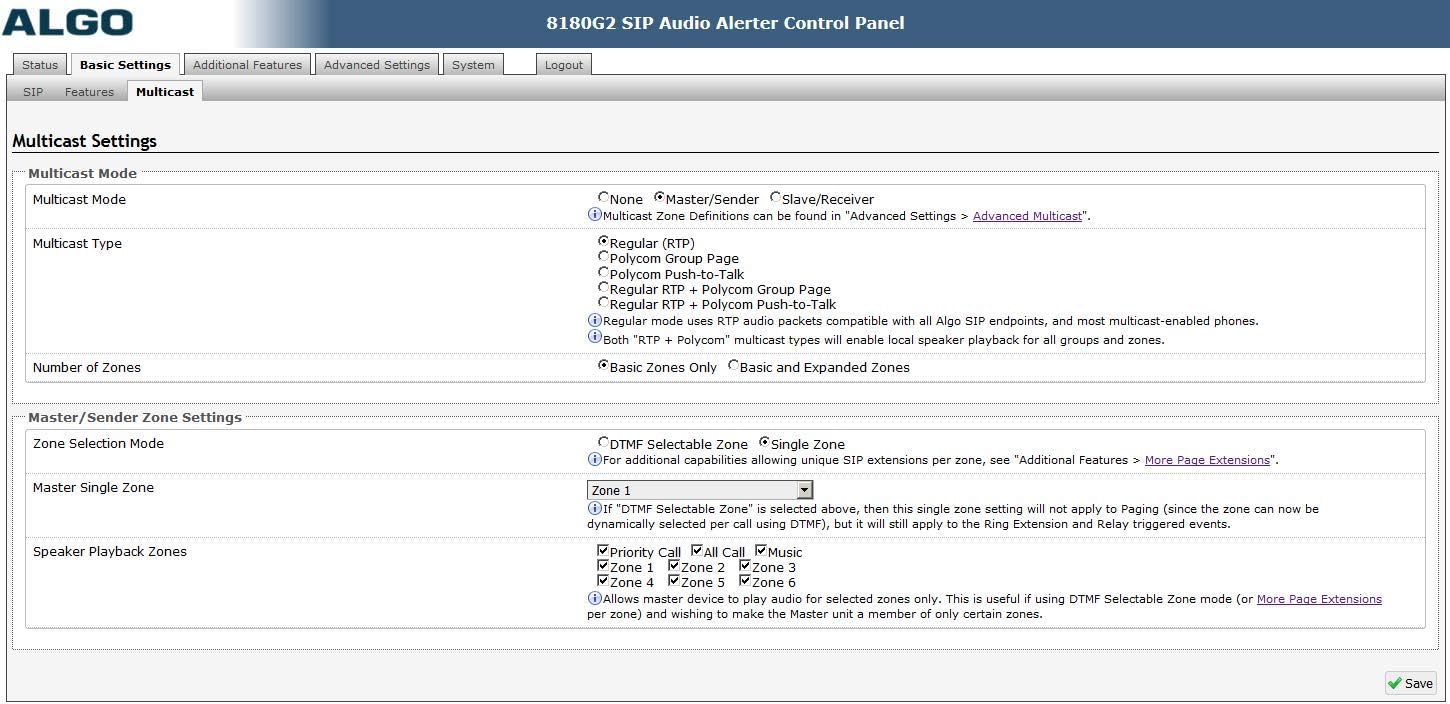
Figure 4: Back view dimensions of the ALGO 8180G2, illustrating the detachable wall mount bracket with a height of 7 inches (17.8 cm) and width of 3.5 inches (8.8 cm).
3.2 Power and Network Connection
The 8180G2 requires Power over Ethernet (PoE) for operation. Connect a standard Ethernet cable from a PoE-enabled switch or a PoE injector to the RJ45 network port on the device. The device does not support direct power connection; PoE is the sole power source. Ensure your network infrastructure supports 802.3af PoE.
3.3 Initial Configuration
Initial configuration and advanced settings are managed through the device's built-in web interface. A basic understanding of computer networking and Voice over IP (VoIP) concepts is recommended for optimal setup. The device can also support provisioning for larger deployments.
4. Operating Instructions
4.1 Web Interface Access
To access the web interface, connect the 8180G2 to your network. Obtain the device's IP address (this can often be found via network scanning tools or by checking your DHCP server logs). Enter the IP address into a web browser to access the control panel.
4.2 SIP Configuration
The 8180G2 registers as a third-party SIP endpoint with most leading premise or hosted UC providers. Configure the necessary SIP account details (extension, password, server address) within the web interface's SIP settings.
4.3 Paging and Loud Ringing Settings
The web interface allows for independent volume adjustment for paging, loud ringer, and alerts. Paging can be configured for one-way or duplex (two-way) audio via the built-in microphone.

Figure 5: Screenshot of the ALGO 8180G2 web interface 'Basic Settings' page, showing options for Inbound Ring Settings, Inbound Page Settings, and Audio Processing, including volume controls and page modes.
4.4 Multicast Settings
The 8180G2 supports various multicast options, including RTP multicast, Polycom Group Page, and Syn-Apps SA Announce. Any number and combination of Algo SIP speakers, paging adapters, and strobes can be used via built-in multicast for comprehensive large-scale deployments. Zoned multicast paging is available via remote DTMF keypress selection.

Figure 6: Screenshot of the ALGO 8180G2 web interface 'Multicast Settings' page, detailing options for Multicast Mode, Multicast Type, Number of Zones, and Master/Sender Zone Settings.
4.5 Input/Output Functions
The device offers configurable input/output functions for enhanced integration.

Figure 7: Screenshot of the ALGO 8180G2 web interface 'Input/Output' page, showing settings for Terminal Block Functions (Speaker Mode, Relay Terminal Function), Audio Streaming (Microphone Always On), and Output controls (Output Light, Output Light Colour, Heartbeat Light, Output Relay).
- Speaker Mode: Configure internal, external, or disable the speaker.
- Relay Terminal Function: Set as input or output.
- Microphone Always On: Stream microphone audio via multicast for monitoring.
- Output Light: Enable or disable the device's indicator light.
- Heartbeat Light: Flash the LED every 30 seconds to indicate device operation.
- Output Relay: Enable or disable the relay output.
5. Maintenance
To ensure optimal performance and longevity of your ALGO 8180G2, regular maintenance is recommended:
- Cleaning: Gently wipe the exterior with a soft, dry cloth. Avoid using harsh chemicals or abrasive cleaners.
- Firmware Updates: Periodically check the manufacturer's website for new features and required firmware updates. Keeping the firmware current ensures access to the latest functionalities and security enhancements.
- Network Integrity: Ensure stable network connectivity and proper PoE supply.
6. Troubleshooting
If you encounter issues with your ALGO 8180G2, consider the following:
- No Power/No LED: Verify the PoE connection. Ensure the Ethernet cable is securely connected to a PoE-enabled port or a functional PoE injector.
- No Audio Output: Check volume settings in the web interface. If an external speaker is connected, ensure it is properly wired and functional. Remember that connecting an external speaker disables the internal one.
- SIP Registration Failure: Confirm SIP account details (extension, password, server address) are correctly entered in the web interface. Verify network connectivity to the SIP server.
- Paging/Ringing Issues: Check multicast settings if using multicast. Ensure the correct zones are configured and active. Verify that the paging source is correctly configured to send audio to the device.
- Web Interface Inaccessible: Confirm the device's IP address and ensure your computer is on the same network segment. Check network cables and switch status.
For advanced technical support, it is recommended to contact your dealer or refer to the manufacturer's official website for detailed documentation and support resources.
7. Specifications
| Feature | Specification |
|---|---|
| Product Dimensions (L x W x H) | 7 x 5 x 3 inches (17.8 x 12.7 x 7.6 cm) |
| Item Weight | 1.52 pounds (0.69 Kilograms) |
| Power Source | PoE (Power over Ethernet) - 802.3af |
| Material | Metal |
| Color | Gray |
| Telephone Type | Corded (VoIP) |
| Compatible Devices | VoIP systems, SIP compatible devices |
| Multiline Operation | Multi-Line Operation |
| Manufacturer | Algo |
| First Available | October 21, 2023 |
8. Warranty and Support
For information regarding product warranty, please refer to the documentation provided with your purchase or visit the official Algo website. For technical assistance, troubleshooting, or inquiries about specific features, please contact your authorized Algo dealer or the Algo customer support team through their official channels.


