
Cybex
Cybex Cloud G Lux Comfort Extend Infant Car Seat User Manual
Model: Cloud G Lux Lava Grey (522001403)
1. Introduction
This manual provides essential information for the safe and proper use, installation, and maintenance of your Cybex Cloud G Lux Comfort Extend Infant Car Seat. Please read this manual thoroughly before using the car seat and keep it in a safe place for future reference. Adherence to these instructions is crucial for your child's safety.

The Cybex Cloud G Lux is designed for infants from 4 pounds up to 35 pounds, or up to 32 inches in height. It offers advanced safety features and ergonomic comfort for your child, both inside and outside the vehicle.
2. Safety Features
The Cybex Cloud G Lux incorporates several key safety technologies to protect your child:
- Energy-Absorbing Shell: The car seat features an energy-absorbing shell designed to distribute crash forces away from your child.
- Linear Side-Impact Protection (L.S.P.): This integrated system extends from the side of the car seat closest to the door, reducing collision forces by up to 30% in a side-impact crash.
- Anti-Rebound Base: The base is engineered to reduce forces on the child by up to 30% in both rear and front impact collisions when installed with Rigid LATCH.
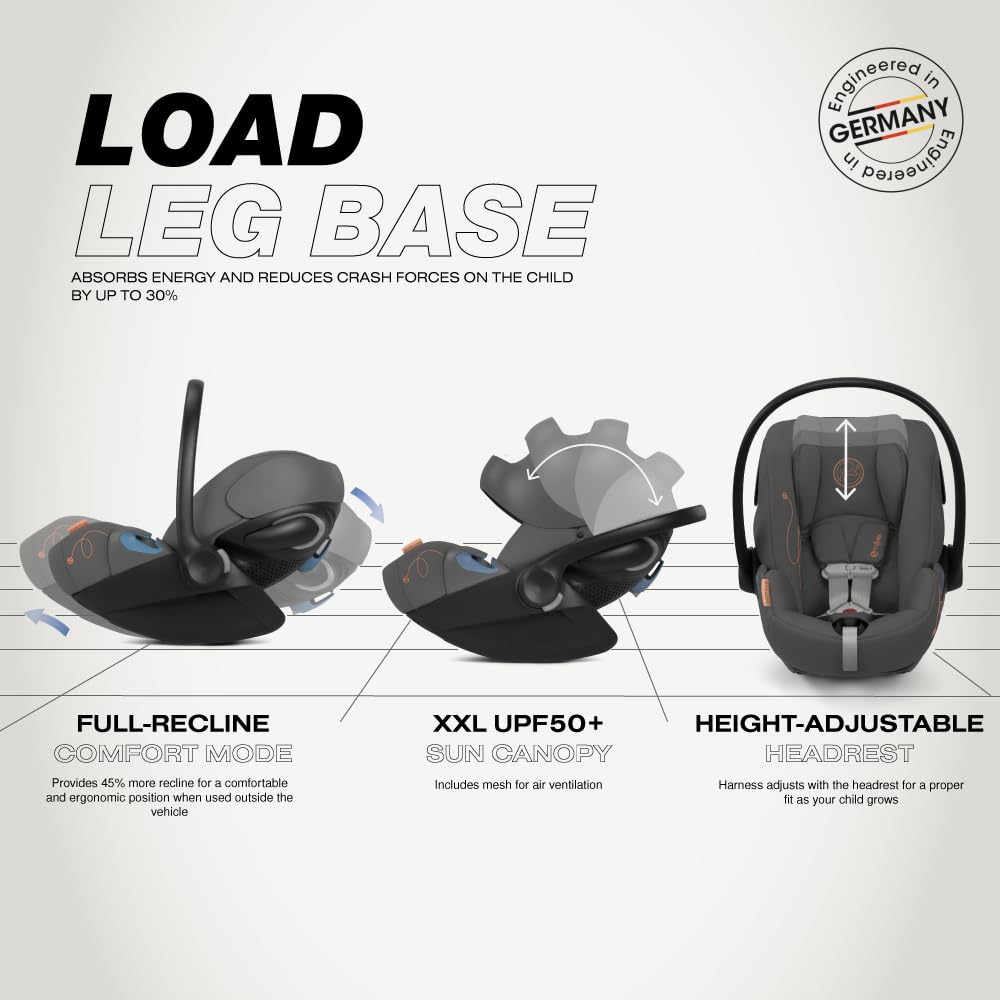
- Load Leg Base: This adjustable leg extends from the base to the vehicle floor, absorbing energy and significantly reducing crash forces on the child by up to 30%.
- SensorSafe Technology: A Bluetooth-enabled chest clip provides real-time alerts to your mobile app. These alerts include notifications if the child unbuckles the chest clip, if the back seat becomes too warm or too cold, or if the driver unintentionally leaves the child behind.


3. Setup and Installation
The Cybex Cloud G Lux is designed for rear-facing installation only. Always ensure the car seat is securely installed before placing your child in it.
3.1. LATCH Installation
The car seat features a one-click rigid LATCH installation system for quick, simple, and safe setup in approximately 5 seconds. Locate the LATCH anchors in your vehicle and align the rigid LATCH connectors on the car seat base. Push firmly until you hear a click, indicating a secure connection. Always check for a tight fit by pulling on the base; it should not move more than one inch side-to-side or front-to-back.
3.2. Load Leg Adjustment
Extend the load leg from the base until it firmly touches the vehicle floor. Ensure the indicator on the load leg turns green, confirming proper contact and stability. The load leg is crucial for absorbing energy and reducing crash forces.
For detailed visual instructions on installation, please refer to the official product video below:
4. Operating Features
4.1. Comfort Extend Recline
The Cloud G Lux offers a full recline position and an extending leg rest, providing a comfortable and ergonomic position for your child when used outside the vehicle, such as on a stroller. This "Comfort Mode" provides 45% more recline for optimal comfort during extended periods outside the car.
4.2. Adjustable Headrest and Harness
The 12-position adjustable headrest allows for proper use from birth up to 35 lbs. The harness system automatically adjusts with the headrest, ensuring a correct and secure fit as your child grows. To adjust, locate the adjustment lever at the top of the headrest, pull it, and slide the headrest up or down to the desired position.
4.3. XXL UPF50+ Sun Canopy
The extra, extra large UPF50+ sun canopy protects your child from the sun's rays. It also includes mesh air ventilation for natural airflow, keeping your child comfortable.
4.4. Stroller Compatibility
The Cloud G Lux is compatible with all CYBEX strollers, allowing you to create a convenient travel system. Simply detach the car seat from its base and click it onto your compatible Cybex stroller frame.

5. Care and Maintenance
Proper care and maintenance will ensure the longevity and safety of your car seat:
- Fabric Cleaning: All seat fabrics are machine washable. Machine wash separately in cold water on a delicate cycle. Do not use bleach. Drip dry only. Do not tumble dry.
- Hard Parts Cleaning: Wipe plastic and metal parts with a mild soap and water solution. Do not use abrasive cleaners or solvents.
- Harness System: Inspect the harness system regularly for any signs of wear, fraying, or damage. Clean the harness straps with a damp cloth and mild soap. Do not immerse the harness in water or machine wash.
6. Specifications
| Feature | Detail |
|---|---|
| Product Dimensions | 26.5 x 17.6 x 15.8 inches |
| Item Model Number | 522001403 |
| Maximum Weight Recommendation | 35 Pounds |
| Maximum Height Recommendation | 32 Inches |
| Minimum Weight Recommendation (Rear-facing) | 4 Pounds |
| Material Composition | 70% Plastic, 15% Softgoods, 5% Metal, 5% Hardparts, 5% Foam |
| Harness Type | 5-Point |
| Installation Type | LATCH |
| Number of Reclining Positions | 12 (adjustable headrest) |
| Item Weight | 12 pounds |
7. Troubleshooting
If you encounter any issues with your Cybex Cloud G Lux car seat, please refer to the following common troubleshooting tips:
- Installation Issues: Ensure the LATCH connectors are fully engaged and the load leg indicator is green. Re-read the installation section carefully.
- Harness Adjustment: If the harness feels too tight or too loose, ensure the headrest is adjusted to the correct height for your child's shoulders. The harness should be snug with no slack.
- SensorSafe Alerts: If you receive unexpected SensorSafe alerts, check the child's buckling, the vehicle's interior temperature, and ensure your mobile device is within range and the app is updated.
- Stroller Attachment: If the car seat does not attach securely to your stroller, ensure it is a compatible CYBEX stroller and that the adapters (if required) are correctly installed.
For persistent issues or specific technical support, please contact Cybex customer service.
8. Warranty and Support
Cybex products are manufactured to the highest quality standards and come with a manufacturer's warranty. For detailed information regarding your product's warranty period, coverage, and how to make a claim, please refer to the warranty card included with your purchase or visit the official Cybex website.
For customer support, product registration, or to find authorized service centers, please visit the Cybex Store on Amazon or the official Cybex website: www.cybex-online.com.
Related documents


Ask a question about this manual
Ask about setup, troubleshooting, compatibility, parts, safety, or missing instructions. Manuals+ will review the question and use this page’s manual context to help answer it.