
EVMaster 28FT 32Amp Portable EV Charger (B0CLGVJNZH)
EVMaster Level 2 Portable EV Charger User Manual
Model: 28FT 32Amp Portable EV Charger (B0CLGVJNZH)
Brand: EVMaster
1. Introduction
Thank you for choosing the EVMaster Level 2 Portable EV Charger. This manual provides essential information for the safe and efficient operation, installation, and maintenance of your new electric vehicle charging station. Please read this manual thoroughly before using the product and retain it for future reference.

Figure 1.1: The EVMaster Level 2 Portable EV Charger, including the charging unit, NEMA 14-50P plug, and a portable carrying bag.
2. Safety Information
Always adhere to the following safety precautions to prevent injury, damage to the product, or damage to your vehicle.
- Electrical Safety: Ensure the NEMA 14-50P outlet is properly installed and grounded by a qualified electrician. Do not use extension cords or adapters not specifically designed for EV charging.
- Environmental Conditions: The charger is designed for use in various weather conditions (IP67 control box), but avoid submerging it in water. Do not operate if the charger or cable is visibly damaged.
- Overheating Protection: The charger features intelligent overheat protection. If the unit becomes excessively hot, it will automatically reduce current or stop charging.
- Children and Pets: Keep the charger and cables out of reach of children and pets during operation.
- Ventilation: Ensure adequate ventilation around the charging unit during operation to prevent heat buildup.
- UL Certification: The EV connector and cable are UL certified, ensuring compliance with safety standards.

Figure 2.1: The charger incorporates multiple protection mechanisms, including over-current, over-voltage, under-voltage, overheating, and leakage protection, along with Type 8X waterproof rating.
3. What's in the Box
Upon opening the package, please verify that all the following components are included:
- EVMaster Level 2 Portable EV Charger (with integrated cable and NEMA 14-50P plug)
- Portable Carrying Bag
- Operating Manual (this document)
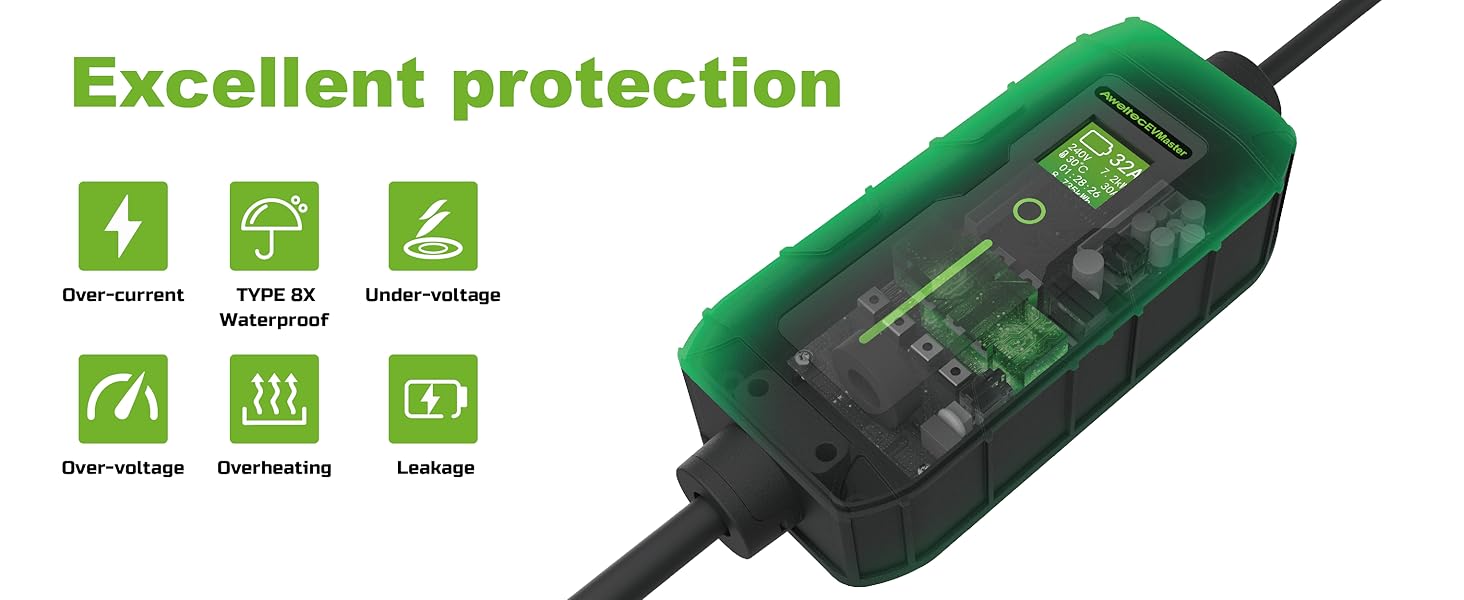
Figure 3.1: Visual representation of the items included in the product packaging.
4. Specifications
| Feature | Specification |
|---|---|
| Model | 28FT 32Amp Portable EV Charger |
| Input Voltage | 240 Volts |
| Output Voltage | 240 Volts (DC) |
| Current Rating | Adjustable: 10A/16A/24A/32A |
| Cable Length | 28 Feet |
| Plug Type | NEMA 14-50P |
| EV Connector Type | SAE J1772 (Type 1) |
| Protection Rating | IP67 (Control Box) |
| Certifications | ETL Certified (Control Box), UL Certified (EV Connector and Cable) |
| Product Dimensions | 20 x 12 x 4 inches |
| Item Weight | 10.36 pounds (4.71 Kilograms) |
5. Setup and Installation
The EVMaster portable charger is designed for ease of use. Follow these steps for initial setup:
5.1 Power Source Requirements
- The charger requires a dedicated 240-volt NEMA 14-50P outlet. This is a common outlet type for electric ranges or RV hookups.
- Ensure the circuit breaker for the outlet is rated appropriately for the desired charging amperage (e.g., a 50-amp breaker for 32-amp charging).
5.2 Connecting the Charger
- Locate a suitable NEMA 14-50P outlet.
- Plug the charger's NEMA 14-50P plug firmly into the outlet.
- The control box LCD screen will illuminate, indicating it is powered on and ready for connection.

Figure 5.1: The charger is easily connected to a standard NEMA 14-50P outlet for portable power.
6. Operating Instructions
Operating your EVMaster charger is straightforward. No app, Wi-Fi, or Bluetooth connection is required.
6.1 Connecting to Your Electric Vehicle
- Ensure the charger is plugged into the NEMA 14-50P outlet.
- Open your vehicle's charging port.
- Insert the SAE J1772 connector firmly into your vehicle's charging port until it clicks into place.
- The charger will automatically begin the charging process. The LCD screen will display real-time charging data.

Figure 6.1: Simply plug the charger into your EV's charging port to begin charging.
6.2 Understanding the LCD Screen and LED Indicators
The control box features an intuitive LCD screen and LED indicator lights to provide real-time charging status.
- LCD Screen: Displays information such as actual charging voltage, selected amperage limit, actual charging power (kW), actual charging amperage, and total energy delivered (kWh).
- LED Indicators:
- Solid Green: Waiting for connection.
- Pulsing Green: Charging in progress.
- Solid Light Green: Fully charged.
- Solid Red: Error. Refer to the Troubleshooting section.

Figure 6.2: The LED light on the control box clearly indicates the charging status.
6.3 Adjusting Amperage
The charger allows you to adjust the charging amperage to suit your needs or the capacity of your electrical circuit. The available settings are 10A, 16A, 24A, and 32A.
- With the charger plugged into the wall but NOT connected to the vehicle, press the 'SET' button on the control box.
- Each press will cycle through the available amperage settings.
- Once you have selected your desired amperage, connect the charger to your vehicle. The charger will remember the last selected setting for future use.
7. Compatibility
The EVMaster Level 2 Portable EV Charger is compatible with most electric vehicles and plug-in hybrid vehicles that comply with the SAE J1772 standard (Type 1 connector).
- SAE J1772 Standard: This is the common charging standard for most EVs in North America.
- Tesla Vehicles: Tesla vehicles require a separate J1772 to Tesla adapter (not included) to use this charger.

Figure 7.1: The charger is compatible with all J1772 EVs, including electric and plug-in hybrid vehicles from various manufacturers. A Tesla adapter is required for Tesla vehicles.
8. Maintenance
Proper maintenance ensures the longevity and safe operation of your EVMaster charger.
- Cleaning: Regularly wipe down the control box and cables with a soft, dry cloth. Do not use harsh chemicals or abrasive cleaners. Ensure the connector is free of dust and debris.
- Cable Care: Avoid kinking, twisting, or driving over the charging cable. Store the cable neatly when not in use.
- Storage: When not in use, store the charger in its portable carrying bag in a dry, cool place, away from direct sunlight and extreme temperatures.

Figure 8.1: The included portable bag allows for effortless storage and convenient transport of the charger in your vehicle.
9. Troubleshooting
If you encounter issues with your EVMaster charger, refer to the following common problems and solutions:
| Problem | Possible Cause | Solution |
|---|---|---|
| Charger not powering on (LCD dark) | No power from outlet; loose connection. | Check the NEMA 14-50P outlet and ensure the plug is fully inserted. Check the circuit breaker. |
| Charging not starting (LED solid green) | EV connector not fully inserted; vehicle not ready to charge. | Ensure the J1772 connector is fully seated in the vehicle's port. Check your vehicle's charging settings. |
| LED indicator is solid red (Error) | Internal fault; over-current/voltage; overheating. | Unplug the charger from the wall and the vehicle. Wait 5 minutes, then plug it back in. If the error persists, contact customer support. |
| Charging speed is slower than expected | Amperage setting is low; vehicle's charging limit; power supply issue. | Adjust the charger's amperage setting to a higher value (up to 32A). Check your vehicle's charging settings. Ensure the outlet can provide sufficient power. |
If the problem persists after attempting these solutions, please contact EVMaster customer support for further assistance.
10. Warranty and Support
EVMaster is committed to providing high-quality products. This charger is ETL certified, ensuring it meets rigorous safety and performance standards.
For any product inquiries, technical support, or warranty claims, please contact EVMaster customer service through the retailer where you purchased the product or visit the official EVMaster store online. Please have your product model number (B0CLGVJNZH) and purchase date ready when contacting support.
Related Documents - 28FT 32Amp Portable EV Charger (B0CLGVJNZH)
 |
Aimiler EV Charger App Guide: Setup and Usage A comprehensive guide to setting up and using the Aimiler EV charger app, including device pairing, appointment scheduling, and charging instructions. |
 |
AIMILER EV Charger Troubleshooting Guide A comprehensive troubleshooting guide for AIMILER Level 2 Electric Vehicle (EV) Chargers, covering common faults and their solutions for issues like unable to turn on, unable to start, incomplete charge, screen display errors, and connectivity problems. |
 |
VEVOR AC EV Charger User Manual - Models EV-B06-US003A, EV-B06-US003B, EV-B06-US007B This user manual provides comprehensive information for VEVOR AC EV Chargers, including safety precautions, product specifications, operating instructions, mobile app integration, fault descriptions, and installation guides for models EV-B06-US003A, EV-B06-US003B, and EV-B06-US007B. |
 |
DAOLAR Electric Vehicle AC Charger Instruction Manual - Model F07-U16A Comprehensive instruction manual for the DAOLAR F07-U16A Electric Vehicle AC Charger. Learn about product features, operation, safety precautions, and technical specifications for charging electric vehicles. |
 |
Tera Portable EV Charger P02 User Manual User manual for the Tera Portable EV Charger P02, detailing safety precautions, product specifications, operating instructions, fault descriptions, and package contents. Includes information on installation, usage, and troubleshooting. |
 |
VEVOR AC EV Charger User Manual - Model EV-B06-US007B Comprehensive user manual for the VEVOR AC EV Charger, Model EV-B06-US007B. Learn about installation, operation, safety precautions, troubleshooting, and product specifications for your electric vehicle charging station. Features IP66 rating and APP connectivity. |