
Introduction
The VOCOlinc Air Tracker Tags are smart item locators designed to help you find your belongings using the Apple Find My network. These tags are MFi certified, ensuring seamless compatibility with your iOS devices. They are ideal for tracking keys, luggage, wallets, bags, and other valuable items, providing both nearby and far-away tracking capabilities.

Image: A set of four black VOCOlinc Air Tracker Tags, showcasing their compact, square design with rounded corners and a small loop for attachment. Each tag features the 'vocolinc' logo.
Setup
Follow these steps to pair your VOCOlinc Air Tracker Tag with your Apple iOS device using the Find My app. Ensure your device's Bluetooth is enabled.
- Turn on Find My App and Bluetooth: On your iOS device, open the Find My app and ensure Bluetooth is active.
- Add Item: Tap on the "Items" tab at the bottom of the Find My app screen, then select "Add Item".
- Select Other Supported Item: From the options, choose "Other Supported Item".
- Pairing: Press and hold the button on your VOCOlinc Tag for 10 seconds to reset it. The app will detect the tag. Follow the on-screen instructions within the Find My app to complete the pairing process.
- Subsequent Pairing: For additional tags, tap the '+' icon and then "Add Other Item" to pair them.

Image: A visual guide illustrating the four steps to pair the VOCOlinc Air Tracker Tag with an iPhone using the Apple Find My application, emphasizing that pairing is done through the app, not directly via Bluetooth settings.
Note: This product is compatible only with iOS devices and does not support Android devices.
Operating Instructions
Finding Items Nearby
When your VOCOlinc tracker is within Bluetooth range (up to 200 feet without obstacles), you can use the Apple Find My app to make it ring. The built-in speaker produces a loud sound (80-100 decibels) to help you locate your item quickly. You can also ask Siri for assistance.

Image: An illustration showing a VOCOlinc tag attached to keys, emitting sound waves from under a couch cushion, while an iPhone displays the Find My app interface indicating the tag's proximity.
Finding Items Far Away
If your item is outside of Bluetooth range, the VOCOlinc tracker leverages the vast Apple Find My network, composed of hundreds of millions of Apple devices worldwide. The location of your tag will be anonymously updated by nearby Apple devices, allowing you to view its last known location on a map within the Find My app. You can even use the app to get navigation directions to its vicinity.

Image: A person holding an iPhone displaying the Apple Find My map, showing the location of a VOCOlinc tag attached to keys in an outdoor urban setting, with navigation options visible on the screen.
Left Behind Remind and Lost Mode
- Left Behind Remind: Receive instant alerts on your iOS device if you leave your item behind, helping you prevent loss in the first place.
- Lost Mode: If your VOCOlinc tracker is lost, activate Lost Mode in the Find My app. You will be automatically notified when any device in the Apple Find My network detects your tag's location.

Image: A VOCOlinc tag attached to a set of keys resting on a table, with an iPhone in the background displaying a notification that the item was left behind, illustrating the 'Left Behind Remind' feature.
Privacy Protection
The Apple Find My app network is designed with privacy in mind. All location data is encrypted and anonymous, ensuring that your location history is not stored on the VOCOlinc tracker itself.
Maintenance
Water Resistance
The VOCOlinc Key Finder tag features an IP67 water-resistant rating, making it durable against splashes and dust. This rating means it can withstand immersion in up to 1 meter of water for up to 30 minutes.
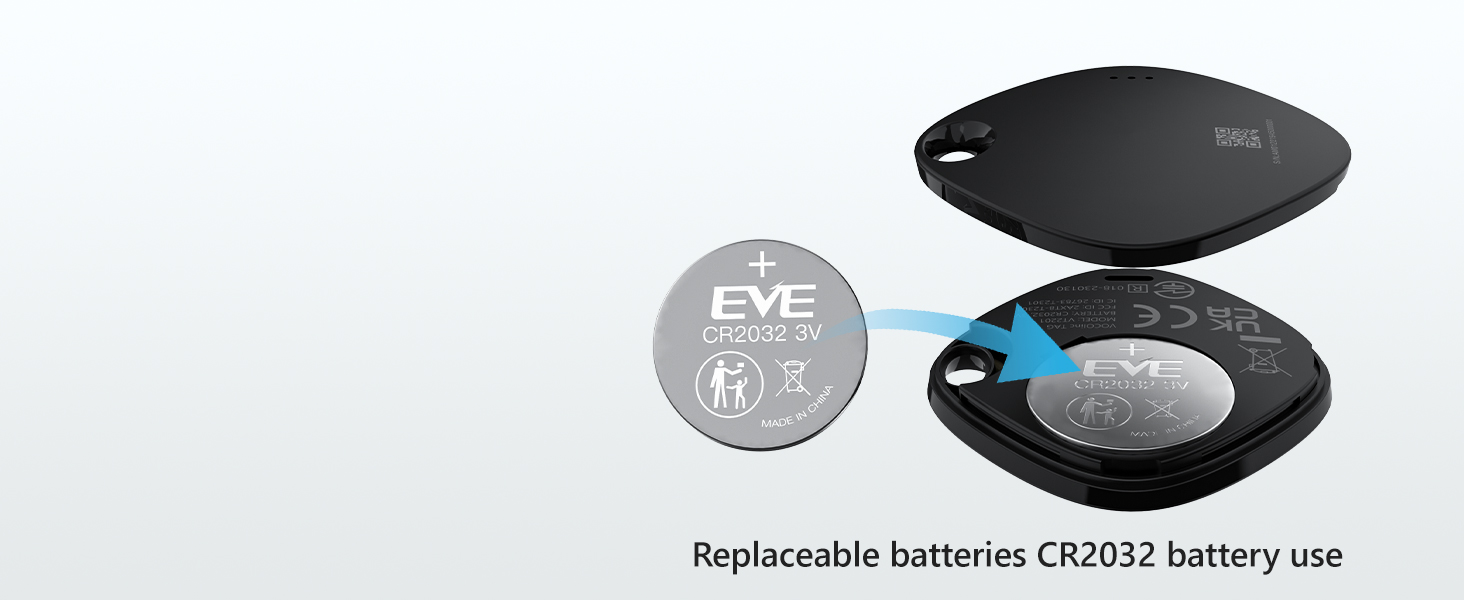
Image: A VOCOlinc tag attached to keys, placed on a countertop next to a sink with water splashing, illustrating its IP67 water-resistant capability.
Battery Replacement
The VOCOlinc Air Tracker Tag is powered by a replaceable CR2032 coin cell battery, which typically lasts over one year. When the battery level is low, you will receive a notification on your iOS device prompting you to replace it. To replace the battery, gently open the tag's casing, remove the old CR2032 battery, and insert a new one with the positive (+) side facing up. Close the casing securely.

Image: A diagram illustrating the process of replacing the CR2032 coin cell battery in the VOCOlinc tag, showing the tag opened with the battery being inserted.
Troubleshooting
- Device Not Pairing:
- Ensure your iOS device's Bluetooth is turned on.
- Confirm you are using the Apple Find My app for pairing, not directly through Bluetooth settings.
- Try resetting the VOCOlinc tag by pressing and holding its button for 10 seconds.
- Ensure your iOS device is updated to the latest software version.
- Device Not Ringing or Ringing Quietly:
- Check the battery level of the tag in the Find My app; replace if low.
- Ensure the tag is within Bluetooth range of your iOS device when attempting to ring it.
- Verify that your phone's volume is not muted or too low.
- Inaccurate Location or Disconnection:
- Location accuracy depends on the density of the Apple Find My network. In remote areas, updates may be less frequent.
- Bluetooth range can be affected by obstacles (walls, furniture) and interference. Try moving closer to the tag.
- Ensure your iOS device has a stable internet connection for map updates.
Specifications
| Feature | Detail |
|---|---|
| Product Dimensions | 1.37 x 1.37 x 0.29 inches (36mm x 36mm x 7.5mm) |
| Item Weight | 2.08 ounces |
| Connectivity Technology | Bluetooth |
| Compatible Devices | iOS devices only (Not for Android) |
| Battery Type | CR2032 Coin Cell (included, replaceable) |
| Battery Life | Over 1 year |
| Sound Level | 80-100 decibels |
| Bluetooth Range | Up to 200 feet (60 meters) without obstacles |
| Water Resistance | IP67 rated |
| What's in the Box | 4 x VOCOlinc Air Tracker Tags |

Image: A technical diagram of the VOCOlinc tag, detailing its dimensions (1.41 inches by 1.41 inches by 0.29 inches) and highlighting key features such as loud sound (80-100 dB), IP65 waterproof rating, up to 200ft/60m Bluetooth range, and replaceable battery.
Warranty and Support
VOCOlinc provides customer support for its products. If you have any questions regarding the use, setup, or troubleshooting of your VOCOlinc Air Tracker Tags, please contact our customer service. We offer 24-hour customer service to assist you.
For specific warranty details, please refer to the product packaging or the official VOCOlinc website.


