
GUESS Men's 45mm Multifunction Watch
Model: GW0491G4 - Instruction Manual
1. Introduction
This manual provides essential instructions for the proper setup, operation, and maintenance of your GUESS Men's 45mm Multifunction Watch, Model GW0491G4. Please read this manual thoroughly to ensure optimal performance and longevity of your timepiece. Keep this manual for future reference.
2. Product Overview
The GUESS GW0491G4 is a two-tone multifunction watch featuring a blue dial and a comfortable silicone strap. Its design incorporates multiple sub-dials for enhanced functionality.
- Case Size: 45mm rose gold tone case
- Strap: 8-inch blue silicone strap
- Dial: Blue dial with multifunction sub-dials
- Movement: Quartz (battery-powered)

Image 2.1: Front view of the GUESS GW0491G4 watch, showcasing the blue dial, rose gold tone case, and silicone strap.
3. Components of Your Watch
Familiarize yourself with the key components of your watch:
- Crown: Located on the right side of the case, used for setting time and date.
- Pushers: Buttons adjacent to the crown, used to adjust the multifunction sub-dials.
- Hour/Minute Hands: Indicate the current time.
- Multifunction Sub-dials: Typically display day of the week, date, and a 24-hour format.
- Silicone Strap: Durable and comfortable band for wearing the watch.
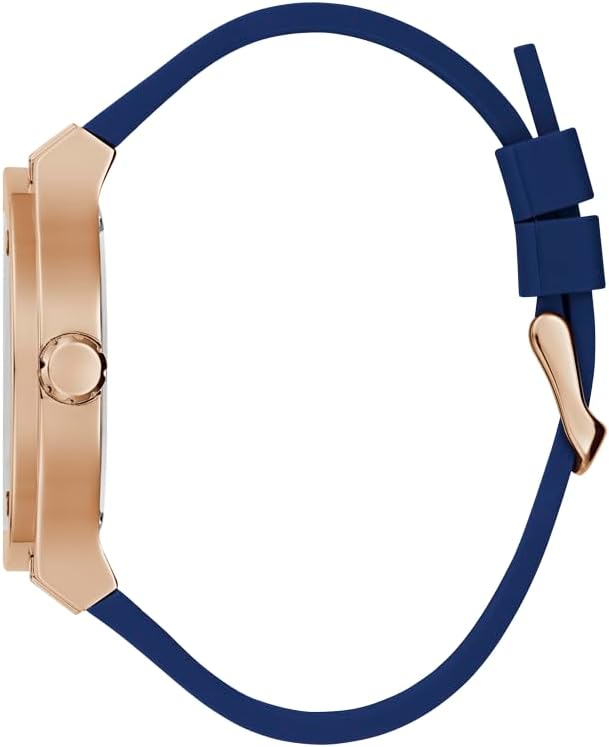
Image 3.1: Side view of the watch, highlighting the crown and the rose gold tone case.
4. Setup Instructions
4.1. Setting the Time
- Pull the crown out to the second click position.
- Rotate the crown to move the hour and minute hands clockwise until the desired time is set. Ensure AM/PM is correctly observed if your watch has a 24-hour indicator or date changes at midnight.
- Push the crown back into the normal position to start the watch.
4.2. Setting the Date and Day
Your watch features multifunction sub-dials for date and day of the week. These are typically adjusted using the pushers or by rotating the crown in the first click position.
- Pull the crown out to the first click position.
- Rotate the crown (usually clockwise or counter-clockwise) to adjust the date sub-dial.
- Use the pushers (top and/or bottom) to adjust the day of the week sub-dial. Press the pushers repeatedly until the correct day is displayed.
- Once set, push the crown back into the normal position.
Note: Avoid setting the date between 9 PM and 3 AM, as this can interfere with the automatic date change mechanism and potentially damage the movement.
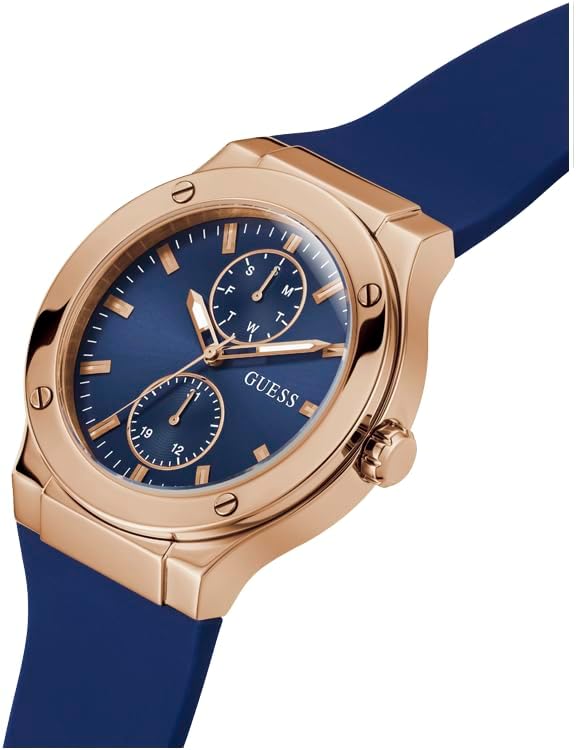
Image 4.1: Angled view of the watch dial, illustrating the position of the crown and pushers for setting.
5. Operating Instructions
Once the time and date are set, your watch operates automatically. The multifunction sub-dials will advance with the main time. No further manual operation is typically required for daily use beyond initial setup.
5.1. Reading the Multifunction Dials
- Day Sub-dial: Indicates the current day of the week (e.g., M, T, W).
- Date Sub-dial: Displays the current day of the month (1-31).
- 24-Hour Sub-dial: Shows the time in a 24-hour format, often synchronized with the main time display.
6. Maintenance
6.1. Cleaning Your Watch
To maintain the appearance of your watch:
- Wipe the case and strap with a soft, dry cloth regularly.
- For silicone straps, a damp cloth with mild soap can be used, then rinse thoroughly and dry.
- Avoid using harsh chemicals or abrasive materials, as these can damage the finish.
6.2. Water Resistance
Refer to the water resistance rating engraved on the back of your watch. This watch is generally designed for everyday use and can withstand splashes or brief immersion. However, it is not suitable for swimming, diving, or prolonged water exposure unless specifically indicated otherwise. Do not operate the crown or pushers when the watch is wet.
6.3. Battery Replacement
Your watch is powered by a product-specific battery (included). When the battery runs low, the watch hands may stop or operate erratically. Battery replacement should be performed by a qualified watch technician to ensure proper sealing and maintain water resistance.
7. Troubleshooting
- Watch Not Running:
- Check if the crown is pushed in completely.
- The battery may need replacement. Consult a professional watch repair service.
- Incorrect Time/Date:
- Refer to Section 4, "Setup Instructions," to reset the time and date.
- Ensure the crown is fully pushed in after setting.
- Condensation Under Crystal:
- This may indicate a loss of water resistance. Have the watch inspected by a professional immediately.
8. Specifications
| Feature | Detail |
|---|---|
| Model Number | GW0491G4 |
| Product Dimensions | 2.76 x 0.79 x 1.57 inches |
| Item Weight | 7.05 ounces |
| Department | Men's |
| Batteries | 1 Product Specific battery (included) |
| Manufacturer | Guess |
| First Available Date | October 19, 2023 |
9. Warranty and Support
Your GUESS watch is covered by a manufacturer's warranty against defects in materials and workmanship. For specific warranty terms and conditions, please refer to the warranty card included with your purchase or visit the official GUESS Watches website. For technical support or service inquiries, please contact GUESS customer service or an authorized service center.
You can find more information and support on the official GUESS website: www.guesswatches.com


