
1. Introduction
Welcome to your new GUESS GW0664G1 analog quartz watch. This manual provides essential information for setting up, operating, and maintaining your timepiece. Please read these instructions carefully to ensure proper use and longevity of your watch.
2. Product Overview
The GUESS GW0664G1 is a men's analog quartz watch featuring a distinctive design with an asymmetrical crown and a multifunction dial. It comes with interchangeable straps, allowing for versatile styling.
Key Features:
- 44 mm silver-tone case
- White dial
- Multifunction dial
- Interchangeable genuine leather and silicone straps
- 20.3 cm interchangeable strap length

Image: The GUESS GW0664G1 watch, showcasing its silver-tone case, white multifunction dial, and both the attached brown leather strap and the additional black silicone strap.
3. Setup
Attaching/Changing Straps:
Your GUESS GW0664G1 watch comes with interchangeable straps. To change a strap:
- Locate the spring bar pins on the underside of the strap where it connects to the watch case.
- Using a spring bar tool or a small, pointed object, gently push the spring bar pin inwards to release one end from the lug hole.
- Carefully remove the strap.
- To attach a new strap, insert one end of the spring bar into a lug hole.
- While holding that end in place, use the tool to push the other end of the spring bar inwards and guide it into the opposite lug hole.
- Ensure both ends of the spring bar are securely seated in the lug holes by gently pulling on the strap.

Image: The GUESS GW0664G1 watch worn on a wrist, demonstrating its appearance when in use.

Image: A close-up of hands holding the GUESS GW0664G1 watch with its brown leather strap, alongside the interchangeable black silicone strap, illustrating the strap changing process.
4. Operating Your Watch
Setting the Time:
- Pull the crown (the knob on the side of the watch case) out to the first or second position (standard operation).
- Turn the crown clockwise or counter-clockwise to adjust the hour and minute hands to the correct time.
- Once the time is set, push the crown back into its original position to start the watch movement.
Using the Multifunction Dial:
The GW0664G1 features a multifunction dial, typically indicating day of the week, date, or 24-hour time.
- Date/Day Setting: If your watch has a date or day display, pull the crown out to the first position (usually a half-pull). Turn the crown to adjust the date or day. Avoid setting the date between 9 PM and 3 AM, as this can damage the movement.
- 24-Hour Sub-dial: This sub-dial usually synchronizes with the main hour hand and indicates the time in a 24-hour format, useful for distinguishing AM/PM. It typically adjusts automatically when the main time is set.
- Other Sub-dials: If there are other sub-dials, they may indicate a second time zone or other functions. Consult a more detailed diagram if specific sub-dial functions are unclear.
5. Maintenance
Cleaning:
To clean your watch, wipe the case and crystal with a soft, damp cloth. For leather straps, avoid excessive moisture and harsh chemicals. Silicone straps can be washed with mild soap and water.
Water Resistance:
While many watches offer some water resistance, it is crucial to understand its limitations. Avoid exposing your watch to hot water, steam, or prolonged submersion unless explicitly stated otherwise in the specifications. Always ensure the crown is fully pushed in before any contact with water.
Battery Replacement:
This watch is powered by a quartz movement and requires a battery. When the watch stops or the second hand skips, it indicates a low battery. Battery replacement should be performed by a qualified watch technician to prevent damage to the movement and maintain water resistance.
Storage:
When not in use, store your watch in a cool, dry place, away from direct sunlight and extreme temperatures. The original packaging box is ideal for storage.
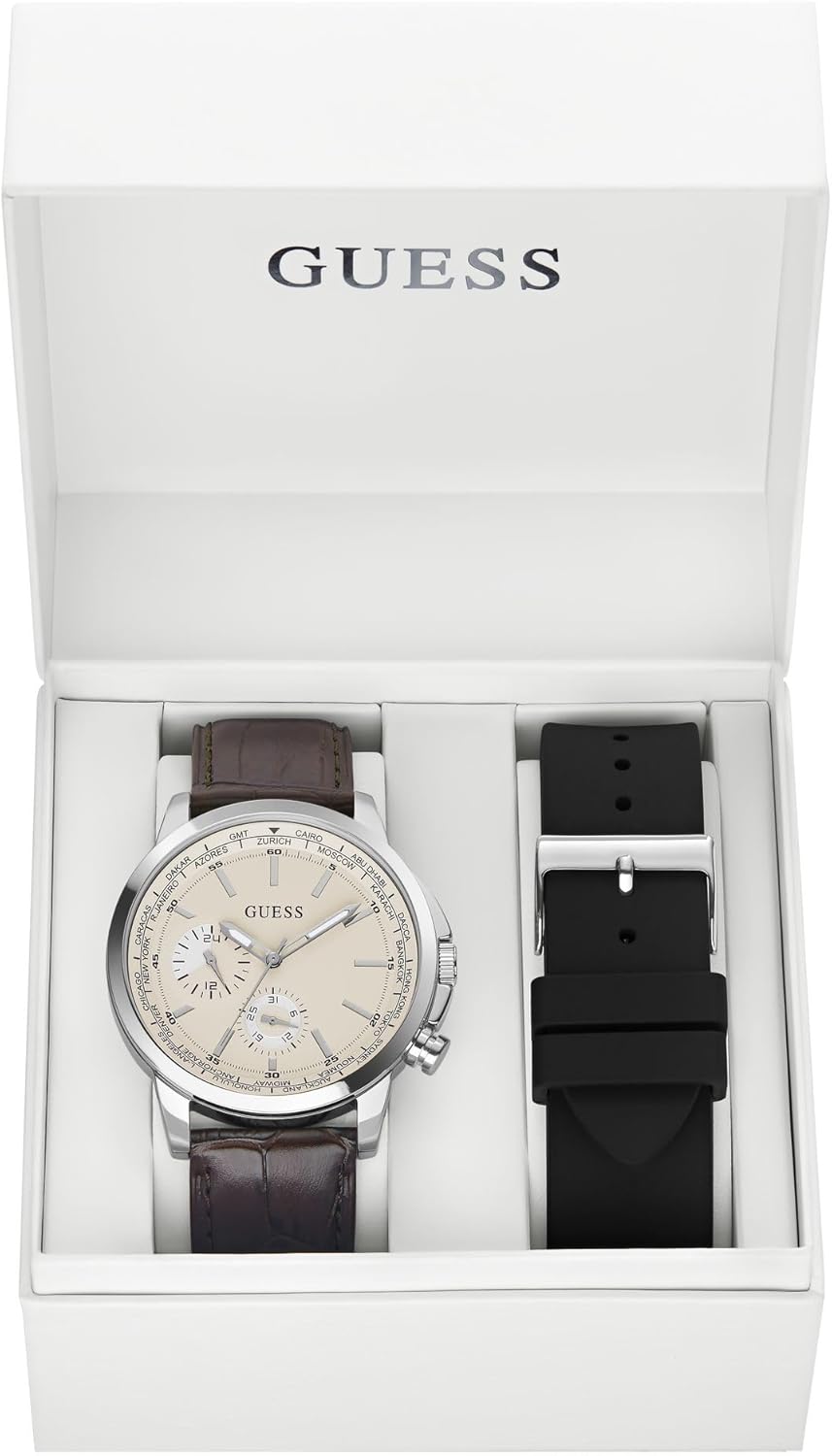
Image: The GUESS GW0664G1 watch presented in its white box, alongside the additional black silicone strap, suitable for storage.
6. Troubleshooting
Watch Not Running:
- Check if the crown is fully pushed in.
- The battery may need replacement. Consult a professional watch repair service.
Incorrect Time/Date:
- Re-set the time and date as per the "Operating Your Watch" section.
- Ensure the crown is fully pushed in after setting.
Condensation Under Crystal:
- This indicates a potential breach in water resistance. Seek professional service immediately to prevent internal damage.
7. Specifications
| Feature | Detail |
|---|---|
| Model Number | GW0664G1 |
| Brand | GUESS |
| Movement | Quartz Analog |
| Case Diameter | 44 mm |
| Case Material | Silver-tone |
| Dial Color | White |
| Strap Material | Genuine Leather, Silicone |
| Strap Length | 20.3 cm (interchangeable) |
| Product Dimensions | 9 x 9 x 7 cm |
| Item Weight | 198 grams |
| Battery | 1 Product Specific (included) |
| Service | Men |
| ASIN | B0CLFBCDMV |
| Manufacturer | Guess |
| Date First Available | 28 October 2023 |
8. Warranty and Support
For warranty information and customer support, please refer to the documentation included with your purchase or visit the official GUESS website. Keep your proof of purchase for any warranty claims.
For additional assistance, you may visit the GUESS Store on Amazon.


