
AYINO HD950
AYINO HD950 5.1CH Surround Sound Decoder Splitter Converter User Manual
Model: HD950 | Brand: AYINO
1. Introduction
The AYINO HD950 is a versatile 5.1 channel surround sound decoder and HDMI splitter converter designed to enhance your audio and video experience. It supports various digital audio decoding formats including Dolby Atmos, AC3, DTS HD, and LPCM. With 4K 60Hz HDMI 2 in 1 out, HDCP 2.2, and HDR support, it integrates seamlessly into modern home theater systems. This manual provides detailed instructions for setup, operation, and maintenance of your device.
2. Box Contents
Please check that all the following items are included in your package:
- 1x AYINO HD950 Audio Decoder
- 1x Power Adapter
- 1x Remote Control (Batteries not included)
- 1x Wireless Antenna
- 1x Optical Cable
- 1x USB A to USB B Cable
- 3x 2RCA Cable
- 1x OFC Audio Cable
- 1x USB C to USB Female Connector
- 1x User Manual (This document)
3. Product Overview
Familiarize yourself with the AYINO HD950's design and key features.
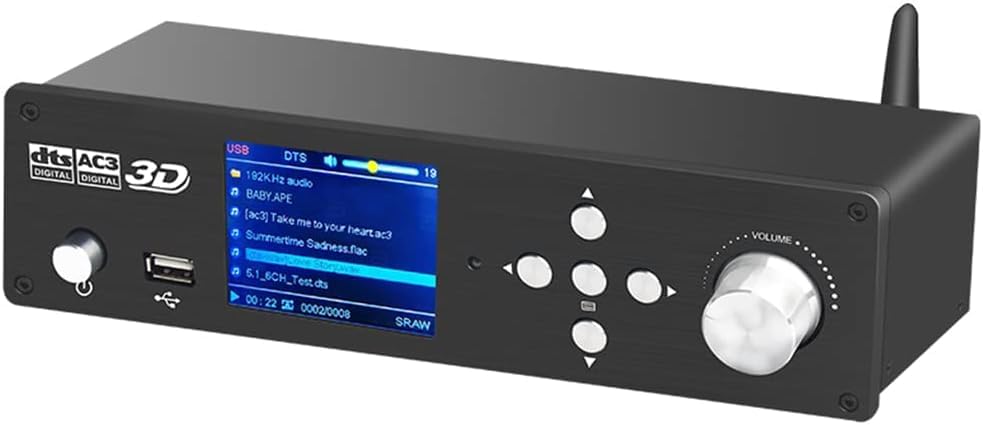
Figure 3.1: Front view of the AYINO HD950 decoder, showing the display, control buttons, and volume knob.

Figure 3.2: Overview of key features including DTS, AC3, DSD decoding, 24Bit/192Khz DSP, USB/SD playback, PC-USB, Coaxial/Optical I/O, Bluetooth 5.0, Remote control, HDMI 2.0, 4K support, and ARC functionality.
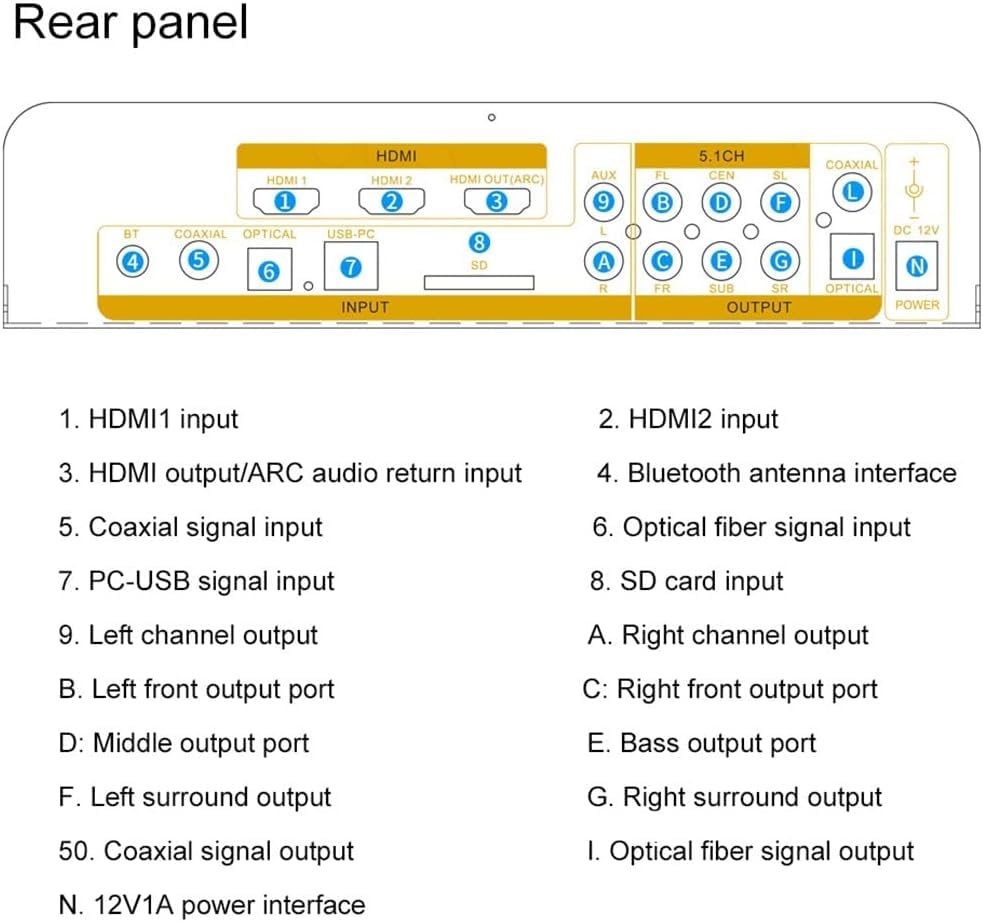
Figure 3.3: Detailed diagram of the rear panel connections, including HDMI inputs/output, Bluetooth antenna, Coaxial, Optical, PC-USB, SD card slots, 5.1ch RCA outputs, and power input.
- HDMI1 input
- HDMI2 input
- HDMI output/ARC audio return input
- Bluetooth antenna interface
- Coaxial signal input
- Optical fiber signal input
- PC-USB signal input
- SD card input
- Left channel output
- Right channel output
- Front Left (FL) output port
- Front Right (FR) output port
- Center (CEN) output port
- Subwoofer (SUB) output port
- Left Surround (SL) output
- Right Surround (SR) output
- Coaxial signal output
- Optical fiber signal output
- 12V/1A power interface
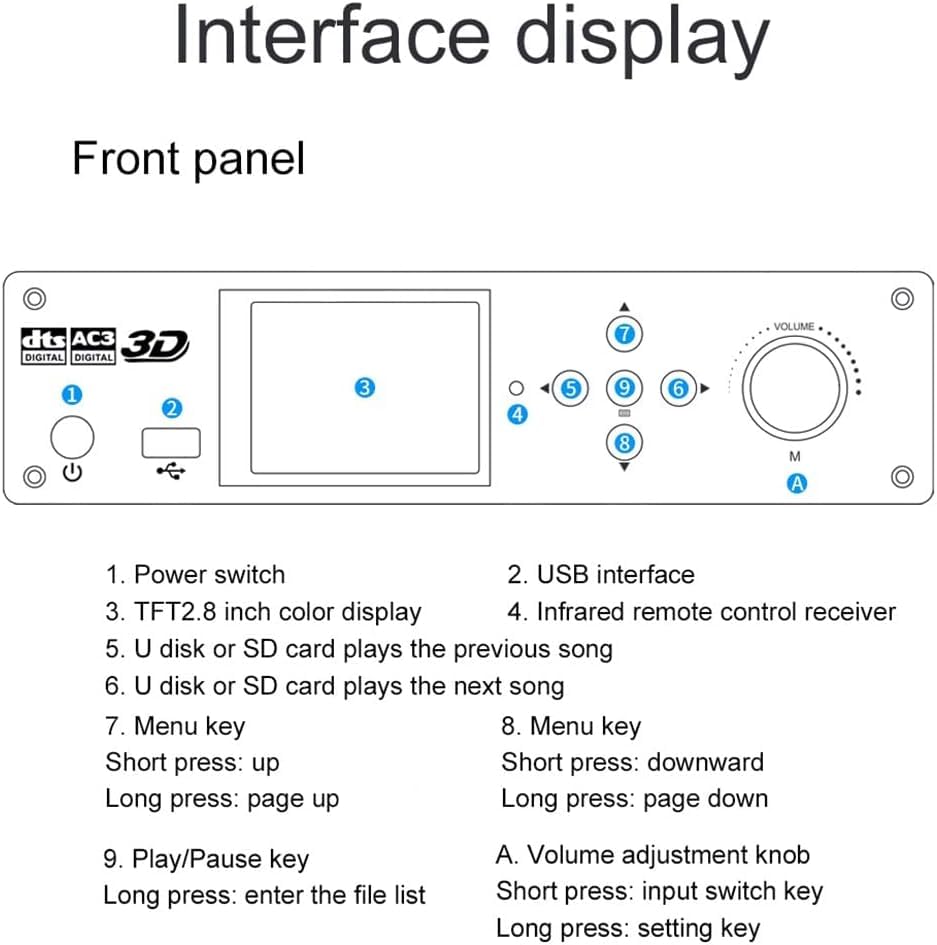
Figure 3.4: Detailed diagram of the front panel controls and display.
- Power switch
- USB interface
- TFT 2.8 inch color display
- Infrared remote control receiver
- U disk or SD card plays the previous song
- U disk or SD card plays the next song
- Menu key (Short press: up, Long press: page up)
- Menu key (Short press: downward, Long press: page down)
- Play/Pause key (Long press: enter the file list)
- Volume adjustment knob (Short press: input switch key, Long press: setting key)
4. Setup Instructions
Follow these steps to connect your AYINO HD950 to your audio and video system.
4.1 Connecting Input Sources

Figure 4.1: General interface connection diagram for various input and output devices.
- HDMI Inputs: Connect your source devices (e.g., TV box, game console, Blu-ray player) to HDMI1 or HDMI2 ports on the rear panel.
- HDMI ARC: If your TV supports Audio Return Channel (ARC), connect an HDMI 2.0 (19+1 core) cable from your TV's HDMI ARC port to the HDMI OUT(ARC) port on the HD950. This allows audio from your TV to be sent back to the decoder.
- Optical/Coaxial: Connect digital audio sources (e.g., TV, set-top box) to the OPTICAL or COAXIAL input ports.
- PC-USB: Connect your computer to the PC-USB port using the provided USB A to USB B cable to use the HD950 as an external sound card.
- USB Disk/SD Card: Insert a USB flash drive or SD card into the respective slots for media playback.
- Bluetooth: Attach the wireless antenna to the BT port. Enable Bluetooth on your mobile device and pair with 'HD950'.
- AUX: Connect analog audio sources to the AUX input.
4.2 Connecting Output Devices
- 5.1 Channel Analog Output: Connect the 5.1ch RCA outputs (FL, FR, CEN, SUB, SL, SR) to a 5.1 channel amplifier or active 5.1 speakers.
- 2.0 Channel Analog Output: Connect the FL and FR RCA outputs to a 2.0 channel amplifier or active 2.0 speakers.
- HDMI Output: Connect the HDMI OUT(ARC) port to your monitor, HDTV, or projector for video output.
- Digital Audio Output: Connect the COAXIAL or OPTICAL output ports to a digital amplifier or digital speakers for digital audio passthrough (not supported for U disk playback).
4.3 Power Connection
Connect the provided power adapter to the DC 12V/1A input port on the rear panel and then plug it into a power outlet.
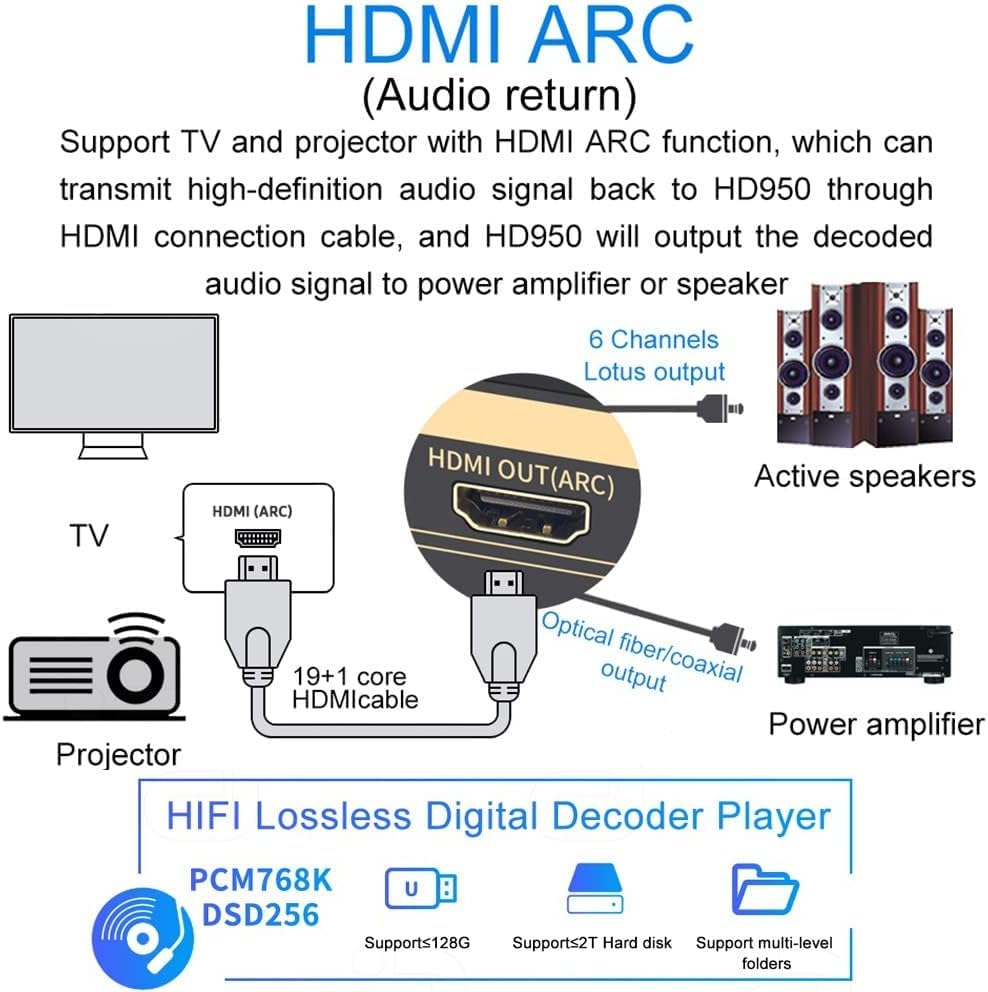
Figure 4.2: Diagram illustrating HDMI ARC connection from a TV to the HD950, and then to active speakers or a power amplifier.
5. Operating Instructions
5.1 Power On/Off
Press the power switch (1) on the front panel to turn the device on or off.
5.2 Input Source Selection
Short press the Volume adjustment knob (A) on the front panel or use the 'Input' button on the remote control to cycle through available input sources (HDMI1, HDMI2, ARC, PC-USB, USB Disk, SD Card, Coaxial, Optical, AUX, Bluetooth). The selected input will be displayed on the TFT screen (3).
5.3 Volume Control
Rotate the Volume adjustment knob (A) on the front panel or use the volume buttons on the remote control to adjust the master volume. Each channel's volume can be adjusted separately via the remote control. Note: When audio originates from a set-top box, volume control may only be possible via the HD950's remote or knob, not your TV remote.
5.4 Media Playback (USB/SD Card)
Insert a USB disk or SD card. Use the navigation buttons (5, 6, 7, 8) on the front panel or the remote control to browse and select audio files. Press the Play/Pause key (9) to start or pause playback. Long press the Play/Pause key to enter the file list.
5.5 Menu and Settings
Long press the Volume adjustment knob (A) to enter the settings menu. Use the navigation buttons (7, 8) to navigate through menu options and adjust settings such as audio output modes or display preferences.
6. Maintenance
- Cleaning: Use a soft, dry cloth to clean the device. Do not use liquid cleaners or aerosols.
- Environment: Keep the device in a cool, dry place, away from direct sunlight, heat sources, and moisture.
- Ventilation: Ensure adequate ventilation around the device to prevent overheating. Do not block ventilation openings.
- Power: Disconnect the power adapter if the device will not be used for an extended period.
7. Troubleshooting
If you encounter issues with your AYINO HD950, please refer to the following common problems and solutions:
- No Sound Output:
- Ensure all audio cables (RCA, Optical, Coaxial) are securely connected.
- Verify that the correct input source is selected on the HD950.
- Check the volume level on both the HD950 and your connected amplifier/speakers.
- Confirm that your source device is outputting audio in a supported format.
- If using ARC, ensure your HDMI cable is HDMI 2.0 (19+1 core) and ARC is enabled on your TV.
- No Video Output (HDMI):
- Ensure HDMI cables are securely connected between the source, HD950, and display.
- Verify the correct HDMI input is selected on your display.
- Check if the source device is powered on and outputting video.
- Incorrect Surround Sound:
- Ensure your source material is 5.1 channel audio. If the source is 2.0 channel, the HD950 will decode it to virtual 5.1.
- Verify that your amplifier/speakers are configured for 5.1 channel input.
- Check the audio settings on your source device to ensure it's outputting the desired audio format (e.g., Bitstream for DTS/AC3).
- Remote Control Not Working:
- Ensure batteries are correctly inserted and not depleted.
- Point the remote directly at the infrared receiver on the front panel.
- Remove any obstructions between the remote and the device.
8. Specifications
| Digital Audio Decoding Formats | Dolby Atmos, AC3, DTS HD, DTS, LPCM, PCM, etc. |
| USB/SD Playback Audio Formats | MP3/APE/FLAC/WAV/DTS/AC3/DSD256/M4A |
| HDMI Input Resolution | Up to 3840*2160 (4K@60Hz) |
| DSP Sampling Frequency/Bit Rate | 32~192KHz/16~24bit |
| USB Sampling Frequency/Bit Rate | DSD256/1Bit PCM32~384KHz/16~24 Bit |
| Digital Input Level | 0.1 ~ 1V p-p |
| 5.1 Analog Output (1kHz@0dB) | ≥1.5V RMS |
| SNR@0dB (CCIR/ARM) | ≥90dB |
| Distortion | ≤ 0.03% |
| Frequency Response | 20Hz ~ 20KHz |
| Power Adapter Specification | AC 100V-240V 50/60Hz / DC 12V 1A |
| Inputs | 2×HDMI/ARC/PC-USB/U disk-USB/COXIAL/OPTICAL/AUX / BT-5.0 |
| Outputs | 5.1ch (RCA)/2.0ch (FL/FR)/HDMI/COXIAL/OPTICAL |
| Speaker Surround Sound Channel Configuration | 5.1ch |
| Item Weight | 1.4 kg |
| Product Dimensions (LxWxH) | 23.1 x 9.3 x 5.6 cm |
| Operating System Compatibility | Android, Blackberry, Linux, Windows, Mac, etc. |
9. Warranty and Support
9.1 Product Warranty
The AYINO HD950 comes with a 3-month warranty from the date of purchase. Please retain your proof of purchase for warranty claims. This warranty covers manufacturing defects and malfunctions under normal use.
9.2 Customer Support
For technical assistance, troubleshooting, or warranty inquiries, please contact AYINO customer support. You may also reach out to the packer for support:
- Packer: Etzin PVT.LTD, Mumbai, India.
- Helpline No.: +91-22-49696922