
1. Product Overview
The AYINO 5.1ch Audio Decoder EPL-1098WA is a versatile audio device designed to convert various digital audio inputs into 5.1 channel analog audio output. It supports a wide range of audio formats including DTS-HD, Dolby Atmos, AC-3, DTS, LPCM, and PCM. This decoder is ideal for enhancing your home theater experience by connecting multiple audio sources such as Blu-ray players, gaming consoles, set-top boxes, and PCs to a 5.1 channel speaker system or amplifier.

Image: The AYINO 5.1ch Audio Decoder integrated into a home theater environment, demonstrating its role in a multi-speaker setup.
2. Key Features
- 5.1 Channel Digital Audio: Automatically converts HDMI input to 5.1 channel analog audio output and decodes AC-3/DTS (LPCM/PCM/RAW) signals.
- Audio Decoding: Supports decoding of DTS-HD, Dolby Atmos, AC-3, DTS, LPCM, PCM, HDCD, Dolbymdigital, DolbyProLogic II, and other digital audio formats.
- Volume Control: Features a volume knob for adjusting output volume. Includes automatic mute for non-audio signals.
- High Sampling Rate: Supports sampling rates up to 192KHz and 24-bit SPDIF incoming bitstream on left and right channels for high-quality sound.
- Wide Compatibility: Equipped with SPDIF/coaxial input and 2.0/5.1CH RCA + 3.5MM audio output, compatible with Blu-ray players, DVDs, PS3/PS4, HDTVs, and more.
- Multiple Input Interfaces: Supports HDMI (X1), coaxial, optical, PC-USB, and USB disk input interfaces.
- Bluetooth 5.0: Long-distance Bluetooth 5.0 reception for wireless audio streaming.

Image: Visual representation of the decoder's key features, including 5.1 CH, Bluetooth 5.0, USB, Remote-C, Optical, Coaxial, HDMI, ARC, Atmos, and DTS.
3. Box Contents
Please check the package for the following items:
- 1x AYINO 5.1 Audio Decoder
- 3x RCA Cable
- 1x Power Cable
- 1x Remote Control
4. Setup Instructions
Follow these steps to set up your AYINO 5.1ch Audio Decoder:
4.1 Connecting Audio Sources
The decoder supports multiple input types. Choose the appropriate connection for your source device:
- HDMI Input: Connect an HDMI cable from your source device (e.g., Blu-ray player, PS4) to the HDMI INPUT port on the decoder.
- Optical Input: Connect an optical fiber cable from your source device to the OPTICAL port.
- Coaxial Input: Connect a coaxial cable from your source device to the COAXIAL port.
- PC-USB Input: Connect a USB cable from your PC to the PC-USB port for audio input.
- USB Disk Input: Insert a USB disk into the USB port for direct audio playback.
- Bluetooth Input: Pair your Bluetooth-enabled device with the decoder (see Section 5.3 for details).
4.2 Connecting Output Devices
Connect the decoder to your amplifier or speaker system:
- 5.1 Channel Analog Output: Use RCA cables to connect the SW, CE, SR, SL, FR, FL output ports on the decoder to the corresponding 5.1 channel analog input ports on your amplifier or active speaker system.
- 2.0 Channel Analog Output: For stereo output, connect the FR and FL RCA ports to a 2.0 channel amplifier or stereo speakers.
- HDMI Output (ARC): If your TV supports Audio Return Channel (ARC), connect an HDMI cable from the HDMI OUT(ARC) port on the decoder to the ARC-enabled HDMI input on your TV.
Note: The RCA output must be connected to an amplifier first, not directly to passive speakers.
4.3 Power Connection
Connect the provided power cable to the DC12V port on the decoder and then plug it into a power outlet.

Image: A diagram illustrating the various input sources (game player, set-top box, projector, PC, U Disk) and output configurations (2.0 Stereo, Amplifier, 5.1 Theater, Smart TV via ARC) compatible with the AYINO 5.1ch Audio Decoder.
5. Operating Instructions
5.1 Input Selection
The decoder allows you to switch between different input signals. Use the rotary switch on the device or the remote control to select your desired input source (HDMI, Optical, Coaxial, PC-USB, USB Disk, Bluetooth).

Image: A detailed view of the AYINO 5.1ch Audio Decoder's rear panel, highlighting the HDMI, Bluetooth, ARC, Fiber, Coaxial, PC-USB, and U disk playback inputs, all converting to 5.1ch audio.
5.2 Volume Control
Adjust the output volume using the dedicated volume knob on the front panel of the decoder or via the remote control. The device will automatically mute when no audio signals are detected.
5.3 Bluetooth Pairing
To connect a Bluetooth device:
- Ensure the decoder is powered on and the Bluetooth input is selected.
- On your mobile device or computer, enable Bluetooth and search for available devices.
- Select "AYINO Decoder" (or similar name) from the list to pair.
- Once paired, audio from your device will be streamed to the decoder.
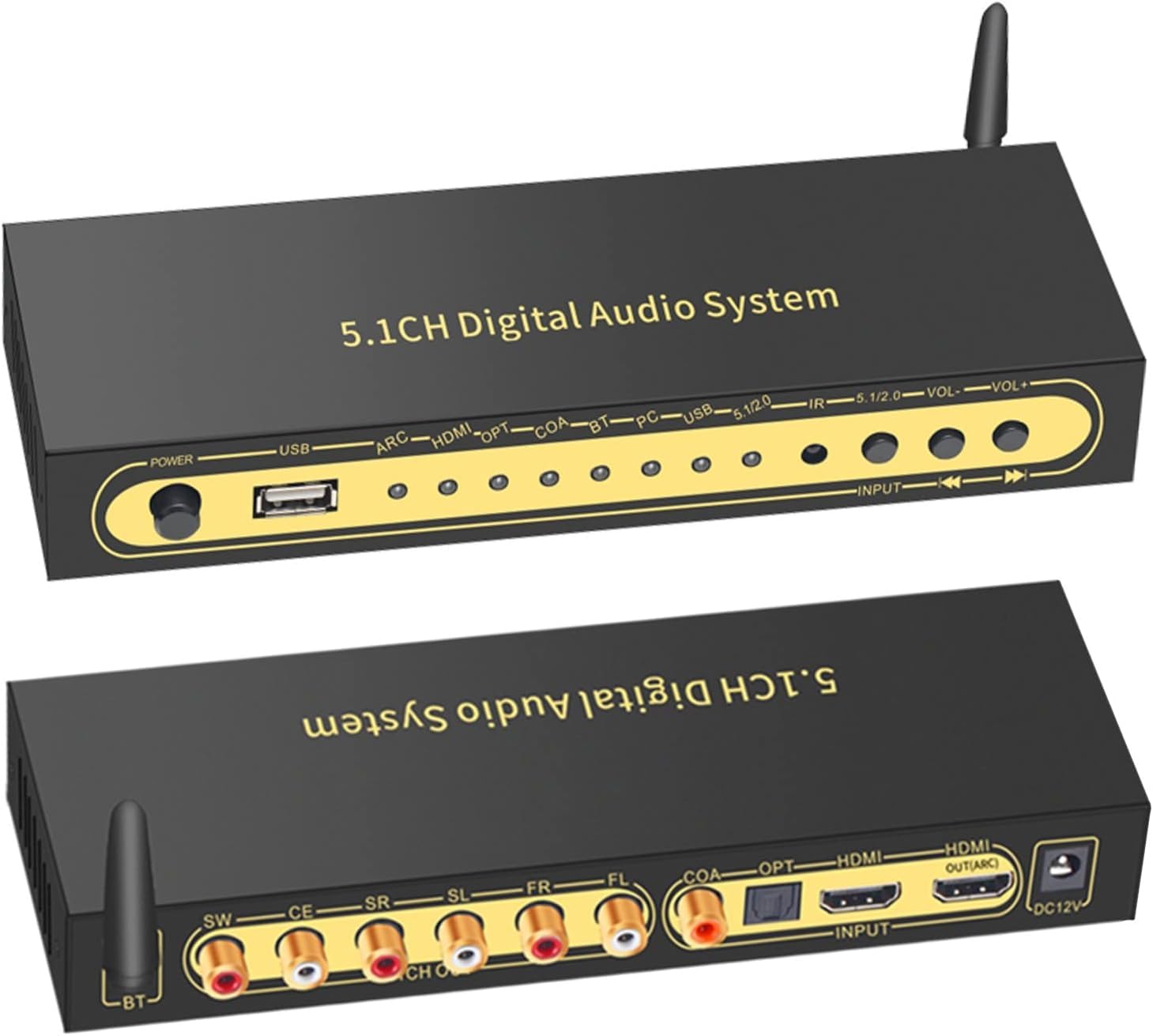
Image: A visual representation of the decoder's Bluetooth 5.0 capability, showing a 20-meter reception range with an external antenna.
5.4 Audio Decoding Modes
The decoder automatically detects and processes various audio formats. It supports both hardware and software decoding:
- Hardware Decoding: For DTS/AC3 signals, the device performs hardware decoding to achieve real 5.1 channel output.
- Software Decoding: For PCM signals, the device performs software decoding to achieve virtual 5.1 channel output.

Image: A flowchart detailing the audio processing path, showing how the decoder automatically detects the audio source (DTS/AC3 or PCM) and applies either hardware decoding for real 5.1 or software decoding for virtual 5.1 output.
6. Technical Specifications
| HDMI Version | HDMI1.4 & HDCP 1.4 |
| HDMI Baud Rate | 10.2 Gbps |
| Digital Signal Processor Sampling Frequency Range | 32KHz ~ 192KHz |
| Digital Signal Processor Bit Rate Range | 16 ~ 24Bit |
| 5.1 Output Level | ≥1.5V RMS |
| Signal-to-Noise Ratio | ≥90dB |
| Frequency Range | 20Hz ~ 20KHz |
| Maximum Working Current | 200 mA |
| Power Adapter Input | DC-5V/500mA |
| Working Temperature Range | -10°C to +60°C |
| Storage Temperature Range | -20°C to +60°C |
| Working Humidity Range | 10% to 90% RH (non-condensing) |
| Storage Humidity Range | 5% to 95% RH (non-condensing) |
| Dimensions (L x W x H) | 72 x 55 x 20 mm |
| Weight | 370 g |
| Connector Types | HDMI, Optical, Coaxial, RCA, 3.5mm Jack |
| Audio Output Mode | Stereo, 5.1 Channel |
7. Troubleshooting Guide
- No Sound Output:
- Ensure all cables are securely connected.
- Verify the correct input source is selected on the decoder.
- Check the volume level on both the decoder and your amplifier/speakers.
- Confirm your amplifier/speakers are powered on and set to the correct input.
- Ensure the audio format from your source device is supported by the decoder.
- Distorted Audio:
- Check for loose cable connections.
- Reduce the volume level to prevent clipping.
- Ensure the audio source is providing a clean signal.
- Remote Control Not Working:
- Check if the batteries are correctly inserted and not depleted.
- Ensure there are no obstructions between the remote and the decoder's IR receiver.
- No Bluetooth Connection:
- Ensure the decoder is in Bluetooth input mode.
- Make sure your device's Bluetooth is enabled and within range.
- Try unpairing and re-pairing the device.
8. Care and Maintenance
- Keep the device away from water, moisture, and extreme temperatures.
- Clean the device with a soft, dry cloth. Do not use liquid or aerosol cleaners.
- Avoid placing the device in direct sunlight or near heat sources.
- Do not attempt to open or repair the device yourself. Refer all servicing to qualified personnel.
9. Warranty Information
This AYINO 5.1ch Audio Decoder EPL-1098WA comes with a 3-month warranty from the date of purchase. This warranty covers manufacturing defects under normal use. It does not cover damage caused by misuse, accidents, unauthorized modifications, or improper installation.
Please retain your purchase receipt as proof of purchase for warranty claims.
10. Support
For technical support or warranty inquiries, please contact your retailer or the manufacturer directly.
Manufacturer: Ayino
Packer Contact Information: Etzin PVT.LTD, Mumbai, India. Help-Line No. +91-22-49696922.