
Introduction
The GODOX WEC Kit2 is a 2.4GHz wireless microphone system designed for high-quality audio recording with DSLR cameras, iPhones, and Android devices. It features advanced noise cancellation, stable 656ft (200m) transmission, and a compact, portable design. This manual provides detailed instructions for the proper setup, operation, and maintenance of your WEC Kit2 system.

Image: The GODOX WEC Kit2 system, showcasing two compact transmitters, one receiver, and the portable charging case with its lid open, revealing the charging slots and a digital display.
Package Contents
Verify that all items listed below are included in your package. If any items are missing or damaged, please contact your retailer.
- Receiver (RX) x 1
- Transmitter (TX) x 2
- Furry Windscreen x 2
- Charging Case x 1
- 3.5mm TRS-TRRS Audio Cable x 1 (for smartphones)
- 3.5mm TRS-TRS Audio Cable x 1 (for cameras)
- USB-A to USB-C Data Cable x 1
- Storage Box x 1

Image: A visual representation of the GODOX WEC Kit2 package contents, including the charging case, two transmitters, one receiver, two furry windscreens, various audio cables, a USB-C cable, and a storage box.
Product Overview
Transmitter (TX)
The transmitter is a compact, lightweight unit designed to be clipped onto clothing. It features an integrated microphone and controls for noise cancellation and pairing.
Receiver (RX)
The receiver connects to your recording device (camera, smartphone) and receives audio signals from the transmitters. It includes a 3.5mm output jack and controls for volume and mode switching.
Charging Case
The charging case stores and charges both transmitters and the receiver. It features a digital display to indicate the battery level of the case and the charging status of the units inside.

Image: The GODOX WEC Kit2 charging case with its lid open, showing two transmitters and one receiver securely docked. A digital display on the front of the case indicates the current battery percentage.
Setup
1. Initial Charging
Before first use, fully charge the charging case and all units. Connect the USB-A to USB-C data cable to the charging case and a power source. The digital display on the case will show the charging progress.
2. Powering On/Off
- Power On: Open the charging case, and the transmitters and receiver will automatically power on. Alternatively, long-press the power button on each unit.
- Power Off: Place the units back into the charging case and close the lid, or long-press the power button on each unit.
3. Pairing the Units
The transmitters and receiver are pre-paired at the factory. If re-pairing is necessary:
- Ensure all units are powered on.
- Long-press the pairing/noise cancellation key on the transmitter(s) for 3 seconds. The indicator light will flash green, indicating pairing mode.
- Long-press the pairing/volume + key on the receiver for 3 seconds. The indicator light will flash green.
- Once successfully paired, the indicator lights on both the transmitter(s) and receiver will turn solid green. If pairing is unsuccessful after 10 seconds, the units will exit pairing mode. Repeat the steps if needed.
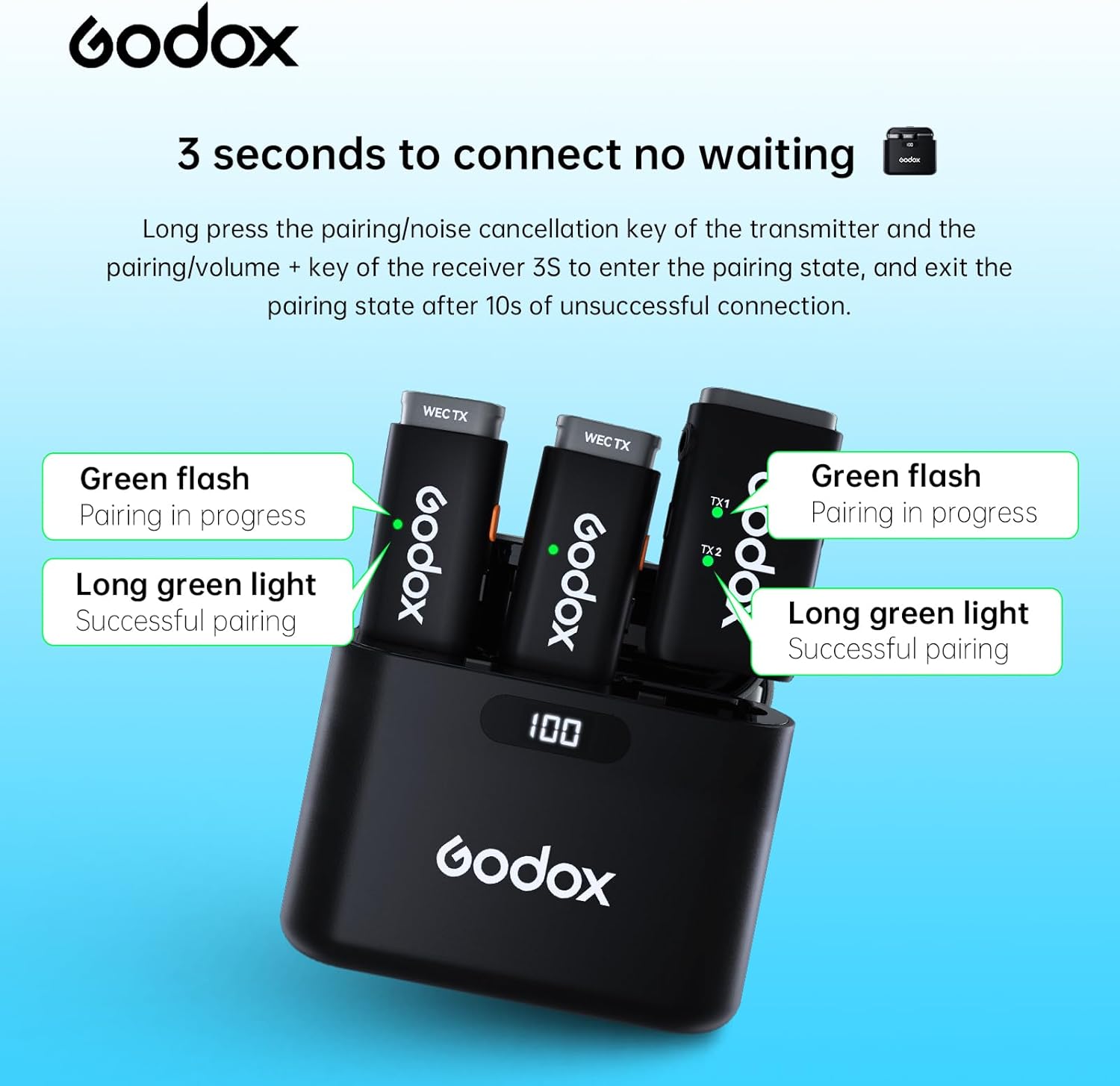
Image: A visual guide demonstrating the pairing process. It shows the transmitters and receiver in the charging case, with indicators for 'Green flash: Pairing in progress' and 'Long green light: Successful pairing', highlighting the 3-second press required for connection.
4. Connecting to Recording Devices
- For DSLR Cameras: Use the provided 3.5mm TRS-TRS audio cable. Connect one end to the receiver's output jack and the other end to your camera's microphone input.
- For Smartphones (iPhone/Android): Use the provided 3.5mm TRS-TRRS audio cable. Connect the TRS end to the receiver's output jack and the TRRS end to your smartphone's 3.5mm audio jack. For devices without a 3.5mm jack, an appropriate adapter (e.g., Lightning to 3.5mm or USB-C to 3.5mm, purchased separately) will be required.

Image: An illustration demonstrating connectivity options for the WEC receiver. It shows connections to an iPhone via a 3.5mm to Lightning cable (GAC-IC10) and to an Android phone via a 3.5mm to Type-C cable (GAC-IC9), both sold separately.
Operation
1. Noise Reduction Function
The WEC Kit2 features a 3.0 noise reduction algorithm. To activate or deactivate the one-click noise reduction function, short-press the noise cancellation button on the transmitter. This helps filter out environmental noise and maintain clear audio.

Image: Two GODOX WEC Kit2 transmitters floating against a blue background with sound wave graphics, emphasizing the one-click noise reduction capability to eliminate environmental interference.
2. Mono/Stereo Mode Switching
The system defaults to mono mode. To switch between mono and stereo modes, long-press the mode/volume button on the receiver. This allows for flexible audio recording based on your needs.

Image: An illustration showing a hand pressing a button on the WEC receiver, with indicators for 'Mono mode' and 'Stereo mode', explaining that a long press of the mode/volume button switches between the two.
3. Transmission Range
The GODOX WEC Kit2 utilizes 3.0 frequency hopping technology, providing high anti-interference wireless audio transmission. It offers a stable transmission distance of up to 656 feet (200 meters) in open environments.

Image: A GODOX WEC receiver attached to a camera lens, with a graphic depicting a 200-meter transmission range extending across a vast, snowy mountain landscape, highlighting the system's long-distance capability.
4. Battery Life and Monitoring
Each transmitter/receiver unit provides approximately 8 hours of continuous use on a single charge. The charging case extends the total battery life to up to 24 hours. The digital display on the charging case allows you to monitor the power level in real-time.

Image: The GODOX WEC Kit2 charging case with a large 'h24' graphic overlaid, signifying the extended 24-hour battery life provided by the charging case, alongside smaller icons indicating 8 hours of use per microphone and 2 charging cycles from the case.
5. Using While Charging
The WEC system can be connected to a Type-C power source for charging while in use, ensuring continuous operation without interruption. This feature prevents power consumption anxiety during extended recording sessions.

Image: A smartphone mounted on a tripod, connected via a USB-C cable to the GODOX WEC receiver, demonstrating the 'Use While Charging' feature on a beach background. This illustrates that the system can be powered externally during operation.
Maintenance
To ensure the longevity and optimal performance of your GODOX WEC Kit2 system, follow these maintenance guidelines:
- Cleaning: Use a soft, dry cloth to clean the units and charging case. Avoid using liquid cleaners or solvents.
- Storage: Store the system in a cool, dry place away from direct sunlight and extreme temperatures. Always store units in the charging case when not in use.
- Battery Care: For long-term storage, ensure the batteries are charged to approximately 50-60% to preserve battery health. Recharge periodically if stored for extended periods.
- Windscreen: Use the provided furry windscreens to reduce wind noise, especially in outdoor environments. Clean or replace windscreens as needed.

Image: A woman wearing a GODOX WEC transmitter with a windscreen attached, set against a natural outdoor background. The image emphasizes the effectiveness of the windscreen in reducing wind noise for clear audio recording.
Troubleshooting
If you encounter issues with your GODOX WEC Kit2, refer to the following common problems and solutions:
| Problem | Possible Cause | Solution |
|---|---|---|
| No sound or low volume | Units not powered on; Low battery; Incorrect cable connection; Receiver volume too low; Units not paired. | Ensure all units are powered on and charged. Check cable connections. Adjust receiver volume. Re-pair units if necessary. |
| Interference or poor audio quality | Obstacles between TX/RX; Too far from receiver; Strong electromagnetic interference; Noise reduction off. | Reduce distance between TX and RX. Avoid obstacles. Move away from sources of interference. Activate noise reduction. |
| Units not pairing | Incorrect pairing procedure; Low battery. | Follow the pairing instructions carefully. Ensure units are sufficiently charged. |
| Charging case display not working | Charging case battery depleted; Faulty cable/charger. | Connect the charging case to a power source. Try a different USB-C cable and charger. |
Specifications
Key technical specifications for the GODOX WEC Kit2 system:
- Wireless Frequency: 2.4GHz
- Transmission Distance: Up to 656 feet (200 meters) in open environments
- Polar Pattern: Omnidirectional
- Noise Reduction: 3.0 Noise Reduction Algorithm (One-click)
- Battery Life (TX/RX): Approximately 8 hours per unit
- Battery Life (with Charging Case): Up to 24 hours
- Charging Interface: USB Type-C
- Connectivity: 3.5mm TRS (for cameras), 3.5mm TRRS (for smartphones)
- Dimensions (TX/RX): Approximately 1.3 x 1.2 x 1.2 inches
- Weight (TX/RX): Approximately 0.005 ounces (12g for TX, 16g for RX)
- Included Components: Receiver, 2 Transmitters, 2 Furry Windscreens, Charging Case, 3.5mm TRS-TRRS Audio Cable, 3.5mm TRS-TRS Audio Cable, USB-A to USB-C Data Cable, Storage Box

Image: A GODOX WEC transmitter being placed into the charging case, with text highlighting its ultra-compact design: 12g in weight, 4.8cm long, and 1.6cm thick, emphasizing its portability.
Warranty and Support
For warranty information and technical support, please refer to the official GODOX website or contact your local distributor. Keep your purchase receipt as proof of purchase for warranty claims.
Manufacturer: GODOX
Date First Available: October 20, 2023