
Aroepurt Maxwest Astro A63
Maxwest Astro A63 Case & Tempered Glass Screen Protector User Manual
Model: Maxwest Astro A63 | Brand: Aroepurt
1. Product Overview
This manual provides instructions for the installation, operation, and maintenance of your Maxwest Astro A63 Phone Case and Tempered Glass Screen Protector. This product is designed to offer robust protection and enhanced functionality for your Maxwest Astro A63 smartphone.
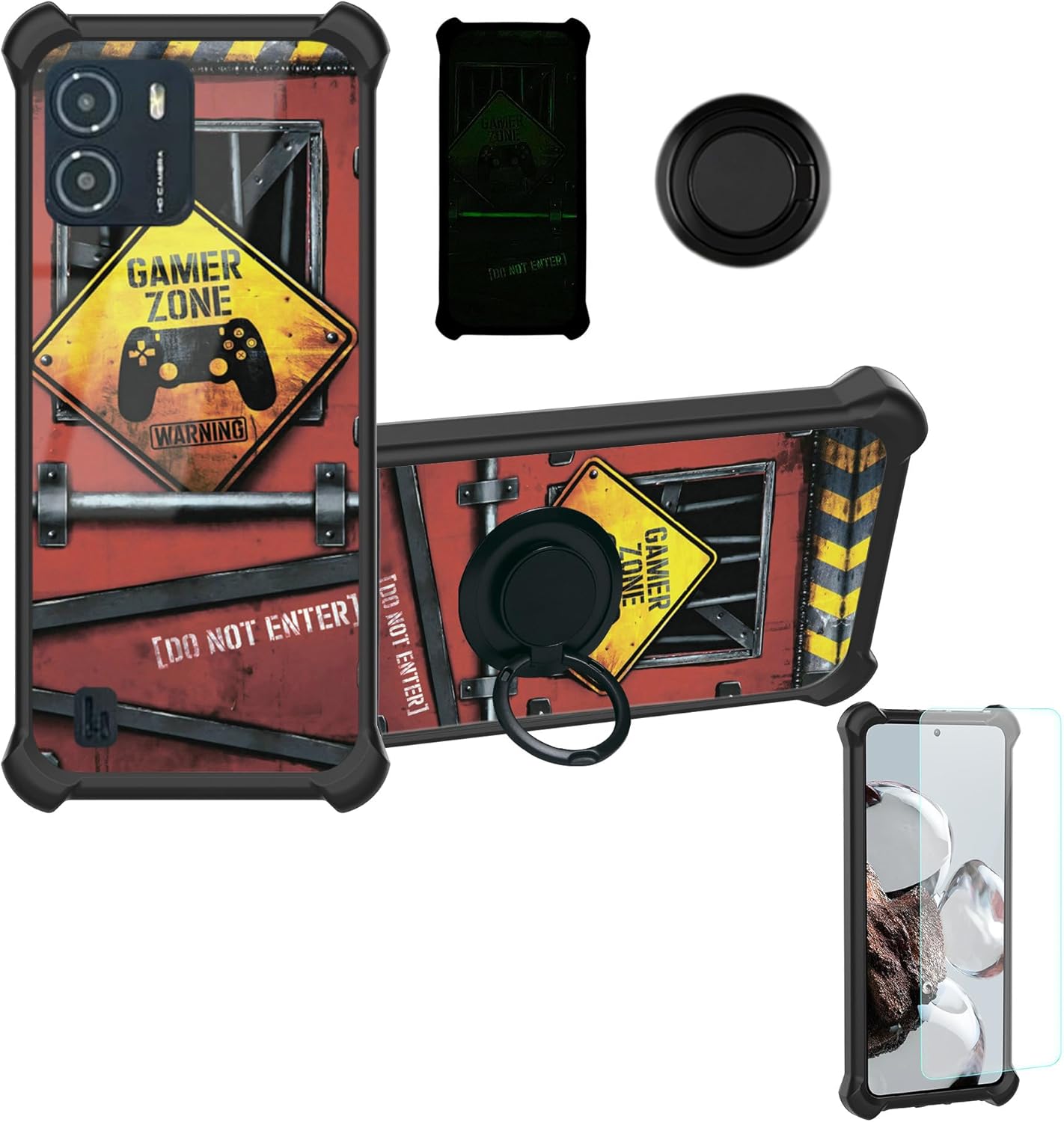
Figure 1.1: Overview of the Maxwest Astro A63 Case, Tempered Glass Screen Protector, and Ring Support.
2. Product Features
- Enhanced Protection: Features a PC hard back panel combined with a soft silicone frame and four-corner shock airbags for superior impact absorption. The case design is elevated around the camera and screen for flat surface protection.
- Advanced Back Panel Construction: The back side consists of four layers: a solid PC base, an ultra-high definition pattern layer, a special process layer, and a clear, scratch-resistant surface layer.
- Luminous Effect: The case absorbs light and sunlight, producing a fluorescent effect in dark environments.
- Integrated Ring Support: Includes an adhesive metal finger ring support that can be attached to the case or used separately. This ring offers 360-degree rotation and is compatible with car bracket magnetic suction mounts.
- Tempered Glass Screen Protector: Provides 9H high hardness, shatterproof protection, perfect adhesion, case-friendly design, 99.9% super transparency, and anti-fingerprint properties.

Figure 2.1: Illustration of the shockproof design with integrated shock airbags in the corners.

Figure 2.2: Diagram showing the layers contributing to the luminous effect and overall back panel construction.
3. Setup and Installation
3.1 Installing the Phone Case
- Ensure your Maxwest Astro A63 phone is clean and free of dust or debris.
- Align the phone with the case, starting with one side.
- Gently press the phone into the case, ensuring all corners and edges are securely fitted.
- Verify that all ports, buttons, and camera cutouts align correctly with the phone.
3.2 Installing the Tempered Glass Screen Protector
Proper installation of the screen protector is crucial for optimal performance and bubble-free application. Perform this in a dust-free environment if possible.
- Clean the Screen: Use the provided alcohol wipe to thoroughly clean your phone's screen. Follow with the microfiber cloth to dry and remove any streaks.
- Remove Dust: Use the dust-absorber sticker to dab the screen and remove any remaining dust particles. Ensure no dust is visible.
- Align the Protector: Carefully peel off the protective film from the adhesive side of the tempered glass. Hold the protector by its edges and align it precisely with your phone's screen, paying attention to the speaker, camera, and home button cutouts.
- Apply: Once aligned, gently lower the screen protector onto the phone's screen. The adhesive will begin to spread automatically.
- Remove Bubbles: If any bubbles remain, gently push them towards the edges of the screen using the microfiber cloth or a soft card.

Figure 3.1: Key features of the tempered glass screen protector, including 9H hardness and shatterproof design.

Figure 3.2: Demonstration of the screen protector's scratch-proof capabilities.
4. Operating Instructions
4.1 Using the Ring Support
- Finger Grip: Insert your finger through the ring for a secure grip, reducing the risk of accidental drops, especially during one-handed operation.
- Kickstand Function: Rotate the ring to a desired angle to prop up your phone for hands-free viewing of videos or video calls. The ring rotates 360 degrees for versatile positioning.
- Magnetic Car Mount Compatibility: The metal ring is designed to attach to magnetic car mounts (not included) for convenient in-car navigation or hands-free use. Note: This case does not support wireless charging when the ring is attached or if the phone is placed on a wireless charger.

Figure 4.1: Demonstrating improved one-hand operation and reach with the integrated ring support.

Figure 4.2: The case's compatibility with magnetic car mounts via the metal ring.
4.2 Activating the Luminous Effect
The luminous effect is passive and requires no activation. Simply expose the case to light (natural sunlight or artificial light) for a period, and it will glow in dark environments. The intensity and duration of the glow depend on the amount and duration of light exposure.
5. Maintenance
- Cleaning the Case: Use a soft, damp cloth to wipe down the phone case. For stubborn dirt, a mild soap solution can be used. Avoid harsh chemicals or abrasive materials.
- Cleaning the Screen Protector: Use a microfiber cloth to gently wipe the screen protector. For smudges, a screen cleaning spray designed for electronics can be used.
- Regular Inspection: Periodically remove the case and inspect both the phone and the case for any trapped dust or debris that could cause scratches. Clean as necessary.
6. Troubleshooting
- Bubbles under Screen Protector: If bubbles appear after installation, gently lift the nearest edge of the protector and re-apply, pushing the bubble out with a soft cloth. Small bubbles may disappear on their own within 24-48 hours.
- Case Fit Issues: Ensure the phone model is Maxwest Astro A63. If the case does not fit correctly, double-check that the phone is fully seated within the case and that no foreign objects are obstructing the fit.
- Ring Stand Stiffness: The ring stand is designed to be firm to provide stable support. If it becomes too loose or too stiff, check for any debris in the hinge mechanism.
- Luminous Effect Not Visible: Ensure the case has been exposed to sufficient light. The effect is most noticeable in complete darkness.
7. Specifications
| Attribute | Detail |
|---|---|
| Compatible Devices | Maxwest Astro A63 |
| Product Dimensions | 0.39 x 0.39 x 0.39 inches |
| Item Weight | 2.46 ounces |
| Form Factor | Solid protection with support |
| Special Features | 360 Rotating Ring, Finger ring + support + car bracket magnetic suction, Car Magnetic Fixing, Luminous Effect, Shock Airbags |
| Color | YGH-JGP |
| Manufacturer | Aroepurt |
| Country of Origin | China |
| What's in the Box | 1*Phone Case, 1*Tempered Glass Screen Protector |
8. Warranty Information
Specific warranty details for this product are not provided in the available information. Please refer to the product packaging or contact the manufacturer, Aroepurt, directly for warranty terms and conditions.
9. Customer Support
For any questions, concerns, or technical assistance regarding your Maxwest Astro A63 Case and Tempered Glass Screen Protector, please contact the manufacturer, Aroepurt. Contact information may be available on the product packaging or their official website.
Ask a question about this manual
Ask about setup, troubleshooting, compatibility, parts, safety, or missing instructions. Manuals+ will review the question and use this page’s manual context to help answer it.