
Introduction
The Creliver 300A Foot Circulation Massager is designed to provide relief from foot and leg discomfort and improve blood circulation using advanced Electrical Muscle Stimulation (EMS) and Transcutaneous Electrical Nerve Stimulation (TENS) technologies. This device offers personalized therapy with multiple modes and intensity levels to address various conditions such as neuropathy, plantar fasciitis, diabetes-related discomfort, Restless Leg Syndrome (RLS), and arthritis.
This manual provides essential information for the safe and effective use of your Creliver 300A device. Please read it thoroughly before first use and retain it for future reference.

Image: The Creliver 300A is designed to alleviate discomfort from various conditions, including prolonged standing, insomnia, sore knees, and frequent high-heeled shoe use.
Important Safety Information
Warning: Consult your physician before using this device if you have any pre-existing medical conditions, especially if you are pregnant, have a pacemaker, suffer from epilepsy, or have any heart conditions. Do not use on open wounds or irritated skin. Keep out of reach of children.
- Do not immerse the device in water.
- Do not use while sleeping or driving.
- Avoid using near high-frequency surgical equipment.
- If you experience any discomfort, stop use immediately and consult a medical professional.
- Use only the provided power adapter.
Package Contents
Please check the package to ensure all items are present:
- 1 x Creliver 300A Foot Circulation Massager
- 1 x Remote Control
- 1 x Power Adapter (UK 3-pin plug)
- 8 x Electrode Pads (with connection cables)
- 1 x User Manual

Image: Contents of the Creliver 300A package, including the main unit, remote, power adapter, and electrode pads.
Product Overview: Parts of the Device
Familiarize yourself with the components of your Creliver 300A device:

Image: Labeled diagram of the Creliver 300A, highlighting the LCD display, foot pads, power button, control panel, and massage roller. The foot pads also feature UV light for disinfection and an infrared thermal effect.
- LCD Display: Shows current mode, intensity level, and remaining time.
- Foot-Pads: Ergonomically designed pads for foot placement, featuring acupressure points, UV light for disinfection, and infrared thermal effect.
- Power ON/OFF: Button to turn the device on or off.
- Control Panel: Buttons for adjusting time, mode, and intensity for both foot pads and body pads.
- Massage Roller: Manual roller for additional foot massage.
- Body Pad Ports: Connectors for electrode pads (located on the side of the device, not visible in this specific image but implied by the presence of electrode pads in the package).
Setup
- Placement: Place the Creliver 300A on a flat, stable surface in a comfortable seating position.
- Power Connection: Connect the power adapter to the device's power input port and then plug it into a suitable electrical outlet.
- Remote Control: Ensure the remote control has batteries installed (if not already).
- Electrode Pads (Optional): If using the TENS body pads, connect the cables to the body pad ports on the device and attach the pads to the desired areas of your body. Ensure skin is clean and dry for optimal adhesion.
Operating Instructions
Basic Operation
- Power On: Press the "Power ON/OFF" button on the control panel or remote control to turn on the device. The LCD display will illuminate.
- Foot Placement: Place your bare feet on the foot pads. Ensure full contact for effective stimulation.
- Select Mode: Use the "MODE" button on the control panel or remote to cycle through the 25 available modes. Each mode offers a different stimulation pattern.
- Adjust Intensity: Use the "FOOT LEVEL +" or "-" buttons on the control panel or remote to adjust the intensity level for the foot pads (99 levels available). Start with a low intensity and gradually increase until you feel a comfortable, yet effective, sensation.
- Set Time: The device has a default session time, typically 25 minutes, with an auto-off function. You can adjust the session duration using the "TIME" buttons if available, or simply allow the device to complete its cycle.
- Auto-Off: The device will automatically turn off after the set session time (e.g., 25 minutes).
- Power Off: To end a session early, press the "Power ON/OFF" button.
Using TENS Body Pads
The Creliver 300A includes TENS body pads for targeted pain relief on other parts of the body.
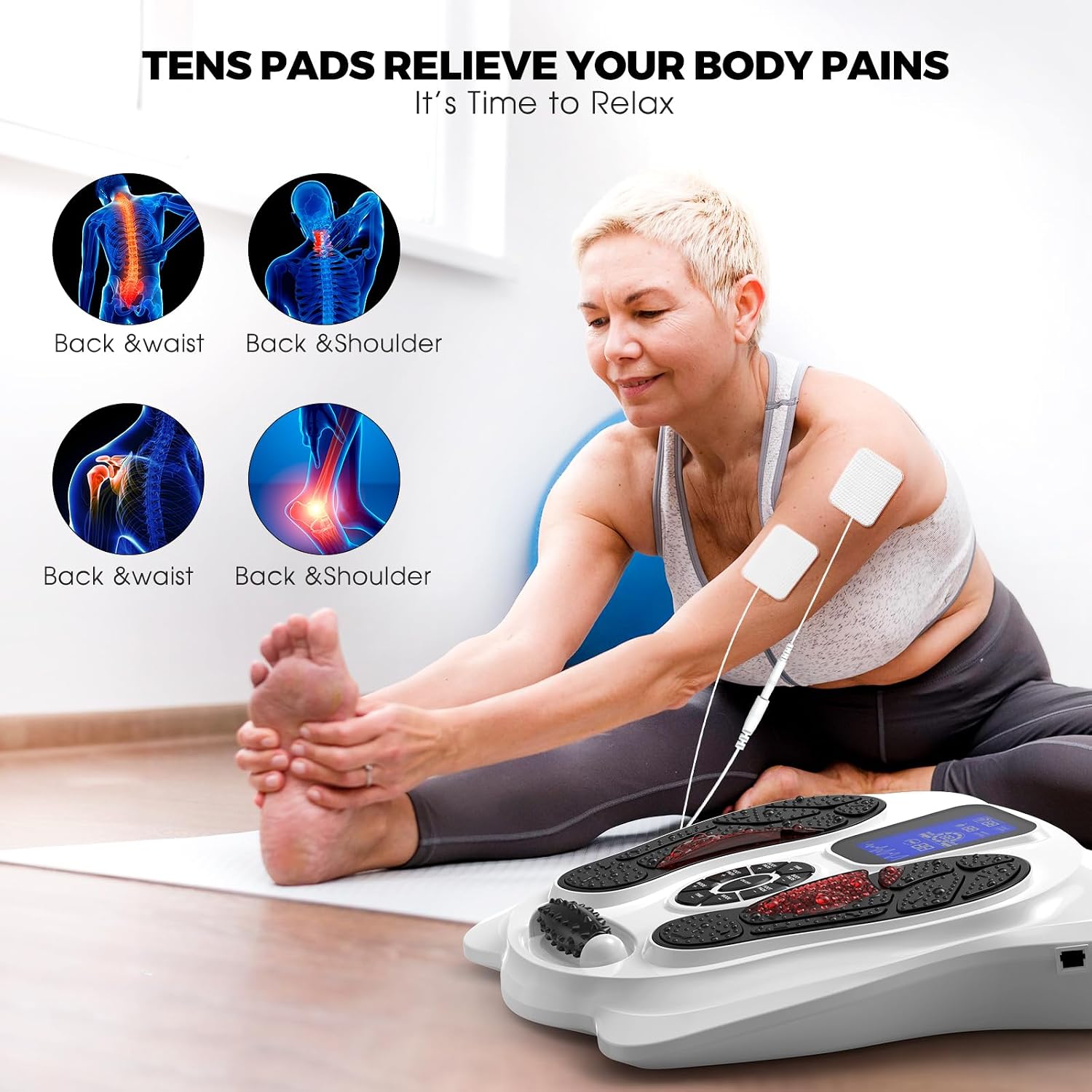
Image: TENS pads can be applied to areas like the back and shoulders to relieve localized body pains.
- Attach Pads: Connect the electrode pads to their cables, then plug the cables into the body pad ports on the device. Apply the adhesive pads to clean, dry skin on the desired body area (e.g., back, shoulders, legs).
- Activate Body Pads: After turning on the device, use the "BODY PADS ON/OFF" button (if available) or ensure the body pad function is active.
- Adjust Body Pad Intensity: Use the "BODY LEVEL +" or "-" buttons on the control panel or remote to adjust the intensity specifically for the body pads.
- Simultaneous Use: You can use the foot pads and body pads simultaneously or separately.
Recommended Usage
- For optimal results, use the device for approximately 25 minutes per day.
- Consistency is key for long-term benefits.

Image: Thermal images illustrating improved blood circulation in the feet and lower legs after using the Creliver 300A.

Image: The Creliver 300A features dual channels, 25 modes, 99 intensity levels, a 25-minute auto-off timer, and includes 8 electrode pads for comprehensive therapy.
Maintenance
- Cleaning: Wipe the device surface with a soft, damp cloth. Do not use abrasive cleaners or immerse in water.
- Electrode Pads: After each use, reattach the protective film to the electrode pads to maintain their adhesive quality. Replace pads when they lose their stickiness.
- Storage: Store the device in a cool, dry place, away from direct sunlight and extreme temperatures.
- Power Adapter: Disconnect the power adapter from the outlet when not in use for extended periods.
Troubleshooting
| Problem | Possible Cause | Solution |
|---|---|---|
| Device does not turn on. | No power, loose connection, faulty adapter. | Check power cable connection. Ensure outlet is working. Try a different outlet. |
| No sensation or weak sensation. | Low intensity, poor foot contact, dry skin, worn-out electrode pads. | Increase intensity. Ensure bare feet are fully on pads. Moisten feet slightly. Replace electrode pads if needed. |
| Remote control not working. | Dead batteries, obstruction, out of range. | Replace remote batteries. Ensure no obstructions between remote and device. Use within close range. |
| Electrode pads not sticking. | Dirty skin, pads are old/worn out. | Clean and dry skin before application. Replace with new electrode pads. |
Specifications
| Feature | Detail |
|---|---|
| Model Number | 300A |
| Dimensions (L x W x H) | 38 x 38 x 7.5 cm (14.96 x 14.96 x 2.95 inches) |
| Weight | 2.71 kg (5.97 lbs) |
| Power Source | Corded Electric |
| Modes | 25 |
| Intensity Levels | 99 |
| Targeted Body Parts | Leg, Foot, Toes, Calf (with foot pads); various body parts (with TENS pads) |
| Special Features | Remote Control, EMS, TENS, Infrared Thermal Effect, UV Light for Disinfection |
| UPC | 769165562418 |
Warranty and Support
Creliver offers a 30-day risk-free trial with a return or exchange guarantee. The product also comes with a limited lifetime warranty and 24-hour online technical support.
For any questions, technical assistance, or warranty claims, please contact Creliver customer support. Refer to the contact information provided in your product packaging or on the official Creliver website.