
1. Introduction
Thank you for choosing the MAIRDI M890DBTC Wireless Headset. This manual provides detailed instructions for setting up, operating, and maintaining your headset to ensure optimal performance and longevity. Please read this manual thoroughly before use.

A detailed front view of the MAIRDI M890DBTC Wireless Headset, showcasing its over-ear design, adjustable headband, and microphone boom.
2. Package Contents
Verify that all items are present in your package:
- MAIRDI M890DBTC Bluetooth Headset x1
- USB Charging Cable x1
- User Manual x1
3. Product Overview
3.1 Headset Components
- Adjustable Headband
- Padded Earmuffs
- Rotatable Microphone Boom (330-degree)
- Power Button
- Volume Up/Down Buttons
- Multi-function Button (MFB)
- Mute Button
- LED Indicator Light
- Charging Port (Mini USB)
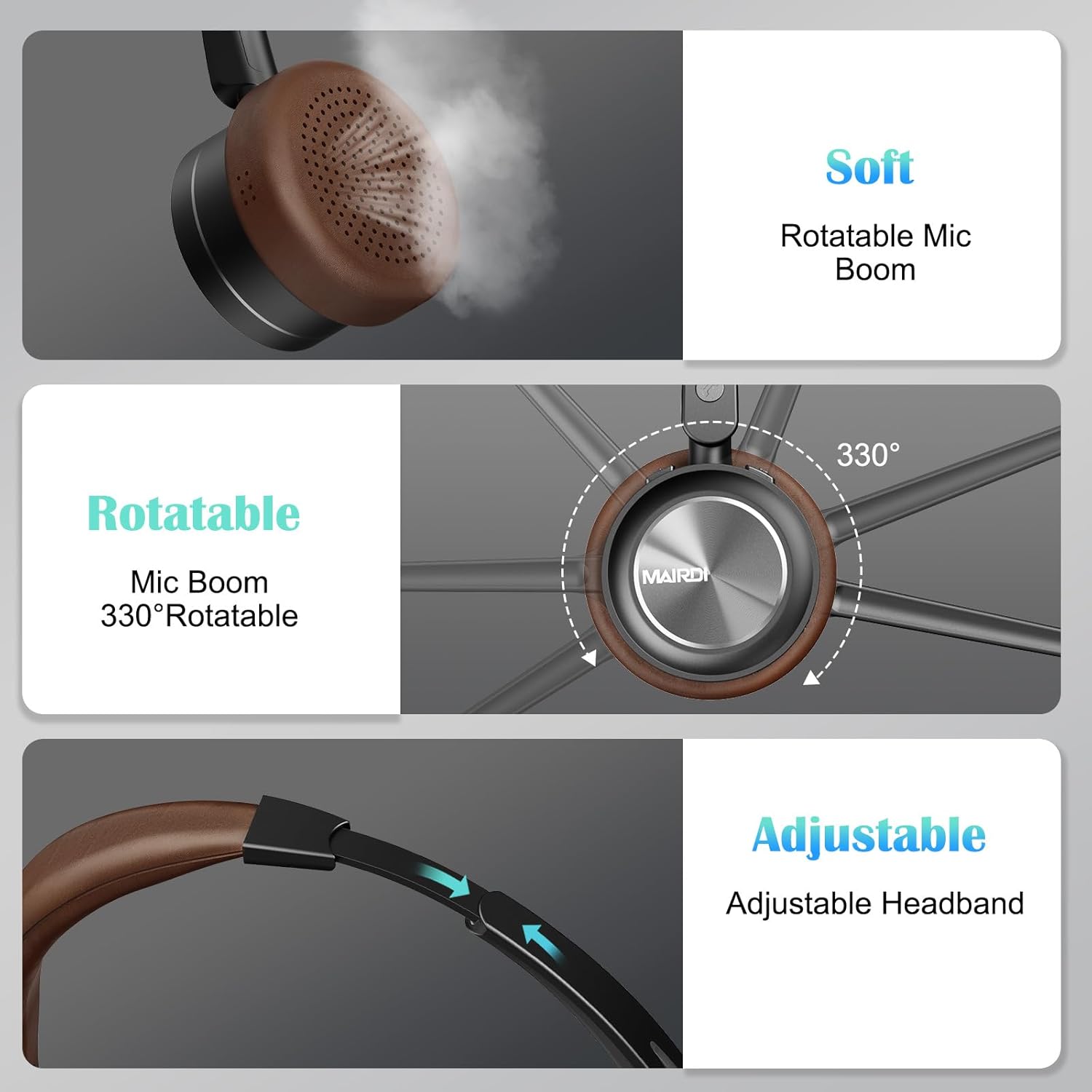
A visual breakdown of the MAIRDI M890DBTC headset's comfort features, including soft earpads, a 330-degree rotatable microphone boom, and an adjustable stainless steel headband.
4. Setup and Charging
4.1 Initial Charge
Before first use, fully charge the headset. Connect the provided USB charging cable to the headset's Mini USB port and a power source (e.g., computer USB port or USB wall adapter). The LED indicator will show charging status and turn off or change color when fully charged (approximately 2 hours).
4.2 Power On/Off
- Power On: Press and hold the Power Button for 3 seconds until the LED indicator flashes blue.
- Power Off: Press and hold the Power Button for 3 seconds until the LED indicator flashes red and then turns off.
5. Operating Instructions
5.1 Bluetooth Pairing
- Ensure the headset is powered off.
- Press and hold the Power Button for approximately 5-7 seconds until the LED indicator flashes red and blue alternately. This indicates pairing mode.
- On your device (smartphone, PC, laptop), enable Bluetooth and search for available devices.
- Select "MAIRDI M890DBTC" from the list of found devices.
- Once connected, the LED indicator will flash blue slowly.
5.2 Multipoint Connectivity
The MAIRDI M890DBTC supports connecting to two Bluetooth devices simultaneously.
- Pair the headset with the first device (e.g., smartphone) as described in Section 5.1.
- Disable Bluetooth on the first device. The headset will re-enter pairing mode.
- Pair the headset with the second device (e.g., laptop).
- Re-enable Bluetooth on the first device. The headset should automatically connect to both devices.

The MAIRDI M890DBTC headset connected simultaneously to a smartphone and a laptop, illustrating its multipoint pairing capability for stable connection with two devices.
5.3 Call Management
- Answer/End Call: Press the Multi-function Button (MFB) once.
- Reject Call: Press and hold the MFB for 2 seconds.
- Redial Last Number: Double-press the MFB.
- Mute/Unmute Microphone: Press the Mute Button once during a call. The LED indicator on the microphone will illuminate when muted.

An image depicting a person wearing the MAIRDI M890DBTC headset, highlighting the noise-canceling microphone feature and the mute button functionality. Visual representation of sound waves before and after noise cancellation is included.
5.4 Volume Control
- Volume Up: Press the Volume Up (+) button.
- Volume Down: Press the Volume Down (-) button.
6. Maintenance
- Clean the headset regularly with a soft, dry cloth.
- Avoid exposing the headset to extreme temperatures, humidity, or corrosive substances.
- Store the headset in a cool, dry place when not in use.
- Do not attempt to disassemble or repair the headset yourself, as this will void the warranty.
7. Troubleshooting
7.1 Headset Does Not Power On
- Ensure the headset is fully charged. Connect it to a power source and allow it to charge for at least 30 minutes before attempting to power on again.
7.2 Cannot Pair with Device
- Ensure the headset is in pairing mode (LED flashing red and blue alternately).
- Make sure Bluetooth is enabled on your device and it is within 10 meters (33 feet) of the headset.
- Try restarting both the headset and your device.
- Clear the Bluetooth pairing list on your device and attempt to pair again.
7.3 No Audio or Poor Audio Quality
- Check the volume levels on both the headset and your connected device.
- Ensure the headset is properly connected to your device. Re-pair if necessary.
- Move closer to your device to avoid interference or range issues.
- If using with a PC, ensure the MAIRDI M890DBTC is selected as the default audio input/output device in your sound settings.
7.4 Microphone Not Working
- Ensure the microphone is not muted (check the LED indicator on the microphone boom).
- Verify that the microphone boom is positioned correctly towards your mouth.
- Check your device's audio settings to ensure the headset microphone is selected as the input device.
8. Specifications
| Model | M890DBTC |
| Connectivity Technology | Wireless (Bluetooth 5.1) |
| Bluetooth Range | Up to 20 meters (60 feet) |
| Battery Life (Talk Time) | Up to 30 hours |
| Battery Life (Standby Time) | Up to 200 hours |
| Charging Time | Approximately 2 hours |
| Microphone | Advanced Noise-Canceling |
| Speaker Driver Size | 40mm |
| Frequency Range | 20 Hz - 20,000 Hz |
| Weight | 0.21 Kilograms (7.4 ounces) |
| Material | Leather, Plastic, Stainless Steel |

The MAIRDI M890DBTC headset positioned over a circuit board, illustrating its advanced Bluetooth 5.1 technology and 40mm speaker drivers for high-definition audio.
9. Warranty and Support
MAIRDI products are designed for reliability and performance. For warranty information or technical support, please refer to the contact details provided on the MAIRDI official website or your purchase documentation. Keep your proof of purchase for warranty claims.
For further assistance, please visit the MAIRDI Store on Amazon.


