
1. Introduction
Thank you for choosing the YATO YT-82807 Cordless Impact Wrench. This manual provides essential information for the safe and effective operation, maintenance, and troubleshooting of your new tool. Please read this manual thoroughly before first use and keep it for future reference. Proper use and care will ensure long-lasting performance and user safety.
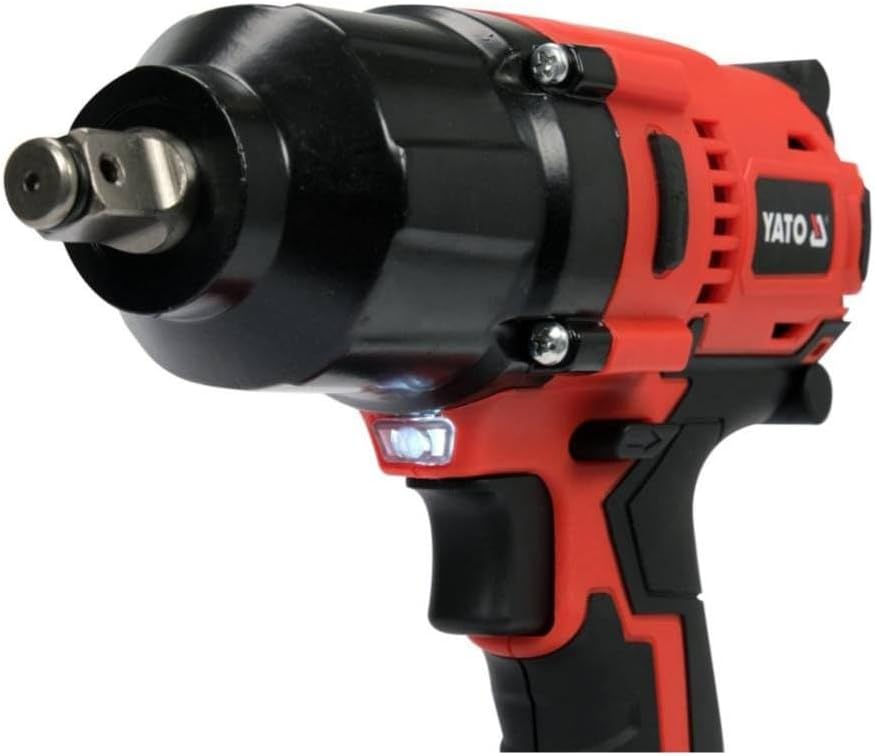
Figure 1: YATO YT-82807 Cordless Impact Wrench kit, including the tool, batteries, charger, and various sockets, neatly organized in a durable plastic case.
2. General Safety Instructions
Always observe basic safety precautions to reduce the risk of fire, electric shock, and personal injury when operating power tools. Keep this manual handy for quick reference.
2.1 Work Area Safety
- Keep the work area clean and well-lit. Cluttered or dark areas invite accidents.
- Do not operate power tools in explosive atmospheres, such as in the presence of flammable liquids, gases, or dust. Power tools create sparks which may ignite the dust or fumes.
- Keep children and bystanders away while operating a power tool. Distractions can cause you to lose control.
2.2 Electrical Safety
- Avoid body contact with earthed or grounded surfaces such as pipes, radiators, ranges, and refrigerators. There is an increased risk of electric shock if your body is earthed or grounded.
- Do not expose power tools to rain or wet conditions. Water entering a power tool will increase the risk of electric shock.
- Use only the charger specified by the manufacturer for the battery pack. A charger that is suitable for one type of battery pack may create a risk of fire when used with another battery pack.
2.3 Personal Safety
- Always wear eye protection. Use safety glasses or goggles.
- Wear appropriate personal protective equipment (PPE) such as hearing protection, non-skid safety shoes, and work gloves.
- Dress properly. Do not wear loose clothing or jewelry. Keep your hair, clothing, and gloves away from moving parts.
- Stay alert, watch what you are doing, and use common sense when operating a power tool. Do not use a power tool while you are tired or under the influence of drugs, alcohol, or medication.
2.4 Power Tool Use and Care
- Do not force the power tool. Use the correct power tool for your application.
- Disconnect the battery pack from the power tool before making any adjustments, changing accessories, or storing power tools.
- Store idle power tools out of the reach of children and do not allow persons unfamiliar with the power tool or these instructions to operate the power tool.
- Maintain power tools. Check for misalignment or binding of moving parts, breakage of parts, and any other condition that may affect the power tool’s operation. If damaged, have the power tool repaired before use.
2.5 Battery Tool Use and Care
- Recharge only with the charger specified by the manufacturer.
- Use power tools only with specifically designated battery packs. Use of any other battery packs may create a risk of injury and fire.
- When battery pack is not in use, keep it away from other metal objects, like paper clips, coins, keys, nails, screws or other small metal objects, that can make a connection from one terminal to another. Shorting the battery terminals together may cause burns or a fire.
- Under abusive conditions, liquid may be ejected from the battery; avoid contact. If contact accidentally occurs, flush with water. If liquid contacts eyes, additionally seek medical help. Liquid ejected from the battery may cause irritation or burns.
3. Product Overview
The YATO YT-82807 is a powerful cordless impact wrench designed for tightening and loosening fasteners. It features a robust motor, a durable 1/2 inch square drive, and a comfortable ergonomic design.
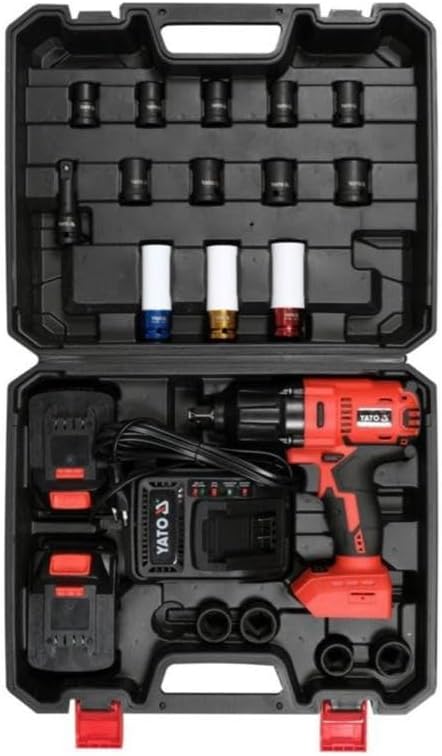
Figure 2: Close-up view of the YATO YT-82807 impact wrench, highlighting the 1/2 inch square drive, LED work light, and trigger mechanism.
3.1 Components
- Impact Wrench Body: Main housing containing the motor and gearing.
- 1/2 inch Square Drive: For attaching sockets.
- Trigger Switch: Activates the tool and controls speed.
- Forward/Reverse Selector: Changes the rotation direction.
- LED Work Light: Illuminates the work area.
- Battery Pack: Rechargeable Li-ion battery.
- Battery Status Indicator: Displays remaining battery charge.
- Battery Charger: For recharging the battery pack.
- Accessories: Includes various sockets and a plastic carrying case.
4. Setup
4.1 Charging the Battery
- Ensure the battery pack is clean and dry before charging.
- Connect the charger to a standard power outlet.
- Slide the battery pack onto the charger until it clicks into place.
- Allow approximately 1.5 hours for a full charge of the 3.0 Ah Li-ion battery. The charger will indicate when charging is complete (refer to charger manual for specific indicator lights).
- Once charged, disconnect the charger from the power outlet and remove the battery pack.
4.2 Attaching and Detaching the Battery Pack
- To Attach: Align the battery pack with the receptacle on the tool handle and slide it in until it locks securely.
- To Detach: Press the battery release button (usually located on the battery pack) and slide the battery pack out of the tool handle.
4.3 Installing Sockets
- Ensure the tool is switched off and the battery pack is removed before installing or removing sockets.
- Push the desired 1/2 inch square drive socket firmly onto the square drive anvil of the impact wrench until it clicks into place.
- To remove, pull the socket off the anvil. Some sockets may require pressing a release pin.
5. Operating Instructions
5.1 Powering On/Off and Speed Control
- The tool is activated by pressing the trigger switch.
- The speed of the impact wrench is variable and controlled by the amount of pressure applied to the trigger. Pressing the trigger further increases the speed up to a maximum of 2600 RPM.
- Releasing the trigger switch turns the tool off.
5.2 Forward/Reverse Rotation
- The forward/reverse selector switch is typically located above the trigger.
- Push the selector to the left for forward (tightening) rotation.
- Push the selector to the right for reverse (loosening) rotation.
- Ensure the tool is completely stopped before changing the direction of rotation.
5.3 Using the LED Work Light
- The integrated LED work light automatically illuminates when the trigger is pressed, providing visibility in dimly lit work areas.
5.4 Battery Status Indicator
- The battery status indicator (usually a series of LED lights on the battery pack) shows the approximate remaining charge. Check this before starting work to avoid interruptions.
5.5 Impact Wrench Operation
- Select the appropriate socket for the fastener.
- Place the socket onto the fastener, ensuring it is fully engaged.
- Apply firm, steady pressure to the tool and press the trigger. The tool will deliver impacts to tighten or loosen the fastener.
- The maximum torque output is 700 Nm, and the impact rate can reach 5000 BPM.
- Avoid over-tightening fasteners. Always use a torque wrench for final torque specifications if precision is required.
6. Maintenance
Regular maintenance ensures the longevity and safe operation of your YATO impact wrench.
6.1 Cleaning
- Keep the tool's ventilation openings clean and free from dust and debris. Use a soft brush or compressed air.
- Wipe the tool's exterior with a damp cloth. Do not use harsh chemicals or abrasive cleaners.
- Clean the battery terminals regularly to ensure good electrical contact.
6.2 Storage
- Store the tool and battery packs in a cool, dry place, away from direct sunlight and extreme temperatures.
- Store the tool in its plastic carrying case to protect it from damage.
- For long-term storage, charge the battery pack to approximately 50% capacity.
6.3 Battery Care
- Do not store battery packs in a discharged state. Recharge them promptly after use.
- Avoid exposing battery packs to water or high humidity.
- Do not attempt to open or modify battery packs.
7. Troubleshooting
This section addresses common issues you might encounter with your impact wrench.
| Problem | Possible Cause | Solution |
|---|---|---|
| Tool does not start. | Battery discharged. Battery not properly inserted. Faulty battery or tool. | Charge the battery. Ensure battery is fully seated. Test with another charged battery. If problem persists, contact customer support. |
| Reduced power or performance. | Low battery charge. Worn carbon brushes (if applicable). Overheating. | Recharge the battery. Allow the tool to cool down. |
| Battery not charging. | Charger not plugged in. Faulty charger or battery. Extreme temperature. | Check power connection. Ensure battery and charger are within recommended temperature range. Try another battery or charger if available. |
| Socket does not stay on. | Socket not fully engaged. Worn anvil or socket. | Push socket firmly until it clicks. Inspect anvil and socket for wear. Replace if necessary. |
8. Specifications
Technical data for the YATO YT-82807 Cordless Impact Wrench:
- Model: YT-82807
- Brand: YATO
- Max. Torque: 700 Nm
- Square Drive Size: 1/2 inch
- No-load Speed: Up to 2600 RPM
- Impact Rate: 0-5000 BPM (blows per minute)
- Operation Type: Cordless (Battery)
- Battery Type: Li-ion
- Battery Capacity: 3.0 Ah
- Charging Time: Approx. 1.5 hours
- Features: Battery status indicator, LED work light, includes charger and accessories.
- Product Dimensions (L x W x H): 39 x 31.9 x 13.3 cm
- Product Weight: 7.11 kg
- Country of Origin: China
9. Warranty and Support
YATO products are manufactured to high-quality standards. For warranty information, please refer to the warranty card included with your product or contact your local YATO dealer or customer service. Keep your purchase receipt as proof of purchase.
For technical assistance, spare parts, or service, please contact the retailer where you purchased the product or visit the official YATO website for support contact details in your region.
