
1. Introduction
The Radtel RT-490 is a versatile tri-band handheld two-way radio designed for reliable communication across multiple frequency ranges. This model, specifically the 'None GPS/None Bluetooth' variant, offers robust features including air band reception, FM radio, VOX, scanning capabilities, and a convenient one-key frequency copy function. Its durable design and user-friendly interface make it suitable for various applications requiring portable radio communication.
This manual provides essential information for setting up, operating, maintaining, and troubleshooting your RT-490 radio to ensure optimal performance and longevity.
2. Setup and Initial Use
2.1. Unpacking and Components
Carefully unpack your Radtel RT-490 radio and verify that all components are present. The standard package includes:
- Radtel RT-490 Handheld Radio Unit
- Lithium-Ion Battery (2000mAh)
- Desktop Charger Cradle
- Antenna
- USB-C Charging Cable
- User's Manual

Image: Radtel RT-490 radio with its included 2000mAh battery, desktop charger, and antenna.
2.2. Battery Installation and Charging
- Install Battery: Align the battery with the grooves on the back of the radio and slide it into place until it clicks securely.
- Charge Battery: Place the radio with the installed battery into the desktop charger cradle. Ensure the charging contacts align. The charger indicator light will typically show red during charging and green when fully charged. Alternatively, you can charge the battery directly via the USB-C port on the radio.

Image: The Radtel RT-490 radio being charged via its USB-C port, highlighting the convenient charging method.
Important: For initial use, fully charge the battery before operation. The charging current must not exceed 1A.
2.3. Antenna Attachment
Screw the antenna clockwise onto the antenna connector on the top of the radio until it is finger-tight. Do not overtighten.
2.4. Power On/Off
Rotate the power/volume knob clockwise to turn on the radio. Rotate it counter-clockwise until it clicks to turn off the radio.
3. Operating Instructions
3.1. Basic Controls
- Power/Volume Knob: Controls power on/off and adjusts audio volume.
- PTT (Push-to-Talk) Button: Press and hold to transmit, release to receive.
- Keypad: Used for frequency input, channel selection, and menu navigation.
- Display: Large color LCD shows frequency, channel, battery status, and other operational indicators.
3.2. Frequency Bands and Reception
The RT-490 supports tri-band transmission and reception, along with specialized reception bands:
- VHF Transmit/Receive: 144-148 MHz
- UHF Transmit/Receive: 420-450 MHz
- 222 MHz Band: The radio is capable of operating on the 222 MHz band.
- Air Band Receive (AM RX): 108-136 MHz (Receive only, useful for monitoring aviation communications).
- Commercial FM Radio Receive (FM RX): 66-108 MHz (Receive only, for broadcast radio).

Image: The Radtel RT-490 display illustrating its capability for aviation reception (AM RX) and commercial FM radio reception (FM RX), alongside its primary transmit/receive bands.
3.3. Channel Management
The radio features 256 storage channels, organized into 128x2 groups, supporting dual band, dual standby, and dual watch functions.
- Dual Standby/Watch: Allows monitoring of two different frequencies simultaneously.
- Channel Display Modes: The radio supports three display modes: Frequency, Channel Number, and Channel Name. These can be configured via the menu.

Image: Two Radtel RT-490 radios demonstrating the 256 storage channels and dual frequency point waiting capability.
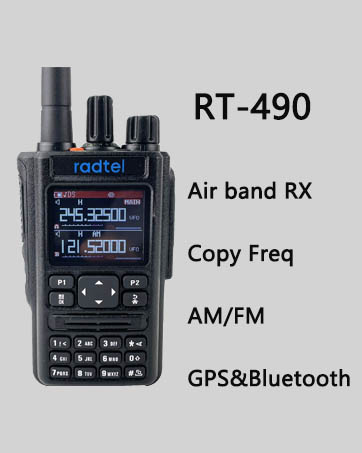
Image: The Radtel RT-490 display highlighting the three channel display modes (Frequency, Channel Number, Channel Name) and three scanning methods.
3.4. One-Key Frequency Copy (Auto Frequency Capture)
This feature allows the RT-490 to quickly copy the frequency and CTCSS/DCS tone from another radio, enabling immediate communication without manual programming. To use this function, ensure both radios are within 1 meter distance.

Image: The Radtel RT-490 radio showcasing its one-key frequency copy function, allowing it to quickly acquire frequencies from other radios.
3.5. VOX Function
Voice Operated Exchange (VOX) allows hands-free transmission. When VOX is enabled, the radio will automatically transmit when it detects your voice, and stop transmitting when you stop speaking. Adjust the VOX sensitivity in the radio's menu.
3.6. Scanning
The RT-490 supports various scanning methods to find active frequencies or channels:
- Time Scan: Scans for a set period on each channel.
- Carrier Scan: Stops scanning when a carrier signal is detected.
- Search Scan: Continuously scans until a signal is found.
3.7. DTMF (Dual-Tone Multi-Frequency)
The radio supports DTMF signaling, including 2-tone and 5-tone capabilities, which can be used for various functions such as remote control or selective calling.
3.8. NOAA Weather Alerts
The RT-490 can receive NOAA Weather Alerts, providing timely warnings for severe weather conditions in your area. This feature is crucial for outdoor activities and emergency preparedness.

Image: The Radtel RT-490 radio prominently displaying the NOAA Weather Alerts logo, indicating its capability to receive weather warnings.
3.9. Emergency Alert
The radio includes an emergency alert function, which can be activated to send out an alarm signal in critical situations. Refer to the radio's menu for specific activation procedures.
4. Maintenance
4.1. Battery Care
- Always use the provided charger.
- Do not overcharge or deep discharge the battery.
- Store the battery in a cool, dry place when not in use.
- If the radio will not be used for an extended period, remove the battery.
4.2. Cleaning
Wipe the radio's surface with a soft, damp cloth. Do not use harsh chemicals or abrasive cleaners. Ensure the radio is dry before use.
4.3. Screen Protection
The radio's display comes with a protective film. This film is designed to prevent scratches and can be removed if desired. If removed, consider applying a standard screen protector for continued protection.
5. Troubleshooting
| Problem | Possible Cause | Solution |
|---|---|---|
| Radio does not power on. | Battery is low or not installed correctly. | Ensure battery is fully charged and properly seated. |
| Cannot transmit or receive. | Incorrect frequency/channel, antenna not attached, or battery low. | Verify frequency/channel settings. Ensure antenna is securely attached. Charge battery. |
| Poor audio quality. | Volume too low/high, antenna issue, or interference. | Adjust volume. Check antenna connection. Move away from sources of interference. |
| Long charging time (e.g., 8 hours). | This is a known characteristic for some charging cycles. | Ensure the charger is connected properly and the charging current does not exceed 1A. This duration can be normal for a full charge. |
| Screen appears scratched easily. | The outermost layer is a protective film, not the actual screen. | Gently peel off the protective film. The actual screen underneath is more durable. |
| Programming issues with software. | Driver issues, incorrect cable, or software compatibility. | Ensure correct USB driver is installed for the programming cable. Use the official Radtel programming software. Verify cable connection. |
If problems persist after attempting these solutions, please contact Radtel customer support.
6. Specifications
| Feature | Specification |
|---|---|
| Model Number | RT 490 |
| Frequency Range | 144-148 MHz (TX/RX), 420-450 MHz (TX/RX), 222 MHz (TX/RX), 108-136 MHz (AM RX), 66-108 MHz (FM RX) |
| Number of Channels | 256 |
| Battery Type | Lithium Ion (2000mAh included) |
| Charging Port | USB Type-C |
| Special Features | Long Range, Type C charger, One-key copy frequency, VOX, Scan, DTMF, FM Radio, Emergency Alert, NOAA Weather Alerts |
| Water Resistance Level | Not Water Resistant |
| Item Weight | 1.03 pounds |
| Package Dimensions | 9.84 x 5.51 x 1.97 inches |
| FCC ID | 2AZSA-RT490 |
| UPC | 783798893503 |
7. Warranty and Support
7.1. Warranty Information
The Radtel RT-490 radio comes with a 1-month warranty from the date of purchase. This warranty covers manufacturing defects under normal use. It does not cover damage caused by misuse, accidents, unauthorized modifications, or natural disasters.
7.2. Customer Support
For technical assistance, warranty claims, or any questions regarding your Radtel RT-490 radio, please contact Radtel customer support directly. You can typically find contact information on the manufacturer's official website or through your point of purchase.
Visit the official Radtel store for more information: Radtel Store on Amazon


