Homtronics IPX8 Electric Cleaning Brush User Manual
Model: HHS
Introduction
Thank you for choosing the Homtronics IPX8 Electric Cleaning Brush. This versatile and powerful cleaning tool is designed to make your cleaning tasks easier and more efficient, whether for your bathroom, kitchen, car, or other surfaces. Please read this manual thoroughly before first use to ensure proper operation, maintenance, and safety.
Important Safety Instructions
- Read all instructions before using the appliance.
- Do not immerse the main unit (handle) in water beyond the brush head connection point unless specified for IPX8 rating. While the product is IPX8 waterproof, ensure the Type-C charging port is securely sealed with its silicone stopper before any water exposure.
- Keep out of reach of children.
- Use only the provided charging cable and adapter (if included) for charging.
- Do not operate the brush if it is damaged or malfunctioning.
- Avoid using abrasive cleaners or harsh chemicals with the brush heads, as this may damage the bristles or surfaces.
- Always turn off the device before changing brush heads or cleaning.
- Store the brush in a dry place when not in use.
Package Contents
- 1 x Electric Cleaning Brush Main Unit
- 4 x Extension Rods
- 1 x Charging Cable (Type-C)
- 1 x Wall Hook
- 1 x Brush Holder
- 9 x Interchangeable Brush Heads
- 1 x Storage Bag

Figure 1: Homtronics Electric Cleaning Brush and included accessories, including the main unit, extension poles, charging cable, wall hook, brush holder, and various brush heads.
Product Overview
The Homtronics Electric Cleaning Brush features a cordless design, powerful motor, and interchangeable brush heads for various cleaning needs. Its adjustable handle allows for comfortable use on different surfaces and heights.
Setup Guide
- Charging the Device:
Before first use, fully charge the electric cleaning brush. Connect the Type-C charging cable to the charging port on the main unit and plug the other end into a compatible USB power adapter (not included). The battery indicator light will show charging status (Red light for charging, Green light for fully charged). A full charge takes approximately 3 hours and provides about 1.5 hours of runtime.

Figure 2: Charging the electric cleaning brush via the Type-C port. The image highlights the 2600mAh battery capacity and approximately 120 minutes of operating time.
- Attaching Brush Heads:
Select the appropriate brush head for your cleaning task. Align the brush head with the rotating shaft on the main unit and push firmly until it clicks into place. To remove, pull the brush head off.

Figure 3: A selection of the 9 powerful and versatile brush heads, including flat brushes, small flat brushes, curved brushes, polishing pads, sponge-cloth brushes, wool brushes, scouring pads, large sponge brushes, and pointed brushes, each designed for specific cleaning applications.
- Assembling the Extension Handle:
For extended reach, attach one or more extension rods between the main unit and the brush head. Simply twist and lock the rods together to achieve the desired length (from 19cm to 122cm).
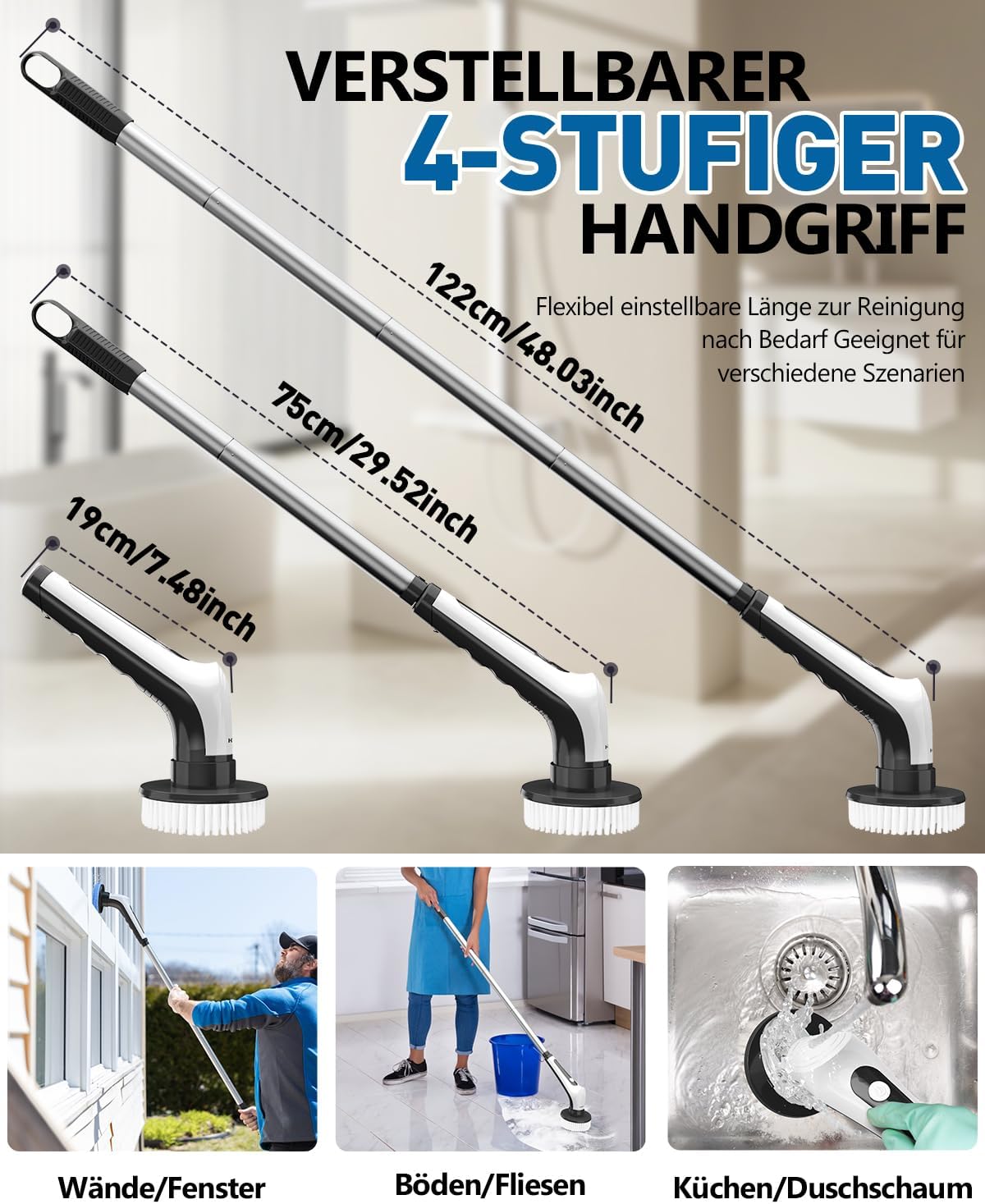
Figure 4: The adjustable 4-stage handle, demonstrating lengths of 19cm (7.48 inches), 75cm (29.52 inches), and 122cm (48.03 inches), suitable for cleaning walls, windows, floors, tiles, kitchens, and shower foam.
Operating Instructions
- Power On/Off: Press the power button on the handle to turn the device on or off.
- Speed Adjustment: The brush features 2 working speeds:
- Low Speed (300 RPM): Ideal for daily cleaning tasks.
- High Speed (400 RPM): Suitable for removing stubborn stains, offering a powerful torque of 25kg.
Press the speed button to toggle between the two speeds.

Figure 5: The electric cleaning brush in action, highlighting its powerful performance with up to 25kg torque and two speed modes (300-400 RPM) for efficient and effortless cleaning.
- Cleaning Surfaces: Apply appropriate cleaning solution to the surface or brush head. Gently press the rotating brush against the surface and move it in a circular or back-and-forth motion. The cordless design allows for unrestricted movement.
- Waterproof Feature: The brush is IPX8 waterproof, allowing it to be used in wet environments and even submerged in water for extended periods without damage. Ensure the charging port is sealed before water exposure.

Figure 6: The electric cleaning brush submerged in water, illustrating its full-body IPX8 waterproof protection. A note advises to seal the silicone stopper when immersing in water.
Maintenance and Care
- Cleaning the Brush Heads: After each use, remove the brush head and rinse it thoroughly under running water to remove any dirt or cleaning residue. Allow to air dry completely before storing.
- Cleaning the Main Unit: Wipe the main unit with a damp cloth. Do not use harsh chemicals or abrasive cleaners.
- Storage: Store the electric cleaning brush and its accessories in a cool, dry place, away from direct sunlight and extreme temperatures. Use the provided storage bag and wall hook for organized storage.
- Battery Care: To prolong battery life, avoid completely draining the battery frequently. Recharge the device when the battery indicator shows low power.
Troubleshooting
| Problem | Possible Cause | Solution |
|---|---|---|
| Brush does not turn on. | Battery is low or depleted. | Charge the device fully. |
| Brush stops rotating during use. | Excessive pressure applied; battery low. | Reduce pressure; recharge the device. |
| Brush heads are not cleaning effectively. | Incorrect brush head for the task; brush head worn out. | Select a more appropriate brush head; replace worn brush heads. |
| Charging indicator not lighting up. | Charging cable or adapter faulty; port not connected properly. | Check cable and adapter; ensure secure connection to charging port. |
Specifications
| Brand | Homtronics |
| Model Number | HHS |
| Dimensions (L x W x H) | 17.5 x 11.5 x 31.5 cm (6.9 x 4.5 x 12.4 inches) |
| Weight | 1.21 kg (2.67 lbs) |
| Color | Black |
| Material | ABS + AS + SUS340 |
| Handle Material | Acrylonitrile Butadiene Styrene |
| Waterproof Rating | IPX8 |
| Torque | 25 kg (Max) |
| Speed Settings | 2 Speeds (300 RPM, 400 RPM) |
| Battery Capacity | 2600 mAh |
| Charging Time | Approx. 3 hours (Type-C) |
| Operating Time | Approx. 1.5 hours (90 minutes) |
| Adjustable Handle Length | 19 cm, 75 cm, 122 cm (7.48 in, 29.52 in, 48.03 in) |
| Included Brush Heads | 9 interchangeable brush heads |
Warranty and Support
Homtronics products are manufactured to the highest quality standards. For warranty information, technical support, or customer service inquiries, please refer to the contact information provided on the product packaging or visit the official Homtronics website.
Please retain your purchase receipt as proof of purchase for any warranty claims.


