1. Introduction
Thank you for choosing the SHIQUN KT-9900 Mobile Car Radio. This high-power, dual-band transceiver is designed for reliable long-range communication in mobile environments. This manual provides essential information for the safe and effective operation, setup, and maintenance of your device. Please read it thoroughly before use.
2. Safety Information
- Power Supply: Connect the radio only to a 12V DC power source. Ensure correct polarity to prevent damage.
- Antenna: Never transmit without a properly connected antenna. Transmitting without an antenna can damage the radio's final amplifier.
- Installation: Install the radio in a secure location within your vehicle, ensuring it does not obstruct driving or airbag deployment.
- Heat: The radio may become warm during extended transmission. Ensure adequate ventilation.
- Water Resistance: This device is NOT waterproof or water-resistant. Avoid exposure to moisture.
- Hearing Protection: Prolonged exposure to high volume levels may cause hearing damage. Adjust volume to a comfortable level.
- Servicing: Do not attempt to open or service the radio yourself. Refer all servicing to qualified technicians.
3. Package Contents
Verify that all items listed below are included in your package:
- SHIQUN KT-9900 Mobile Transceiver Unit
- Handheld Microphone with DTMF Keypad
- Cigarette Plug Connector Power Cable
- Mounting Bracket
- Mounting Screws
- User's Manual
- M507 Antenna
- 5-meter Antenna Cable
- Antenna Clip
- Programming Cable (for PC connection)

Figure 3.1: Included Components. This image displays the SHIQUN KT-9900 mobile transceiver, handheld microphone, cigarette plug power cable, mounting bracket, screws, M507 antenna, antenna cable, antenna clip, and programming cable.
4. Product Overview
4.1 Transceiver Unit

Figure 4.1: Top view of the KT-9900 transceiver. This image shows the top of the compact radio unit, highlighting its robust casing and power cable connection points.

Figure 4.2: Front view of the KT-9900 transceiver. This image displays the front panel of the radio, which typically houses indicators and possibly a speaker grille.

Figure 4.3: Rear view of the KT-9900 transceiver. This image shows the rear of the unit, featuring the antenna connector, data port, and external speaker port.
4.2 Handheld Microphone
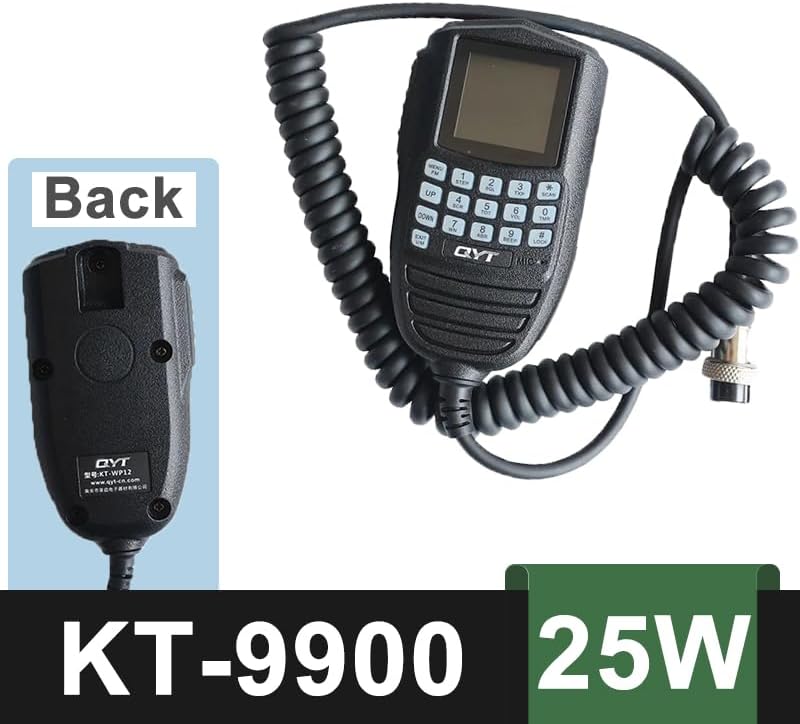
Figure 4.4: Handheld Microphone. This image shows the microphone unit with its coiled cable and DTMF keypad, used for remote operation and input.
5. Setup
- Mounting the Transceiver: Use the provided mounting bracket and screws to securely install the KT-9900 unit in a suitable location within your vehicle. Ensure it is easily accessible but does not interfere with driving controls or safety features.
- Antenna Connection: Connect the M507 antenna to the antenna cable, then connect the antenna cable to the antenna port on the rear of the transceiver unit (refer to Figure 4.3). Secure the antenna using the provided clip in an optimal location on your vehicle for best signal reception and transmission.
- Power Connection: Connect the cigarette plug connector power cable to the 12V DC power outlet in your vehicle. Ensure the connection is firm.
- Microphone Connection: Plug the handheld microphone's connector into the designated port on the transceiver unit.
- Optional PC Programming: For advanced configuration and channel programming, connect the provided programming cable from the transceiver's data port to your computer. Refer to specific programming software instructions (not included in this manual).
6. Operating Instructions
6.1 Basic Operation
- Power On/Off: Turn the volume knob clockwise to power on the radio. Turn counter-clockwise until it clicks to power off.
- Volume Adjustment: Rotate the volume knob to adjust the audio output level.
- Channel Selection: Use the UP/DOWN buttons on the handheld microphone to navigate through the 200 memory channels.
- Frequency Band: The radio operates on UHF/VHF dual bands. The specific band can be selected or programmed via the microphone or PC software.
- Transmission: Press and hold the PTT (Push-To-Talk) button on the microphone to transmit. Release to receive.
6.2 Advanced Functions
The KT-9900 supports various advanced functions, typically accessed via the handheld microphone's DTMF keypad or PC programming:
- Squelch Method: Supports CTCSS/DCS/5Tone/2Tone/DTMF for selective calling and noise reduction.
- Monitoring: Listen to a channel without transmitting.
- Telehalo/Remote Death/Boot: Remote control features for specific applications (requires programming).
- Alarm Function: Activates an emergency alarm.
- Call Key: Dedicated button for specific call functions.
- PC Program: Use the programming cable and software for comprehensive customization of channels, frequencies, and features.
- External Speaker: An external speaker can be connected to the rear port for enhanced audio output.
7. Maintenance
- Cleaning: Use a soft, dry cloth to clean the radio's exterior. Do not use harsh chemicals or solvents.
- Connections: Periodically check all cable connections (power, antenna, microphone) to ensure they are secure and free from corrosion.
- Antenna: Inspect the antenna and cable for any damage. A damaged antenna can reduce performance and potentially harm the radio.
- Storage: If storing the radio for an extended period, disconnect it from the power source and store it in a dry, cool place.
8. Troubleshooting
| Problem | Possible Cause | Solution |
|---|---|---|
| Radio does not power on | No power, loose connection, blown fuse | Check power cable connection to vehicle and radio. Verify vehicle's 12V outlet is functional. Check fuse in power cable. |
| No reception or poor signal | Antenna not connected, damaged antenna/cable, incorrect frequency/channel, high squelch level | Ensure antenna is securely connected. Inspect antenna and cable for damage. Verify correct frequency/channel. Adjust squelch level. |
| Cannot transmit | Microphone not connected, PTT button faulty, transmit inhibited (e.g., busy channel lockout) | Check microphone connection. Ensure PTT button is fully pressed. Check radio settings for transmit inhibit functions. |
| No audio from speaker | Volume too low, external speaker connected, internal speaker faulty | Increase volume. Disconnect external speaker if not in use. If problem persists, contact support. |
| Programming issues via PC | Incorrect cable, driver issues, software incompatibility | Ensure correct programming cable is used. Install necessary drivers. Use compatible programming software. |
9. Specifications
| Feature | Specification |
|---|---|
| Model Numbers | KT-9900 / WP-9900 / KT-WP12 |
| Output Power (Max) | 25W (VHF), 20W (UHF) |
| Frequency Range | 144-148MHz (VHF), 420-450MHz (UHF) - Expandable |
| Memory Channels | 200 |
| Channel Spacing | 12.5 / 20 / 25 KHz |
| Squelch Method | CTCSS / DCS / 5Tone / 2Tone / DTMF |
| Voltage | 13.8 Volts (DC) |
| Water Resistance Level | Not Water Resistant |
| Item Weight | 3.68 pounds (approx. 1.67 kg) |
| Dimensions (L x W x H) | 4.07 x 3.09 x 1.77 inches (approx. 10.34 x 7.85 x 4.5 cm) |
| Special Features | 25W output, Long Range, Dual Band, PC Program, DTMF Handheld Microphone |
10. Warranty and Support
10.1 Warranty Information
This SHIQUN KT-9900 Mobile Car Radio comes with a 1-year warranty. This warranty is provided exclusively through "Shiqun Electronics Co., Ltd". Please retain your proof of purchase for warranty claims.
10.2 Customer Support
For technical assistance, troubleshooting beyond this manual, or warranty inquiries, please contact Shiqun Electronics Co., Ltd. customer support. Refer to the contact information provided with your purchase or on the official Shiqun Electronics website.


