
1. Introduction
This manual provides essential instructions for the safe assembly, operation, and maintenance of your COSTWAY 2-in-1 Foldable Workbench Sawhorse. This versatile tool functions as both a robust workbench and a heavy-duty sawhorse, designed for various tasks in workshops and garages. Please read this manual thoroughly before initial use and retain it for future reference.
2. Safety Instructions
Always observe the following safety precautions to prevent injury and damage to the product:
- Ensure the workbench is placed on a stable, level surface before use.
- Do not exceed the maximum load capacities: 200 kg (440 lbs) as a workbench and 454 kg (1000 lbs) as a sawhorse.
- Verify all locking mechanisms are securely engaged before applying weight or beginning work.
- Keep hands and fingers clear of moving parts during folding, unfolding, and height adjustment.
- Wear appropriate personal protective equipment (PPE) such as safety glasses and gloves when working.
- Do not modify the product in any way. Use only original replacement parts if necessary.
- Store the workbench in a dry, secure location when not in use.
3. Product Overview
The COSTWAY 2-in-1 Foldable Workbench Sawhorse is engineered for convenience and durability. Key features include:
- Dual Functionality: Easily converts between a workbench and a sawhorse.
- Adjustable Height: Features a 2-level height adjustment (55 cm to 82 cm) to suit various tasks and user preferences.
- Integrated Clamping System: Includes 2 quick clamps, 2 clamping dogs, and a functional clamping system with foldable, rotatable clamping handles for securing workpieces.
- Durable Construction: Made from robust metal and aluminum for high load-bearing capacity.
- Portable and Foldable: Folds into a compact size for easy storage and transport. Net weight: 11.5 kg.
- Additional Features: Built-in tool storage, metric and SAE linear scales, wide anti-slip foot pads, and a power strip holder.

Image 3.1: The COSTWAY 2-in-1 Foldable Workbench Sawhorse shown in its workbench configuration and folded for storage.

Image 3.2: Close-up view of various features: wide anti-slip foot pads, foldable rotary clamping handle, tool tray, metric and SAE linear scale, and power strip holder.
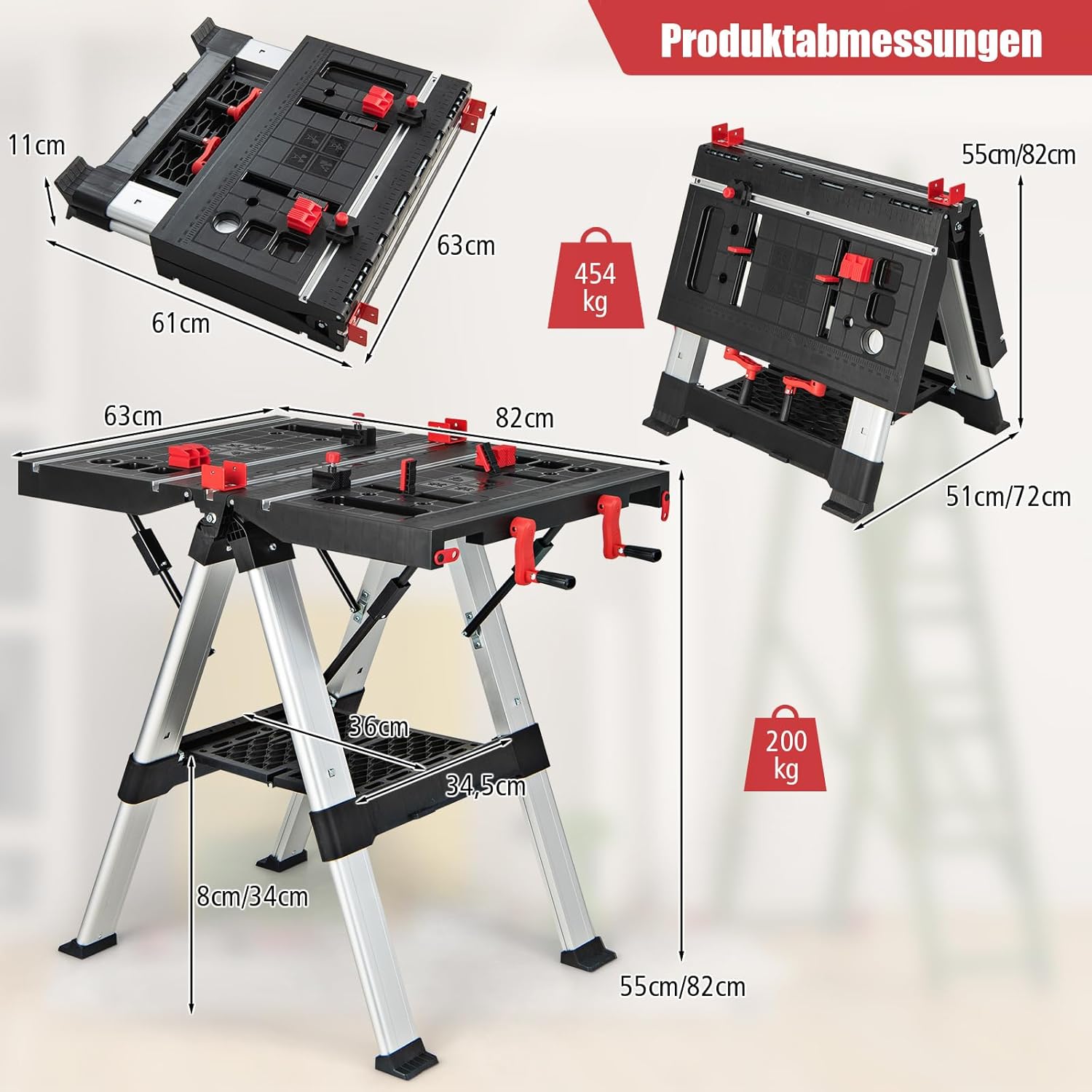
Image 3.3: The multifunctional workbench surface, highlighting the quick clamps and clamping dogs for securing materials.
4. Setup
4.1 Unfolding the Workbench
- Place the folded workbench on a flat, stable surface.
- Release any transport locks or latches.
- Carefully extend the legs until they are fully open and locked into position. Ensure the safety locking mechanisms are engaged.
- Unfold the tabletop sections until they lie flat and are securely connected.
4.2 Adjusting Height
The workbench offers two height settings:
- Locate the height adjustment buttons on the legs.
- Press the buttons and simultaneously raise or lower the tabletop to the desired height (55 cm or 82 cm).
- Ensure both sides are adjusted to the same height and the locking pins are fully engaged before use.

Image 4.1: Illustration of the 2-level height adjustment (55-82 cm) and the folding tabletop feature, with a close-up of the adjustment button.
5. Operating Instructions
5.1 Using as a Workbench
For general tasks, position the workbench at your preferred height. Utilize the integrated clamping system to secure workpieces:
- Insert the quick clamps into the designated slots on the tabletop to hold materials firmly.
- Place the clamping dogs into the holes on the tabletop to provide additional support and clamping points for irregularly shaped objects.
- Use the foldable rotary clamping handles to adjust the clamping jaws and apply pressure to secure your material.
- The built-in metric and SAE linear scales can assist with precise measurements.
- Store small tools and accessories in the integrated tool compartments or on the lower tool shelf.
- Attach a power strip to the designated holder for convenient access to power tools.
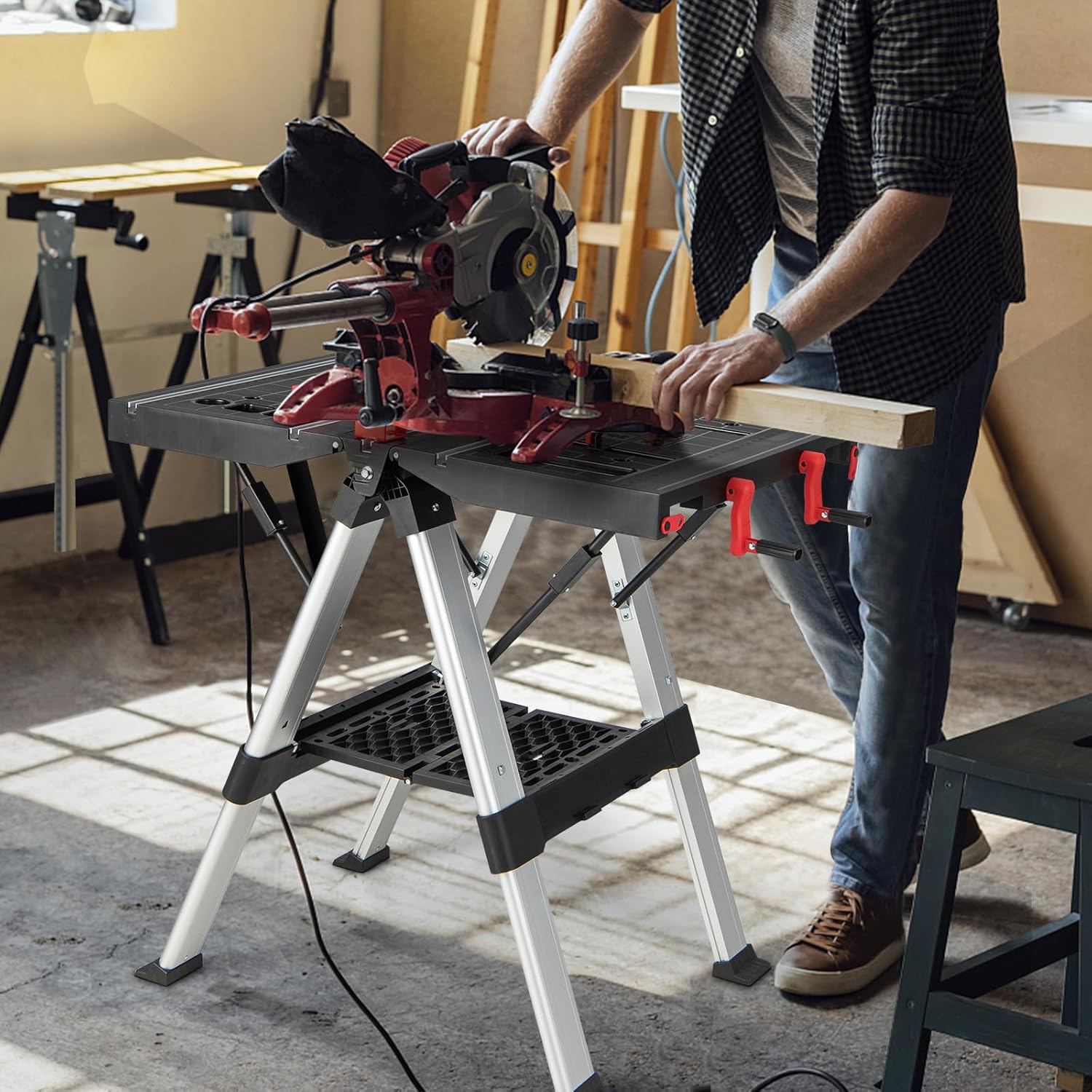
Image 5.1: A user operating a miter saw on the workbench, demonstrating its use for cutting tasks.

Image 5.2: The workbench being used for various applications such as assembly, repair, and wood processing.
5.2 Using as a Sawhorse
To use the unit as a sawhorse, ensure the tabletop is folded down. The robust frame can support heavy loads for cutting or supporting long materials.
- Fold the tabletop sections inward to convert the unit into a sawhorse.
- Ensure all folding mechanisms are securely locked.
- The sawhorse configuration can support up to 454 kg (1000 lbs).
5.3 Linking Multiple Units
For larger work surfaces, multiple COSTWAY workbenches can be linked together:
- Position two workbenches side-by-side.
- Utilize the integrated linkage locks to securely connect the units.
- Optional: Use 2x4 support arms (not included) to create a continuous work surface between two units.

Image 5.3: Two workbenches connected to create an extended work area, showing the use of 2x4 support arms and the linkage locks.
6. Maintenance
Regular maintenance ensures the longevity and safe operation of your workbench:
- Cleaning: Wipe down the workbench surfaces with a damp cloth after each use to remove dust, debris, and spills. Avoid abrasive cleaners.
- Inspection: Periodically inspect all bolts, screws, and locking mechanisms for tightness. Tighten any loose fasteners.
- Lubrication: Lightly lubricate moving parts, such as hinges and clamping mechanisms, with a silicone-based spray to ensure smooth operation.
- Storage: When not in use, fold the workbench to its compact size and store it in a dry, protected area to prevent rust or damage.
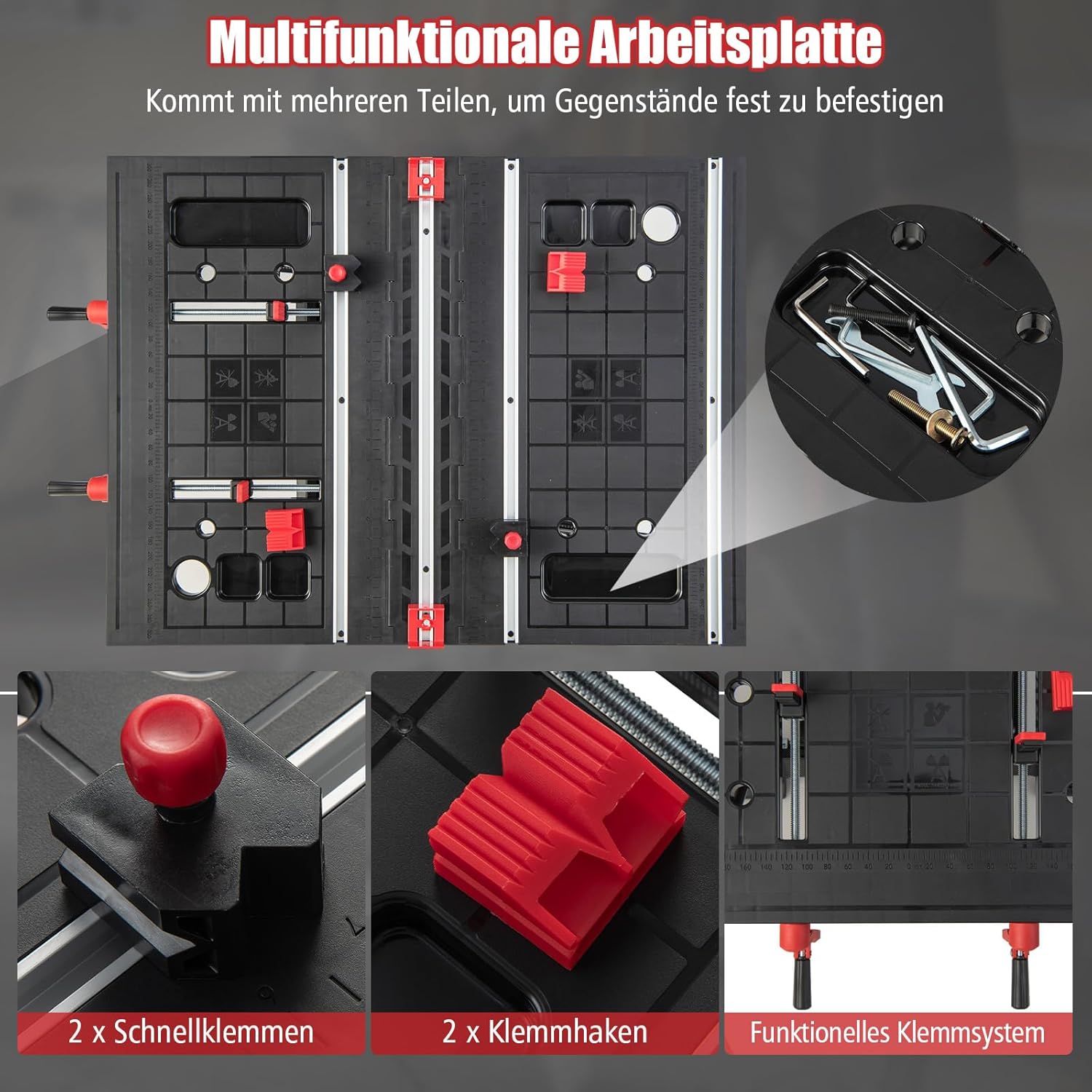
Image 6.1: The workbench in its folded, compact state, demonstrating its space-saving design for storage.
7. Troubleshooting
If you encounter issues with your workbench, consider the following common solutions:
- Workbench feels unstable: Ensure all legs are fully extended and locked. Check that the workbench is on a level surface. Verify all fasteners are tight.
- Clamping mechanism is stiff: Clean any debris from the clamping jaws and lubricate the moving parts with a suitable lubricant.
- Difficulty folding/unfolding: Check for any obstructions or debris in the hinges or locking mechanisms. Apply light lubrication if necessary.
For persistent issues not resolved by these steps, please contact COSTWAY customer support.
8. Specifications
| Feature | Specification |
|---|---|
| Brand | COSTWAY |
| Model | B0CLB7NPC4 |
| Material | Aluminum, Metal |
| Color | Red |
| Finish Type | Painted |
| Base Type | Leg |
| Product Dimensions (L x W x H) | 63 cm x 63 cm x 82 cm (24.8 in x 24.8 in x 32.3 in) |
| Minimum Height | 55 cm (21.7 in) |
| Workbench Load Capacity | 200 kg (440 lbs) |
| Sawhorse Load Capacity | 454 kg (1000 lbs) |
| Net Weight | 11.5 kg (25.3 lbs) |
| Assembly Required | Yes |

Image 8.1: Detailed product dimensions and load capacities for the workbench and sawhorse configurations.


