
1. Introduction
Thank you for choosing the HICON Vittoria Gaming Chair. This manual provides essential information for the safe assembly, operation, and maintenance of your new chair. Please read these instructions carefully before use and retain them for future reference.

Image: Front view of the HICON Vittoria Gaming Chair, showcasing its ergonomic design and red finish.
2. Safety Information
- Ensure all components are present and undamaged before assembly. Do not use if any parts are missing or broken.
- Follow assembly instructions precisely. Incorrect assembly can lead to instability and injury.
- Do not stand on the chair. Use it only for sitting.
- Do not exceed the maximum weight capacity of 150 kg (330 lbs).
- Keep children and pets away from the chair during assembly.
- Avoid exposing the chair to direct sunlight or extreme temperatures to prevent material degradation.
- Regularly check all bolts and screws to ensure they are tight. Retighten as necessary.
3. Package Contents
Verify that all the following components are included in your package:
- Backrest
- Seat Base with Armrests and Footrest mechanism
- Star Base (5-star aluminum base)
- Casters (5 pieces)
- Gas Lift Cylinder
- Gas Lift Cover
- Lumbar Support Cushion with Massage Function (USB powered)
- Headrest Cushion
- Assembly Hardware (screws, washers, Allen key)
4. Setup and Assembly
Follow these steps to assemble your HICON Vittoria Gaming Chair:
- Attach Casters to Star Base: Insert each of the five casters into the holes at the end of each leg of the star base. Push firmly until they click into place.
- Insert Gas Lift: Place the gas lift cylinder into the center hole of the assembled star base. Cover the gas lift with the telescopic plastic cover.
- Attach Backrest to Seat Base: Align the backrest with the mounting brackets on the seat base. Secure it using the provided screws and Allen key. Ensure all screws are tightened evenly.
- Place Assembled Seat onto Gas Lift: Carefully place the assembled seat and backrest onto the gas lift cylinder, ensuring it is centered and stable.
- Attach Cushions: Secure the headrest cushion to the top of the backrest using its straps. Attach the lumbar support cushion to the lower backrest using its straps. Connect the USB cable from the lumbar cushion to a power source (e.g., power bank, USB adapter) for the massage function.

Image: Close-up of the OmniRoll casters, designed for hard floors and carpets, attached to the chair's stable base.

Image: Detail of the NitroLift gas lift, providing durability and a load capacity of up to 250 kg.
5. Operating Instructions
Your HICON Vittoria Gaming Chair offers several adjustable features for personalized comfort:
- Seat Height Adjustment: To raise the seat, lift the lever located under the right side of the seat while taking your weight off the chair. To lower the seat, lift the lever while seated. Adjust until your feet are flat on the floor and your knees are at a 90-110 degree angle.
- Backrest Recline: Pull the lever on the right side of the chair (below the seat) to unlock the backrest. Lean back to your desired angle (between 90 and 170 degrees) and push the lever down to lock it in place.
- Armrest Adjustment (Adapto Arm): The armrests can be adjusted in height and forward-backward. Locate the buttons or levers on the armrests to unlock and adjust them to your preferred position. Ensure your forearms rest comfortably and your elbows are at approximately a 90-degree angle.
- Lumbar Support Massage (PneuMassage): The lumbar cushion features a vibration massage mechanism. Connect the USB cable to a power source to activate the massage function. Adjust the cushion's position on the backrest for optimal lower back support and comfort.
- Extendable Footrest (LegRest): To extend the footrest, pull it out from under the seat. To retract, push it back in until it is fully stored. Use the footrest for additional leg support when reclining.
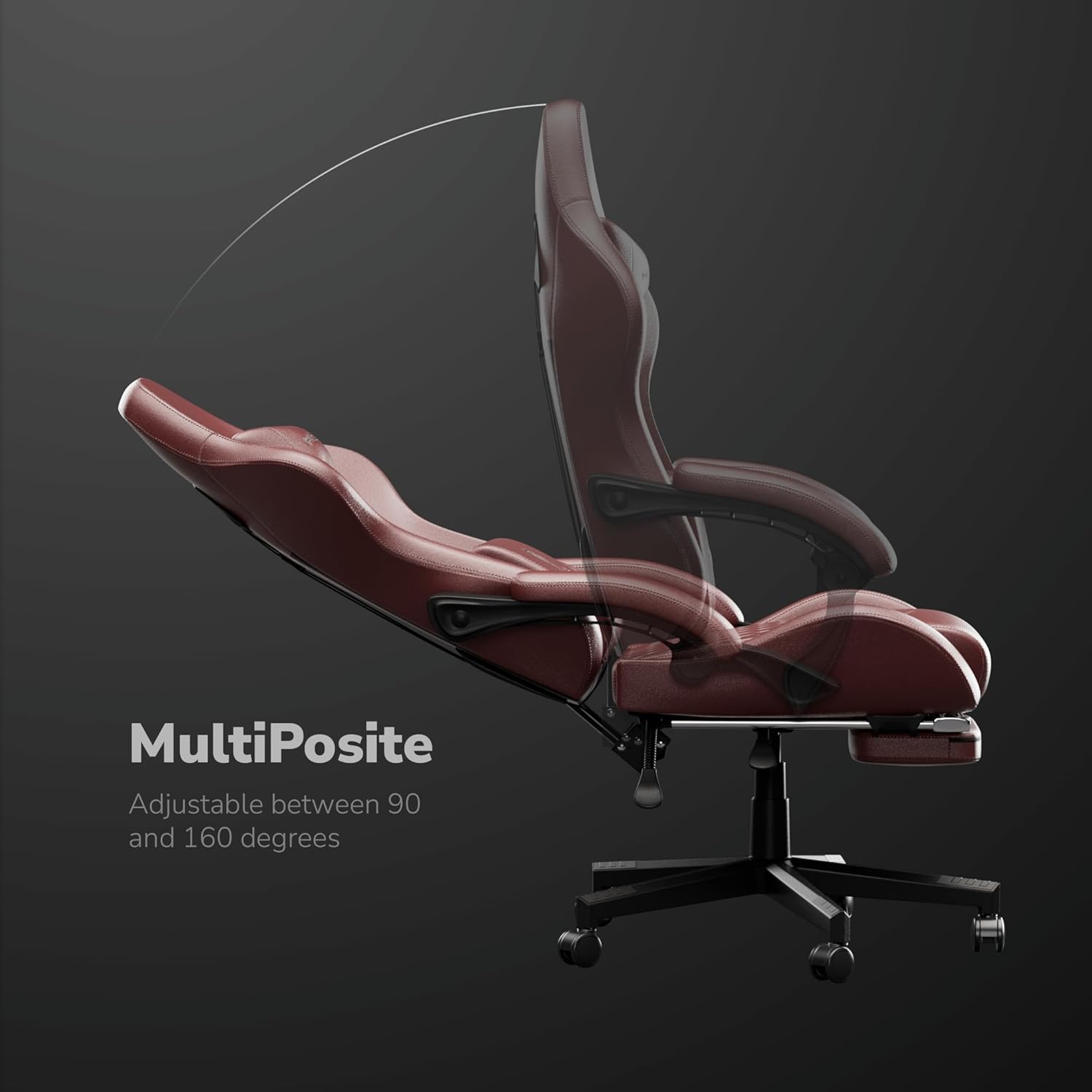
Image: The MultiPosite feature illustrates the adjustable recline range of the chair, from 90 to 160 degrees.

Image: Close-up of the Adapto Arm, highlighting its adjustable height and forward-backward movement for optimal arm support.

Image: Detail of the PneuMassage lumbar cushion, featuring a vibration mechanism for enhanced comfort and support.

Image: Close-up of the LegRest, providing foot support for comfort during extended sitting or reclining.
6. Maintenance
- Cleaning: Wipe the PU leather surfaces with a soft, damp cloth. For stubborn stains, use a mild soap solution and then wipe with a clean, damp cloth. Avoid harsh chemicals or abrasive cleaners.
- Hardware Check: Periodically check all screws and bolts to ensure they are tight. Retighten as needed to maintain stability and safety.
- Caster Care: Keep the casters clean from hair and debris to ensure smooth movement.
- Avoid Overloading: Do not place excessive weight on the armrests or backrest.

Image: Detail of the DuraBreathe material, highlighting its durable, waterproof, and easy-to-clean properties.
7. Troubleshooting
- Chair Squeaks: Check all bolts and screws for tightness. Apply a small amount of silicone lubricant to moving parts if necessary.
- Difficulty Adjusting Height: Ensure the gas lift lever is fully engaged. If the issue persists, the gas lift cylinder may need replacement.
- Casters Not Rolling Smoothly: Remove any hair or debris wrapped around the caster wheels. Clean the wheels thoroughly.
- Backrest Not Locking: Verify that the recline lever is fully pushed down to lock the backrest in position.
8. Specifications
| Feature | Specification |
|---|---|
| Brand | HICON |
| Model Number | HC-6689 |
| Color | Red |
| Material | Aluminum, Faux Leather |
| Frame Material | Metal |
| Seat Material Type | Memory Foam |
| Item Weight | 16 Kilograms |
| Recommended Maximum Weight | 150 Kilograms |
| Item Dimensions (L x W x H) | 64 x 62 x 124 centimeters |
| Seat Depth | 55 centimeters |
| Number of Reclining Positions | 3 |
| Adjustable | Yes |
| Assembly Required | Yes |
| Indoor/Outdoor Use | Indoor |
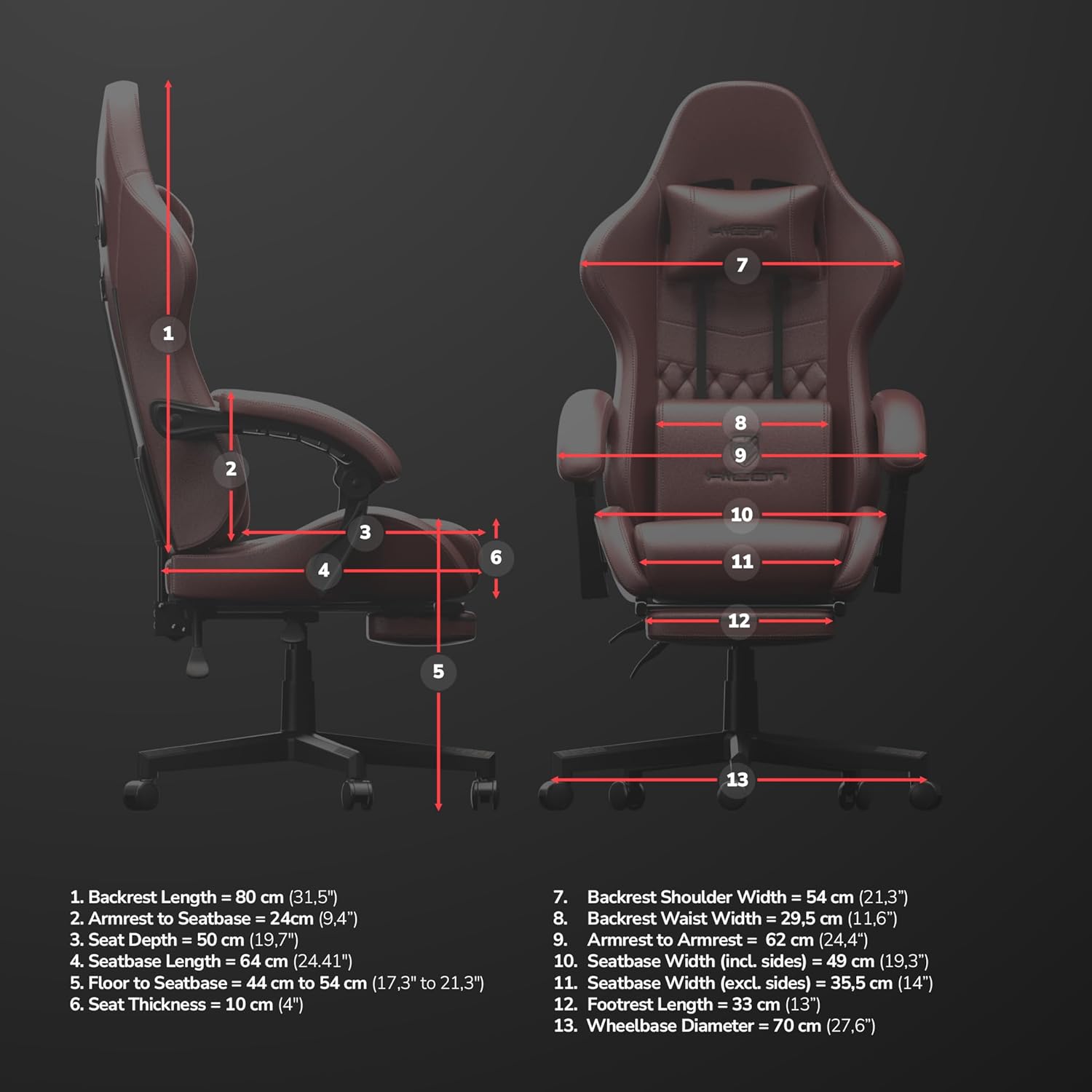
Image: Detailed dimensional diagram of the HICON Vittoria Gaming Chair, showing various measurements for reference.
9. Warranty and Support
For warranty information or technical support, please refer to the documentation included with your purchase or contact the retailer/manufacturer directly. Keep your proof of purchase for warranty claims.


