Introduction
The Mitel 712dt DECT phone is the basic model of the new Mitel 700 SIP-DECT family. This manual provides essential information for setting up, operating, and maintaining your Mitel 712dt DECT phone. It is designed to help users understand the phone's features and ensure optimal performance in a business environment.
The 712dt phone is constructed from plastics protected with an antimicrobial BioCote compound, making it ideal for shared workspaces where hygiene is a priority.
Product Overview
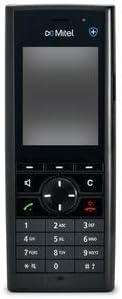
Front view of the Mitel 712dt DECT phone, showing its 2.4-inch color TFT LCD screen, navigation buttons, and numeric keypad.
The Mitel 712dt DECT phone offers a robust set of features designed for reliable communication:
- Display: Large 2.4-inch color TFT LCD with backlight (240 x 320 pixels, 64K colors) for clear visibility.
- Construction: Made from plastic with an antimicrobial BioCote compound for enhanced hygiene.
- Audio Quality: Protected speaker grille on the back ensures excellent audio performance.
- Battery: Excellent battery capacity for extended use.
- Charging: USB Type-C charging port, compliant with new EU standards.
- Connectivity: 3.5 mm headphone jack for external audio accessories.
- Controls: Side buttons for volume adjustment and mute function.
- Alerts: Vibration mode for incoming calls and notifications.
- Durability: IP44 protection rating, offering resistance against splashes and dust.
What's in the Box
Upon unboxing your Mitel 712dt DECT Set, please verify that all components are present:
- Mitel 712dt Handset
- Charging Station
- Rechargeable Battery
If any items are missing or damaged, please contact your supplier immediately.
Setup
- Install Battery: Open the battery compartment cover on the back of the handset. Insert the rechargeable battery, ensuring correct polarity. Close the cover securely.
- Charge Handset: Connect the charging station to a power outlet using the provided power adapter. Place the handset into the charging station. The display will indicate charging status. For first-time use, charge the handset for at least 4 hours to ensure full battery capacity.
- Register Handset (if required): If your handset is not pre-registered to a DECT base station, you will need to register it. Refer to your DECT base station's manual for specific registration instructions. Typically, this involves activating registration mode on the base station and then initiating registration from the handset's menu (e.g., Menu > Settings > Registration > Register Handset).
- Initial Setup: Follow the on-screen prompts to set the date, time, and language preferences.
Operating Instructions
Making Calls
- Dialing: Enter the phone number using the numeric keypad.
- Initiate Call: Press the green call button ☎ to dial the number.
- End Call: Press the red end call button ☒ to terminate the call.
Receiving Calls
- When the phone rings, press the green call button ☎ to answer.
- To reject a call, press the red end call button ☒.
Volume Adjustment
- During a call, use the side volume buttons to adjust the earpiece volume.
- In standby mode, use the side volume buttons to adjust the ringer volume.
Menu Navigation
- Press the central navigation button to access the main menu.
- Use the up/down/left/right navigation buttons to scroll through menu options.
- Press the central button again to select an option.
- Press the 'C' (Clear/Back) button to go back to the previous screen or exit the menu.
Maintenance
- Cleaning: Use a soft, damp cloth to clean the handset and charging station. Do not use abrasive cleaners or solvents. The antimicrobial BioCote compound helps maintain hygiene.
- Battery Care: To prolong battery life, avoid exposing the battery to extreme temperatures. If the phone will not be used for an extended period, remove the battery.
- Storage: Store the device in a cool, dry place away from direct sunlight and moisture.
Troubleshooting
| Problem | Possible Cause | Solution |
|---|---|---|
| Handset does not power on. | Battery is not charged or not inserted correctly. | Ensure battery is correctly inserted and fully charged. Place handset on charging station. |
| No dial tone / Cannot make calls. | Handset is out of range or not registered to the base station. | Move closer to the base station. Re-register the handset if necessary. Check base station power and connection. |
| Poor audio quality. | Interference or low signal strength. | Move away from other electronic devices. Ensure handset is within optimal range of the base station. |
| Display is blank. | Handset is in power-saving mode or battery is depleted. | Press any button to wake the display. Charge the handset. |
Specifications
| Feature | Detail |
|---|---|
| Brand | Generisch (Mitel) |
| Model | 712dt |
| Display Size | 2.4 Inches |
| Display Type | Color TFT LCD (240 x 320 pixels, 64K colors) |
| Power Source | Battery Powered |
| Charger Port | USB Type-C |
| Headphone Jack | 3.5 mm |
| Keypad Type | Single Keypad |
| Caller ID | Yes |
| Protection Rating | IP44 |
| Antimicrobial Protection | BioCote Compound |
Warranty and Support
For warranty information and technical support, please refer to the documentation provided by your point of purchase or visit the official Mitel website. Warranty terms may vary based on region and retailer.
Please retain your proof of purchase for any warranty claims.


