
1. Product Overview
The MOUNTUP MU3004-07 is a long pole type PC monitor stand designed to accommodate two LCD monitors in a vertical arrangement. It supports displays ranging from 13 to 32 inches, with a load capacity of up to 8kg per arm. The stand is compatible with VESA standards of 75mm x 75mm and 100mm x 100mm, offering versatile mounting options and multi-angle adjustments to optimize your workspace.

Figure 1: Product overview showing the dual monitor stand supporting two monitors, with key specifications like 8kg load capacity per monitor, compatibility with up to 32-inch displays, and VESA 75x75mm/100x100mm standards.
2. Setup Instructions
Follow these steps to properly set up your MOUNTUP MU3004-07 Dual Monitor Stand.
2.1. Installation Video Guide
Video 1: Detailed installation guide for the MOUNTUP Dual Monitor Stand, demonstrating each step from assembly to mounting.
2.2. Choosing a Mounting Method
The stand offers two installation methods: Clamp Mount and Grommet Mount. Choose the method that best suits your desk.

Figure 2: Illustration of the two available mounting options: Clamp Mount for desk edges and Grommet Mount for desks with existing holes.
2.3. Attaching VESA Plates and Cable Management
Secure the VESA plates to your monitors and utilize the integrated cable management system to keep your workspace tidy.

Figure 3: Instructions for attaching the VESA plate to the monitor and organizing cables using the provided wire clips along the pole.
3. Operating Instructions
The MOUNTUP MU3004-07 monitor stand offers extensive adjustability for optimal viewing comfort and productivity.
3.1. Adjustment Features Video Guide
Video 2: Demonstration of the monitor stand's adjustment capabilities, including tilt, swivel, pivot, and height adjustments.
3.2. Multi-Angle Adjustment
- Tilt: Adjust the monitor's vertical angle up to 90° upwards and 90° downwards.
- Pan/Swivel: Rotate the monitor horizontally up to 90° to the left and 90° to the right.
- Pivot: Rotate the screen 360° for easy switching between landscape and portrait orientations.
The multi-stage height adjustment allows you to position your monitors precisely at eye level, whether you are sitting or standing.
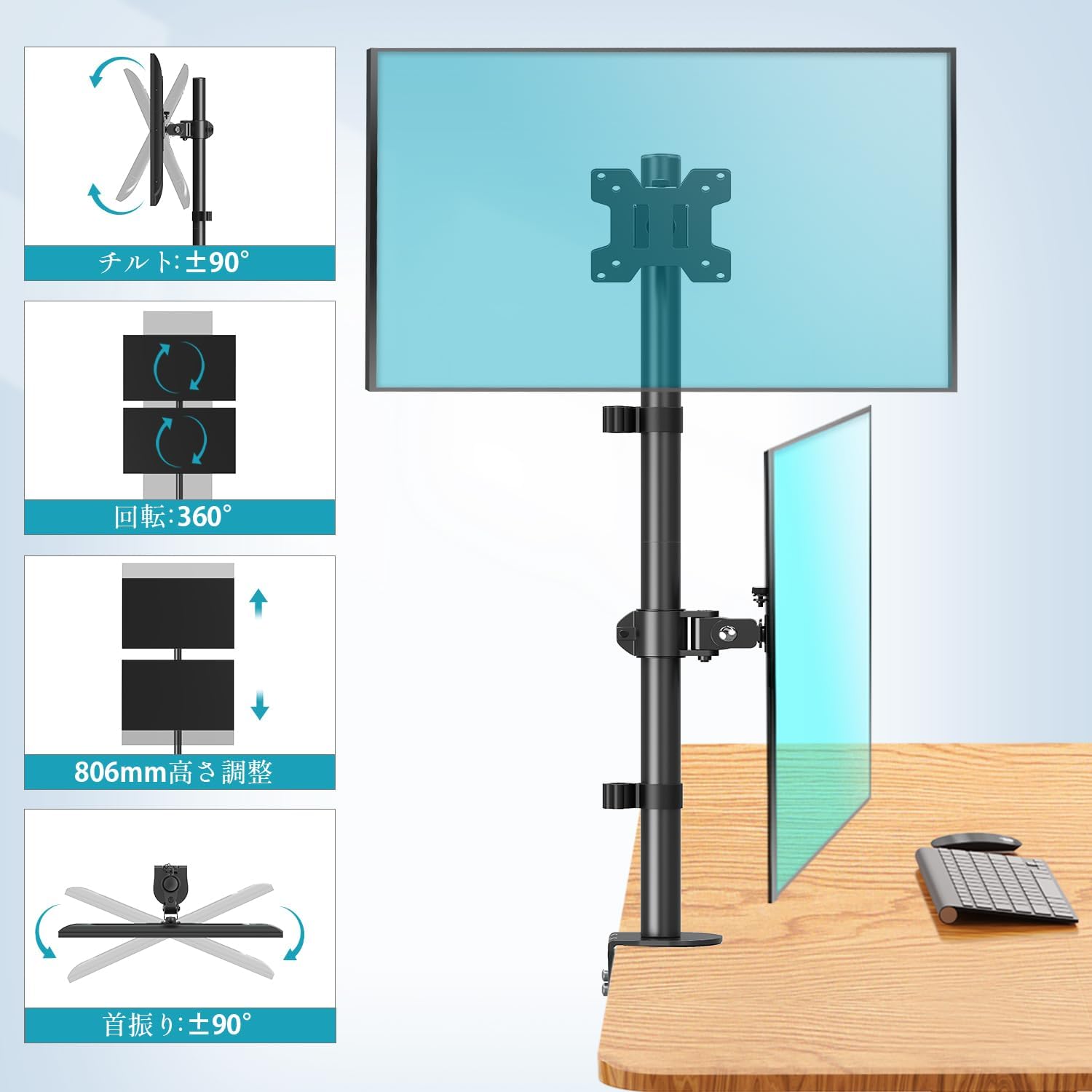
Figure 4: Visual representation of the monitor arm's tilt (up/down), swivel (left/right), 360° pivot, and overall height adjustment capabilities.
4. Maintenance
To ensure the longevity and optimal performance of your MOUNTUP monitor stand, follow these simple maintenance guidelines:
- Cleaning: Regularly wipe the stand with a soft, dry cloth to remove dust and dirt. For stubborn marks, use a slightly damp cloth with mild soap, then dry thoroughly. Avoid abrasive cleaners or solvents.
- Tightening: Periodically check all screws and bolts to ensure they are securely tightened. Loose connections can affect stability and adjustment performance.
- Lubrication: Moving parts are designed for smooth operation and generally do not require lubrication. If you notice any stiffness, consult the manufacturer's support.
- Weight Capacity: Do not exceed the maximum weight capacity of 8kg per monitor. Overloading can cause damage to the stand and monitors.
5. Troubleshooting
If you encounter any issues with your MOUNTUP monitor stand, refer to the following common troubleshooting tips:
- Monitors are not stable/sagging:
- Ensure all VESA plate screws are tightly secured to the monitor.
- Verify that the monitor arm connections to the pole are tightened.
- Check that the desk clamp or grommet mount is firmly attached to the desk.
- Confirm that the monitor weight does not exceed the 8kg per arm capacity.
- Difficulty adjusting monitor position:
- For tilt adjustment, loosen the tilt bolt, adjust to the desired angle, then re-tighten.
- For height adjustment, ensure the screws holding the monitor arms to the pole are slightly loosened to allow movement, then re-tighten once the desired height is achieved.
- Stand feels wobbly:
- Re-check the desk clamp or grommet mount for tightness.
- Ensure the desk surface is stable and capable of supporting the stand and monitors.
If the problem persists, please contact customer support as detailed in the Warranty & Support section.
6. Specifications
| Feature | Detail |
|---|---|
| Model Number | MU3004-07 |
| Mounting Type | Tabletop Mount (Clamp or Grommet) |
| Movement Type | Full-motion Adjustable |
| Material | Steel |
| Color | Metallic |
| Compatible Monitor Size | 13-32 inches |
| Load Capacity (per arm) | Up to 8kg |
| VESA Compatibility | 75mm x 75mm, 100mm x 100mm |
| Pole Length | 806mm |
| Tilt Adjustment | Up 90° / Down 90° |
| Pan/Swivel Adjustment | Left 90° / Right 90° |
| Pivot Rotation | 360° |
| Country of Origin | China |

Figure 5: Detailed dimensions of the monitor stand, including pole height and VESA plate measurements.
7. Warranty & Support
7.1. 3-Year Quality Guarantee
The MOUNTUP MU3004-07 Dual Monitor Stand is constructed from high-quality, durable materials designed to be robust and resistant to tipping. We provide a 3-year quality guarantee from the date of purchase. This warranty covers any issues arising from manufacturing defects or premature deterioration under normal use.
7.2. Customer Support
Should you have any questions about the product, or if you encounter any initial defects, missing parts, or problems such as deterioration over time, please do not hesitate to contact us. You can reach our customer support by following these steps:
- Go to your "Account Service" on the platform where you purchased the product.
- Navigate to "Order History".
- Find your order for the MOUNTUP MU3004-07 and click on the "Seller" information.
- Select "Ask a question?" to send a message directly to our support team.
Our team is dedicated to providing prompt and helpful assistance.


