1. Product Overview and Compatibility
This manual provides instructions for the BELLV CS-GMC300SL Lithium-Polymer replacement battery. This battery is designed for use with GlocalMe G1611 and G3 mobile hotspot devices.
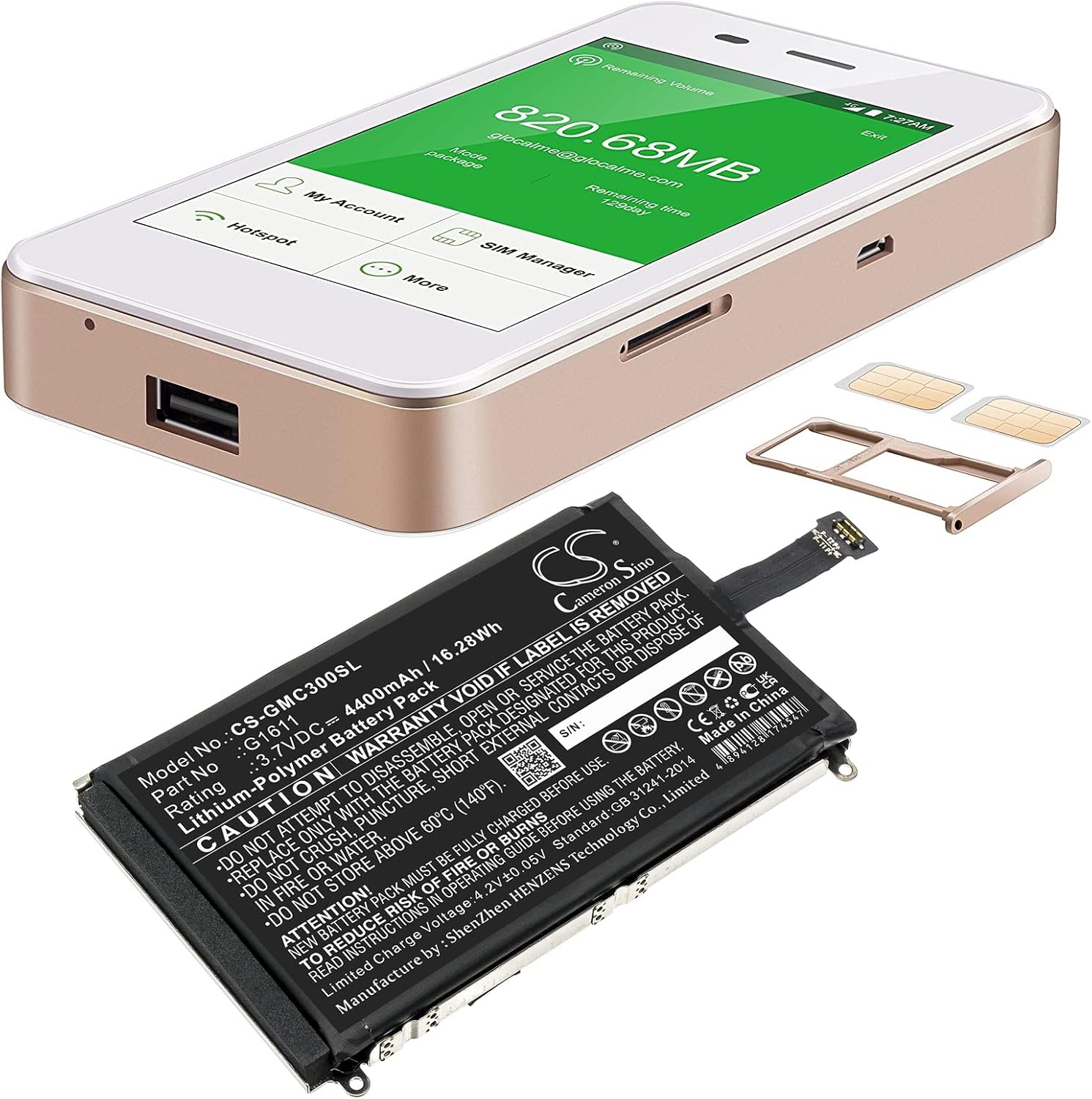
Image 1: The BELLV CS-GMC300SL replacement battery shown alongside a GlocalMe G1611 mobile hotspot device and associated SIM card trays, illustrating the product and its intended use.
Ensure that your device model matches the compatible models (GlocalMe G1611, G3) to ensure proper fit and function. Refer to your device's original manual for specific battery replacement procedures.
2. Safety Information and Warnings
WARNING: Read all safety instructions before use. Failure to follow these instructions may result in fire, electric shock, explosion, or other hazards.
- Do not attempt to disassemble, open, or service the battery pack. This battery is a sealed unit.
- Replace only with the battery pack designated for this product. Using an incompatible battery may cause damage or safety risks.
- Do not crush, puncture, short external contacts, or dispose of in fire or water. Mishandling can lead to severe hazards.
- Do not store above 60°C (140°F). High temperatures can degrade battery performance and pose a safety risk.
- New battery packs must be fully charged before first use. This optimizes battery life and performance.
- To reduce the risk of fire or burns, always read and follow the operating guide provided with your device.
- The warranty is void if the battery label is removed.

Image 2: A detailed view of the BELLV CS-GMC300SL battery label, clearly displaying model number, electrical ratings, and critical safety warnings. For more information, visit www.cameronsino.com.
3. Setup and Installation
This section outlines the general steps for replacing the battery. Always refer to your GlocalMe G1611 or G3 device's specific service manual or instructions for detailed, model-specific guidance.
- Power Off Device: Ensure your GlocalMe device is completely powered off before beginning the battery replacement process.
- Locate Battery Compartment: Identify the battery compartment on your GlocalMe G1611 or G3 device. This typically involves removing the back cover.
- Remove Old Battery: Carefully disconnect the old battery's connector from the device's mainboard. Gently lift and remove the old battery.
- Insert New Battery: Align the BELLV replacement battery (CS-GMC300SL) into the battery compartment. Ensure the connector is properly oriented.
- Connect Battery: Firmly but gently connect the new battery's flexible connector to the corresponding port on the device's mainboard.
- Secure Compartment: Replace the back cover of your GlocalMe device, ensuring it is securely fastened.

Image 3: A close-up view of the flexible connector on the BELLV replacement battery, showing the contact points for connection to the device's mainboard.
4. Operating Instructions
After successful installation, follow these steps for initial operation and charging:
- Initial Charge: Connect your GlocalMe device to its original charger. Allow the battery to charge completely before its first use. This typically takes several hours.
- Power On: Once fully charged, disconnect the charger and power on your GlocalMe device as usual.
- Monitor Battery Level: Observe the battery indicator on your device to ensure it is functioning correctly and displaying accurate charge levels.
For daily use, charge the battery using the charger provided with your GlocalMe device. Avoid using third-party chargers unless they are certified compatible and meet the device's power requirements.
5. Maintenance and Care
Proper maintenance extends the life of your BELLV replacement battery:
- Regular Charging: Avoid completely draining the battery frequently. Charge it regularly to maintain optimal performance.
- Temperature Control: Keep the device and battery away from extreme temperatures, both hot and cold. Ideal operating temperature is between 0°C and 35°C (32°F and 95°F).
- Storage: If storing the device for an extended period, charge the battery to about 50-60% before storage. Store in a cool, dry place.
- Cleaning: Keep the battery contacts clean and free from dust or debris. Use a dry, soft cloth for cleaning if necessary.
- Disposal: Do not dispose of the battery in household waste. Follow local regulations for proper disposal of lithium-polymer batteries.

Image 4: The reverse side of the BELLV CS-GMC300SL battery, showing its metallic casing designed for protection and heat dissipation.
6. Troubleshooting
If you encounter issues with your new BELLV battery, consider the following:
| Problem | Possible Cause | Solution |
|---|---|---|
| Device does not power on after battery replacement. | Battery not properly connected or not charged. | Ensure the battery connector is firmly seated. Charge the battery fully before attempting to power on. |
| Battery drains quickly. | Initial calibration needed, or high power consumption by device. | Perform a full charge-discharge cycle a few times. Check device settings for power-intensive apps or features. |
| Battery not charging. | Faulty charger, cable, or device charging port. | Try a different charger and cable. Inspect the device's charging port for damage. |
| Battery feels unusually hot. | Overcharging, internal short, or external heat source. | Immediately disconnect the charger and power off the device. Do not use the battery if it remains hot. Contact support. |
If troubleshooting steps do not resolve the issue, please contact BELLV customer support.
7. Specifications
| Feature | Detail |
|---|---|
| Model Number | CS-GMC300SL |
| Part Number | G1611 |
| Battery Type | Lithium-Polymer |
| Voltage | 3.7V DC |
| Capacity | 4400mAh / 16.28Wh |
| Dimensions (L x W x H) | 92.10 x 61.55 x 9.90 mm |
| Weight | Approximately 148.4 g |
| Limited Charge Voltage | 4.2V ± 0.05V |
| Standard | GB 31241-2014 |
| Manufacturer | Shenzhen HENZENS Technology Co., Limited |
8. Warranty and Support
BELLV provides the following support for your replacement battery:
- Warranty: 12-month warranty from the date of purchase.
- Money Back Guarantee: 14-day money-back guarantee.
- Customer Support: For any questions or assistance, please contact BELLV customer service. 24/7 email support is available.
Please retain your proof of purchase for warranty claims.