1. Introduction
Thank you for choosing the Artist hand SL-Track Zero Gravity Massage Chair. This manual provides essential information for the safe and effective use of your new massage chair. Please read it thoroughly before operation and retain it for future reference.
2. Important Safety Instructions
To reduce the risk of electric shock, burns, fire, or injury, observe the following precautions:
- Always unplug the appliance from the electrical outlet immediately after using and before cleaning.
- Do not use while bathing or in a shower.
- Do not place or store appliance where it can fall or be pulled into a tub or sink.
- Do not place in or drop into water or other liquid.
- Never use pins or other metallic fasteners with this appliance.
- Close supervision is necessary when this appliance is used by, on, or near children, invalids, or disabled persons.
- Use this appliance only for its intended use as described in this manual. Do not use attachments not recommended by the manufacturer.
- Never operate the appliance if it has a damaged cord or plug, if it is not working properly, if it has been dropped or damaged, or dropped into water.
- Keep the cord away from heated surfaces.
- Never operate the appliance with the air openings blocked. Keep the air openings free of lint, hair, and the like.
- Do not use outdoors.
- Do not operate where aerosol (spray) products are being used or where oxygen is being administered.
- To disconnect, turn all controls to the OFF position, then remove plug from outlet.
- This appliance is intended for household use only.
- Do not stand on or in the appliance. Use only while seated.
- Do not use on bare skin.
- Do not use on sensitive skin areas or in the presence of poor circulation.
- Do not use on infants, invalids, or sleeping or unconscious persons.
- Do not use if you have open wounds, skin irritation, or swelling.
- Consult a physician before using if you have any medical conditions.
3. Product Overview
The Artist hand Massage Chair (Model 2100-ah) is designed to provide a comprehensive full-body massage experience. Key features include:
- SL-Track & 4D Massage Technology: Rollers follow the natural curvature from neck to thighs, adjusting depth, speed, and intensity.
- Zero Gravity Recline: Three-position recline to elevate legs above heart level, reducing spinal pressure.
- Heating Function: Lumbar heating to promote blood circulation and soothe muscles.
- Airbag Compression: 46 airbags targeting shoulders, arms, legs, and feet for compression therapy.
- Foot Roller Massage: 3-stage foot massager with adjustable intensity and automatic acupressure point targeting.
- AI Voice Control: Hands-free operation for various settings and modes.
- Bluetooth Speakers: Integrated speakers for audio streaming.
- User-Friendly Features: LCD touch screen controller, USB charging, convenient knob controller, and space-saving design with casters.
- Massage Techniques: Shiatsu, Tapping, Kneading, Knocking, Rolling, Vibration.
- Automatic Modes: 12 pre-programmed modes including Family Care, Massage Master, Pain Relief, Sports Refresh, Leisure Time, Soft Care, Focus Massage.
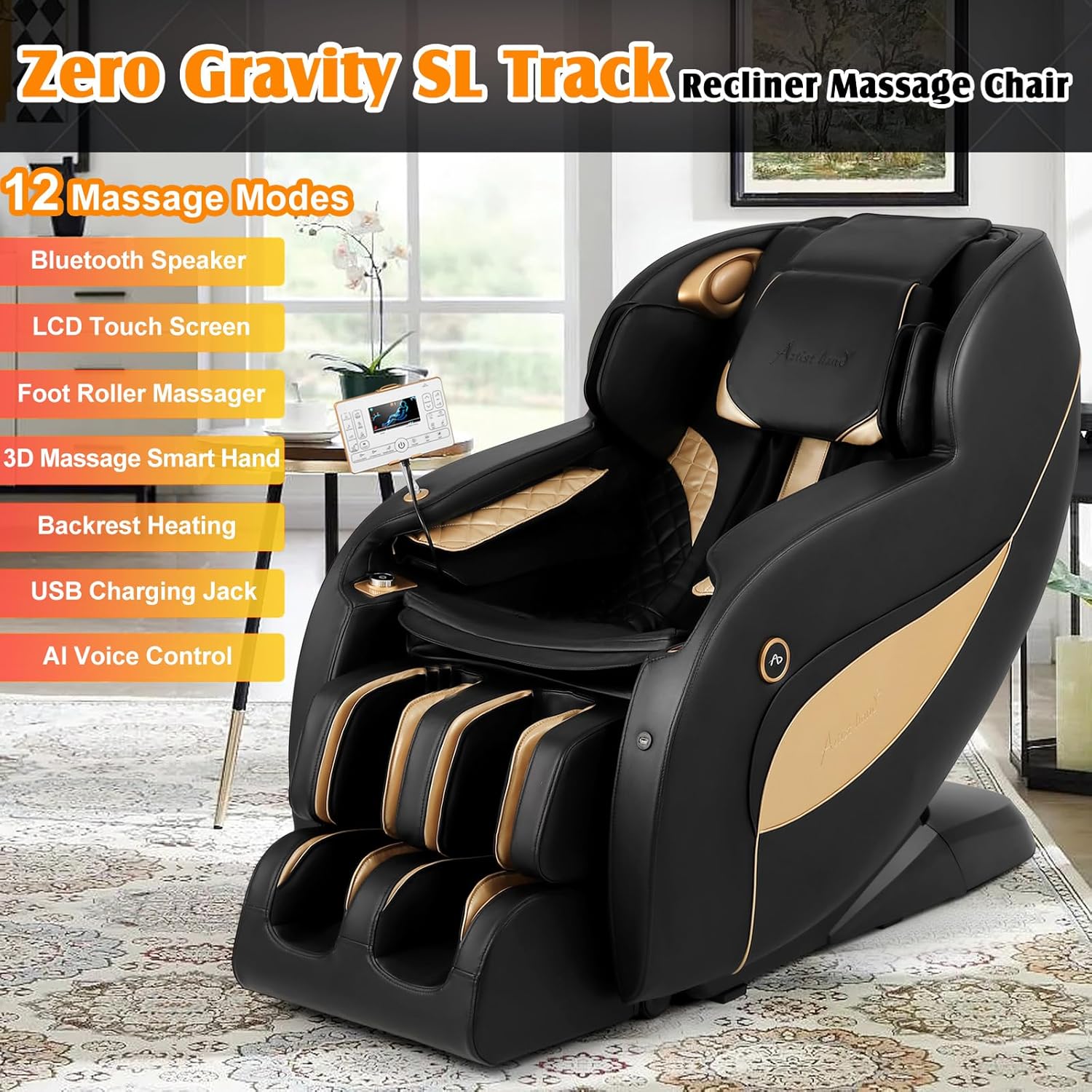
Figure 1: Key components of the Artist hand Massage Chair, including Bluetooth speakers, LCD touch screen, mobile phone storage, USB charging jack, shoulder airbag, 3D massage smart hand, backrest heating, arm airbag, leg/belly/ankle airbags, AI voice control, one-button switch, and foot roller massager.
4. Setup
The Artist hand Massage Chair is designed for easy, one-piece, installation-free setup. Follow these steps to prepare your chair for use:
- Unboxing: Carefully remove the chair from its packaging. Ensure all packing materials are removed.
- Positioning: Place the chair in your desired location. The chair features small casters for easy movement. Utilize the integrated handles at the back of the chair to tilt and roll it into position.
- Power Connection: Locate the power input on the back of the chair. Connect the provided power cord to the chair and then to a suitable electrical outlet. Ensure the power switch (usually a red rocker switch near the power input) is in the 'ON' position.
- Controller Setup: The LCD touch screen controller is pre-attached. Ensure its cable is securely connected.

Figure 2: Product dimensions for placement planning. The chair measures 61"D x 29.5"W x 41.3"H. Minimum doorway size for entry is 29.52 inches.
Video 1: A short demonstration of the Artist hand Massage Chair, highlighting its features and ease of setup. This video is provided by the seller.
5. Operating Instructions
Your massage chair offers various ways to control its functions:
5.1. Power On/Off
- Main Power Switch: Located at the back of the chair, near the power cord.
- Controller Power Button: Press the power button on the LCD touch screen controller.
- AI Voice Control: Say "Hi, Artist. Power on." or "Hi, Artist. Power off."
5.2. AI Voice Control
The chair features advanced voice recognition. To activate, say "Hi, Artist." Then, state your command. A list of commands is available on the back of the controller.
- "Hi, Artist. Massage Master." (Activates the Massage Master mode)
- "Hi, Artist. Sports Refresh." (Activates the Sports Refresh mode)
- "Hi, Artist. Power off." (Turns off the chair)
- Other commands include: Family Care, Pain Relief, Leisure Time, Soft Care, Focus Massage, Neck Massage, Shoulder Massage, Back Massage, Waist Massage, Hip Massage, Leg Massage, Foot Massage, Zero Gravity, Heat On/Off, Foot Roller On/Off.

Figure 3: User interacting with the AI voice control feature of the massage chair.
5.3. Automatic Massage Modes
Select from 12 pre-programmed automatic modes via the LCD touch screen or voice control. Each mode offers a unique combination of massage techniques and intensities.
- Family Care
- Massage Master
- Pain Relief
- Sports Refresh
- Leisure Time
- Soft Care
- Focus Massage (+6 additional focus areas)
5.4. Manual Adjustments
Customize your massage experience using the LCD touch screen controller:
- Techniques: Choose from Shiatsu, Tapping, Kneading, Knocking, Rolling, Vibration.
- Strength: Adjust the intensity of the massage rollers.
- Air Pressure Intensity: Adjust the pressure of the airbags (Gentle/Medium/Strong).
- Air Pressure Focus: Target specific areas for airbag compression (Upper Body, Lower Body, Whole/Partial).
- Mechanism/Back Adjustment: Move the massage rollers up/down or left/right to pinpoint specific areas.
- Width/Speed: Adjust the width and speed of the massage rollers.
- Heat: Turn lumbar heating on/off and adjust levels.
- Foot: Turn foot roller massage on/off and adjust intensity.
- Time: Adjust the duration of the massage program (5-30 minutes).

Figure 4: The LCD touch screen controller displaying various massage options and body mapping.
5.5. Zero Gravity Recline
Press the "Zero Gravity" button on the controller to recline the chair into one of three zero-gravity positions. This position elevates your legs, distributing body weight evenly and reducing pressure on the spine.
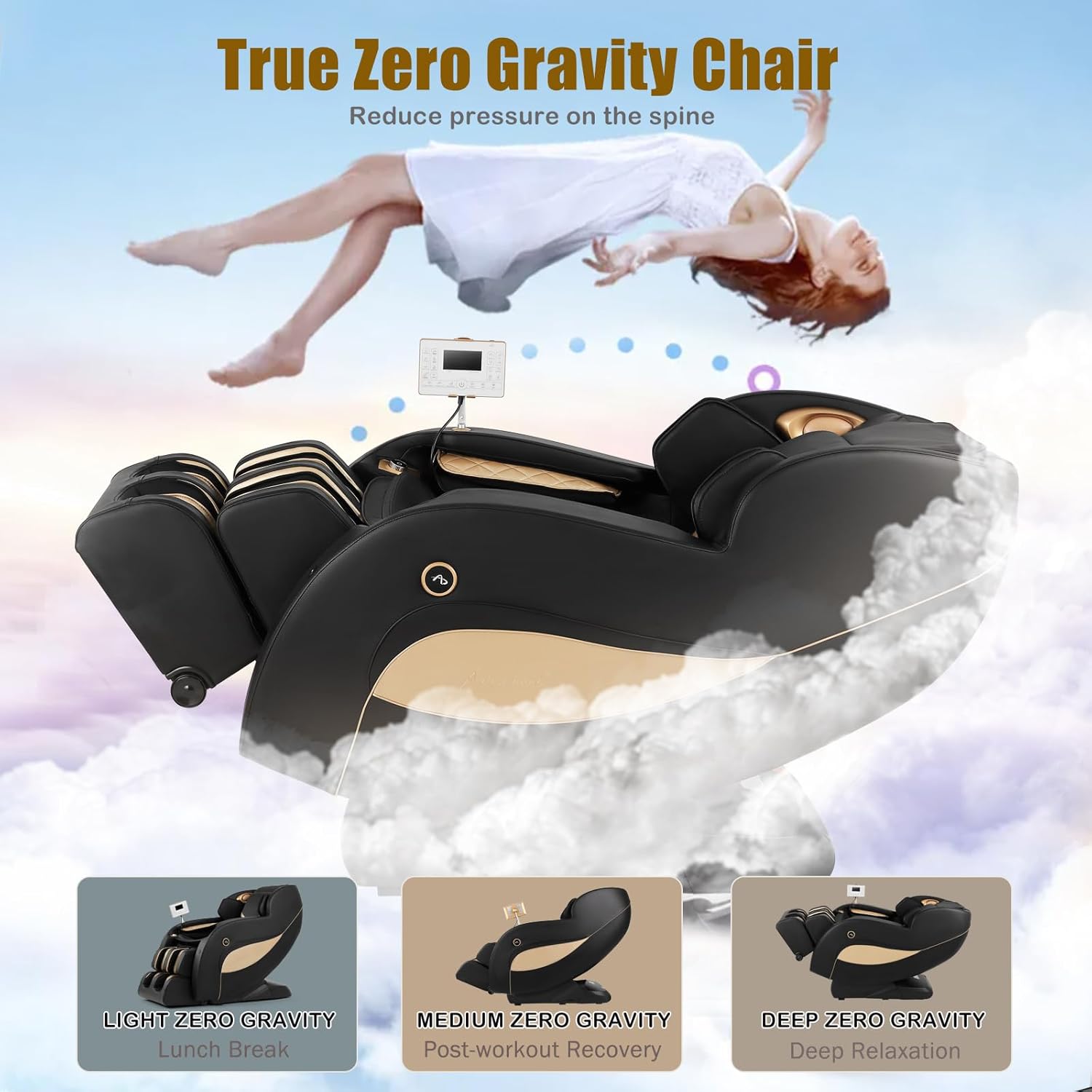
Figure 5: The massage chair reclined into a zero-gravity position, designed to optimize relaxation and reduce spinal pressure.
5.6. Bluetooth Speakers
Connect your mobile device to the chair's built-in Bluetooth speakers for an immersive audio experience during your massage.
- Ensure Bluetooth is enabled on your mobile device.
- On your device, search for "Artist Hand" in the list of available Bluetooth devices.
- Select "Artist Hand" to pair. Once paired, you can stream music or other audio through the chair's speakers.
5.7. USB Charging
A USB charging jack is conveniently located on the side of the chair to charge your mobile devices during use.

Figure 6: Close-up of the USB charging port and mobile phone storage hole on the side of the massage chair.
6. Maintenance
Regular maintenance ensures the longevity and optimal performance of your massage chair.
- Cleaning: The chair's material is designed for easy cleaning. Use a soft, damp cloth to wipe down surfaces. Avoid harsh chemicals or abrasive cleaners.
- Removable Components: The foot and calf cushions are removable via zippers for easier cleaning or replacement.
- Storage: When not in use, store the chair in a cool, dry place away from direct sunlight.
7. Troubleshooting
If you encounter issues with your massage chair, refer to the following common problems and solutions:
| Problem | Possible Cause | Solution |
|---|---|---|
| Chair does not power on. | Power cord not connected; Main power switch off. | Ensure power cord is securely plugged in. Flip the main power switch to 'ON'. |
| Massage rollers/airbags not working. | Program not selected; Chair in suspended mode. | Select an automatic program or manually activate massage functions. Check if the chair is in 'Suspend' mode and resume. |
| Voice control not responding. | Microphone off; Incorrect command. | Ensure voice control is active. Refer to the list of commands on the controller. Speak clearly. |
| Bluetooth not connecting. | Bluetooth off on device; Chair not in pairing mode. | Ensure Bluetooth is on your device and search for "Artist Hand". Try restarting both devices. |
If the problem persists after attempting these solutions, please contact customer support.
8. Specifications
| Feature | Detail |
|---|---|
| Brand | Artist hand |
| Model Name | Massage chair-200700800 (Item model number: 2100-ah) |
| Product Dimensions | 61"D x 29.5"W x 41.3"H |
| Item Weight | 156 pounds |
| Color | Black |
| Special Features | Ergonomic, Foot Rest, Heated, Heavy Duty, Zero Gravity, AI Voice Control, Bluetooth Speakers, USB Charging |
| Massage Techniques | Shiatsu, Tapping, Kneading, Knocking, Rolling, Vibration |
| Automatic Modes | 12 (Family Care, Massage Master, Pain Relief, Sports Refresh, Leisure Time, Soft Care, Focus Massage +6) |
| Reclining Position Count | 3 (Zero Gravity) |
| Foot Rest Stretch Range | 6.1 inches |
| Maximum User Weight | 400 pounds (from image) |
| Maximum User Height | 6.1 feet (from image) |
| Wood Material | FSC-Certified wood |
9. Warranty & Support
Artist hand provides a 1-year warranty service for this massage chair. Our customer support is available 24/7 to assist with any questions or concerns.
- Warranty Period: 1 year from the date of purchase.
- Contact Support: Please refer to the contact information provided with your purchase documentation or visit the official Artist hand website for support options.
We ensure strict quality inspection before products leave the factory. Please feel free to contact us if you have any questions.


