1. Introduction
This manual provides detailed instructions for the VODESON Advanced Bluetooth Hearing Aids. Please read this manual thoroughly before using your device to ensure proper operation, maintenance, and to maximize your listening experience. These devices are designed for individuals with mild to moderate hearing loss.
2. Product Overview and Components
The VODESON Advanced Bluetooth Hearing Aids consist of two hearing aid units and a portable charging case. Key components include:
- Hearing Aid Unit: Contains the microphone, multifunction button, sound tube, and external receiver with eartip.
- Charging Case: Provides power for recharging the hearing aids and acts as a storage unit.

Figure 2.1: Diagram of a single VODESON hearing aid unit with labeled components.
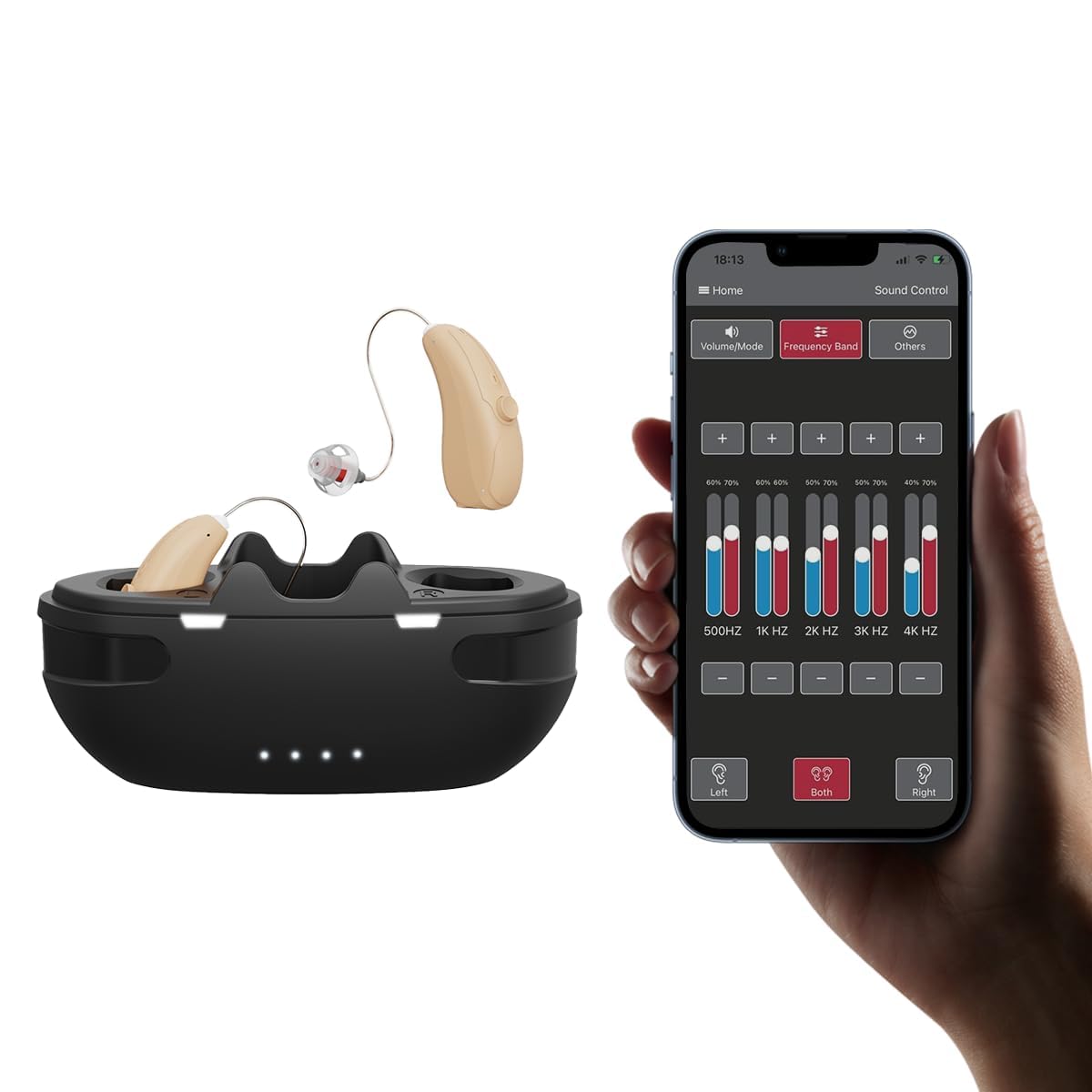
Figure 2.2: VODESON hearing aids in their charging case, illustrating the compact design and app connectivity.

Figure 2.3: Illustration of the Receiver-In-Canal (RIC) design, showing how the external receiver sits in the ear canal for clear sound transmission.
3. Setup
3.1 Initial Charging
Before first use, fully charge the hearing aids and the charging case. The charging case can store up to 105 hours of standby power, sufficient for 3 full charges of the hearing aids.
- Place the hearing aids into the charging slots within the case.
- Connect the charging case to a power source using the provided USB cable.
- Charging indicators on the case will illuminate to show charging status.
- A full charge for both hearing aids and the charging case typically takes approximately 2 hours.
3.2 Fitting the Hearing Aids
Select the appropriate eartip size for a comfortable and secure fit. The eartip should seal the ear canal without causing discomfort.
- Gently insert the eartip into your ear canal.
- Position the main body of the hearing aid behind your ear.
- Adjust the sound tube to ensure it sits comfortably and securely.
3.3 App Connection (Bluetooth Pairing)
The VODESON hearing aids can be controlled via a smartphone application. Ensure the hearing aids are out of the charging case to enable Bluetooth pairing.
- Download the "HA-Fit" app from your smartphone's app store.
- Open the app and follow the on-screen instructions to pair your hearing aids.
- If prompted for a passcode, proceed with the pairing process as no specific passcode is typically required for initial connection.
- The app allows for a hearing evaluation to customize settings to your specific hearing profile.
4. Operating Instructions
4.1 Power On/Off
- Power On: The hearing aids automatically power on when removed from the charging case.
- Power Off: The hearing aids automatically power off when placed back into the charging case. Alternatively, long press the multifunction button for 6 seconds to manually turn them off.
4.2 Volume Adjustment
- Manual Adjustment: Click the multifunction button on the hearing aid unit to adjust the volume. There are 11 volume levels available.
- App Adjustment: Use the "HA-Fit" app for precise volume control.
4.3 Mode Switching (Scene Modes)
The hearing aids offer 4 scene modes to adapt to different listening environments.
- Manual Switching: Long press the multifunction button for 2 seconds to cycle through the available scene modes.
- App Switching: Select desired scene modes directly from the "HA-Fit" app.
4.4 Bluetooth Functions
The hearing aids support Bluetooth connectivity for phone calls and music streaming.
- Switching Modes: Easily switch between hearing aid mode and Bluetooth audio mode (calls/music) via the app or device controls.
- Reset Bluetooth: Long press the multifunction button for 10 seconds to reset the Bluetooth function.

Figure 4.1: Examples of multi-program adjustment for different environments, such as daily conversation, watching TV, outdoor activities, and Bluetooth communication.
5. App Control
The "HA-Fit" app provides advanced control and customization options for your VODESON hearing aids.
- Volume/Mode: Adjust volume levels and switch between scene modes.
- Frequency Band Adjustment: Fine-tune specific frequency bands to match your hearing test results or personal preference.
- Hearing Test: Conduct an in-app hearing evaluation to personalize the hearing aid settings.

Figure 5.1: The VODESON app interface for sound control, including frequency band adjustments.
6. Maintenance
6.1 Cleaning
- Regularly clean the eartips and sound tubes to prevent wax buildup, which can affect sound quality.
- Use a soft, dry cloth to wipe the hearing aid units and charging case.
- Do not use water or cleaning solvents directly on the devices.
6.2 Battery Care
- Charge the devices regularly to maintain battery health.
- Avoid completely draining the battery frequently.
- Store the devices in their charging case when not in use to protect them and keep them charged.
7. Troubleshooting
- No Sound:
- Check if the hearing aid is powered on.
- Ensure the volume is not set to minimum.
- Clean the eartip and sound tube for any blockages.
- Verify the battery is charged.
- Whistling/Feedback:
- Ensure the eartip is properly seated in the ear canal, creating a good seal.
- Try a different size eartip.
- Adjust the volume to a lower setting.
- Difficulty Pairing Bluetooth:
- Make sure the hearing aids are out of the charging case.
- Restart your smartphone's Bluetooth.
- Long press the multifunction button on the hearing aid for 10 seconds to reset Bluetooth.
- Ensure the "HA-Fit" app is updated to the latest version.
- Short Battery Life:
- Ensure the charging case is fully charged.
- Verify the hearing aids are correctly seated in the charging case.
- Battery performance can vary with usage patterns and environmental factors.
8. Specifications
| Model Name | 860011157304 |
| Brand | Vodeson |
| Power Source | Battery Powered (Lithium Ion) |
| Battery Life (Single Use) | Up to 16 hours |
| Charging Case Capacity | Provides 105 hours standby power (approx. 3 full charges) |
| Charging Time | Approx. 2 hours (hearing aids and case) |
| Volume Levels | 11 |
| Scene Modes | 4 |
| Connectivity | Bluetooth, App Control |
| Dimensions (Charging Case) | 3.46 x 2.1 x 1.1 inches (approximate) |
| Dimensions (Hearing Aid) | 1.25 x 0.31 inches (approximate) |

Figure 8.1: Key product features and advantages of the VODESON hearing aids.
Figure 8.2: Physical dimensions of the VODESON hearing aids and their charging case.
9. Official Product Video
Watch this video for a visual guide on using your VODESON Hearing Aids and experiencing various sound environments.
Video 9.1: "Hearing Aids re-listen to the sounds of the world" - This video demonstrates the VODESON hearing aids and their ability to enhance various natural and musical sounds, showcasing the user experience.
10. Warranty and Customer Support
For any questions or concerns regarding your VODESON Advanced Bluetooth Hearing Aids, please contact customer service.
- Contacting Support: You can reach customer service through your Amazon account. Navigate to "Your Orders," locate the order ID for your VODESON hearing aids, and click "Contact Seller."
- Warranty Information: Specific warranty details are not provided in this manual. Please refer to the product packaging or contact customer support for warranty terms and conditions.