Introduction
This manual provides detailed instructions for the installation, operation, and maintenance of your karwerry Adjustable Bed Remote and Receiver Control Box, compatible with OKIN JLDK and JLDP series adjustable beds. This combined unit ensures seamless functionality and compatibility, replacing individual components to prevent operational issues.

Image: The adjustable bed remote control and the receiver control box, shown side-by-side.
Setup Instructions
- Inspect Components: Before installation, ensure all components (remote, receiver, power supply, and motor cables) are present and undamaged.
- Verify Motor Socket: Confirm that the motor socket on your existing adjustable bed frame is a round metal type with 5 pins inside. This product is designed for compatibility with this specific socket type.
- Connect Motors to Receiver: Plug the head motor and foot motor cables into their respective ports on the receiver control box. These ports are typically labeled "HEAD MOTOR" and "FOOT MOTOR".
- Connect Massage Motors (if applicable): If your bed has massage functions, connect the massage motor cables to the "MASSAGE" ports on the receiver.
- Connect Power Supply: Connect the power supply unit to the receiver control box, and then plug the power supply into a standard electrical outlet.
- Install Remote Batteries: The remote control requires 3 AA batteries (not included). Open the battery compartment on the back of the remote and insert the batteries, observing the correct polarity.
- Pairing (if necessary): The remote and receiver are typically pre-paired. If pairing is required, refer to the pairing indicator light on the receiver. Press and hold the pairing button on the receiver until the indicator light flashes, then press any button on the remote to complete pairing.
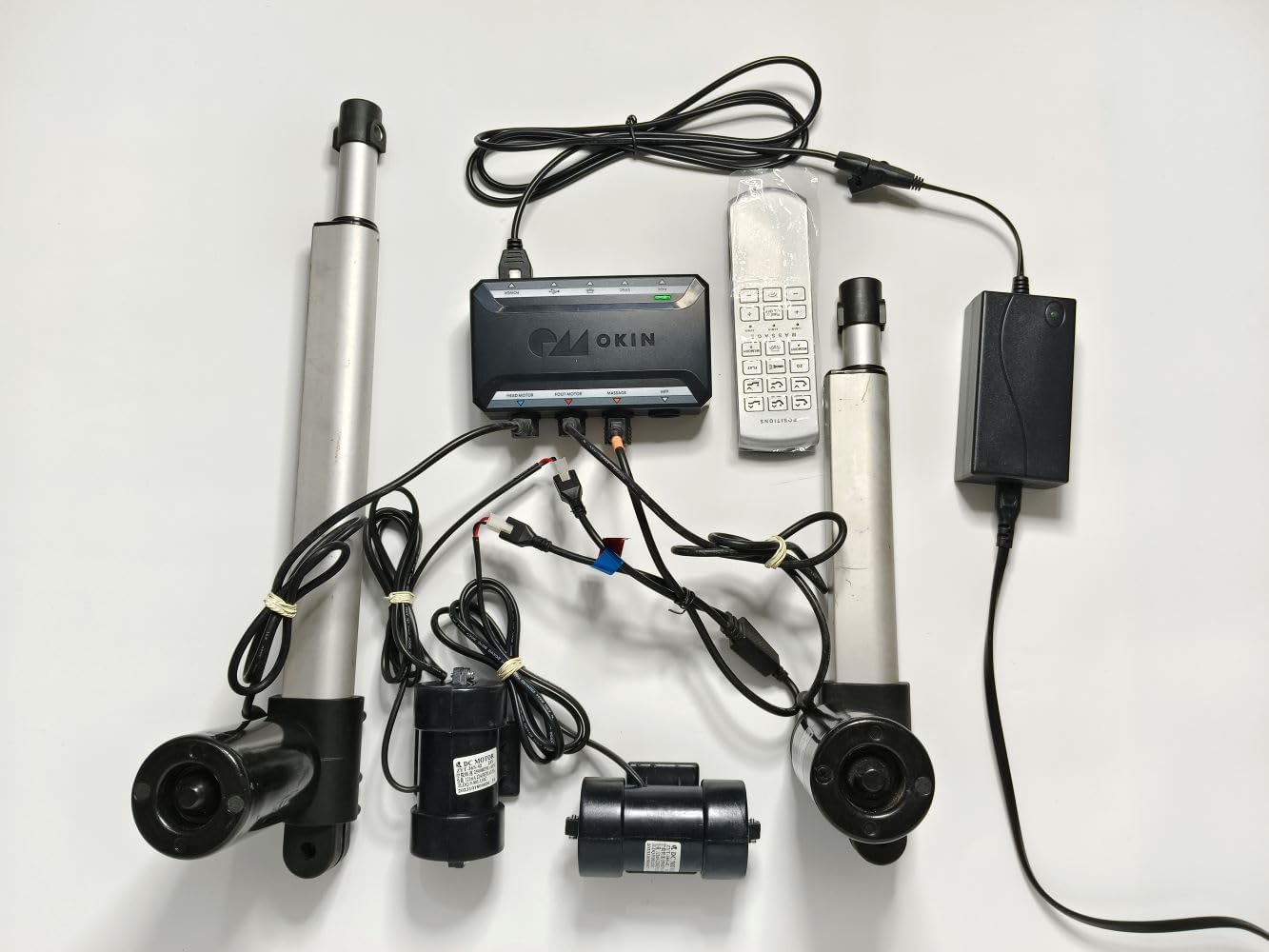
Image: A complete overview of the adjustable bed system components, showing the receiver, remote, linear actuators (motors), and power supply connected.
Video: This video demonstrates the connection process of the adjustable bed remote, receiver, and motors, followed by a demonstration of the remote's functions.
Operating Instructions
The remote control features 18 buttons for various functions, providing comprehensive control over your adjustable bed. Ensure the remote has fresh AA batteries for optimal performance.

Image: The back of the remote control, displaying the battery compartment and product labels. Please ensure to remove any protective labels before use.
Remote Control Functions:
- Head Up/Down: Adjusts the head section of the bed.
- Feet Up/Down: Adjusts the foot section of the bed.
- Zero Gravity (ZG): Activates a pre-programmed zero-gravity position.
- Flat: Returns the bed to a flat position.
- Memory A/B: Saves and recalls custom bed positions.
- Massage (2 Motors): Controls two vibration massage motors.
- Massage Timer (10min, 20min, 30min): Sets the duration for massage functions.
- Under Bed Light: Activates or deactivates the under-bed lighting.
- Timer/All Off: Turns off all active functions or sets a timer.
This remote control is compatible with other 6-button and 9-button remote controls and receiver boxes within the same OKIN brand series.
Compatibility Information
This product is specifically designed for replacement within the OKIN brand JLDK and JLDP series. It is crucial to ensure compatibility to avoid operational issues.
- Combined Replacement: The remote control and receiver control box are intended to be replaced together. This ensures proper model and chip compatibility, which is not guaranteed when replacing components individually.
- Motor Socket Type: Before purchasing or installing, verify that the motor socket of your old receiver control box is a round metal type with 5 pins inside. If your existing sockets differ, this product may not be compatible.
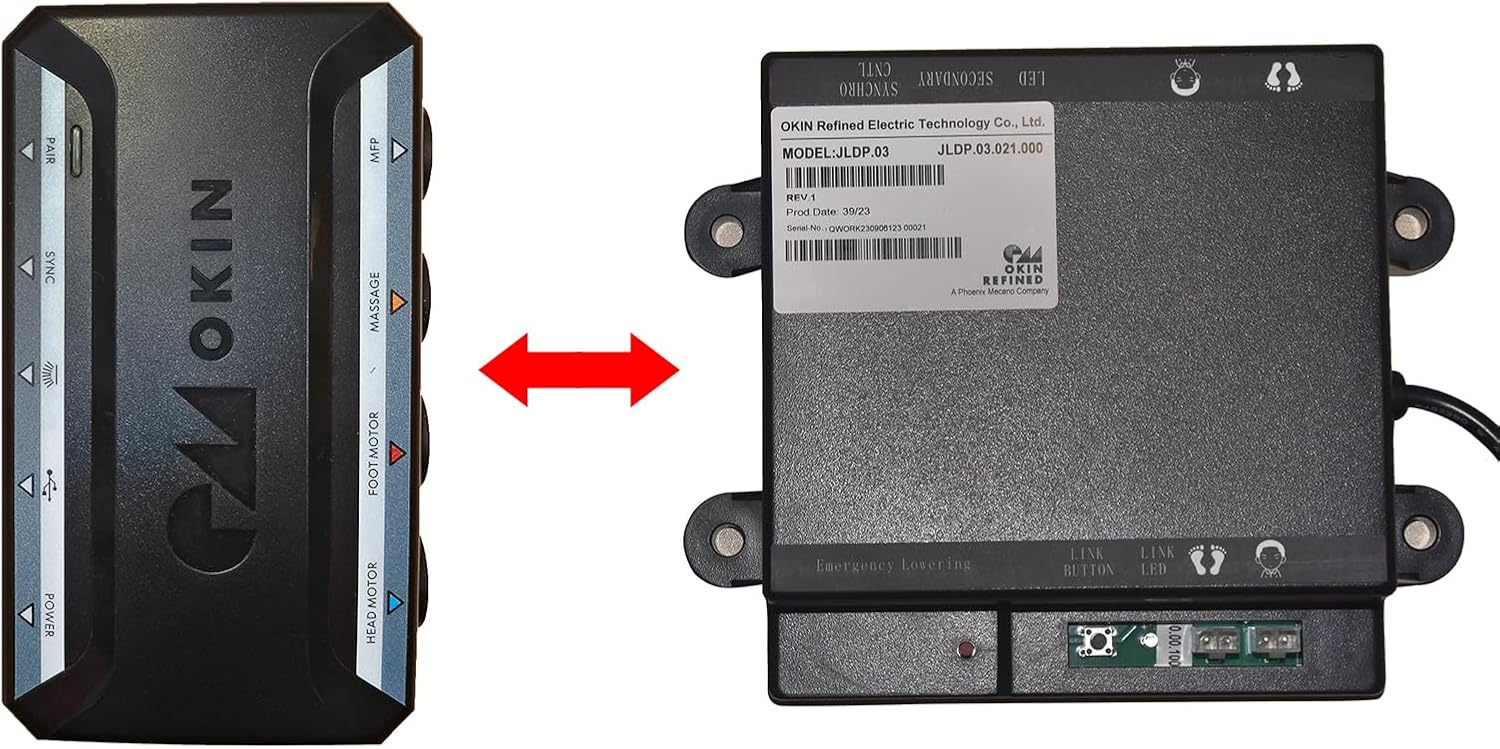
Image: A visual comparison showing the new receiver control box (left) and an older JLDP model (right), indicating that the new model is compatible with the old JLDP model.
Maintenance
- Cleaning: Use a soft, dry cloth to clean the remote control and receiver box. Avoid using liquid cleaners or abrasive materials.
- Battery Replacement: Replace the 3 AA batteries in the remote control when the signal weakens or the remote becomes unresponsive. Ensure correct polarity when inserting new batteries.
- Storage: When not in use for extended periods, store the remote and receiver in a cool, dry place.
- Avoid Moisture: Keep the remote control and receiver box away from water and excessive moisture to prevent damage.
Troubleshooting
| Problem | Possible Cause | Solution |
|---|---|---|
| Remote not responding. | Dead or incorrectly installed batteries. Remote not paired with receiver. | Replace batteries, ensuring correct polarity. Re-pair the remote with the receiver (refer to Setup section). |
| Motors not moving. | Power supply disconnected. Motor cables loose or disconnected. Receiver not receiving power. | Check all power connections. Ensure motor cables are securely plugged into the receiver. Verify the power outlet is functional. |
| Incompatibility issues after replacement. | Attempted to replace only one component (remote or receiver) instead of both. Incorrect motor socket type. | Ensure both the remote and receiver are replaced together as a set. Verify your bed's motor socket is the 5-pin round metal type. |
Specifications
- Product Dimensions: 8 x 6 x 1.5 inches
- Item Weight: 1.75 pounds
- Model Numbers: JLDK, JLDP (compatible)
- Manufacturer: OKIN
- Brand: karwerry
- Special Feature: Ergonomic design
- Color: Black
- Max Number of Supported Devices: 1 (set)
- Compatible Devices: Adjustable Bed (OKIN JLDK/JLDP series)
- Remote Battery Requirement: 3 x AA batteries (not included)
Warranty Information
This product comes with a one-year commodity warranty from the date of purchase. The warranty covers manufacturing defects and malfunctions under normal use.
Exclusions: The warranty does not cover damage caused by human error, misuse, accidents (e.g., water damage), unauthorized repairs, or modifications.
Customer Support
For any questions, technical assistance, or warranty claims, please contact karwerry customer support through the platform where you purchased the product. Please have your purchase details and product model number ready when contacting support.