
1. Product Overview
The AGARO Galaxy Portable Blender is designed for convenient preparation of smoothies, shakes, and other blended drinks. Its compact and rechargeable design makes it suitable for use at home, office, gym, or while traveling.

Image: AGARO Galaxy Portable Blender with various fruits, highlighting its 450ml capacity and BPA-free construction.

Image: A close-up view of the AGARO Galaxy Portable Blender's six sharp stainless steel blades, designed for efficient crushing and uniform mixing of ingredients.
Key Features:
- Versatile Blending: Suitable for powders, protein shakes, smoothies, milkshakes, and baby food.
- Powerful Performance: Equipped with a 126W motor, 6 sharp stainless steel blades, and a 3000 mAh battery for quick blending.
- Portable Design: Lightweight, wireless, and features a 450ml BPA-free food-grade jar with a glossy ABS body.
- Easy Operation: Simple one-button control for blending and cleaning.
- Rechargeable: USB Type-C fast charging for convenience.
2. Setup and Assembly
- Initial Charge: Before first use, fully charge the blender using the provided USB Type-C cable. The charging port is located on the motor base.
- Assemble the Jar: Place the 450ml blending jar onto the motor base. Twist the jar clockwise until it is securely locked.
- A white light indicates the jar is correctly locked and ready for use.
- If a red light flashes 5 times, the jar is not correctly placed. Re-twist until the white light appears.
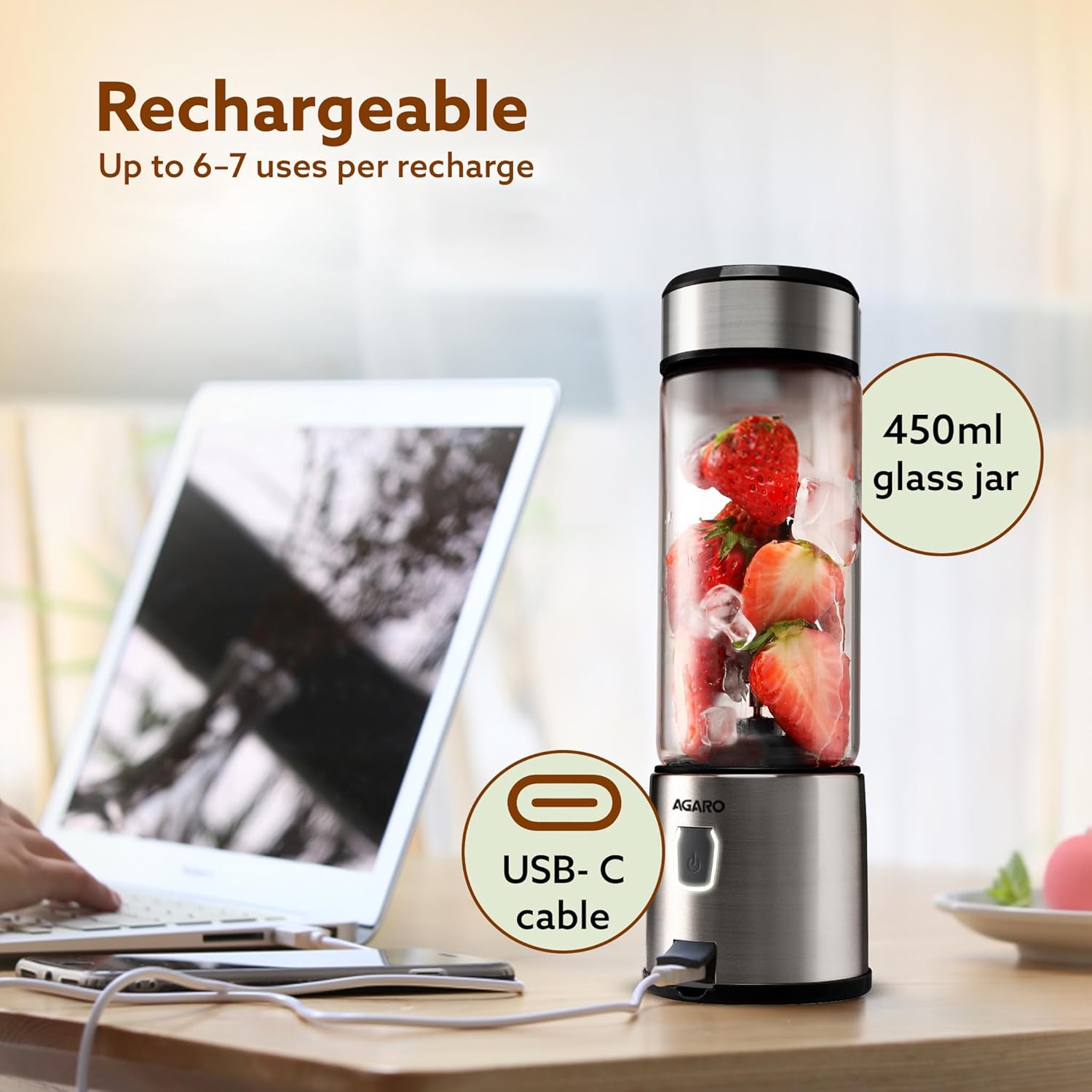
Image: The AGARO Galaxy Portable Blender connected to a laptop via a USB-C cable for charging, illustrating its rechargeable nature.
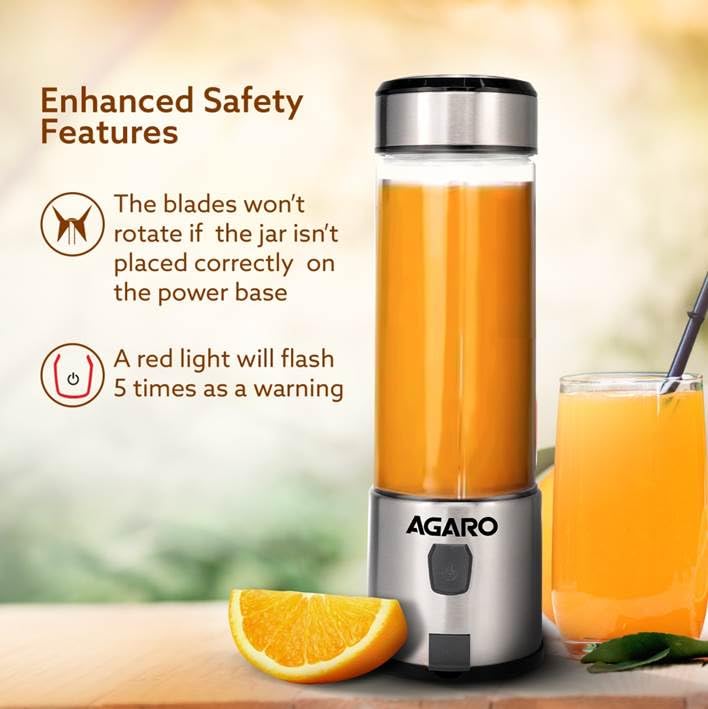
Image: Diagram showing the safety features of the blender, indicating that blades will not rotate if the jar is not correctly placed and a red light will flash as a warning.
3. Operating Instructions
Follow these steps for optimal blending results:
- Prepare Ingredients: Cut fruits and vegetables into small pieces (approximately 1-2 cm). This ensures smoother blending and prevents strain on the motor.
- Add Ingredients: Place your prepared ingredients into the blending jar.
- Add Liquid: Pour in your desired liquid (e.g., water, milk, juice). Ensure the total volume of ingredients and liquid does not exceed 3/4 of the jar's capacity to prevent overfilling and ensure proper blending.
- Start Blending: Press and hold the power button for 2 seconds to start the blending cycle. The blender will run for approximately 45 seconds before automatically shutting off.
- Optimize Blending: For a smoother blend, especially with thicker mixtures, gently tilt the blender at a 45-degree angle and shake it lightly during operation.
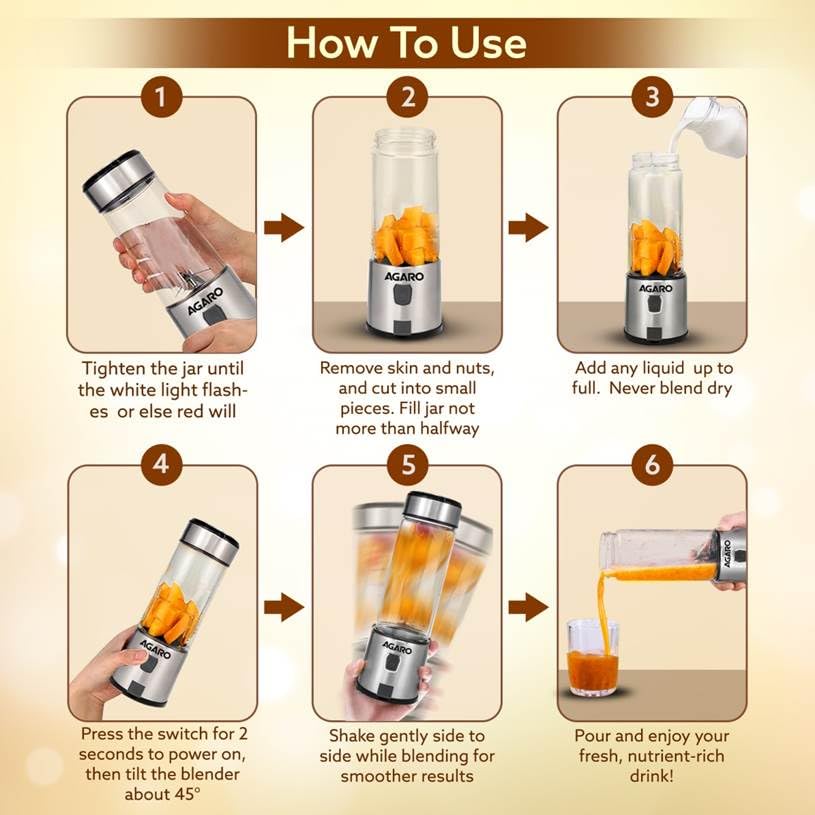
Image: Visual step-by-step guide demonstrating how to use the blender, including tightening the jar, adding small-cut ingredients and liquid, pressing the switch, tilting, and pouring the blended drink.
Important Notes:
- This product is a blender, not a juicer. Always add sufficient liquid for smooth operation.
- Avoid blending hard ingredients such as whole nuts, coffee beans, or frozen solid items like large ice cubes or coconut pieces, as this may damage the blades or motor.
- If ingredients get stuck, turn off the blender, gently shake it, and restart.
Official Product Video: How to Use
Video: Demonstrates the step-by-step process of using the AGARO Galaxy Portable Blender to prepare various drinks, including ingredient preparation and blending techniques.
4. Maintenance and Cleaning
Regular cleaning ensures the longevity and hygiene of your blender:
- Quick Clean Cycle: After use, add approximately 2/3 water to the blending jar and a single drop of liquid soap.
- Activate Cleaning: Press and hold the power button for 2 seconds to run a 45-second cleaning cycle.
- Rinse: Discard the soapy water. Fill the jar with clean water and run another short cycle to rinse off any remaining soap or residue.
- Dry the Jar: Detach the glass jar from the motor base and rinse it under running water if necessary. Allow it to air dry completely, preferably by placing it upside down for 1-2 minutes to ensure all water drains.
- Clean the Motor Base: NEVER wash or immerse the motor base in water. Use a soft, dry cloth to gently wipe the motor base clean. This prevents damage to the electrical components and charging port.
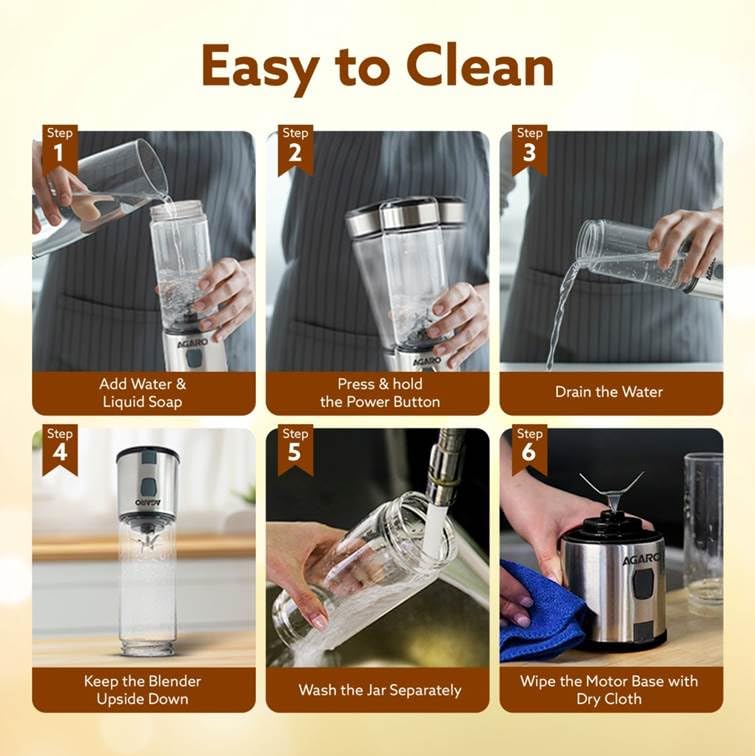
Image: Visual step-by-step guide demonstrating the cleaning process for the blender, including adding water and soap, blending, draining, washing the jar separately, and wiping the motor base with a dry cloth.
Official Product Video: How to Clean
Video: Demonstrates the easy cleaning process of the AGARO Galaxy Portable Blender, showing how to use the self-cleaning function and proper care for the motor base.
5. Troubleshooting
- Blender Not Starting (Red Light Flashing): This indicates the blending jar is not securely attached to the motor base. Twist the jar clockwise until it locks into place and the white indicator light appears.
- Blender Not Starting (No Light): Ensure the blender is charged. Connect it to a power source using the USB Type-C cable.
- Blades Stuck During Blending:
- Turn off the blender immediately.
- Gently shake the blender to dislodge ingredients.
- Ensure ingredients are cut into small pieces and the jar is not overfilled.
- Add more liquid if the mixture is too thick.
- Avoid blending excessively hard ingredients.
- Restart the blending cycle.
- Leakage: Ensure the lid is tightly secured before blending. Check that the silicone seal on the lid is properly seated.
6. Specifications
| Feature | Detail |
|---|---|
| Brand | AGARO |
| Model Number | 34119 |
| Colour | Steel & Black |
| Capacity | 450 Milliliters |
| Product Dimensions | 25D x 7.5W x 25H Centimeters |
| Material | Stainless Steel (Blades), ABS Plastic (Container) |
| Special Features | Lightweight, Portable, USB Rechargeable |
| Power Source | Battery Powered |
| Wattage | 126 Watts |
| Voltage | 3.7 Volts |
| Number Of Speeds | 1 |
| Control Type | Basic |
| Item Weight | 689 Grams |
| Material Type Free | BPA Free |
| Dishwasher Safe | No |
| Included Components | Juice Container |
7. Warranty and Support
The AGARO Galaxy Portable Blender comes with a 1-year limited warranty.
For warranty claims, product support, or any inquiries, please contact:
- Manufacturer: Universal Corporation Limited
- Address: 4/1 Middleton street, Sikkim Commerce House, Kolkata-700071
- Customer Care No: 9821486487
- Email Id: info@uclindia.com
Please retain your purchase receipt for warranty validation.