
BAOFENG UV17L-3B_BK
Contents
BAOFENG UV-17L Tri-Band Walkie Talkie User Manual
Model: UV17L-3B_BK
Introduction
This manual provides comprehensive instructions for the operation and maintenance of your BAOFENG UV-17L Tri-Band Walkie Talkie. Please read this manual thoroughly before using the device to ensure proper function and safety.
The BAOFENG UV-17L is a versatile handheld radio designed for reliable two-way communication across multiple frequency bands, including 136-174MHz, 220-260MHz, and 400-520MHz. It features a 1.77-inch high-definition large screen display, Type-C USB charging, and a built-in LED flashlight.

Image: The Baofeng UV-17L Tri-Band Walkie Talkie, showcasing its compact design and display.
What's in the Box
Verify that all items listed below are present in your package:
- UV-17Pro Two way radio x 1
- Li-ion Battery (with one screw) x 1
- Belt Clip x 1
- Lanyard x 1
- Headset x 1
- Power Adapter x 1
- USB Cable x 1
- User Manual x 1

Image: All components included in the Baofeng UV-17L package, laid out for inspection.
Product Overview
Familiarize yourself with the various parts and controls of your UV-17L radio:
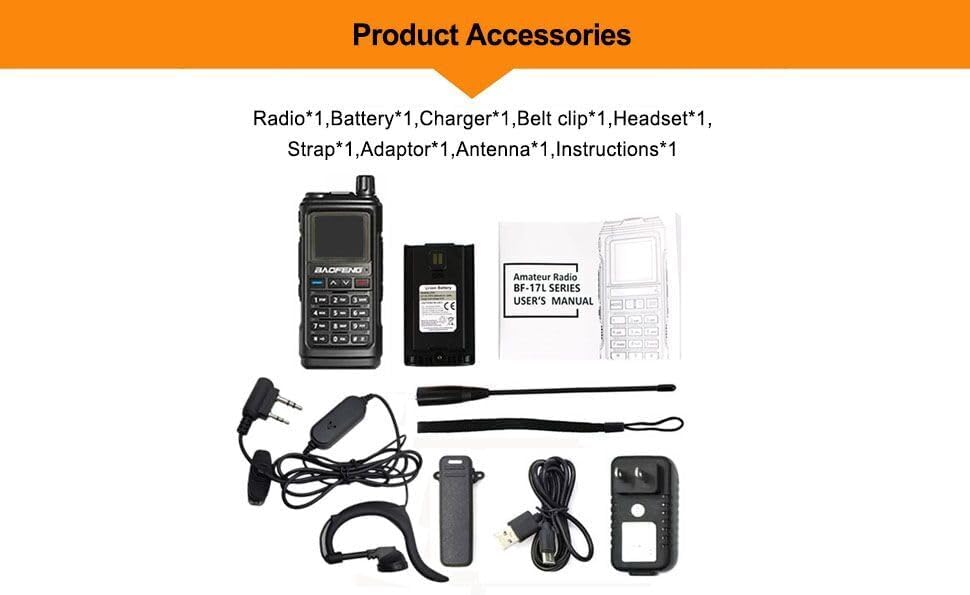
Image: Detailed diagram illustrating the numbered components and controls of the UV-17L radio.
- Antenna
- Flashlight/Emergency Alert key
- PTT key (Push-to-Talk)
- FM broadcast/Monitor key
- MENU key
- Numeric keypad
- Power/Volume knob
- Color LCD Display
- Speaker/Mic Jacks
- MIC Input
- Exit Key
- ∧ or ∨ navigation keys
- Battery pack
- Type-C charging port
- Battery tightening screw
- Type-C charging indicator
- LED flashlight
- LED Status Indicator
Setup
1. Battery Installation and Charging
The UV-17L comes with a Li-ion battery. Before first use, ensure the battery is fully charged.
- Align the battery pack with the grooves on the back of the radio and slide it upwards until it clicks into place. Secure it with the battery tightening screw if applicable.
- Connect the provided USB Type-C cable to the Type-C charging port (14) on the radio and the other end to the power adapter.
- Plug the power adapter into a standard AC outlet. The Type-C charging indicator (16) will illuminate to show charging status.
- A full charge typically takes several hours. The indicator will change or turn off when charging is complete.

Image: The UV-17L radio connected via its Type-C USB port for charging, demonstrating various charging methods like power bank, car, and computer.
2. Antenna Attachment
Screw the antenna (1) clockwise into the connector on the top of the radio until it is finger-tight. Do not overtighten.
3. Belt Clip and Lanyard
Attach the belt clip to the back of the radio for convenient carrying. The lanyard can be attached to the designated loop for added security.
Operating Instructions
1. Power On/Off and Volume Control
To power on the radio, rotate the Power/Volume knob (7) clockwise. Continue rotating to adjust the volume. Rotate counter-clockwise until a click is heard to power off the radio.
2. Frequency and Channel Display
The 1.77-inch high-definition color LCD display (8) shows frequency and channel information. You can switch between frequency and channel display modes to suit your preference.
Image: The UV-17L's 1.77-inch color screen displaying frequency information and a menu overlay, indicating user-friendly interface.
3. Wireless Copy Frequency (FQSCAN)
This feature allows the UV-17L to quickly copy frequency and privacy codes from another radio.
- Press the MENU key (5) to enter the "FQSCAN" interface.
- Press MENU again. The UV-17L will begin searching for another radio's transmission frequency and privacy code.
- Once detected, press MENU to store the frequency. This enables communication between the two walkie-talkies.
4. Push-to-Talk (PTT) Key
Press and hold the PTT key (3) on the side of the radio to transmit. Speak clearly into the microphone. Release the PTT key to receive.
5. LED Flashlight
The built-in LED flashlight (17) can be activated using the Flashlight/Emergency Alert key (2). This feature provides illumination in low-light conditions.

Image: The UV-17L radio demonstrating its powerful built-in LED flashlight, illuminating a dark area.
Maintenance
1. Cleaning
Wipe the radio with a soft, damp cloth. Do not use harsh chemicals or abrasive cleaners. Ensure all ports are dry before charging or using.
2. Battery Care
To prolong battery life, avoid fully discharging the battery frequently. Store the radio and battery in a cool, dry place when not in use for extended periods.

Image: An illustration highlighting the 1800mAh, 7.4V battery of the UV-17L, emphasizing its high energy capacity.
3. Water Resistance
The UV-17L features an IP54 waterproof rating, indicating protection against dust ingress and splashing water from any direction. While it can withstand light rain, it is not designed for submersion. Always ensure the Type-C charging port cover is securely closed when not charging.

Image: The UV-17L radio shown in a natural outdoor environment with simulated rain, illustrating its IP54 waterproof and solid material construction.
Troubleshooting
If you encounter issues with your UV-17L radio, refer to the following common problems and solutions:
| Problem | Possible Cause | Solution |
|---|---|---|
| Radio does not power on. | Battery is low or not installed correctly. | Charge the battery. Ensure the battery pack is securely attached. |
| Cannot transmit or receive. | Incorrect frequency/channel, antenna not attached, or out of range. | Verify frequency settings. Ensure antenna is securely attached. Move closer to the other radio. |
| Poor audio quality. | Low battery, interference, or incorrect volume. | Charge battery. Move away from sources of interference. Adjust volume. |
| Wireless Copy Frequency fails. | Other radio not transmitting or too far away. | Ensure the target radio is transmitting. Reduce distance between radios. |
Specifications
| Feature | Detail |
|---|---|
| Frequency Range | 136-174MHz, 220-260MHz, 400-520MHz |
| Power | 5W/2W |
| Channel Spacing | 25.0KHz (Wide) / 12.5KHz (Narrow) |
| Memory Channels | 999 Groups |
| Operation Voltage | DC 7.4 V ±10% |
| Transmission Current | ≤1800mA |
| Receive Sensitivity | 0.25μV (12dB SINAD) |
| Rated Audio Power Output | 1W @16 ohms |
| Receive Current | ≤380mA |
| Connection for Accessories | 2 pin Kenwood jack |
| Antenna Impedance | 50 Ohm |
| Item Weight | 1.54 pounds |
| Package Dimensions | 7.48 x 5.91 x 4.33 inches |
| Water Resistance Level | IP54 Waterproof |
Warranty Information
The BAOFENG UV-17L radio comes with a 6-month warranty from the date of purchase. This warranty covers manufacturing defects under normal use. Please retain your proof of purchase for warranty claims.
The warranty does not cover damage caused by misuse, accidents, unauthorized modifications, or natural disasters.
Support
For technical assistance, troubleshooting beyond this manual, or warranty inquiries, please contact BAOFENG customer support. Refer to the official BAOFENG website or your purchase documentation for the most current contact information.
You can also visit the official BAOFENG store on Amazon for more product information and support resources: BAOFENG Store
Documents and downloads
Ask a question about this manual
Ask about setup, troubleshooting, compatibility, parts, safety, or missing instructions. Manuals+ will review the question and use this page’s manual context to help answer it.