1. Introduction
This user manual provides essential information for the safe and efficient installation, operation, and maintenance of your atrina katrina Solar HYG 5532 5500W Hybrid Solar Inverter. This device is a multi-functional inverter/charger, combining functions of an inverter, solar charger, and battery charger to offer uninterruptible power support in a portable size. Its comprehensive LCD display allows user-configurable and easy-accessible button operation such as battery charging current, AC/solar charger priority, and acceptable input voltage based on different applications.
Please read this manual thoroughly before installation and operation to ensure optimal performance and safety.
2. Safety Instructions
Please adhere to all safety warnings and instructions provided in this manual. Improper installation or operation may result in electric shock, fire, or serious injury.
- Ensure all wiring is performed by qualified personnel.
- Do not attempt to disassemble or repair the inverter yourself. Contact qualified service personnel.
- Keep the inverter away from flammable materials, moisture, and direct sunlight.
- Ensure proper ventilation around the inverter to prevent overheating.
- Always disconnect all power sources (solar, battery, utility) before performing any maintenance or wiring.
- Wear appropriate personal protective equipment (PPE) when working with electrical systems.
3. Product Overview
The atrina katrina Solar HYG 5532 is a 5500W hybrid solar inverter designed for various power applications. It features a pure sine wave output, an integrated MPPT solar charge controller, and supports multiple operation modes.
Key Features:
- Pure sine wave output for sensitive electronics.
- Self-consumption and feed-in to the grid capabilities.
- Programmable supply priority for PV, Battery, or Grid.
- User-adjustable battery charging current to suit different battery types.
- Multiple operation modes: Grid-tie, Off-grid, and Grid-tie with backup.
- Built-in timer for various on/off operations.
- Multiple communication options: USB, RS232, Modbus, and SNMP.
- Monitoring software for real-time status display and control.
- Parallel operation up to 6 units for 10KW & 15KW models (5.5KW model does not support parallel operation).
Component Identification:
Refer to the image below for a detailed view of the inverter's components and their respective labels.
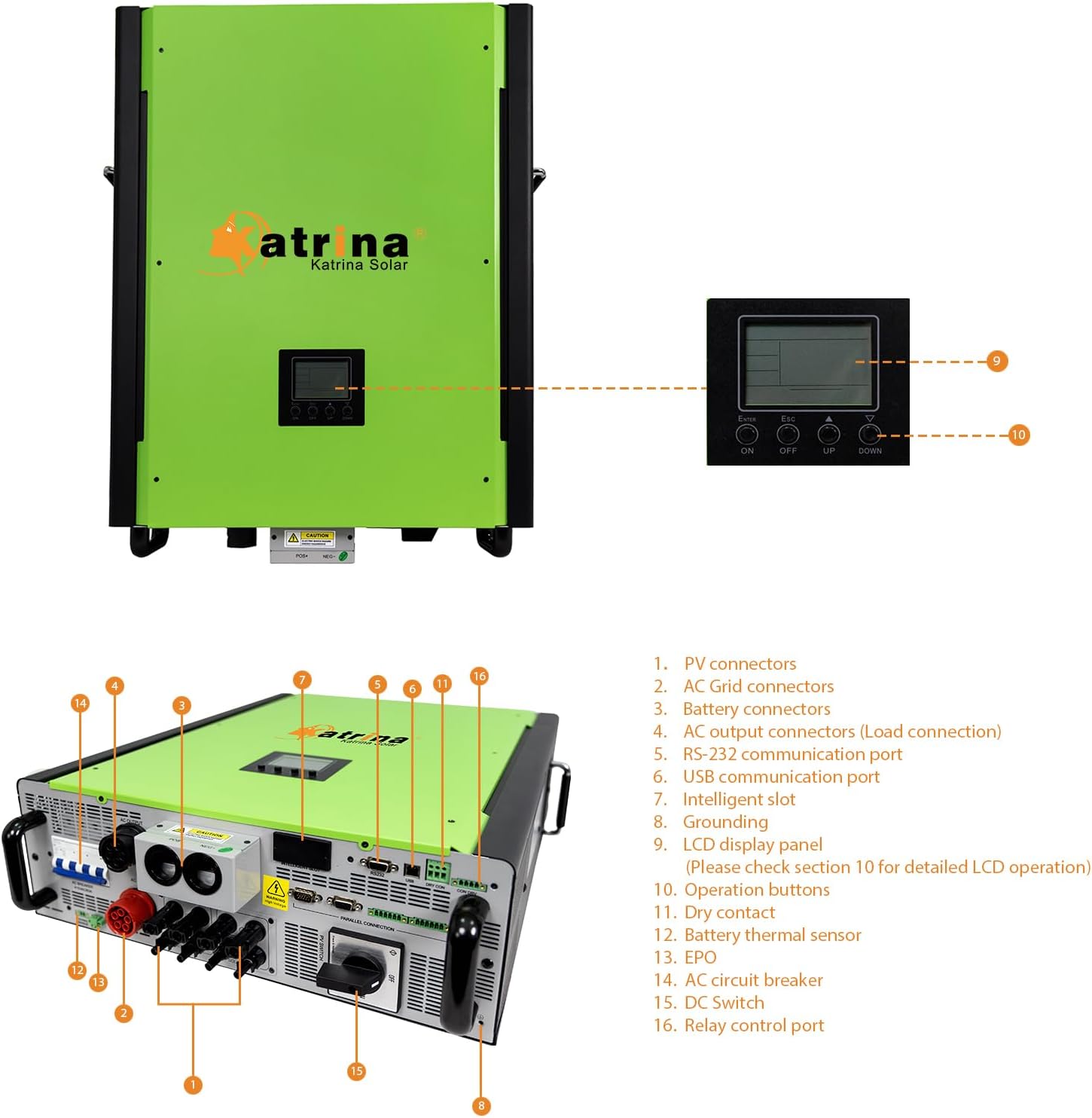
Image 3.1: Front and side view of the atrina katrina Solar HYG 5532 Inverter with labeled connection ports and display panel. Key components include PV connectors, AC grid connectors, battery connectors, AC output connectors, communication ports (RS-232, USB), grounding terminal, intelligent slot, AC circuit breaker, DC switch, and relay control port.
4. Installation and Setup
Proper installation is crucial for the safe and efficient operation of your hybrid solar inverter. Ensure all connections are secure and follow local electrical codes.
Connection Diagram:
The diagram below illustrates the typical connection setup for the hybrid solar inverter, integrating solar panels, batteries, utility grid, generator, and household loads.

Image 4.1: Schematic showing the connection of solar power, generator, utility grid, external battery packs, and home appliances to the atrina katrina Solar HYG 5532 Inverter.
Installation Steps (General):
- Mounting: Choose a suitable location for mounting the inverter. It should be indoors, well-ventilated, and protected from direct sunlight and moisture. Ensure sufficient clearance for air circulation.
- Battery Connection: Connect the battery bank to the inverter's battery terminals. Ensure correct polarity (+ to + and - to -). Use appropriate cable gauges.
- AC Input Connection (Utility/Generator): Connect the utility grid or generator AC input to the designated AC input terminals on the inverter.
- AC Output Connection (Loads): Connect your household loads or distribution panel to the AC output terminals of the inverter.
- PV Input Connection (Solar Panels): Connect the solar panel array to the PV input terminals. Verify correct voltage and current ratings.
- Grounding: Ensure the inverter is properly grounded according to local electrical codes.
- Initial Power-Up: Follow the specific power-up sequence outlined in the full manual (typically battery first, then solar, then AC input).
5. Operating Modes
The HYG 5532 inverter supports multiple operating and charging modes to optimize energy usage based on your specific needs and available power sources.
Programmable Operation Modes:
- Grid-tie: The inverter operates in parallel with the utility grid, feeding excess solar power back into the grid.
- Off-grid: The inverter operates independently from the utility grid, providing power from solar and/or batteries to connected loads.
- Grid-tie with backup: Combines grid-tie functionality with battery backup for uninterrupted power during grid outages.
Four Charging Modes:
The inverter offers four distinct charging modes to manage battery charging from solar, utility, or a combination of both.

Image 5.1: Visual representation of the four charging modes: Solar Only, Solar Priority, Mains Priority, and Hybrid Charge.
- Solar Only: Solar energy is the sole charging source. This mode is suitable for areas with abundant solar resources where utility power is unavailable or not needed.
- Solar Priority: Solar energy charges the battery first. Utility power charges the battery only when solar energy is insufficient or unavailable. Ideal for areas with stable grid and high electricity prices.
- Mains Priority: Utility power charges the battery first. Solar energy charges the battery only when utility power is unavailable.
- Hybrid Charge: Both solar energy and utility power charge the battery simultaneously. This mode is suitable for areas with unstable power grids, ensuring continuous backup power.
6. LCD Display and Operation
The inverter features an intuitive LCD display and operation buttons for monitoring system status and configuring settings. The display provides real-time information on input/output voltage, current, frequency, battery status, and operational mode.
Operation Buttons:
The control panel, visible in Image 3.1, includes buttons for navigation and selection:
- ESC: Exit current menu or cancel selection.
- UP/DOWN: Navigate through menu options or adjust values.
- ON/OFF: Power on/off the inverter.
- ENTER: Confirm selection or enter a submenu.
Detailed instructions for navigating the LCD menu and configuring specific parameters (e.g., battery type, charging current, output voltage range) are provided in the comprehensive user manual.
7. Parallel Operation
For higher power requirements, the 10KW and 15KW models of this inverter series support parallel operation, allowing up to 6 units to work together. The HYG 5532 (5.5KW) model does not support parallel operation.

Image 7.1: Illustration of multiple inverter units connected in parallel to a shared battery bank, utility grid, and loads, enhancing overall system capacity.
Parallel operation requires specific wiring and configuration. Refer to the detailed instructions in the full user manual for proper setup of parallel systems.
8. Maintenance
Regular maintenance ensures the longevity and optimal performance of your inverter. Always disconnect all power sources before performing any maintenance.
- Cleaning: Periodically clean the exterior of the inverter with a dry, soft cloth. Ensure ventilation openings are free from dust and debris.
- Connections: Annually inspect all electrical connections (battery, solar, AC input/output) for tightness and signs of corrosion. Tighten any loose connections.
- Environment: Ensure the installation environment remains within the specified temperature and humidity ranges.
- Battery Inspection: If using lead-acid batteries, check electrolyte levels and terminal conditions as per battery manufacturer guidelines.
9. Troubleshooting
If you encounter issues with your inverter, refer to the following general troubleshooting steps. For complex problems, contact customer support.
- No Power Output: Check battery connections, AC input breaker, and inverter's ON/OFF switch. Verify battery voltage is within operating range.
- Inverter Overheating: Ensure adequate ventilation. Clear any obstructions from cooling vents. Reduce load if continuously overloaded.
- Error Codes on LCD: Consult the full user manual for a list of specific error codes and their corresponding solutions.
- Low Battery Voltage Alarm: Check battery charge level. Ensure solar panels are producing power and AC input is available if configured for charging.
- No Solar Charging: Verify solar panel connections, ensure panels are clean and not shaded, and check PV input voltage.
10. Specifications
The following table provides detailed technical specifications for the atrina katrina Solar HYG 5532 Hybrid Solar Inverter.

Image 10.1: Detailed technical specifications including PV input, AC input, AC output, battery charger, and efficiency for various models in the series.
| Feature | Specification |
|---|---|
| Model Name | HYG 5532 |
| Output Power | 5500 Watts |
| Power Source | Solar Powered |
| ASIN | B0CL71PTNY |
| UPC | 768502001979 |
| Date First Available | October 17, 2023 |
11. Warranty and Support
For warranty information, technical support, or service inquiries, please contact atrina katrina Solar customer service. Keep your purchase receipt and product model number (HYG 5532) readily available when contacting support.
Please visit the official atrina katrina Solar website or refer to your purchase documentation for specific warranty terms and conditions.


