
1. Introduction
Thank you for choosing the chiphy RF-Grow Light. This 69-inch full spectrum LED plant light is designed to provide optimal lighting conditions for your indoor plants at all growth stages. It features adjustable color temperature, dimmable brightness, and an automatic timer function, all controllable via a remote or touch panel. This manual provides detailed instructions for assembly, operation, and maintenance to ensure the best performance and longevity of your grow light.
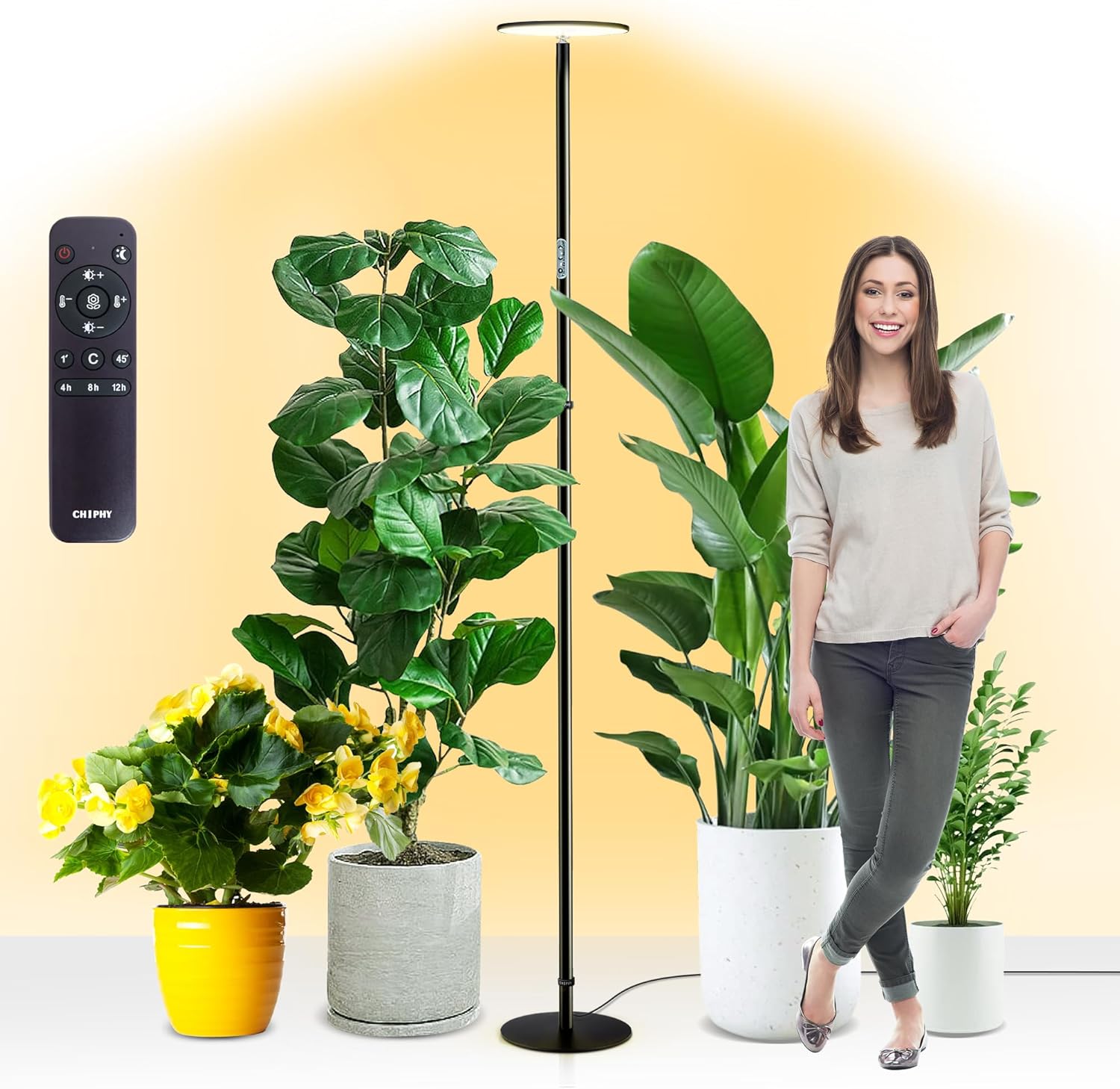
Figure 1: The chiphy RF-Grow Light with remote control, illuminating a variety of indoor plants.
2. Safety Instructions
- Read all instructions before using the appliance.
- Do not expose the grow light to water or high humidity. This product is water-resistant, but not waterproof for submersion.
- Ensure the power adapter is connected to a suitable power outlet (110V AC).
- Do not attempt to disassemble or modify the grow light. Refer all servicing to qualified personnel.
- Keep the grow light away from flammable materials.
- Avoid direct eye exposure to the LED light for prolonged periods.
- Place the light on a stable, level surface to prevent tipping, especially in homes with children or pets.
3. Package Contents
Verify that all components are present in the package:
- 1x 40W Grow Light Head
- Multiple Aluminum Poles (for adjustable height)
- 1x Grow Light Base
- 1x Power Adapter
- 1x Remote Control
- 1x User Manual (this document)
4. Product Features
- Full Spectrum Lighting: High-quality LEDs provide full spectrum light (2300K-6500K color temperature) suitable for all plant growth stages, from seedling to fruiting.
- Adjustable Height: The light's height can be adjusted to 22'', 38'', 54'', or 69'' to accommodate plants of various sizes.
- Dimmable Brightness: 10 levels of brightness (1% to 100%) allow for precise light intensity control.
- Automatic Timer: Features 4H/8H/12H timing cycles, automatically turning on and off daily.
- Dual Control: Operate the light using the included remote control or the sensitive touch panel on the pole.
- Durable Construction: Upgraded whole-body metal construction with an aluminum LED panel for excellent heat dissipation and an aluminum pole for stability and rust prevention. Integrated steel base (4.18 lbs) prevents tipping.
- Water Resistant: Designed to withstand splashes, making it suitable for indoor plant environments.

Figure 2: High-quality construction details of the grow light, highlighting the aluminum components and stable base.
5. Setup Instructions
- Unpack Components: Carefully remove all items from the packaging and verify against the 'Package Contents' list.
- Assemble Poles: Screw the aluminum pole sections together clockwise until secure.
- Attach Base: Screw the assembled pole into the integrated steel base clockwise until firmly attached.
- Attach Light Head: Screw the 40W Grow Light Head onto the top of the assembled pole clockwise.
- Connect Power: Plug the power adapter into the designated port on the light pole, then plug the adapter into a standard 110V AC wall outlet.
- Cable Management: Use the provided cable ties or Velcro straps to secure any excess power cord along the pole for a neat and safe setup.

Figure 3: The grow light's adjustable height feature, showing its versatility for different plant sizes.
6. Operating Instructions
6.1 Power On/Off
- Touch Panel: Press the power button on the light pole to turn the light on or off.
- Remote Control: Press the power button (⏻) on the remote control.
6.2 Brightness Adjustment
The light offers 10 levels of dimmable brightness (1% to 100%).
- Touch Panel: Use the brightness control buttons on the pole.
- Remote Control: Use the brightness increase (☀+) and decrease (☀-) buttons.
6.3 Color Temperature Adjustment
Adjust the color temperature between 2300K and 6500K to suit different plant growth stages.
- Remote Control: Use the color temperature increase (🌡+) and decrease (🌡-) buttons.

Figure 4: Visual representation of the grow light's full color temperature and spectrum capabilities.
6.4 Automatic Timer Function
The grow light features three timing modes: 4 hours, 8 hours, and 12 hours. Once set, the light will automatically turn on for the selected duration and then turn off for the remainder of a 24-hour cycle (e.g., 4H on / 20H off).
- Remote Control: Press the 4h, 8h, or 12h button to activate the desired timer.

Figure 5: The remote control and visual representation of the 4-hour, 8-hour, and 12-hour timer settings.
6.5 Memory Function
The grow light retains the last used brightness and color temperature settings when powered off and on, ensuring consistent lighting for your plants.
6.6 Smart Plug Compatibility
The grow light is compatible with smart plugs (not included), allowing for custom timer schedules and remote control via smart home applications.
7. Maintenance
- Cleaning: Disconnect the power before cleaning. Use a soft, dry cloth to wipe the light head and pole. Do not use abrasive cleaners or solvents.
- Storage: If storing the light for an extended period, disassemble it and store in its original packaging in a dry, cool place.
- Inspection: Periodically check the power cord and connections for any signs of damage. Do not use if damaged.
8. Troubleshooting
- Light does not turn on:
- Ensure the power adapter is securely plugged into both the light and the wall outlet.
- Check if the wall outlet is functioning by plugging in another device.
- Verify that the power button on the remote or touch panel has been pressed.
- Remote control not working:
- Ensure the remote control has working batteries.
- Point the remote directly at the sensor on the light pole.
- Remove any obstructions between the remote and the light.
- Light flickers or changes brightness unexpectedly:
- Check for loose connections in the power adapter or pole sections.
- Ensure the light is not exposed to extreme temperature fluctuations.
9. Specifications
| Feature | Specification |
|---|---|
| Model Name | RF-Grow Light |
| Brand | chiphy |
| Power Source | Corded Electric |
| Wattage | 40 watts |
| Voltage | 110 Volts (AC) |
| Brightness | 4400 Lumen |
| Light Source Type | LED |
| Color Temperature | 2300K-6500K |
| Color Rendering Index (CRI) | 95 |
| Adjustable Height | 22''/38''/54''/69'' |
| Product Dimensions | 9.2"D x 9.2"W x 69"H |
| Item Weight | 7.8 Pounds |
| Material | Aluminum, Iron |
| Control Method | Remote, Touch |
| Indoor/Outdoor Usage | Indoor |
| Water Resistance Level | Water Resistant |
10. Warranty and Support
For warranty information or technical support, please contact chiphy customer service through the retailer's platform or the official chiphy website. Please have your model number (RF-Grow Light) and purchase date available when contacting support.