1. Introduction
Thank you for choosing the ECOELER 5-Inch LED Surface Mount Downlight. This low-profile fixture is designed for easy installation and offers versatile lighting options with its 5CCT selectable color temperature and smooth dimming capabilities. This manual provides essential information for safe installation, operation, and maintenance of your new LED downlight.

Image 1.1: ECOELER 5-Inch LED Surface Mount Downlights.
2. Safety Information
Please read all instructions carefully before installation and retain this manual for future reference. Failure to follow these instructions may result in electric shock, fire, or other hazards.
- WARNING: Risk of Electric Shock. Disconnect power at the fuse or circuit breaker before installing or servicing.
- This product must be installed in accordance with the applicable installation code by a person familiar with the construction and operation of the product and the hazards involved.
- Use only 120V AC, 60Hz circuits.
- Do not modify the fixture. Any modifications may void the warranty and create safety hazards.
- Suitable for damp locations. Not suitable for direct exposure to water.
- Ensure all electrical connections are secure and correct.
- Do not handle the fixture with wet hands.
3. Package Contents
Verify that all components are present before beginning installation:
- ECOELER 5-Inch LED Surface Mount Downlight (4 units)
- Mounting Hardware (Screws)
- Wire Nuts

Image 3.1: Product Dimensions and Included Components (Screws, Wire Nuts).
4. Product Features
- 5CCT Selectable Color Temperature: Choose from Soft White (2700K), Warm White (3000K), Cool White (4000K), Day Light (5000K), and Bright White (6000K) to suit various environments and preferences.
- Smooth Dimmable: Compatible with most standard dimmers, allowing for seamless brightness adjustment from 5% to 100% without flickering or humming.
- High Brightness: Delivers 850 Lumens at 10.5 Watts, providing efficient illumination.
- Low Profile Design: Ideal for installations with limited ceiling space.
- Durable Construction: Features an aluminum ring and sealed design for longevity.
- Safety Assured: ETL & FCC compliant.

Image 4.1: High Performance Features.


Image 4.2: High-quality LEDs and Sealed Design for durability.
5. Specifications
| Attribute | Specification |
|---|---|
| Model Number | YSLIM-5CCT |
| Dimensions | 4.96"L x 4.96"W x 1.33"H |
| Wattage | 10.5 Watts |
| Brightness | 850 Lumens |
| Color Temperature | 5CCT Selectable (2700K, 3000K, 4000K, 5000K, 6000K) |
| Voltage | 125 Volts (AC) |
| CRI | 90+ |
| Dimmable | Yes (5%-100% smooth dimming) |
| Material | Aluminum |
| Installation Type | Flush Mount (fits 4" Junction Box) |
| Indoor/Outdoor Usage | Indoor (Suitable for damp locations) |
| Certifications | ETL, FCC |
6. Installation Instructions
Follow these steps to properly install your ECOELER LED Surface Mount Downlight. Ensure power is disconnected at the circuit breaker before starting.
- Prepare the Fixture: Gently remove the trim ring from the luminaire. This will expose the mounting holes and the CCT selection switch.
- Select Color Temperature: Before mounting, locate the 5CCT selection switch on the side of the fixture. Slide the switch to your desired color temperature (2700K, 3000K, 4000K, 5000K, or 6000K). This setting cannot be changed easily after installation.
- Connect Wiring: Connect the fixture's wires to the corresponding wires in your 4-inch junction box using the provided wire nuts. Connect the black wire to the live wire, the white wire to the neutral wire, and the green wire to the ground wire. Ensure all connections are secure.
- Mount the Fixture: Align the fixture with the junction box. Secure the luminaire to the junction box using the provided screws.
- Attach the Trim: Once the luminaire is securely mounted, twist the trim ring back onto the luminaire until it is firmly in place.
- Restore Power: Restore power at the circuit breaker.

Image 6.1: Easy Installation Steps and CCT Selection Switch.
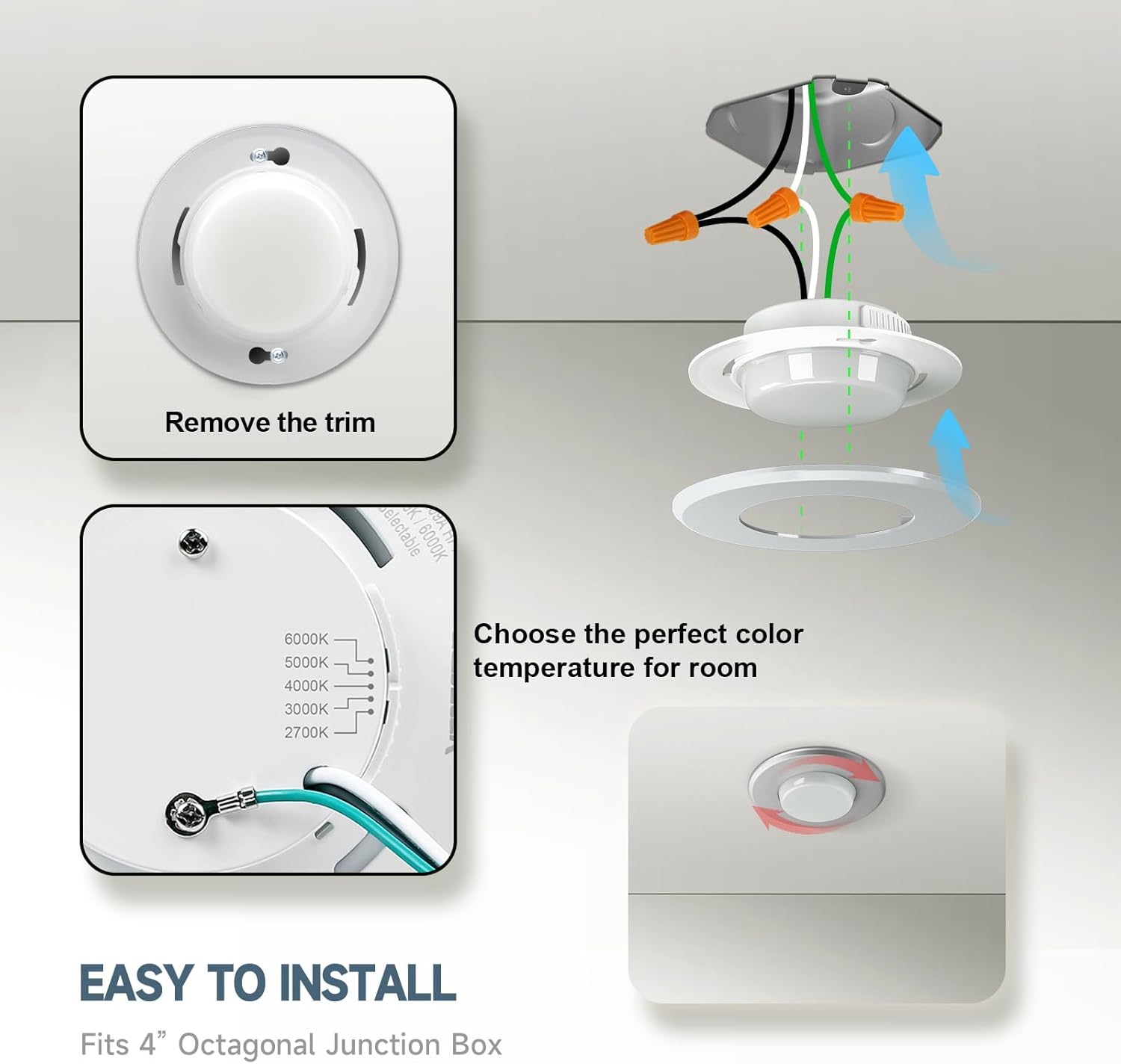
Image 6.2: Internal Components and CCT Selector.
7. Operation
The ECOELER LED Surface Mount Downlight is designed for simple operation once installed.
- Power On/Off: Use your standard wall switch to turn the light fixture on or off.
- Color Temperature Selection: The color temperature is set via a switch on the fixture itself during installation (refer to Section 6, Step 2). Once installed, the color temperature remains constant unless the fixture is uninstalled to access the switch.
- Dimming Function: If connected to a compatible dimmer switch, you can adjust the brightness from 5% to 100%. Ensure your dimmer is LED-compatible for optimal performance.

Image 7.1: Smooth Dimming Capability.

Image 7.2: Compatible Dimmer Models.
8. Maintenance
The ECOELER LED Surface Mount Downlight requires minimal maintenance.
- Cleaning: Ensure power is off before cleaning. Wipe the fixture with a soft, dry, or slightly damp cloth. Do not use harsh chemicals, abrasive cleaners, or solvents, as these can damage the finish or electrical components.
- Bulb Replacement: The LED light source is integrated and not user-replaceable. The fixture is designed for a long lifespan of approximately 50,000 hours.
- Inspection: Periodically inspect the fixture for any signs of damage or loose connections. If any issues are found, disconnect power and consult a qualified electrician.
9. Troubleshooting
If you experience issues with your ECOELER LED downlight, refer to the following common problems and solutions:
| Problem | Possible Cause | Solution |
|---|---|---|
| Light does not turn on | No power to the fixture; Loose wiring; Faulty switch or circuit breaker. | Check circuit breaker and wall switch. Verify all wire connections are secure. Test power at the junction box. |
| Light flickers or hums | Incompatible dimmer switch; Loose wiring. | Ensure dimmer is LED-compatible (refer to Section 7, Image 7.2). Check wiring connections. |
| Incorrect color temperature | CCT switch set incorrectly. | Disconnect power, remove fixture, and adjust the CCT selection switch (refer to Section 6, Step 2). |
| Light is too dim or too bright | Dimmer setting; Incorrect CCT selection. | Adjust dimmer switch. Consider if a different CCT setting would provide desired perceived brightness. |
If the problem persists after attempting these solutions, please contact ECOELER customer support.
10. Warranty and Support
ECOELER provides a limited warranty for this product. For specific warranty terms and conditions, please refer to the documentation included with your purchase or contact ECOELER customer service.
If you encounter any problems during use or require technical assistance, please contact ECOELER customer support. We are committed to providing a response within 24 hours.
Contact Information:
- For support, please visit the official ECOELER website or refer to your purchase documentation.


