
DF Models DF-90
DF-MODELS Land Rover Defender 90 1/12 RTR Crawler Remote Control Vehicle Instruction Manual
Brand: DF Models | Model: DF-90
1. Introduction
Thank you for purchasing the DF-MODELS Land Rover Defender 90 1/12 RTR Crawler. This highly detailed, licensed replica of the legendary Land Rover D-90 all-terrain vehicle is designed for robust performance and realistic appearance. It features full LED lighting with turn signals and a durable metal chassis. This Ready-To-Run (RTR) model comes with a powerful Li-Ion battery and a USB charger, allowing you to get started quickly.
Package Contents:
- DF-MODELS Land Rover Defender 90 1/12 RTR Crawler (Model 3190)
- 2.4 GHz Remote Control Transmitter
- 7.4 Volt - 1200 mAh Li-ion Battery
- USB Charging Cable
- Instruction Manual
Required Accessories (Not Included):
- 4 x AA Batteries for the Remote Control Transmitter
- 220V USB Power Adapter (optional, for faster charging)

Image: The DF-MODELS Land Rover Defender 90 1/12 RTR Crawler, its 2.4 GHz remote control, the Li-ion battery, and the USB charging cable.
2. Safety Information
Please read all safety warnings and instructions carefully before operating the vehicle. Failure to do so may result in injury or damage to the product.
- This product is recommended for users aged 14 years and older.
- Always operate the vehicle in open areas away from people, pets, and obstacles.
- Do not operate near public roads, busy areas, or water bodies.
- Keep fingers, hair, and loose clothing away from moving parts.
- Never touch the motor or battery immediately after use, as they may be hot.
- Use only the provided battery and charging cable. Do not attempt to charge non-rechargeable batteries.
- Supervise children during operation.
- Store the vehicle and its components in a cool, dry place when not in use.
- Disconnect the battery from the vehicle when not in use and during storage.
3. Setup and First Use
3.1 Charging the Vehicle Battery
- Connect the included USB charging cable to the 7.4V 1200mAh Li-ion battery.
- Plug the USB end of the charging cable into a USB power source (e.g., computer USB port, USB wall adapter).
- The charging indicator light on the USB cable will show the charging status (refer to the charger's specific instructions for light indications).
- Once fully charged, disconnect the battery from the charger. Do not overcharge the battery.
3.2 Installing Transmitter Batteries
- Locate the battery compartment on the back of the 2.4 GHz remote control transmitter.
- Open the battery compartment cover.
- Insert 4 x AA batteries (not included) into the compartment, ensuring correct polarity (+/-).
- Close the battery compartment cover securely.
3.3 Installing Vehicle Battery and Powering On
- Carefully open the engine hood of the Land Rover Defender 90 model.
- Connect the fully charged Li-ion battery to the vehicle's power connector.
- Place the battery securely inside the compartment.
- Close the engine hood.
- Turn on the power switch on the vehicle.
- Turn on the power switch on the remote control transmitter. The vehicle and transmitter should automatically bind. If not, refer to the troubleshooting section.
4. Operating the Vehicle
4.1 Basic Controls
- Steering Wheel (on Transmitter): Rotate left or right to steer the vehicle.
- Throttle Trigger (on Transmitter): Pull to move forward, push to brake/reverse.
4.2 Driving Tips
- The DF-90 Crawler is designed for off-road crawling. It performs best on uneven terrain, rocks, and dirt.
- Start with slow movements to get accustomed to the controls.
- The vehicle features full LED lighting, including turn signals, enhancing realism during operation.
- Depending on the terrain and driving style, you can expect a run time of up to 20 minutes on a full charge.
- Avoid driving in wet conditions or through deep puddles to prevent damage to electronics.

Image: The Land Rover Defender 90 Crawler navigating rocky terrain, showcasing its off-road capabilities.
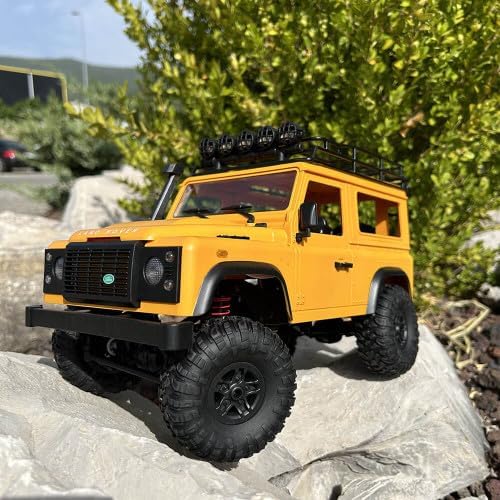
Image: Front view of the Land Rover Defender 90 Crawler positioned on rocks, highlighting its detailed scale appearance.
5. Maintenance and Storage
5.1 Cleaning
- After each use, especially after driving in dusty or dirty conditions, gently clean the vehicle.
- Use a soft brush or compressed air to remove dirt and debris from the chassis, wheels, and suspension components.
- Wipe the body with a soft, damp cloth. Do not use harsh chemicals or solvents.
- Ensure no dirt or moisture enters the electronic components.
5.2 Battery Care
- Always disconnect the battery from the vehicle after use.
- Store the Li-ion battery in a cool, dry place, away from direct sunlight and extreme temperatures.
- For long-term storage, it is recommended to store Li-ion batteries at approximately 50% charge.
- Never leave batteries charging unattended.
5.3 Storage
- Store the vehicle and remote control in a safe, dry environment.
- Remove AA batteries from the transmitter if storing for extended periods to prevent leakage.
6. Troubleshooting
| Problem | Possible Cause | Solution |
|---|---|---|
| Vehicle does not respond to transmitter. |
|
|
| Short run time. |
|
|
| Vehicle moves erratically or loses connection. |
|
|
7. Technical Specifications
| Model Name | DF-90 Crawler Land Rover Defender 90 |
| Scale | 1:12 RTR (Ready-To-Run) |
| Drive System | 4WD Brushed |
| Length | 350 mm |
| Width | 165 mm |
| Height | 205 mm |
| Wheelbase | 195 mm |
| Weight | Approx. 900g (excluding battery) |
| Run Time | Up to 20 minutes (depending on terrain and driving style) |
| Recommended Age | 14 years and up |
| Main Material | Metal Chassis |
| Battery Type | Li-ion 7.4 Volts - 1200 mAh |
| Special Features | Remote control, Full LED lighting with turn signals |
8. Warranty Information
This product is covered by a standard manufacturer's warranty against defects in materials and workmanship. Please retain your proof of purchase for warranty claims. The warranty does not cover damage caused by misuse, accidents, unauthorized modifications, or normal wear and tear. For specific warranty terms and conditions, please refer to the documentation provided with your purchase or contact DF Models customer support.
9. Customer Support
Should you encounter any issues or have questions regarding your DF-MODELS Land Rover Defender 90 Crawler, please contact your retailer or the manufacturer's customer support.
For more information and spare parts, visit the official DF Models website or contact their support channels.
Related documentsDF-90


Ask a question about this manual
Ask about setup, troubleshooting, compatibility, parts, safety, or missing instructions. Manuals+ will review the question and use this page’s manual context to help answer it.